linkedin
VWO logo
play VWO Product Webinar: How To Interpret Your A/B Testing Results For Actionable Insights
VWO AB Testing
VWO Sophisticated

VWO

Brand: Wingify

  • 4.4

  • 3 Ratings

VWO Low-Code No-Code software empowers users to easily create powerful applications, utilizing its intuitive interface and drag-and-drop functionality.

See More

Have you used VWO before?

Share your insights for better experience

Add a Review
Starting Price
₹15,172 excl.GST
₹ 17,903 incl. GST

View plans

offer Save upto 18%, Get GST Invoice on your business purchase T&C
offer Buy Now & Pay Later, Check offer on payment page.
Buy Now
100% Genuine
Products
Best Price
Guaranteed
Safe & Secure
Payment
  • Description

  • Pricing

  • Features

  • Specification

  • Review

  • Compare

  • Alternatives

  • FAQ

Starting at ₹15,172
Buy Now

VWO Software Overview

What is VWO Software?

VWO low code no code software is a modern web development masterpiece for A/B testing and experimentation. It is the preferred choice of thousands of brands worldwide. With VWO, you can unleash the power of experimentation to drive growth and enhance user experiences.

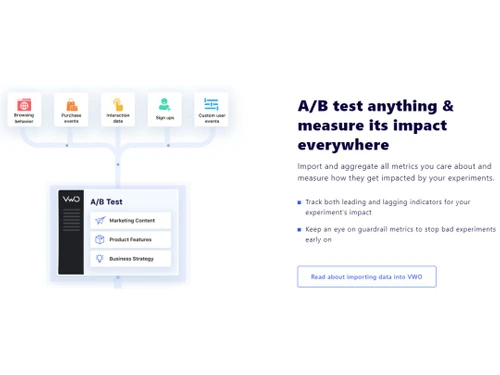
VWO allows you to import and aggregate all the metrics that matter to you, enabling you to measure the impact of your experiments comprehensively. Whether it is website performance, app engagement, or product conversions, VWO helps you understand how your experiments affect key metrics.

The software will help you stay ahead by monitoring leading and lagging indicators for your experiment's impact. With VWO, you can keep an eye on guardrail metrics, ensuring that you can quickly identify and halt any unfavorable experiments. This proactive approach helps prevent negative consequences and maintains a successful testing strategy.

With an intuitive, point-and-click visual editor, marketing teams can conduct A/B tests on their websites effortlessly. In contrast, product and engineering teams can leverage VWO's thoughtful SDKs for server-side experiments on platforms such as Node.js, iOS, Python, Go, PHP, Java, and NET. VWO streamlines your experiments pipeline, boosting your testing velocity.

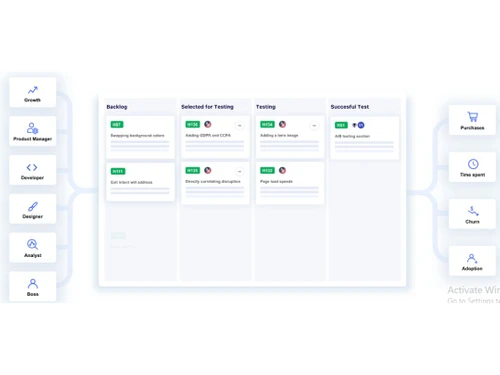
With centralized experimentation management, you will have a clear overview of your testing initiatives, enabling seamless collaboration and coordination among team members. So, get ready to dig deeper into your test results with VWO's fine-grained analysis. The software will also help you understand how different user segments respond to your variants and make data-driven decisions.

Why Choose VWO System?

VWO is ideal for anyone looking to enhance online performance and achieve tangible results. Whether you are a marketer, product manager, or developer, VWO equips you with the tools and capabilities needed to optimize your digital assets, boost conversion rates, and create exceptional user experiences. Marketing teams benefit from VWO's intuitive visual editor for conducting A/B testing, enabling them to drive better engagement and conversions. Product and engineering teams can leverage VWO's SDKs for server-side experiments, empowering them to fine-tune product features.

Benefits of VWO Low Code No Code Software

  • By leveraging VWO's A/B testing and experimentation capabilities, businesses can optimize their websites, apps, and products to improve conversion rates. It streamlines experimentation, allowing businesses to launch and manage experiments seamlessly.
  • Through data-driven decision-making and testing different variations, you can identify the most effective design elements and messaging strategies that resonate with users, leading to higher conversion rates and revenue.
  • This tool empowers businesses to deliver exceptional user experiences by testing and refining their digital assets. Companies can gain valuable insights into user behavior and preferences, enabling them to make informed design and UX decisions that improve user satisfaction and engagement.
  • The platform provides a centralized experimentation management system, scheduling capabilities, and campaign segmentation tools, enabling teams to efficiently plan, execute, and analyze experiments. This leads to increased testing velocity and productivity across the organization.
  • VWO prioritizes user privacy and ensures compliance with various data protection regulations, such as automatically removing personally identifiable information (PII) and certifications such as GDPR, CCPA, HIPAA, etc. This gives businesses the confidence to conduct experiments, knowing that user data is handled securely.

Pricing of VWO Low Code No Code System

VWO low code no code system pricing starts at INR 15172 on techjockey.com.

The overall pricing model is based on different factors such as personalization, extra features required, total users, and the deployment type. Please feel free to request a call from our product experts if you want to learn more about our subscription plans or premium package deals.

Read more

Wingify Company Details

Founded Year:  2010

Wingify develops Visual Website Optimizer which is a tool for increasing website sales, signups, downloads and conversions.

Director/Founders Paras Chopra
Company Size 101-500 Employees

VWO Pricing & Plans

Growth(Billed Annually)
Key Features
  • Visual & Code Editor
  • Unlimited Variation & Metrics
  • Basic AI CoPilot Features
  • Enhanced Targeting
  • Download & Share Report Summary
  • Multi-Page Campaigns
  • URL Targeting
  • Device & OS Targeting
  • Traffic Source Targeting
  • Preview Campaign

Calculated Price

15172 Exclusive of all taxes
    • Licenses

      Licenses
      Licenses
    • Monthly

      Monthly
      Monthly

Key Features

  • Visual & Code Editor

  • Unlimited Variation & Metrics

  • Basic AI CoPilot Features

  • Enhanced Targeting

  • Download & Share Report Summary

  • Multi-Page Campaigns

  • URL Targeting

  • Device & OS Targeting

  • Traffic Source Targeting

  • Preview Campaign

VWO Features

  • icon_check Audience Targeting
    Reach the right audience precisely and tailor experiments to specific user segments.
  • icon_check Visual Editor
    Easily create and modify experiments using a user-friendly, point-and-click interface.
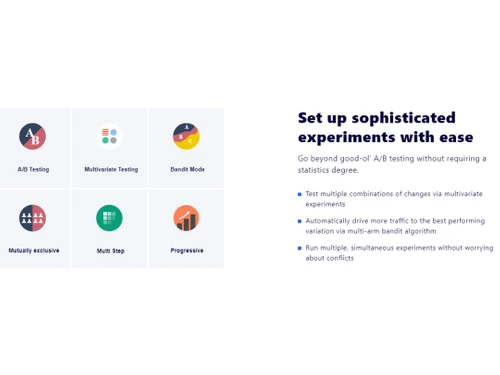
  • icon_check Multivariate Testing
    Test multiple combinations of changes simultaneously to identify the most impactful variations.
  • icon_check Split Testing
    Compare different webpage or app element versions to determine the best-performing option.
  • icon_check Statistical Relevance Analysis
    Ensure the validity of your results with robust statistical analysis and interpretability.
  • icon_check Heatmaps
    Visualize user behavior patterns and interactions on your website or app for insightful optimization.
  • icon_check Funnel Analysis
    Track and analyze user journeys to identify bottlenecks and optimize conversion rates.
  • icon_check Test Scheduling
    Plan and automate your experiments at desired times to ensure efficient testing processes.
  • icon_check Campaign Segmentation
    Segment your audience and run targeted experiments based on specific user groups or demographics.
  • icon_check AB Testing
    Conduct controlled experiments to compare and optimize different versions of your website or app elements.
VWO Demo Video play icon

Get VWO Demo

Watch the demo video to explore key features, real workflows, and how the software fits your business needs.

Understand
Key Features
Personal
Demo Insights
Interactive
Demo Support

VWO Specifications

Supported Platforms
Ubuntu Ubuntu Windows Windows MacOS MacOS Linux Linux
Devices
Desktop Desktop Mobile Mobile Tablet Tablet iPad iPad
Deployment
Cloud-Based Cloud-Based
Suitable For
All Industries
Business Specific
All Businesses
Business Size
Small Business Startups Medium Business Enterprises
Customer Support
Phone Email Live Chat
Language
Nederlands English Español
Integration
API Integration
Training Resources
Webinars Documentation
AI Features
AI Integrated

Explore the Best Alternative Solutions Similar to Your Business Size and Needs

VWO Review

4.4

Out of 5

img

Overall Rating

Based on
3 Verified Ratings

Rating Breakdown

  • Features 4
  • Value for Money 4.5
  • Ease of Use 4.6
  • Customer Support 4.6

83% Recommend this Product

Add Review

Be the First to Review

This product has no reviews yet. Be the first to leave your feedback.

Add Review

Compare VWO With other A/B Testing Software

Products
Ratings
Pricing
Device Supported
Deployment
Supported Platforms
  • img

    VWO

  • 4.4

  • ₹ 15172.00 excl. GST

  • Desktop

    Mobile

  • Web based

    On Premises

  • Windows

    Mac OS

  • img

    GrowthBook

  • 4.6

  • Price On Request

  • Desktop

    Mobile

  • Web based

    On Premises

  • Windows

    Mac OS

  • img

    Taplytics

  • 4.6

  • Price On Request

  • Desktop

    Mobile

  • Web based

    On Premises

  • Windows

    Mac OS

  • img

    ABtesting AI

  • 4.4

  • Price On Request

  • Desktop

    Mobile

  • Web based

    On Premises

  • Windows

    Mac OS

  • img

    Convertize

  • 4.5

  • Price On Request

  • Desktop

    Mobile

  • Web based

    On Premises

  • Windows

    Mac OS

  • img

    Mida AI

  • 4.3

  • Price On Request

  • Desktop

    Mobile

  • Web based

    On Premises

  • Windows

    Mac OS

  • img

    Flagsmith

  • 4.4

  • Price On Request

  • Desktop

    Mobile

  • Web based

    On Premises

  • Windows

    Mac OS

  • img

    Kameleoon

  • 4.0

  • Price On Request

  • Desktop

    Mobile

  • Web based

    On Premises

  • Windows

    Mac OS

  • img

    ABlyft

  • 4.3

  • Price On Request

  • Desktop

    Mobile

  • Web based

    On Premises

  • Windows

    Mac OS

(0) Product(s) selected

Starting Price:

$13 /Month

Starting Price:

$59 /Month

Starting Price:

$45 /Month

Starting Price:

$99 /Month

Available

Price on Request

Available

Price on Request

Which operating system does VWO Software Support?

VWO software is compatible with Windows and macOS operating systems.

Is there any VWO app?

VWO app is unavailable on Android and iOS devices.

What is the deployment type of the VWO System?

VWO system supports web-based deployment.

How much does VWO cost?

VWO pricing starts from INR 15172 at techjockey.com.

Who are the potential users of the VWO System?

VWO Software can be used by marketers, digital marketing businesses, e-commerce stores and anyone who needs a robust low code no code A/B testing tool.

Is there any free trial or demo for VWO?

VWO software demo is available for free with techjockey.com.

Is VWO System free?

VWO offers a free trial. Please request a call back for subscription-related details and to avail offers on premium packages.

How can you download VWO Solution?

VWO solution is a web-based platform. So, you need not download any software or app to use it.

How does VWO work?

VWO is a user-friendly software that allows businesses to conduct A/B tests without coding. It provides a visual interface for creating and running experiments, helping businesses optimize their websites and easily improve user experiences.

What is VWO software?

VWO is a testing software for web and platform optimization. It is an experimentation platform that lets you run A/B tests on websites, apps, etc., to optimize their web experience across desktops, mobiles, and other devices.

How do you create an AB test in VWO?

To create an AB test in VWO go to ‘testing’ then A/B. The dashboard for A/B testing will appear. Click ‘create’ to set up a new A/B test. If you want to change the test name, select the ‘edit’ icon next to the new campaign and enter your desired test name. The ‘Enter the URL of the page you want to test,’ will allow you to test the webpage using the URL.

What is the VWO tool used for?

VWO software is a modern web development platform for A/B testing and experimentation. With it, you can optimize users experience for websites and mobile applications, understand user behavior, tests and release complicated features on websites, customize user journey, etc. It can also be used to customize your websites without any code.

How do I set up VWO?

To set up VWO account, click the gear icon on the upper right and go to ‘Accounts’ then ‘User'. Click ‘Add User’ and the add user popup will appear. In the popup window, enter the email address of the user and fill in the field. From the ‘Account’ dropdown, choose the account or sub-account to which you want to set up the user. In the ‘Permission’ drop-down, assign access permission to the user.

Which tool is used for AB testing?

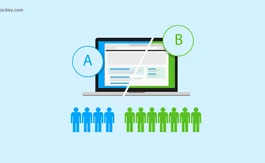
A/B testing is a comparison in which you take two different applications or website versions together and see which of them performs better. There are several tools that can be used for AB testing like VWO, Google Optimize and Freshmarketer.

20,000+ Software Listed

Best Price Guranteed

Free Expert Consultation

2M+ Happy Customers

Terms and Condtions

close

Users with registered businesses can purchase goods from merchants on the platform to satisfy their business needs. Users are not permitted to utilize any products acquired through the platform for resale, advertising, business, or further distribution.

For each purchase made, users will receive a Tax Invoice (or 'GST invoice') that includes specific details such as:

  • the GSTIN of the user associated with their registered business, and

  • the specified Entity Name for their business.

It should be noted that not all products are eligible for GST Invoice. Only the products displayed by participating sellers with the 'GST-based Invoice Available' callout on the product description page would qualify.

Certain goods and services are not eligible to get a GST Invoice, including items with VAS, i.e., Value Added Services (e.g., Total Mobile Protection/Assured Buyback) and those involving an exchange offer at the time of purchase.

Users must ensure the accuracy of the GSTIN, and business entity name provided for the GST Invoice. Requests for corrections into GST Invoice would not be accommodated by Techjockey.com or any Seller, and any issues arising from user-provided information are the sole responsibility of users.

Techjockey.com is not liable for the GST Invoice or any associated input tax credit. To efficiently claim an input tax credit, users should select the registered place of business address as per the GST authority's data and follow the provisions of the GST Act and rules.

To claim an input tax credit, the delivery and billing addresses must match. Furthermore, input tax credits will not be granted if the delivery address and GSTIN on the invoice are from different states. In case of incorrect GST details provided during the order placement, the order will be canceled automatically.