
linkedin
Windsurf logo
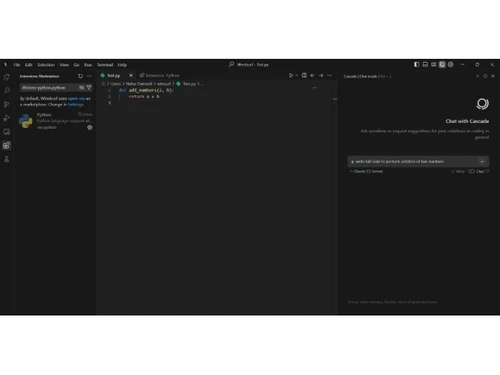
play Windsurf: Testing and Debugging
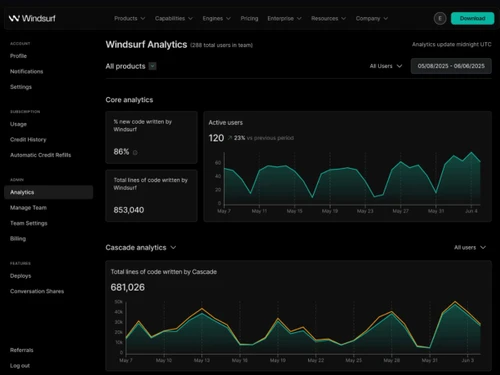
windsurf-analytics
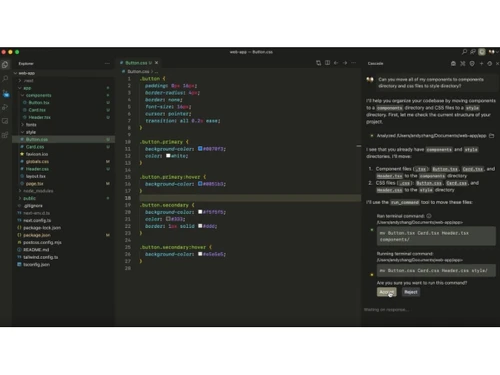
windsurf-codes

Windsurf

Brand: Exafunction

  • 4.2

  • 5 Ratings & 1 Review

An integrated development environment software that helps developers write, manage, and optimize code efficiently.

See More

Have you used Windsurf before?

Share your insights for better experience

Add a Review
Starting Price
$15

View plans

100% Genuine
Products
Best Price
Guaranteed
Safe & Secure
Payment
  • Description

  • Pricing

  • Features

  • Specification

  • Review

  • FAQ

Starting at $15

WindsurfSoftware Overview

What is Windsurf?

Windsurf IDE software is an AI-powered integrated development environment (IDE) that helps programmers write, edit, and manage code more easily and quickly by combining intelligent AI assistance with a full code editor.

It embeds a smart AI agent called Cascade that understands your entire project and can suggest, generate, or fix code based on context. Windsurf works on major operating systems and supports many programming languages, with features like autocomplete, error detection, and natural language coding help built in.

Unlike regular IDEs that simply provide a text editor, it uses AI at its core to automate repetitive tasks and improve productivity. Developers can stay in one tool for coding, debugging, and even deploying apps without switching between programs.

Why Choose Windsurf Software?

  • AI-Powered Coding: Provides smart suggestions to write code faster and reduce repetitive tasks.
  • Autonomous AI Flows: Manages complex coding workflows with intelligent automation.
  • Project-Wide Context: Understands your project context to give relevant code recommendations.
  • Multi-File Editing: Edit multiple files simultaneously, ensuring consistency across projects.
  • Smart Autocomplete: Predicts and completes code efficiently to save time.
  • Built-in AI Chat: Chat with AI in real-time for guidance, explanations, or refactoring.
  • Automatic Error Fixing: Detects and corrects errors automatically to maintain quality.
  • Integrated Terminal: Run scripts and commands directly within the editor.
  • Memory & Rules System: Remember your coding preferences for more personalized suggestions.
  • Tool Integrations: Connects with Figma, Slack, and databases for seamless workflows.
  • Supports Multiple Languages: Works with over 70 programming languages.
  • IDE Compatibility: Integrates with popular editors like VS Code and JetBrains.

Benefits of Windsurf Software

  • Customizable Interface: Adjust the UI and settings to match your workflow.
  • Faster Onboarding: Intuitive design reduces learning time for new developers.
  • High-Quality Code Generation: Produces clean, well-structured, and maintainable code.
  • Unit Test Assistance: Helps generate tests for reliable and robust code.
  • Cost and Time Efficiency: Automation reduces development time and project costs.
  • Team Collaboration: Supports real-time teamwork within the IDE.
  • Upskilling Opportunities: Acts as an AI tutor to improve your coding skills over time.
  • Rapid Deployment: Streamlines deployment with integrated one-click options.

Windsurf Pricing

Windsurf price starts at USD 15 at techjockey.com. The pricing model is based on different parameters, including extra features, deployment type, and the total number of users. For further queries related to the product, you can contact our product team and learn more about the pricing and offers.

Read more

Exafunction Company Details

Founded Year:  2021

Exafunction optimizes your deep learning inference workload, delivering up to a 10x improvement in resource utilization and cost. Focus on building your deep learning application, not on managing clusters and fine-tuning performance.

Director/Founders Varun Mohan
Company Size 1-100 Employees

Windsurf Pricing & Plans

Pro
Starting at $15
    • Users

      Users
      Users
    • Monthly

      Monthly
      Monthly

Key Features

  • 500 prompt credits/month

  • SWE-1 model

  • 5 App Deploys / day

Teams
Starting at $30
    • Users

      Users
      Users
    • Monthly

      Monthly
      Monthly

Key Features

  • 500 prompt credits/user/month

  • Windsurf Reviews

  • Centralized billing

  • Admin dashboard with analytics

  • Automated zero data retention

Enterprise
Starting at $60
    • Users

      Users
      Users
    • Monthly

      Monthly
      Monthly

Key Features

  • 1,000 prompt credits/user/month

  • Role-Based Access Control (RBAC)

  • SSO + Access control features

  • Volume based annual discounts (>200 seats)

  • Highest priority support

  • Dedicated account management

Windsurf Features

  • icon_check Code Autocomplete
    Generates real-time code suggestions to speed up development and reduce manual typing.
  • icon_check Inline Editing
    Enables direct in-place code generation or modification using natural language prompts.
  • icon_check Code Refactoring
    Suggests and applies improvements to existing code for better readability and performance.
  • icon_check One Click Deployment
    Allows seamless deployment of applications directly from the editor to live environments.
  • icon_check Preview Functionality
    Displays real-time visual feedback of frontend changes inside the editor without switching tabs.
  • icon_check Code Navigation
    Enables quick jumping between files, functions, and symbols using predictive tabbing.
  • icon_check Syntax highlighting
    Enhances code readability with automatic language-specific color coding and formatting.
  • icon_check Model Customization
    Supports switching between different AI models for speed, accuracy, and personalization.
  • icon_check Remote Repo Indexing
    Provides cross-repository code suggestions by indexing remote repositories.
  • icon_check Version Control
    Includes Git integration for managing commits, branches, and code history inside the editor.
  • icon_check Real-Time Collaboration
    Allows multiple users to work on the same codebase simultaneously with shared AI context.
Windsurf Demo Video play icon

Get Windsurf Demo

Watch the demo video to explore key features, real workflows, and how the software fits your business needs.

Understand
Key Features
Personal
Demo Insights
Interactive
Demo Support

Windsurf Specification

Supported Platforms
Windows Windows MacOS MacOS Linux Linux
Devices
Desktop Desktop
Deployment
Perpetual Perpetual
Suitable For
ITES
Business Specific
All Businesses
Business Size
Individual Small Business Startups Medium Business Enterprises SMBs SMEs MSMBs MSMEs Freelancers
Customer Support
Email Communities
Language
English
Training Resources
Webinars Documentation Videos

Windsurf Review

4.2

Out of 5

img

Overall Rating

Based on
1 Verified Review

Rating Breakdown

  • Features 4.4
  • Value for Money 3.8
  • Ease of Use 4.2
  • Customer Support 4.5

80% Recommend this Product

Add Review

Windsurf Video Review

youtubeVideoId

4.3

“Windsurf AI Review: Best Agentic IDE for Developers in 2026?”

Review by: Savage Reviews

How much does Windsurf Software cost?

Windsurf pricing starts at USD 15 on techjockey.com.

Is there a mobile app available for Windsurf Software?

No mobile app is available. Windsurf is primarily a desktop IDE.

Which operating systems are compatible with Windsurf Software?

Windsurf is compatible with Windows, macOS, and Linux.

Does Windsurf Software offer a free trial?

Yes, Windsurf offers a free trial.

How does Windsurf Software function?

Windsurf is an AI-powered coding platform that assists with writing, editing, and automating code.

Who uses Windsurf Software?

Developers, engineers, and coding teams use Windsurf to improve productivity.

Is a free demo available for Windsurf Software?

No separate demo, but the free plan and trial act as a demo.

Is Windsurf Software available for free?

Yes, a Windsurf free plan with basic features is available.

20,000+ Software Listed

Best Price Guranteed

Free Expert Consultation

2M+ Happy Customers

Terms and Condtions

close

Users with registered businesses can purchase goods from merchants on the platform to satisfy their business needs. Users are not permitted to utilize any products acquired through the platform for resale, advertising, business, or further distribution.

For each purchase made, users will receive a Tax Invoice (or 'GST invoice') that includes specific details such as:

  • the GSTIN of the user associated with their registered business, and

  • the specified Entity Name for their business.

It should be noted that not all products are eligible for GST Invoice. Only the products displayed by participating sellers with the 'GST-based Invoice Available' callout on the product description page would qualify.

Certain goods and services are not eligible to get a GST Invoice, including items with VAS, i.e., Value Added Services (e.g., Total Mobile Protection/Assured Buyback) and those involving an exchange offer at the time of purchase.

Users must ensure the accuracy of the GSTIN, and business entity name provided for the GST Invoice. Requests for corrections into GST Invoice would not be accommodated by Techjockey.com or any Seller, and any issues arising from user-provided information are the sole responsibility of users.

Techjockey.com is not liable for the GST Invoice or any associated input tax credit. To efficiently claim an input tax credit, users should select the registered place of business address as per the GST authority's data and follow the provisions of the GST Act and rules.

To claim an input tax credit, the delivery and billing addresses must match. Furthermore, input tax credits will not be granted if the delivery address and GSTIN on the invoice are from different states. In case of incorrect GST details provided during the order placement, the order will be canceled automatically.