linkedin
WorkFusion logo
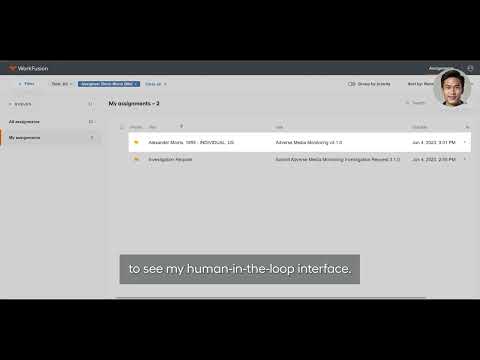
play Demo of WorkFusion's AI Agent Evan
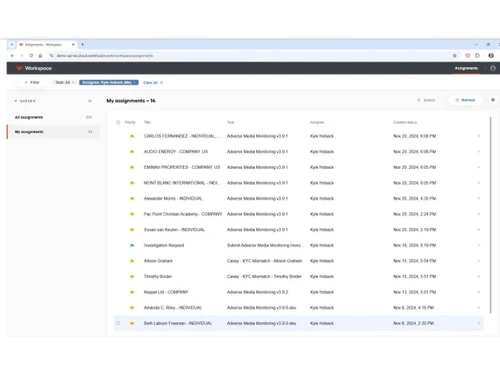
workfusion-assignments
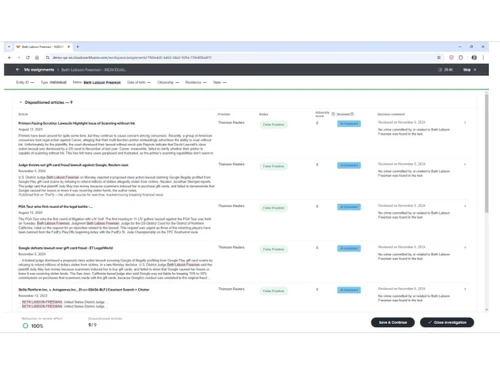
workfusion-logs

WorkFusion

Brand: UiPath

  • No Ratings & Reviews

WorkFusion works like a seasoned analyst behind the scenes. Intelligent agents untangle tasks with sheer confidence and expertise.

See More

Have you used WorkFusion before?

Share your insights for better experience

Add a Review

Price Available on Request

Questions about pricing or customization? We’re here to help, just a click away.

100% Genuine
Products
Best Price
Guaranteed
Safe & Secure
Payment
  • Description

  • Pricing

  • Features

  • Specification

  • Review

  • Compare

  • Alternatives

  • FAQ

WorkFusion Software Overview

What is WorkFusion Software?

WorkFusion is a sophisticated software solution designed for enterprise process automation tasks. It uses digital workers for handling business activities. The AI agentic platform focuses on operations requiring decisions and reviews. It is commonly used in banking and healthcare sectors. The software mainly works with documents and business records. Organisations may use it for flawless compliance and customer-related processes.

The platform processes information from different connected systems. It uses artificial intelligence (AI) for handling operations. WorkFusion works through digital workers and configurable agents. The advanced digital platform interacts with applications across business environments. It handles tasks involving several connected stages. Many companies include it within their operational processes.

Why Choose WorkFusion Software?

  • Human-Like Reasoning:Digital workers tend to analyse situations with proper context. Complex cases receive thoughtful handling across processes.
  • Document Reading Capability:Records and files undergo automated reviews. Teams can easily move past repetitive examination work.
  • Explainable Decision Records:Every action includes documented reasoning details. Audits involve clearer evidence and histories.
  • Industry-Ready Agents:Prebuilt workers match common compliance tasks. Organisations may begin with familiar operational frameworks.
  • Multi-Step Processing:Related activities connect through several stages. Operations stay clear of interruptions between dependent tasks.
  • Cross-System Connectivity:Different applications exchange information naturally. Existing environments work together without barriers.
  • Regulatory Focus:Activities align perfectly with compliance expectations. Records remain easier for reviewers to inspect.
  • Custom Worker Creation:Organisations can configure workers for specific needs. Processes reflect business requirements more closely.

Benefits of WorkFusion Software

  • Reduced Investigation Delays:Repetitive case reviews require less time. Teams can handle larger workloads comfortably.
  • Consistent Case Handling:Similar situations follow common approaches. Outcomes vary less across departments.
  • Lower Manual Effort:Routine checks demand fewer repetitive actions. Staff can easily focus on higher priorities.
  • Faster Information Access:Relevant records surface in almost no time. Searching consumes fewer working hours.
  • Clear Performance Visibility:Metrics reveal operational patterns clearly. Leaders can understand activity levels better.
  • Better Error Detection:Problem areas surface through detailed reports. Issues receive attention before escalation.
  • Continuous Processing Capacity:Tasks can continue with ease across long periods. Backlogs shrink without extra staffing.
  • Knowledge Retention Value:Historical information guides future activities. Experience remains available across teams.

WorkFusion Software Pricing

WorkFusion Software price is available on request at techjockey.com.

The pricing model is based on different parameters, including extra features, deployment type, and the total number of users. For further queries related to the product, you can contact our product team and learn more about the pricing and offers.

Read more

UiPath Company Details

Founded Year:  2005

UiPath is a software company developing robotic process automation and artificial intelligence software.

Director/Founders Andra Ciorici, Daniel Dines, Marius Tirca, Prabhdeep Singh
Company Size 1000+ Employees

WorkFusion Pricing & Plans

Looking for The Right Pricing?

Share your requirements and get a plan built around your business.

  • Define your business needs
  • Get customised pricing
  • Choose features that fit your workflow

Price Available on Request

Get personalised WorkFusion pricing that fits your needs. Our team will connect with you.

WorkFusion Features

Core Functionality

  • icon_check Natural Language Processing (NLP)
    Interprets and structures complex text from documents, news, and legal filings.
  • icon_check Autonomous Task Management
    AI Agents independently prioritize and execute tasks within end-to-end compliance workflows.
  • icon_check Reasoning and Decision-Making
    Employs AI to evaluate evidence and make calculated judgments in financial crime investigations.

Learning and Adaptation

  • icon_check Machine Learning
    Utilizes proprietary models to extract data and automate decision-making from unstructured sources.
  • icon_check Deep Learning
    Uses neural networks to improve recognition of complex patterns in unstructured documents.
  • icon_check Supervised and Reinforcement Learning
    Models learn from human feedback (Human-in-the-Loop) to refine accuracy over time.
  • icon_check Contextual Memory
    Retains relevant information across steps in a workflow to ensure consistent processing.
  • icon_check Long-Term Learning
    Continuously improves model performance based on historical data processing and human corrections.

Interaction Capabilities

  • icon_check Sentiment Analysis
    Analyzes text to detect tone and urgency, often used in adverse media and customer screening.
  • icon_check Multimodal Interaction
    Processes varied data types including text, structured tables, and scanned document images.
  • icon_check Behavior Customization
    Allows organizations to tailor AI Agent logic to meet specific internal policies and risk appetites.
  • icon_check User Profiling
    Creates detailed entities for screening by aggregating data from multiple disparate sources.
  • icon_check Multi-Agent Collaboration
    Different AI Agents (e.g., for KYC and Sanctions) share data to complete a unified task.
  • icon_check Empathetic Responses
    Generates responses that align with detected user emotions to enhance engagement.

Integration Capabilities

  • icon_check Third Party Integrations
    Connects with external tools like SAP, Salesforce, and specialized financial databases.
  • icon_check API Connectivity
    Enables seamless data exchange with external applications via RESTful APIs and webhooks.
  • icon_check Enterprise Software Integration
    Built-in connectors for core banking systems, ERPs, and CRMs to streamline data flow.
  • icon_check Data Analytics Integration
    Bridges with BI tools like Tableau or PowerBI to visualize automation and compliance results.
  • icon_check IoT Integration
    Connects with Internet of Things devices for expanded interaction capabilities.

Performance and Scalability

  • icon_check Load Balancing
    Optimizes resource distribution across servers to maintain platform stability during high-volume tasks.
  • icon_check Real-Time Processing
    Enables immediate screening and alert generation as new data enters the system.
  • icon_check Database Querying
    Extracts and cross-references data from internal and external SQL/NoSQL databases.
  • icon_check Dynamic Scaling
    Automatically adjusts processing power to handle fluctuating workloads and document volumes.
  • icon_check Offline Functionality
    Operates without internet connectivity, maintaining essential features.

Advanced Features

  • icon_check Workflow Automation
    Orchestrates complex, multi-step business processes by integrating AI and human workers.
  • icon_check Autonomous Problem Solving
    AI Agents identify and resolve common data discrepancies without human intervention.
  • icon_check Knowledge Graphs
    Links entities and relationships to uncover hidden risks in complex financial networks.
  • icon_check Complex Scenario Handling
    Manages intricate investigations that require gathering data from multiple sources and jurisdictions.
  • icon_check Simulation and Forecasting
    Models the impact of regulatory changes or workflow adjustments on overall operations.

Security and Compliance

  • icon_check Audit Trail
    Maintains detailed logs of AI and human actions for regulatory reporting and transparency.
  • icon_check Encryption
    Secures data at rest and in transit using industry-standard protocols to ensure enterprise safety.
  • icon_check Data Privacy
    Enforces strict controls to ensure compliance with global standards like GDPR, CCPA, and HIPAA.
  • icon_check Role-Based Access Control (RBAC)
    Restricts platform access based on user roles to protect sensitive financial data and settings.
  • icon_check Regulatory Adherence
    Specifically engineered to meet strict AML, KYC, and Sanctions screening requirements.
  • icon_check Bias Mitigation
    Includes tools to monitor and adjust AI models for fairness and objective decision-making.

Analytics and Reporting

  • icon_check Performance Metrics
    Tracks automation accuracy, processing speed, and efficiency gains across workflows.
  • icon_check Predictive Analytics
    Forecasts potential risks and identifies patterns in data to preemptively address compliance issues.
  • icon_check Workflow Insights
    Provides visibility into bottleneck detection and process optimization opportunities.
  • icon_check Error Reporting
    Automatically flags exceptions or data gaps for human review and system diagnostics.
  • icon_check Feedback Collection
    Gathers input from human analysts to retrain models and improve automation confidence.
  • icon_check Custom Reporting
    Generates tailored dashboards and audit-ready documents for internal and external stakeholders.
  • icon_check Interaction Insights
    Analyzes how humans and AI interact to optimize the 'Human-in-the-Loop' experience.

Maintenance and Support

  • icon_check Self Monitoring
    Tracks system health and model drift to ensure consistent performance and reliability.
  • icon_check User Feedback Loop
    Directly integrates human corrections into the machine learning lifecycle for iterative improvement.
  • icon_check Iterative Updates
    Regularly deploys model enhancements and platform features based on market and user data.
  • icon_check Diagnostics and Debugging
    Provides technical tools to troubleshoot workflow logic and model extraction errors.
WorkFusion Demo Video play icon

Get WorkFusion Demo

Watch the demo video to explore key features, real workflows, and how the software fits your business needs.

Understand
Key Features
Personal
Demo Insights
Interactive
Demo Support

WorkFusion Specification

Supported Platforms
Ubuntu Ubuntu Windows Windows MacOS MacOS Linux Linux
Devices
Desktop Desktop
Deployment
Web-Based Web-Based
Suitable For
Healthcare Logistics Insurance Financial Institutions Banking Supply Chain
Business Specific
All Businesses
Business Size
Medium Business Enterprises
Customer Support
Email
Language
English
Integration
API Integration
Training Resources
Webinars Videos
AI Features
AI Integrated
Compliance Regulation
HIPAA CCPA CPRA

Explore the Best Alternative Solutions Similar to Your Business Size and Needs

WorkFusion Review

Techjockey Trusted Reviews from Verified Users

No reviews are currently available for WorkFusion. Discover similar AI Agents reviews

  • Pando AI

    4.4

    Whats great - Pando gives a lot of functional modules (routing, tracking, payments, integrations) in one suite. read more

  • Orby AI

    4.4

    Whats great - Easy deployment, scalable cloud performance, and proactive AI recommendations. read more

  • LegalFly

    4.5

    Whats great - LegalFly offers many different legal services, like helping with documents, writing contracts, or giving legal advice. read more
Compare WorkFusion With other AI Agents

Products
Ratings
Pricing
Device Supported
Deployment
Supported Platforms
  • img

    WorkFusion

  • Price On Request

  • Desktop

    Mobile

  • Web based

    On Premises

  • Windows

    Mac OS

  • img

    SleekFlow

  • 5

  • Price On Request

  • Desktop

    Mobile

  • Web based

    On Premises

  • Windows

    Mac OS

  • img

    Manus AI

  • 4.3

  • Price On Request

  • Desktop

    Mobile

  • Web based

    On Premises

  • Windows

    Mac OS

  • img

    Wand AI

  • 4.5

  • Price On Request

  • Desktop

    Mobile

  • Web based

    On Premises

  • Windows

    Mac OS

  • img

    Cosmitude Bridge

  • 4.3

  • ₹ 1999

  • Desktop

    Mobile

  • Web based

    On Premises

  • Windows

    Mac OS

  • img

    Kaily

  • 4.2

  • Price On Request

  • Desktop

    Mobile

  • Web based

    On Premises

  • Windows

    Mac OS

  • img

    Quickchat AI

  • 4.6

  • Price On Request

  • Desktop

    Mobile

  • Web based

    On Premises

  • Windows

    Mac OS

  • img

    CrewAI

  • 4.3

  • Price On Request

  • Desktop

    Mobile

  • Web based

    On Premises

  • Windows

    Mac OS

  • img

    Uservox

  • 4.4

  • Price On Request

  • Desktop

    Mobile

  • Web based

    On Premises

  • Windows

    Mac OS

  • img

    Lindy

  • 4.2

  • Price On Request

  • Desktop

    Mobile

  • Web based

    On Premises

  • Windows

    Mac OS

  • img

    NinjaTech AI

  • 4.1

  • Price On Request

  • Desktop

    Mobile

  • Web based

    On Premises

  • Windows

    Mac OS

(0) Product(s) selected

WorkFusion Alternatives

See All WorkFusion Alternatives

Starting Price:

$19 /Month

Starting Price:

$39 /Month

Starting Price:

$25 /Month

Starting Price:

$50 /Month

Starting Price:

$20 /Month

Available

Price on Request

Starting Price:

$50 /Month

Available

Price on Request

Tars

4.3

Starting Price:

$20 /Month

Articles for WorkFusion

See All Related Articles

How much does WorkFusion Software cost?

The software's pricing is available on request at techjockey.com. It must be noted that final costs may depend largely on feature selection, deployment type, and certain user requirements.

Who uses WorkFusion Software?

It is commonly used by organisations in banking, healthcare, and compliance sectors. Teams handling investigations and customer processes may also rely on WorkFusion.

Is there a mobile app available for WorkFusion Software?

Yes, there are certain mobile applications available for the software. For example, the Work Fusion Mobile app helps with tasks and team productivity.

Which operating systems are compatible with WorkFusion Software?

It is compatible with Ubuntu, Windows, macOS, and Linux. Users can access it across supported platforms.

Does WorkFusion Software offer a free trial?

Yes, a free trial option is available for everyone. Users can easily explore its capabilities before making a decision.

How does WorkFusion Software function?

It uses AI agents and digital workers to handle business processes. The platform reads information, makes decisions, and manages connected tasks.

20,000+ Software Listed

Best Price Guranteed

Free Expert Consultation

2M+ Happy Customers

Terms and Condtions

close

Users with registered businesses can purchase goods from merchants on the platform to satisfy their business needs. Users are not permitted to utilize any products acquired through the platform for resale, advertising, business, or further distribution.

For each purchase made, users will receive a Tax Invoice (or 'GST invoice') that includes specific details such as:

  • the GSTIN of the user associated with their registered business, and

  • the specified Entity Name for their business.

It should be noted that not all products are eligible for GST Invoice. Only the products displayed by participating sellers with the 'GST-based Invoice Available' callout on the product description page would qualify.

Certain goods and services are not eligible to get a GST Invoice, including items with VAS, i.e., Value Added Services (e.g., Total Mobile Protection/Assured Buyback) and those involving an exchange offer at the time of purchase.

Users must ensure the accuracy of the GSTIN, and business entity name provided for the GST Invoice. Requests for corrections into GST Invoice would not be accommodated by Techjockey.com or any Seller, and any issues arising from user-provided information are the sole responsibility of users.

Techjockey.com is not liable for the GST Invoice or any associated input tax credit. To efficiently claim an input tax credit, users should select the registered place of business address as per the GST authority's data and follow the provisions of the GST Act and rules.

To claim an input tax credit, the delivery and billing addresses must match. Furthermore, input tax credits will not be granted if the delivery address and GSTIN on the invoice are from different states. In case of incorrect GST details provided during the order placement, the order will be canceled automatically.