linkedin
X-Design logo
play X-Design AI Tutorial | Create a Full Brand Design with AI | Logo Design & Poster Creation
x design-branding
x design-brandkit

X-Design

Brand: Starii Tech Pty Ltd

  • 4.3

  • 3 Ratings

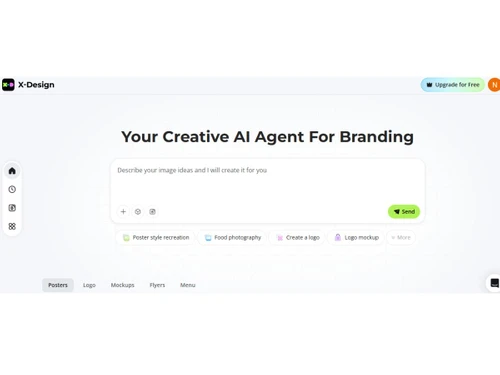
X-Design is an AI-powered creative and branding platform that helps users generate logos, marketing visuals, product photos, videos, and complete brand assets using simple text prompts or uploaded images.

See More

Have you used X-Design before?

Share your insights for better experience

Add a Review
Starting Price
$10

View plans

100% Genuine
Products
Best Price
Guaranteed
Safe & Secure
Payment
  • Description

  • Pricing

  • Features

  • Specification

  • Review

  • FAQ

Starting at $10

X-Design Software Overview

What is X-Design?

X-Design is an AI tool that helps users create professional-quality visuals, branding assets, and marketing content quickly and efficiently. It allows users to generate logos, product images, promotional graphics, social media creatives, and even videos using simple text prompts or uploaded photos, eliminating the need for advanced design expertise.

The platform combines AI image generation, smart editing tools, background removal, brand kit creation, and content automation in one cloud-based workspace. This makes it especially useful for businesses, e-commerce sellers, marketers, and content creators.

Why Choose X-Design?

  • All-in-one AI creative suite: Generate logos, brand kits, product photos, graphics, and videos without switching between tools.
  • No design skills required: Simply describe your idea or upload an image, and the AI creates editable, production-ready designs in seconds.
  • Time and cost savings: Automates complex design tasks, reducing the need for expensive designers or long production timelines.
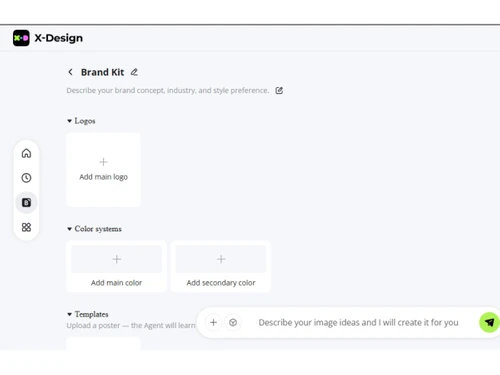
  • Brand consistency: Built-in brand kits ensure all visuals stay aligned with your colors, fonts, and identity across projects.
  • Versatile use cases: Ideal for marketing, e-commerce, social media, and business branding needs in one workspace.

Benefits of X-Design

  • Faster content creation: AI automates complex design tasks, turning ideas into logos, visuals, and marketing assets in minutes instead of hours.
  • Cost savings: Reduces the need for professional designers, photoshoots, and expensive software by providing an all-in-one creative solution.
  • Consistent branding: Stores brand elements like colors, fonts, and logos to ensure all designs remain visually consistent across campaigns.
  • Easy to use: Designed for beginners with no design experience, allowing anyone to create professional-quality visuals through simple prompts or uploads.
  • Improved productivity: Automates repetitive editing tasks and enables teams to produce more creative variations quickly.

X-Design Pricing

X-Design pricing starts at USD 10 at techjockey.com. The pricing model is based on different parameters, including the amount of bandwidth you need, the number of servers you need, and the features you need. For further queries related to the product, you can contact our product team and learn more about the pricing and offers.

Read more

X-Design Pricing & Plans

Plus Plan
Starting at $10
    • Licenses

      Licenses
      Licenses
    • Monthly

      Monthly
      Monthly

Key Features

  • 200 credits/mo

  • 100 Agent credits monthly

  • Up to 150 image generations monthly

  • Up to 15 × 5s video generations monthly

  • Unlimited AI image removal

  • Unlimited image upscaling & enhancement

Pro Plan
Starting at $30
    • Licenses

      Licenses
      Licenses
    • Monthly

      Monthly
      Monthly

Key Features

  • 700 credits/mo

  • 300 Agent credits monthly

  • Up to 500 image generations monthly

  • Up to 100 × 5s video generations monthly

  • Unlimited usage of Nano Banana Pro

  • Up to 175 AI e-commerce image generations monthly

X-Design Features

  • icon_check Background Remover
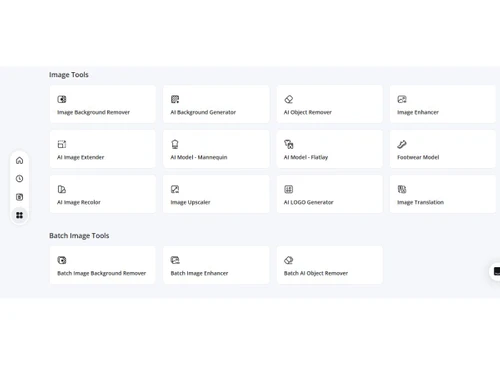
    Automatically detects and extracts the main subject from an image by removing the background with pixel-level precision.
  • icon_check AI Image Generator
    Transforms product photography by generating realistic and lifestyle-inspired backgrounds through advanced AI prompts.
  • icon_check Photo Enhancement
    Increases the resolution of low-quality files to HD or Ultra HD while restoring lost details and sharpening the visuals.
  • icon_check Fashion Model Creator
    Generates lifelike digital models to showcase apparel, eliminating the need for traditional and expensive photoshoots.
  • icon_check Video Quality Sharper
    Enhances the clarity of video files by reducing noise and increasing sharpness through specialized AI processing algorithms.
  • icon_check Watermark Remover
    Identifies and removes static or dynamic watermarks from video footage to ensure a clean and professional final output.
  • icon_check Brand Kit Integration
    Generates a cohesive set of logos, typography, and color palettes based on initial brand prompts and industry styles.
  • icon_check Image Extender Utility
    Uses generative expansion to extend the edges of an image, allowing for the modification of aspect ratios without cropping.
  • icon_check 3D Visual Mockups
    Applies brand logos and designs onto 3D objects like packaging and storefronts to visualize real-world implementations.
  • icon_check Asset Management
    Stores and synchronizes design files in a centralized cloud repository for access across multiple web-enabled devices.
  • icon_check Batch Processing Engine
    Allows for the simultaneous application of edits, such as background removal, across a large volume of product images.
  • icon_check Intelligent Scene Templates
    Provides a library of pre-configured lighting and prop settings to create professional indoor and outdoor environments.
  • icon_check Multi Format Support
    Supports high-resolution exports in various formats, including PNG, JPG, and vector files, suitable for print and digital.
X-Design Demo Video play icon

Get X-Design Demo

Watch the demo video to explore key features, real workflows, and how the software fits your business needs.

Understand
Key Features
Personal
Demo Insights
Interactive
Demo Support

X-Design Specifications

Supported Platforms
Windows Windows iOS iOS Android Android MacOS MacOS
Devices
Desktop Desktop Mobile Mobile Tablet Tablet iPad iPad
Deployment
Cloud-Based Cloud-Based
Suitable For
All Industries
Business Specific
All Businesses
Business Size
Individual Small Business Startups Medium Business Enterprises SMBs SMEs MSMBs MSMEs
Customer Support
Email Communities
Language
English
Training Resources
Videos
AI Features
AI Integrated

X-Design Review

4.3

Out of 5

img

Overall Rating

Based on
3 Verified Ratings

Rating Breakdown

  • Features 4.6
  • Value for Money 4.3
  • Ease of Use 4.5
  • Customer Support 4

80% Recommend this Product

Add Review

Techjockey Trusted Reviews from Verified Users

No reviews are currently available for X-Design. Discover similar AI Tools reviews

  • Chatrly

    5.0

    Whats great - Natural voice and chat experience, easy integration, real-time responsiveness, lead generation, user-friendly interface, exce... read more
  • SyncMonster

    4.3

    Whats great - syncMonster is a User-friendly product and its provides high-quality results read more

  • Krutrim AI

    4.4

    Whats great - It helped me communicate and get information in my preferred language. The AI is also easy to use and helped me generate good... read more

Articles for X-Design

See All Related Articles

How much does X-Design cost?

X-Design pricing starts at USD 10 at techjockey.com. Pricing is customised based on specific business needs.

Which operating system does X-Design support?

X-Design is a cloud-based tool that works on any operating system (Windows, macOS, Linux) through a web browser.

How does X-Design work?

It uses AI to generate and edit visuals based on text prompts or uploaded images, allowing users to create logos, graphics, and marketing content quickly.

Is X-Design suitable for small businesses?

Yes, it is designed to be affordable and easy to use, making it ideal for small businesses, startups, and entrepreneurs.

Does X-Design offer a free trial or a demo?

Yes, X-Design typically offers free access or trial options so users can explore its features before upgrading to paid plans.

What features does X-Design offer?

Key features include AI image generation, logo creation, product photo editing, background removal, branding tools, templates, and marketing content creation.

Is there a X-Design App?

X-Design mainly operates as a web-based platform, though it may integrate with other tools and services for workflow flexibility.

Who are the potential users of X-Design?

Marketers, e-commerce sellers, designers, content creators, agencies, and businesses needing quick, professional visuals.

How secure is X-Design?

It provides standard cloud security measures such as secure data handling and user account protection suitable for business use.

What is X-Design used for?

It is used to create branding assets, marketing visuals, product images, and promotional content efficiently using AI automation.

20,000+ Software Listed

Best Price Guranteed

Free Expert Consultation

2M+ Happy Customers

Terms and Condtions

close

Users with registered businesses can purchase goods from merchants on the platform to satisfy their business needs. Users are not permitted to utilize any products acquired through the platform for resale, advertising, business, or further distribution.

For each purchase made, users will receive a Tax Invoice (or 'GST invoice') that includes specific details such as:

  • the GSTIN of the user associated with their registered business, and

  • the specified Entity Name for their business.

It should be noted that not all products are eligible for GST Invoice. Only the products displayed by participating sellers with the 'GST-based Invoice Available' callout on the product description page would qualify.

Certain goods and services are not eligible to get a GST Invoice, including items with VAS, i.e., Value Added Services (e.g., Total Mobile Protection/Assured Buyback) and those involving an exchange offer at the time of purchase.

Users must ensure the accuracy of the GSTIN, and business entity name provided for the GST Invoice. Requests for corrections into GST Invoice would not be accommodated by Techjockey.com or any Seller, and any issues arising from user-provided information are the sole responsibility of users.

Techjockey.com is not liable for the GST Invoice or any associated input tax credit. To efficiently claim an input tax credit, users should select the registered place of business address as per the GST authority's data and follow the provisions of the GST Act and rules.

To claim an input tax credit, the delivery and billing addresses must match. Furthermore, input tax credits will not be granted if the delivery address and GSTIN on the invoice are from different states. In case of incorrect GST details provided during the order placement, the order will be canceled automatically.