linkedin
AcTouch Cloud ERP Solutions logo
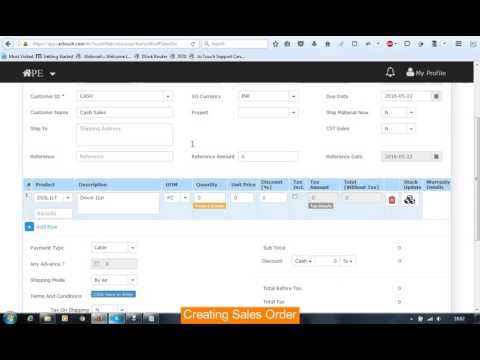
play AcTouch Cloud based Application
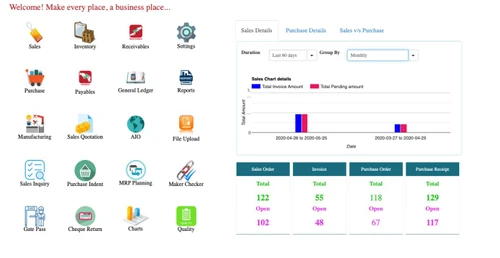
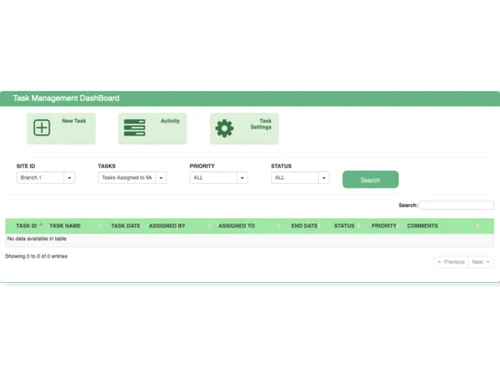
actouch dashboard
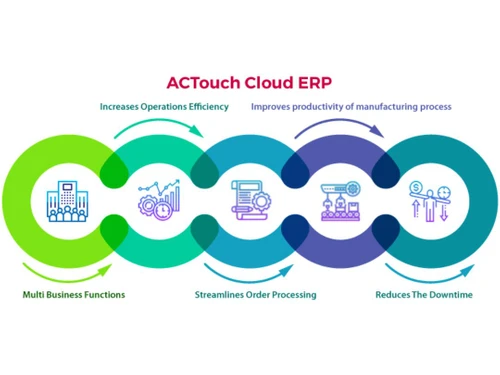
actouch cloud erp solutions-productivity

AcTouch Cloud ERP Solutions

Brand: AcTouch

  • 4.4

  • 3 Ratings

AcTouch is Cloud computing manufacturing erp software solution exclusively designed for manufacturers, traders and distributers, to assist them manage their business smoothly. This solution helps solve your inventory, invoice and billing issues. The software is equipped with the features of GST (Goo...

See More

Have you used AcTouch Cloud ERP Solutions before?

Share your insights for better experience

Add a Review
Starting Price
₹500 excl.GST
₹ 590 incl. GST

View plans

100% Genuine
Products
Best Price
Guaranteed
Safe & Secure
Payment
  • Description

  • Pricing

  • Features

  • Specification

  • Review

  • Compare

  • Alternatives

  • FAQ

Starting at ₹500

AcTouch Cloud ERP Solutions Software Overview

AcTouch is Cloud computing manufacturing erp software solution exclusively designed for manufacturers, traders and distributers, to assist them manage their business smoothly. This solution helps solve your inventory, invoice and billing issues. The software is equipped with the features of GST (Goods and Services).

Actouch manufacturing erp modules:
ActTouch is a comprehensive ERP management software, equipped with following features:
1. Inventory Management- Efficient stock management with accurate costing. This cloud based ERP software integrated accounting software enables you manage products with different batch and expiry dates with their medical industry, multiple unit of measurement, etc.
2. Sales and Invoices Management- This software makes it easy for you to create bundle of invoices for your customers. Through the software, you can easily create sales orders and seamlessly handle sales returns.
3. Purchase and Receipts Management- Seamlessly track the number of products and tools you have purchased with their respective prices. It also enables you to manage all the purchase receipts for the future use. Plus, stock alerts notify when you have to make the next purchase.
4. Payments and Receipts- Manage your payment, receipts effortlessly and never miss receivables from customers. Also, you can track your expenses and receivables with this easy to use ERP software.
5. Manufacturing Management- Seamlessly handle your in-house production, subcontracting, products manufactured, organize your stocks and keep a track of stocks present with vendors.
6. Automate Warranty Management- This solution assist you to manage your post sales services, repairs, outbond SMS and barcode generation. This further helps you to keep a track of the products that are in warranty and total time of their warranty.

Read more

AcTouch Company Details

Founded Year:  2013

AcTouch

Director/Founders Nityananda Rao
Company Size 1-100

AcTouch Cloud ERP Solutions Pricing & Plans

Only Invoice and Billing Software
Key Features
  • Invoices and Payment Receipts
  • Bills and Payments
  • MIS and Finance Reports
  • Automated Quality Alerts
  • Work Order Maintenance
  • Quotation and Proposal Management

Calculated Price

500 Exclusive of all taxes
    • Users

      Users
      Users
    • Monthly

      Monthly
      Monthly

Key Features

  • Invoices and Payment Receipts

  • Bills and Payments

  • MIS and Finance Reports

  • Automated Quality Alerts

  • Work Order Maintenance

  • Quotation and Proposal Management

AcTouch Cloud ERP Solutions Features

Production and Operations Management

  • icon_check Work Order Management
    Create, assign, and track production tasks with detailed work orders.
  • icon_check Bill Of Materials (BOM)
    Manage multi-level BOMs for accurate production planning and costing.
  • icon_check Shop Floor Management
    Oversee and streamline operations directly on the shop floor.
  • icon_check Production Scheduling
    Optimize production timelines, resources, and workflows for maximum efficiency.
  • icon_check Material Requirements Planning (MRP)
    Ensure materials are available for production with precise planning.
  • icon_check Production Tracking
    Monitor and report real-time progress across all production stages.

Inventory and Supply Chain Management

  • icon_check Supplier Management
    Track and optimize supplier relationships and performance.
  • icon_check Warehouse Management
    Optimize storage, picking, and inventory movement in warehouses.
  • icon_check Order Management
    Process and track customer orders efficiently from creation to delivery.
  • icon_check Inventory Control
    Monitor and manage stock levels in real-time to ensure availability.
  • icon_check Procurement Management
    Streamline purchasing processes and vendor communications.
  • icon_check Stock Alerts & Reordering
    Automate notifications and replenishments to avoid stockouts.
  • icon_check Demand Forecasting
    Predict inventory needs with data-driven demand projections.
  • icon_check Shipping & Receiving
    Manage inbound and outbound logistics for timely deliveries.
  • icon_check Stock Tracking
    Monitor inventory movement and location with precision.

Quality Assurance and Compliance

  • icon_check Quality Control
    Perform inspections and tests to maintain high-quality standards.
  • icon_check Traceability
    Track materials and products through the supply chain for transparency.
  • icon_check Quality Assurance
    Implement systems to maintain consistent product quality.
  • icon_check Quality Planning
    Define quality standards and inspection criteria for products.
  • icon_check Automated Quality Alerts
    Receive instant notifications for quality deviations.
  • icon_check Non-Conformance Management
    Identify, report, and address quality deviations effectively.
  • icon_check Compliance Management
    Ensure adherence to regulatory and industry standards.

Maintenance and Asset Management

  • icon_check Work Order Maintenance
    Manage work orders for planned and emergency maintenance tasks.
  • icon_check Preventive Maintenance
    Schedule regular maintenance to minimize equipment downtime.
  • icon_check Asset Management
    Track and manage machinery, tools, and equipment lifecycles.
  • icon_check Predictive Maintenance
    Use data to predict and prevent equipment failures.

Sales and Customer Management

  • icon_check Returns Management
    Streamline the return process for products and handle reverse logistics.
  • icon_check Sales Order Management
    Process and track sales orders efficiently from entry to delivery.
  • icon_check Quotation and Proposal Management
    Generate detailed quotes and proposals tailored to customer needs.
  • icon_check Customer Relationship Management (CRM)
    Manage customer interactions, sales, and after-service.

Financial and Cost Management

  • icon_check Tax Management
    Automate tax calculations and ensure regulatory compliance.
  • icon_check Profitability Analysis
    Evaluate product, project, or business unit profitability.
  • icon_check General Ledger
    Record and manage all financial transactions and accounts.
  • icon_check Bank Reconciliation
    Match bank statements with internal financial records accurately.
  • icon_check Budgeting And Forecasting
    Plan and predict financial performance with precision.
  • icon_check Accounts Payable (AP) & Accounts Receivable
    Handle vendor payments and customer invoices seamlessly.
  • icon_check Cost of Goods Sold (COGS) Management
    Track production costs for profitability insights.
  • icon_check Financial Reporting
    Generate comprehensive financial statements and reports.
  • icon_check Fixed Asset Management
    Track and manage the lifecycle and depreciation of assets.

Human Resource Management

  • icon_check Labor Tracking
    Monitor workforce productivity and labor hours in real-time.
  • icon_check Employee Management
    Maintain comprehensive employee records and lifecycle management.
  • icon_check Attendance and Time Tracking
    Track employee attendance and manage time efficiently.
  • icon_check Training and Development
    Plan and monitor employee training and skill enhancements.
  • icon_check Payroll Management
    Automate salary calculations and payroll disbursements.
  • icon_check Performance Management
    Evaluate employee performance with detailed appraisals.
  • icon_check Health and Safety Management
    Track compliance and ensure workplace safety protocols.

Analytics and Reporting

  • icon_check Real-Time Analytics
    Analyze live data to drive proactive decision-making.
  • icon_check Real-Time Dashboards
    Visualize key data metrics live for informed decision-making.
  • icon_check Customizable Reporting
    Generate tailored reports for specific business needs.
  • icon_check Business Intelligence (BI) Analytics
    Use advanced BI tools for deep data insights.
  • icon_check KPI Tracking
    Monitor critical performance metrics for better outcomes.
  • icon_check Downtime Tracking
    Monitor and analyze equipment or production line downtimes.

Integrations

  • icon_check Accounting Integration
    Sync ERP with accounting tools for seamless financial operations.
  • icon_check System Integration
    Connect ERP with other enterprise systems for data synchronization.
  • icon_check Barcode/RFID Integration
    Enhance inventory tracking with barcode and RFID technology.
  • icon_check Vendor-Managed Inventory (VMI)
    Let vendors monitor and replenish stock levels efficiently.
  • icon_check Quality Management System (QMS)
    Integrate advanced quality management workflows.
  • icon_check Computerized Maintenance Management Systems (CMMS)
    Enhance maintenance tracking and automation.
  • icon_check Payroll Integration
    Automate payroll processes by integrating with ERP systems.
  • icon_check 3PL Integration
    Manage third-party logistics providers for streamlined operations.
  • icon_check Transportation Management
    Optimize freight and logistics operations seamlessly.

Notifications and Alerts

  • icon_check Email and SMS Notifications
    Supports real-time communication.
  • icon_check Security Alerts
    Strengthens system security.
  • icon_check Custom Event Alerts
    Useful for production or inventory updates.
  • icon_check Non-Compliance Issues
    Critical for addressing quality deviations.

Others

  • icon_check Supplier Relationship Management
    Strengthen and optimize supplier collaboration.
  • icon_check Remote Access
    Access ERP data and tools securely from any location.
  • icon_check Real-Time Data Sync
    Ensure instant updates across all connected systems.
  • icon_check Multi-Currency Support
    Handle transactions in multiple currencies with ease.
AcTouch Cloud ERP Solutions Demo Video play icon

Get AcTouch Cloud ERP Solutions Demo

Watch the demo video to explore key features, real workflows, and how the software fits your business needs.

Understand
Key Features
Personal
Demo Insights
Interactive
Demo Support

AcTouch Cloud ERP Solutions Specifications

Supported Platforms
Windows Windows
Devices
Desktop Desktop
Deployment
Cloud-Based Cloud-Based
Suitable For
All Industries
Business Specific
All Businesses
Language
English

Explore the Best Alternative Solutions Similar to Your Business Size and Needs

AcTouch Cloud ERP Solutions Review

4.4

Out of 5

img

Overall Rating

Based on
3 Verified Ratings

Rating Breakdown

  • Features 4.8
  • Value for Money 4.6
  • Ease of Use 4
  • Customer Support 4.1

90% Recommend this Product

Add Review

Techjockey Trusted Reviews from Verified Users

No reviews are currently available for AcTouch Cloud ERP Solutions. Discover similar Manufacturing ERP Software reviews

  • Gesta ERP

    4.5

    Whats great - d'Katia ERP is perfect fit for my business requirement as it can be suits my distributor, wholesaler, retailer. It heleped us... read more

  • Astral Manufacturing ERP

    4.4

    Whats great - Astral is best assembling Enterprise Resource Planning System exceptionally structure for a little to enormous size of assemb... read more
  • Probiz ERP

    4.6

    Whats great - High degree of ethics, structured delivery model, Implementation and Support system. Highly skilled team, Intensive experienc... read more

Compare AcTouch Cloud ERP Solutions With other Manufacturing ERP Software

Products
Ratings
Pricing
Device Supported
Deployment
Supported Platforms
  • img

    AcTouch Cloud ERP Solutions

  • 4.4

  • ₹ 500.00 excl. GST

  • Desktop

    Mobile

  • Web based

    On Premises

  • Windows

    Mac OS

  • img

    Epicor Kinetic

  • 5

  • Price On Request

  • Desktop

    Mobile

  • Web based

    On Premises

  • Windows

    Mac OS

  • img

    TCS iON

  • 4.4

  • Price On Request

  • Desktop

    Mobile

  • Web based

    On Premises

  • Windows

    Mac OS

  • img

    DELMIAWorks

  • 4.3

  • Price On Request

  • Desktop

    Mobile

  • Web based

    On Premises

  • Windows

    Mac OS

  • img

    Storyboard ERP

  • 4.6

  • ₹ 480000

  • Desktop

    Mobile

  • Web based

    On Premises

  • Windows

    Mac OS

  • img

    Tick Software

  • 4.4

  • ₹ 51000

  • Desktop

    Mobile

  • Web based

    On Premises

  • Windows

    Mac OS

  • img

    VisualGEMS ERP

  • 4.1

  • Price On Request

  • Desktop

    Mobile

  • Web based

    On Premises

  • Windows

    Mac OS

  • img

    Spectrum ERP

  • 4.4

  • Price On Request

  • Desktop

    Mobile

  • Web based

    On Premises

  • Windows

    Mac OS

  • img

    SolutionOne ERP

  • 4.2

  • ₹ 75000

  • Desktop

    Mobile

  • Web based

    On Premises

  • Windows

    Mac OS

  • img

    UniERP

  • 4.5

  • Price On Request

  • Desktop

    Mobile

  • Web based

    On Premises

  • Windows

    Mac OS

(0) Product(s) selected

AcTouch Cloud ERP Solutions Alternatives

See All AcTouch Cloud ERP Solutions Alternatives

Available

Price on Request

Starting Price:

$50 /Month

Available

Price on Request

Available

Price on Request

Available

Price on Request

Starting Price:

$250 /Month

Articles for AcTouch Cloud ERP Solutions

See All Related Articles

Which operating system does AcTouch Cloud ERP Solutions support?

AcTouch Cloud ERP Solutions Manufacturing ERP Software is compatible with Windows operating systems.

Is there any AcTouch Cloud ERP Solutions app?

AcTouch Cloud ERP Solutions Manufacturing ERP Software app is not available.

What is deployment type of AcTouch Cloud ERP Solutions?

AcTouch Cloud ERP Solutions Manufacturing ERP Software supports Web-Based.

How much does AcTouch Cloud ERP Solutions cost?

AcTouch Cloud ERP Solutions Manufacturing ERP Software pricing starts at Rs.1500.00.

Who are the potential users of AcTouch Cloud ERP Solutions?

AcTouch Cloud ERP Solutions Manufacturing ERP Software is typically used in All Industries.

Is there any free trial or demo for AcTouch Cloud ERP Solutions?

AcTouch Cloud ERP Solutions Manufacturing ERP Software demo is available for free with Techjockey.com

Is AcTouch Cloud ERP Solutions free?

AcTouch Cloud ERP Solutions Manufacturing ERP Software offers a free trial. However, the premium plan with advanced features available at Techjockey .

How can you download AcTouch Cloud ERP Solutions?

For AcTouch Cloud ERP Solutions Manufacturing ERP Software installation, insert the given CD/USB flash storage in your system and open the Setup Wizard to get started.

How does AcTouch Cloud ERP Solutions work?

AcTouch Cloud ERP Solutions Manufacturing ERP Software helps with Billing & Invoicing,CRM,Sales Orders and Purchase Management. It's a complete solution for Inventory,Payment Handling,Multi Currency and Manufacturing.

20,000+ Software Listed

Best Price Guranteed

Free Expert Consultation

2M+ Happy Customers

Terms and Condtions

close

Users with registered businesses can purchase goods from merchants on the platform to satisfy their business needs. Users are not permitted to utilize any products acquired through the platform for resale, advertising, business, or further distribution.

For each purchase made, users will receive a Tax Invoice (or 'GST invoice') that includes specific details such as:

  • the GSTIN of the user associated with their registered business, and

  • the specified Entity Name for their business.

It should be noted that not all products are eligible for GST Invoice. Only the products displayed by participating sellers with the 'GST-based Invoice Available' callout on the product description page would qualify.

Certain goods and services are not eligible to get a GST Invoice, including items with VAS, i.e., Value Added Services (e.g., Total Mobile Protection/Assured Buyback) and those involving an exchange offer at the time of purchase.

Users must ensure the accuracy of the GSTIN, and business entity name provided for the GST Invoice. Requests for corrections into GST Invoice would not be accommodated by Techjockey.com or any Seller, and any issues arising from user-provided information are the sole responsibility of users.

Techjockey.com is not liable for the GST Invoice or any associated input tax credit. To efficiently claim an input tax credit, users should select the registered place of business address as per the GST authority's data and follow the provisions of the GST Act and rules.

To claim an input tax credit, the delivery and billing addresses must match. Furthermore, input tax credits will not be granted if the delivery address and GSTIN on the invoice are from different states. In case of incorrect GST details provided during the order placement, the order will be canceled automatically.