linkedin
Qualis LIMS logo
play How to use QuaLIS LIMS? - Agaram QuaLIS LIMS Demo
Qualis LIMS features

Qualis LIMS

Brand: Agaram Technologies

  • 4.2

  • 6 Ratings

Agaram QuaLIS LIMS offers a range of solutions for any type of laboratory across multiple domains such as chemical, environmental, food and beverage, clinical research, pathology, public health, and pharmaceutical. It obeys the regulatory compliance requirements that laboratories need. This laboratory software complies with Good Laboratory Practice (GLP), Eudralex Annex 11, GCP, cGMP, Net Cord, 2...

See More

Have you used Qualis LIMS before?

Share your insights for better experience

Add a Review

Price Available on Request

Questions about pricing or customization? We’re here to help, just a click away.

100% Genuine
Products
Best Price
Guaranteed
Safe & Secure
Payment
  • Description

  • Pricing

  • Features

  • Specification

  • Review

  • Compare

  • Alternatives

  • FAQ

Qualis LIMS Software Overview

What is Agaram QuaLIS LIMS?

Agaram QuaLIS LIMS offers a range of solutions for any type of laboratory across multiple domains such as chemical, environmental, food and beverage, clinical research, pathology, public health, and pharmaceutical. It obeys the regulatory compliance requirements that laboratories need. This laboratory software complies with Good Laboratory Practice (GLP), Eudralex Annex 11, GCP, cGMP, Net Cord, 21 CFR Part 11, etc.

QuaLIS LIMS can be deployed on a web server and supports Databases and Open Source OS. It is basically used for Analytical purposes and QC/QA. This software, built on the Java platform, has some compelling features. Some of them are:

  1. Sampling and Storage: Users can manage sampling points in labs, receive samples and manage the custody of those samples.
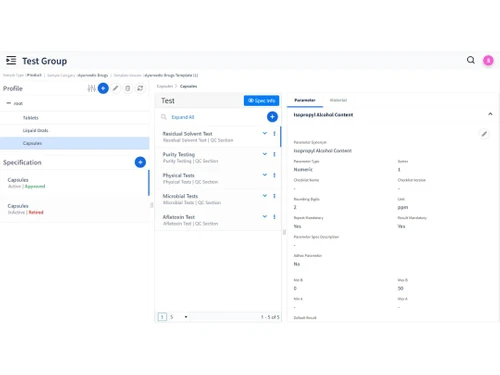
  2. Specification Management: One can easily manage tests, samples, MDL, Formulae, etc. by using Agaram QuaLIS LIMS.
  3. Results: After the conduction of an experiment, results are published after going through two levels of review approval.

What are the features and technical highlights of Agaram QuaLIS LIMS?

Solutions

Agaram QuaLIS LIMS offers a wide range of solutions for:

  • Document Management
  • Stability Management
  • Quotations and Invoicing
  • Non-conformance (OOS / Deviations)
  • Email Alerts
  • Training Management
  • Synthesis Project Management and Formulations
  • Method Development and Validation

Technical Highlights

Basically, the structure of Agaram QuaLIS LIMS is classified into three parts:

  • Lab - The lab consists of a PDA, RS232 Instrument and an RS232 to TCP/IP Converter.
  • Data Center - It is exclusively composed of the QuaLIS Database Server.
  • Local Area Network - The LAN comprises PC-Based Instruments, App Server and the QuaLIS Web Server.

Some of the salient technical points pertaining to the software are:

  • The software is a web-based internet application, built using JAVA, HTML5 and JavaScript on a UI site.
  • Agaram QuaLIS LIMS is specifically designed for multi-department and multi-site organizations.
  • This web-based solution is accessible from browsers such as Chrome, Internet Explorer, etc.
  • The software supports PostgreSQL and MS-SQL.

Pricing of Agaram QuaLIS LIMS

The pricing of Agaram QuaLIS LIMS is completely customizable and is available on the request of users. Drop-in a request to our website through the “request a callback” option and our customer care team will correspond with you shortly. We will support you with all possible help regarding cost, activation and license key, and renewal procedures.

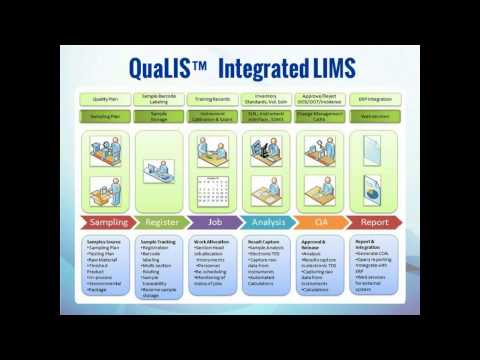
Agaram QuaLIS LIMS Data Workflow

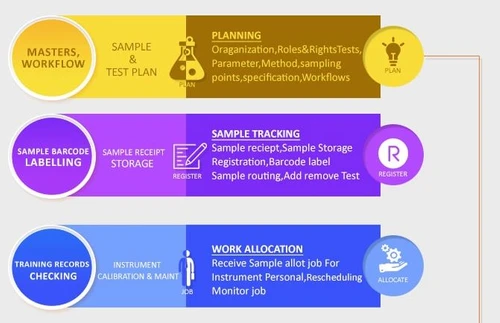
The data workflow in Agaram QuaLIS LIMS follows a set of steps:

  1. Masters, Workflow: This is the planning process of an experiment. This step comprises rights and roles, tests, methods, sampling points, specifications and workflows.
  2. Approve / Reject Re-Test: This step is meant for checking, approving or ordering re-tests, reviewing, releasing reports and recording incidents.
  3. Sample Barcode Labelling: This is for sample storage and tracking. The process involves sample storage registration, sample routing, barcode registration and addition of the removed tests.
  4. Training Records Checking: It is used primarily for instrument calibration and maintenance. Through this step, one can receive samples and allot jobs for personnel and instruments, as well as for rescheduling or monitoring.
  5. Inventory Tracking: This procedure is used to calculate results with insightful analytics. One can also calculate inventory usage and generate a report by virtue of QuaLIS LIMS.
Read more

Agaram Technologies Company Details

Founded Year:  1995

Agaram Technologies is a leading provider of Enterprise-Class Laboratory Informatics and Automation Solutions.

Director/Founders Mukunth Venkatesan
Company Size 101-500 Employees

Qualis LIMS Pricing & Plans

Looking for The Right Pricing?

Share your requirements and get a plan built around your business.

  • Define your business needs
  • Get customised pricing
  • Choose features that fit your workflow

Price Available on Request

Get personalised Qualis LIMS pricing that fits your needs. Our team will connect with you.

Qualis LIMS Features

  • icon_check Sample Collection & Test Management
    The software provides comprehensive sample management by providing registration, aliquoting and barcode labelling. It also
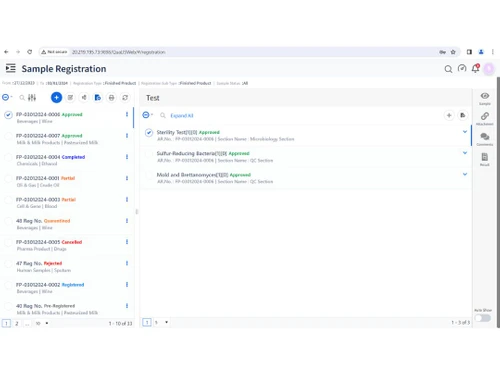
  • icon_check Sample Login/Registration
    Users can pre-register or register samples and also allot tests and barcode samples by using this software.
  • icon_check Job Allocation
    Agaram QuaLIS LIMS has a separate work allocation module designed for personnel and instruments, which are cross-linked with
  • icon_check Results
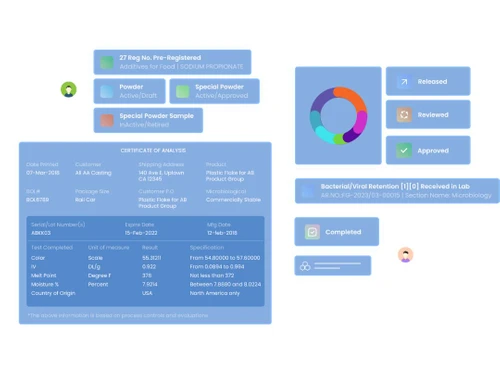
    The results generated after the tests conducted are subject to release after 2 levels of review approval.
  • icon_check Approval
    You can create configurable workflows for different sample types by using this software.
  • icon_check Traceability
    The inbuilt audit trail of the software gives access to the inventory usage, instrument data, comments and re-tests that helps in
  • icon_check Integration
    Agaram QuaLIS LIMS is so designed that it can integrate with any external system(s) for enhanced performance.
  • icon_check Document Management
    After the test planning, the software goes for approval, where checking, reviewing, report releasing and proper management of
  • icon_check Training Management
    Lab personnel skill matrix management is achieved through this software, which makes sure there is tight integration between work
  • icon_check Invoicing
    The QuaLIS portal effectively takes stock of customer sample submissions and allows one to download reports and invoices.
  • icon_check Quotation
    One of the notable solutions provided by the software is the generation of quotations, reports and invoices.
  • icon_check E-mail Alert
    QuaLIS LIMS comes equipped with dashboards and alerts that take stock of the system and generates email reports.
  • icon_check Quality Management
     The comprehensive quality management of the software takes care of documents, deviations, change management and incidents
  • icon_check Compliance Management
    The software comes equipped with an inbuilt audit trail and complies according to certain security standards such as GLP, 21 CFR
  • icon_check MIS Reports
    Agaram QuaLIS LIMS has over 20 inbuilt report templates besides dashboards and alerts for system and email management. There is a
Qualis LIMS Demo Video play icon

Get Qualis LIMS Demo

Watch the demo video to explore key features, real workflows, and how the software fits your business needs.

Understand
Key Features
Personal
Demo Insights
Interactive
Demo Support

Qualis LIMS Specifications

Supported Platforms
Ubuntu Ubuntu Windows Windows MacOS MacOS Linux Linux
Devices
Desktop Desktop
Deployment
Cloud-Based Cloud-Based
Suitable For
Healthcare
Business Specific
Hospitals
Business Size
Small Business Startups Medium Business Enterprises
Customer Support
Phone Email Live Chat
Language
English
Training Resources
Videos

Explore the Best Alternative Solutions Similar to Your Business Size and Needs

Qualis LIMS Review

4.2

Out of 5

img

Overall Rating

Based on
6 Verified Ratings

Rating Breakdown

  • Features 4.5
  • Value for Money 4.1
  • Ease of Use 4.0
  • Customer Support 4.0

90% Recommend this Product

Add Review

Techjockey Trusted Reviews from Verified Users

No reviews are currently available for Qualis LIMS. Discover similar LIMS Software reviews

  • Healthray LIMS

    5.0

    Whats great - Healthray LIMS impresses with its simple, user-friendly interface that requires minimal training. It promotes smooth day-to-d... read more

  • CrelioHealth LIMS

    5.0

    Whats great - User friendly GUI, cost-effective, required less time for implementation, higher uptime. easy to understand the software. read more

  • OasisLIMS

    4.9

    Whats great - Having been using it for quite long and can state that it is quite a decent product for our business. Basically we deal in th... read more

Compare Qualis LIMS With other LIMS Software

Products
Ratings
Pricing
Device Supported
Deployment
Supported Platforms
  • img

    Qualis LIMS

  • 4.2

  • Price On Request

  • Desktop

    Mobile

  • Web based

    On Premises

  • Windows

    Mac OS

  • img

    CrelioHealth LIMS

  • 5

  • Price On Request

  • Desktop

    Mobile

  • Web based

    On Premises

  • Windows

    Mac OS

  • img

    Piysan

  • 5

  • Price On Request

  • Desktop

    Mobile

  • Web based

    On Premises

  • Windows

    Mac OS

  • img

    Healthray LIMS

  • 5

  • ₹ 25000

  • Desktop

    Mobile

  • Web based

    On Premises

  • Windows

    Mac OS

  • img

    SIGMA LIMS

  • 4.4

  • ₹ 400000

  • Desktop

    Mobile

  • Web based

    On Premises

  • Windows

    Mac OS

  • img

    Miracle LIS

  • 4.1

  • Price On Request

  • Desktop

    Mobile

  • Web based

    On Premises

  • Windows

    Mac OS

  • img

    OasisLIMS

  • 4.8

  • Price On Request

  • Desktop

    Mobile

  • Web based

    On Premises

  • Windows

    Mac OS

  • img

    Dorayslis LIMS

  • 4.3

  • Price On Request

  • Desktop

    Mobile

  • Web based

    On Premises

  • Windows

    Mac OS

  • img

    LabWare

  • 4.2

  • Price On Request

  • Desktop

    Mobile

  • Web based

    On Premises

  • Windows

    Mac OS

  • img

    Docpulse LIMS

  • 4.3

  • Price On Request

  • Desktop

    Mobile

  • Web based

    On Premises

  • Windows

    Mac OS

(2) Product(s) selected

Qualis LIMS Alternatives

See All Qualis LIMS Alternatives

Available

Price on Request

Available

Price on Request

Articles for Qualis LIMS

See All Related Articles

Can I install Agaram QuaLIS LIMS on my smartphone?

You can install the software on your smartphone only if it is a Windows phone. Agaram QuaLIS LIMS supports only Windows OS.

Can I get a live demo of Agaram QuaLIS LIMS?

Techjockey provides free online demos of Agaram QuaLIS LIMS at the time and date as per your convenience.

What is the role of the scheduler in Agaram QuaLIS LIMS?

The software comes with a sampling point-based scheduler and also allows you to take note of instrument calibration, scheduler and validation processes.

How does Agaram QuaLIS LIMS keep track of the results and release management?

You can enter results as per samples or tests, handle raw data, track inventory usage with respect to history and add comments. Agaram QuaLIS LIMS allows an individual to create a configurable approval workflow for the ease of work.

How does Agaram QuaLIS LIMS help in achieving test and specification management?

The software achieves test and specification management by three procedures: ? Template-Based Hierarchy ? Release and Version Control ? Efficiency in managing tests as well as re-tests.

20,000+ Software Listed

Best Price Guranteed

Free Expert Consultation

2M+ Happy Customers

Terms and Condtions

close

Users with registered businesses can purchase goods from merchants on the platform to satisfy their business needs. Users are not permitted to utilize any products acquired through the platform for resale, advertising, business, or further distribution.

For each purchase made, users will receive a Tax Invoice (or 'GST invoice') that includes specific details such as:

  • the GSTIN of the user associated with their registered business, and

  • the specified Entity Name for their business.

It should be noted that not all products are eligible for GST Invoice. Only the products displayed by participating sellers with the 'GST-based Invoice Available' callout on the product description page would qualify.

Certain goods and services are not eligible to get a GST Invoice, including items with VAS, i.e., Value Added Services (e.g., Total Mobile Protection/Assured Buyback) and those involving an exchange offer at the time of purchase.

Users must ensure the accuracy of the GSTIN, and business entity name provided for the GST Invoice. Requests for corrections into GST Invoice would not be accommodated by Techjockey.com or any Seller, and any issues arising from user-provided information are the sole responsibility of users.

Techjockey.com is not liable for the GST Invoice or any associated input tax credit. To efficiently claim an input tax credit, users should select the registered place of business address as per the GST authority's data and follow the provisions of the GST Act and rules.

To claim an input tax credit, the delivery and billing addresses must match. Furthermore, input tax credits will not be granted if the delivery address and GSTIN on the invoice are from different states. In case of incorrect GST details provided during the order placement, the order will be canceled automatically.