linkedin
Agro CD logo
play What is ArgoCD
agro cd-settings
agro cd-applications

Agro CD

Brand: The Linux Foundation

  • 4.3

  • 5 Ratings

A DevOps tool that automatically syncs Kubernetes applications with configurations stored in Git.

See More

Have you used Agro CD before?

Share your insights for better experience

Add a Review

Free Forever

Get started immediately at no cost. Upgrade anytime if your business demand more.

100% Genuine
Products
Best Price
Guaranteed
Safe & Secure
Payment
  • Description

  • Pricing

  • Features

  • Specification

  • Review

  • FAQ

Agro CD Software Overview

What is Agro CD?

Argo CD is a declarative GitOps DevOps tool for Kubernetes that keeps your deployed applications in sync with the configuration stored in a Git repository. It continuously monitors the live cluster state, compares it with the desired state defined in Git, and automatically or manually synchronizes them to ensure consistency.

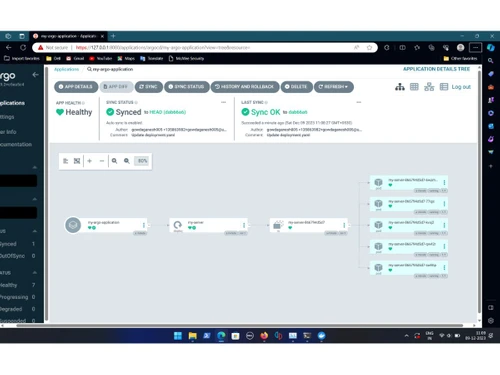
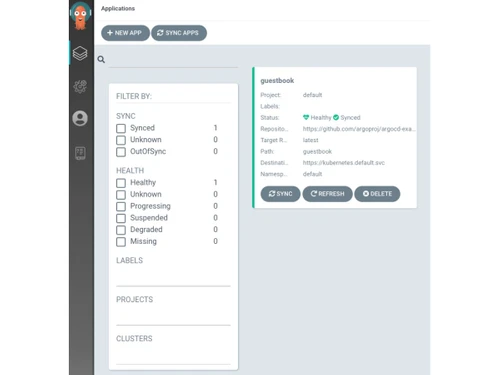
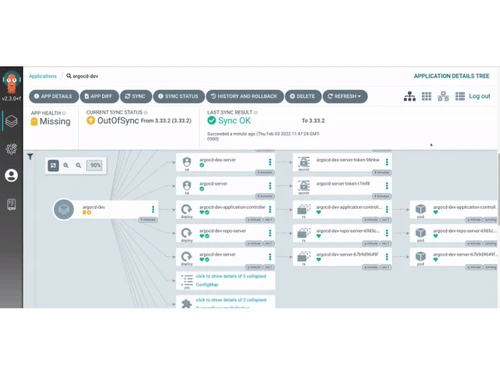
Argo CD supports multiple config formats like Helm, Kustomize, and plain YAML, and lets you deploy and manage apps across multiple clusters. It provides a web UI and CLI for visualizing deployments and managing sync operations. The tool detects configuration drift and can automatically correct it to match the Git-defined desired state.

It also includes role-based access control, single sign-on integrations, health checks, and rollback capabilities. Argo CD is widely used in Kubernetes environments to streamline automated deployments and make delivery auditable and reliable.

Why Choose Agro CD Software?

  • GitOps Native: Uses Git as the single source of truth for deployments.
  • Automated Sync: Keeps live Kubernetes apps in sync with Git automatically.
  • Drift Detection: Detects changes in the cluster that differ from Git.
  • Declarative Deployments: Supports YAML, Helm, and Kustomize for configuration.
  • Multi-Cluster Support: Manage applications across multiple clusters easily.
  • Rollback Options: Quickly revert to previous application versions.
  • Web Dashboard: Visual interface to monitor deployments and health.
  • CLI Access: Command-line interface for advanced automation.
  • API Integration: Connects with CI/CD and other DevOps tools.
  • Role-Based Access: Secure permissions for different team members.
  • Single Sign-On: Supports SSO with OIDC, LDAP, and SAML.
  • Audit Logs: Tracks all user actions and deployment history.
  • Metrics Export: Integrates with Prometheus for monitoring.
  • Health Monitoring: Shows the real-time health of applications.
  • Webhook Support: Trigger deployments automatically from Git events.
  • Sync Hooks: Run custom scripts before or after deployments.

Benefits of Agro CD Software

  • Enterprise-Ready: Scales for large organizations and complex apps.
  • Consistent Deliveries: Ensures environments match Git definitions.
  • Reduces Errors: Automation minimizes manual deployment mistakes.
  • Blue/Green & Canary: Supports advanced deployment strategies.
  • Reliable Deployments: Ensures applications work as intended.
  • Dev Self-Service: Developers deploy via Git without cluster access.
  • Traceable Changes: All updates tracked via Git commits.
  • Faster Releases: Speeds up application delivery cycles.
  • Regulatory Compliance: RBAC and audit trails support governance.
  • Flexible Config Tools: Compatible with multiple configuration formats.
  • Multi-Repo Support: Deploy from multiple Git repositories.

Agro CD Pricing

Agro CD price is available for FREE at techjockey.com. The pricing model is based on different parameters, including extra features, deployment type, and the total number of users. For further queries related to the product, you can contact our product team and learn more about the pricing and offers.

Read more

The Linux Foundation Company Details

Founded Year:  2000

he Linux Foundation is the organization of choice for the world's top developers and companies to build ecosystems that accelerate open technology development and commercial adoption.

Director/Founders Jim Zemlin
Company Size 101-500 Employees

Agro CD Pricing & Plans

This Product is Available Free Forever.

Start instantly with no fees, no subscriptions, and no commitments.

  • Full access to basic version available
  • No credit card or sign-up required

Free Forever Plan

Get started immediately at no cost. Upgrade anytime if your business demand more.

Free Forever

Agro CD Features

  • icon_check Automated State Sync
    The controller continuously monitors the live cluster state and applies changes to match the desired state in the Git repository.
  • icon_check GitOps Workflow Model
    Uses a Git repository as the single source of truth for defining infrastructure and application configurations for a Kubernetes.
  • icon_check Multi-Tenancy
    System provides logical isolation for multiple teams through Project CRDs to manage destination clusters and resource access.
  • icon_check SSO Integration Layer
    Supports authentication via OIDC, SAML 2.0, LDAP, and GitHub to manage user access through existing identity provider systems.
  • icon_check Policy Management
    Allows administrators to define granular permissions for users and groups at the application, project, and cluster level tiers.
  • icon_check Command Line Interface
    Offers a dedicated binary for managing applications, clusters, and synchronization tasks via terminal or CI/CD pipeline scripts.
  • icon_check Multi-Cluster Management
    Enables a single Argo CD instance to deploy and manage applications across multiple external Kubernetes clusters from one point.
  • icon_check Helm Chart Rendering
    Supports deploying applications using Helm charts by rendering templates with custom values files directly during the sync ops.
  • icon_check Health Status Assessment
    Continuously evaluates the health of various Kubernetes resources, including Deployments, Pods, and Services, for operational.
  • icon_check Auto Rollback
    Provides functionality to revert a cluster to a previous known-good state stored in the Git history when deployments fail tests.
  • icon_check Alerts & Notifications
    Identifies discrepancies between the live object configuration and the source version control system to ensure state integrity.
  • icon_check Sync Policy Control
    Defines automated pruning and self-healing parameters to control how and when changes are applied to the targeted environment.
  • icon_check Resource Filtering
    Allows users to exclude or include specific Kubernetes resource types from being managed or tracked by the application controller.
  • icon_check Application Set Engine
    Automates the generation of multiple applications across clusters using generators for Git, List, Cluster, or Matrix patterns.
Agro CD Demo Video play icon

Get Agro CD Demo

Watch the demo video to explore key features, real workflows, and how the software fits your business needs.

Understand
Key Features
Personal
Demo Insights
Interactive
Demo Support

Agro CD Specifications

Supported Platforms
Windows Windows MacOS MacOS Linux Linux
Devices
Desktop Desktop
Deployment
Perpetual Perpetual
Suitable For
ITES
Business Specific
All Businesses
Business Size
Individual Small Business Startups Medium Business Enterprises Freelancers
Customer Support
Email Communities
Language
English
Integration
API Integration
Training Resources
Documentation Videos

Agro CD Review

4.3

Out of 5

img

Overall Rating

Based on
5 Verified Ratings

Rating Breakdown

  • Features 4.2
  • Value for Money 4.3
  • Ease of Use 4.6
  • Customer Support 4.4

80% Recommend this Product

Add Review

Techjockey Trusted Reviews from Verified Users

No reviews are currently available for Agro CD. Discover similar Devops Tools reviews

  • Github

    4.5

    Whats great - The free tier for public repos is generous; unlimited collaborators; GitHub Student for students. For teams, paid tiers add a... read more

  • Buddy

    4.4

    Whats great - Works from mobile app or browser read more

  • Progress Chef

    5.0

    Whats great - Ampla gama de recursos; Fácil de usar; Suporte a Python, Suporte ao cliente excelente; Comunidade ativa. read more

Articles for Agro CD

See All Related Articles

How much does Agro CD cost?

Agro CD price is available for FREE at techjockey.com.

Is there a mobile app available for Agro CD Software?

No, Agro CD does not offer a mobile app.

Which operating systems are compatible with Agro CD Software?

Agro CD is compatible with Linux, Windows and MacOS.

Does Agro CD Software offer a free trial?

Yes, Argo CD is open-source and free to use, so you can try it without cost.

How does Agro CD Software function?

Argo CD continuously syncs Kubernetes applications with Git repositories and automates deployments.

Who uses Agro CD Software?

DevOps teams, developers, and organizations deploying applications on Kubernetes use Argo CD.

Is a free demo available for Agro CD Software?

Yes, you can try Argo CD using its open-source version or demo environments.

Is Agro CD Software available for free?

Yes, Argo CD is fully free and open-source software.

20,000+ Software Listed

Best Price Guranteed

Free Expert Consultation

2M+ Happy Customers

Terms and Condtions

close

Users with registered businesses can purchase goods from merchants on the platform to satisfy their business needs. Users are not permitted to utilize any products acquired through the platform for resale, advertising, business, or further distribution.

For each purchase made, users will receive a Tax Invoice (or 'GST invoice') that includes specific details such as:

  • the GSTIN of the user associated with their registered business, and

  • the specified Entity Name for their business.

It should be noted that not all products are eligible for GST Invoice. Only the products displayed by participating sellers with the 'GST-based Invoice Available' callout on the product description page would qualify.

Certain goods and services are not eligible to get a GST Invoice, including items with VAS, i.e., Value Added Services (e.g., Total Mobile Protection/Assured Buyback) and those involving an exchange offer at the time of purchase.

Users must ensure the accuracy of the GSTIN, and business entity name provided for the GST Invoice. Requests for corrections into GST Invoice would not be accommodated by Techjockey.com or any Seller, and any issues arising from user-provided information are the sole responsibility of users.

Techjockey.com is not liable for the GST Invoice or any associated input tax credit. To efficiently claim an input tax credit, users should select the registered place of business address as per the GST authority's data and follow the provisions of the GST Act and rules.

To claim an input tax credit, the delivery and billing addresses must match. Furthermore, input tax credits will not be granted if the delivery address and GSTIN on the invoice are from different states. In case of incorrect GST details provided during the order placement, the order will be canceled automatically.