linkedin
Alvys logo
play Supercharge your trucking company with Alvys TMS
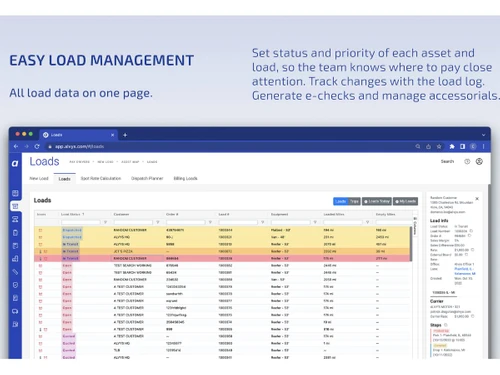
Alvys-load management
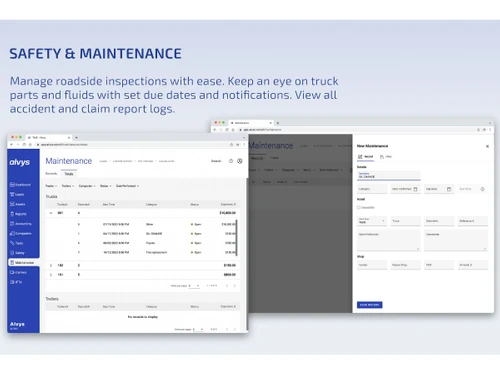
Alvys-maintenance

Alvys

Brand: Alvys Inc

  • No Ratings & Reviews

Have you used Alvys before?

Share your insights for better experience

Add a Review

Price Available on Request

Questions about pricing or customization? We’re here to help, just a click away.

100% Genuine
Products
Best Price
Guaranteed
Safe & Secure
Payment
  • Description

  • Pricing

  • Features

  • Specification

  • Review

Alvys Software Overview

Alvys Inc Company Details

Founded Year:  2020

Alvys provides a cloud-based transportation management system (TMS) designed for trucking and logistics companies.

Director/Founders Leo Gorodinski, Nick Darman
Company Size 1-100 Employees

Alvys Pricing & Plans

Looking for The Right Pricing?

Share your requirements and get a plan built around your business.

  • Define your business needs
  • Get customised pricing
  • Choose features that fit your workflow

Price Available on Request

Get personalised Alvys pricing that fits your needs. Our team will connect with you.

Alvys Features

Core Functionalities

  • icon_check Fleet Management
    Manages trucks, trailers, assignments, and operational fleet data in one platform.
  • icon_check Order Management
    Manages freight orders from creation through execution and final delivery.
  • icon_check Dispatch Management
    Centralized dispatch board for assigning loads, drivers, and equipment.
  • icon_check Transportation Management
    Core TMS covering planning, execution, tracking, billing, and analytics.
  • icon_check Route Management
    Supports route planning, optimization, and execution visibility.
  • icon_check Logistics Management
    End-to-end logistics operations across carriers, brokers, and hybrid models.
  • icon_check Load Management
    Core feature for creating, assigning, tracking, and closing freight loads.
  • icon_check Freight Management
    Manages freight lifecycle including pricing, execution, and settlement.
  • icon_check Carrier Management
    Onboards carriers, tracks compliance, rates, and performance metrics.
  • icon_check Inventory Management
    Monitor and control inventory levels, track stock movements, and ensure that goods are available to meet demand without
  • icon_check Warehouse Management
    Coordinate the storage and movement of goods within a warehouse, optimizing space utilization and improving inventory accuracy.
  • icon_check Reverse Logistics
    Manage the return of goods from customers back to the warehouse or supplier

Financial and Accounting Management

  • icon_check Billing & Invoicing
    Automates customer invoicing, accessorial charges, settlements, and billing workflows.
  • icon_check Financial Management
    Supports revenue, costs, settlements, and accounting integrations for financial visibility.
  • icon_check Accounts Payable
    Supports carrier payables, settlements, and approval workflows.
  • icon_check Accounts Receivable
    Manages customer receivables, invoices, and payment tracking.
  • icon_check Expense Management
    Tracks operational expenses tied to loads, drivers, and fleet activities.
  • icon_check MIS Reports
    Generates management reports for operational, financial, and compliance insights.
  • icon_check Audit Management
    Supports compliance reviews through logs, reports, and historical records.
  • icon_check Budgeting And Forecasting
    Plan and allocate financial resources by forecasting future revenues and expenses to guide decision-making.
  • icon_check Freight Auditing
    Audit freight bills to ensure accuracy and compliance, identifying discrepancies and recovering overpayments.

Vehicle and Driver Management

  • icon_check GPS Tracking
    Real-time GPS tracking via telematics and ELD integrations for shipment visibility.
  • icon_check Driver Management
    Stores driver profiles, documents, assignments, and operational status updates.
  • icon_check Delivery Tracking
    Tracks delivery status and milestones from pickup to final confirmation.
  • icon_check Fleet Operations
    Supports day-to-day fleet execution, assignments, and operational oversight.
  • icon_check Vehicle Maintenance
    Schedule and track maintenance activities for vehicles, ensuring they are in good condition and minimizing downtime.
  • icon_check Tire Management
    Monitor tire usage and performance, scheduling maintenance and replacements to ensure safety and efficiency.
  • icon_check Fuel Management
    Track fuel usage and costs, optimizing fuel consumption to reduce expenses and environmental impact.
  • icon_check Container Load Optimization
    Optimizes the loading of goods into containers to maximize space and reduce costs.
  • icon_check Driver Behavior Monitoring
    Tracks and analyzes driver behavior to improve safety and efficiency.

Supply Chain Management

  • icon_check Hub Operations
    Supports hub-and-spoke operations, transfers, and cross-terminal visibility.
  • icon_check Shipment Tracking
    Tracks shipments with real-time status updates and event milestones.
  • icon_check Supply Chain Collaboration
    Enables collaboration between shippers, carriers, brokers, and dispatch teams.
  • icon_check Cross Docking
    Supports cross-dock workflows for hub-based freight movement.
  • icon_check Distribution Management
    Manage the distribution of goods from the warehouse to the end customer, optimizing routes and ensuring timely delivery.
  • icon_check Procurement Management
    Manage the procurement process, including supplier selection, contract management, and order processing

Task and Project Management

  • icon_check Workflow Management
    Configurable workflows automate dispatch, billing, compliance, and approvals.
  • icon_check Document Management
    Centralized storage for BOLs, PODs, rate cons, and compliance documents.
  • icon_check Task Management
    Track and manage tasks and activities, ensuring that projects are completed on time and within budget.
  • icon_check Project Management
    Plan, execute, and monitor projects, coordinating resources and activities to achieve project goals.

HR and Payroll Management

  • icon_check Payroll Management
    Automate the payroll process, ensuring that employees are paid accurately and on time.
  • icon_check Employee Management
    Manage employee information, including job roles, performance, and attendance, to support HR decision-making.
  • icon_check Leave Management
    Manage employee leave requests and approvals, ensuring that leave policies are followed and staffing levels are maintained.
  • icon_check Time and Attendance
    Track employee time and attendance, ensuring that hours worked are accurately recorded

Compliance and Security

  • icon_check Compliance Management
    Tracks carrier, driver, insurance, and regulatory compliance to reduce operational risk.
  • icon_check Audit Trail
    Maintains system activity logs to track changes and support operational audits.
  • icon_check Data Encryption
    Uses encryption standards to protect sensitive operational and financial data.
  • icon_check GDPR Compliant
    Supports data privacy controls aligned with GDPR compliance requirements.
  • icon_check Two-Factor Authentication (2FA)
    Adds an extra security layer for user authentication and access protection.
  • icon_check Electronic Documentation
    Digital capture and storage of shipping and compliance documents.
  • icon_check E Way Bill Integration
    Integrates with the E-Way Bill system for generating and tracking transport documents.

Integrations

  • icon_check Email & SMS Integration
    Sends load updates, notifications, and alerts via email and SMS integrations.
  • icon_check API Integration
    Open APIs enable custom integrations with logistics, finance, and enterprise systems.
  • icon_check Third Party Integration
    Integrates with ELDs, GPS, accounting tools, load boards, and external systems.
  • icon_check 3PL Management
    Supports broker and third-party logistics workflows within the same system.
  • icon_check EDI Integration
    Native EDI for load tenders, status updates, and invoicing.
  • icon_check Customizable Workflows
    Allows workflow customization to match operational processes.
  • icon_check Electronic Logging Device (ELD) Integration
    Integrates with ELD providers for compliance and real-time tracking.
  • icon_check Warehouse Management System (WMS) Integration
    Integrates with external WMS platforms via APIs and connectors.

Analytics and Reporting

  • icon_check Performance Metrics
    Provides KPIs and analytics for dispatch efficiency, revenue, and carrier performance.
  • icon_check Dashboards
    Visual dashboards provide real-time operational and financial visibility.
  • icon_check Compliance Reporting
    Generate automated reports to meet regulatory requirements, reducing manual effort and errors.

Administrative Features

  • icon_check User Access Management
    Role-based access controls manage user permissions and data visibility.
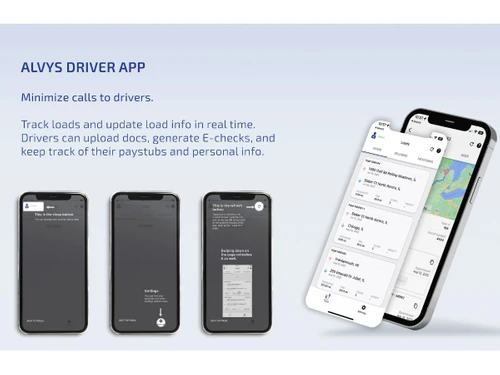
  • icon_check Cloud and Mobile Access
    Cloud-based platform with mobile access for drivers and operations teams.
  • icon_check Booking and Reservations
    Manage the booking and reservation process, ensuring that resources are allocated efficiently

Alerts And Notifications

  • icon_check Automatic Triggers
    Rule-based triggers automate notifications, updates, and workflow actions.
  • icon_check Custom Alerts
    Configurable alerts notify teams of delays, exceptions, and status changes.
  • icon_check Real-Time GPS Location
    Live vehicle location tracking via integrated GPS and ELD systems.
  • icon_check Delivery Confirmation Alerts
    Sends alerts when deliveries are completed and documents are submitted.
  • icon_check Incident Notifications
    Notifies teams of delays, exceptions, or operational incidents.
  • icon_check Driver Performance Alerts
    Alerts based on delivery delays, utilization, and operational driver metrics.
Alvys Demo Video play icon

Get Alvys Demo

Watch the demo video to explore key features, real workflows, and how the software fits your business needs.

Understand
Key Features
Personal
Demo Insights
Interactive
Demo Support

Alvys Specifications

Supported Platforms
Windows Windows iOS iOS Android Android MacOS MacOS
Devices
Desktop Desktop Mobile Mobile Tablet Tablet iPad iPad
Deployment
Cloud-Based Cloud-Based
Suitable For
All Industries
Business Specific
All Businesses
Business Size
Small Business Startups Medium Business Enterprises
Customer Support
Email Communities
Language
English
Training Resources
Videos

Alvys Review

Techjockey Trusted Reviews from Verified Users

No reviews are currently available for Alvys. Discover similar Transport Management Software reviews

  • SuperProcure

    4.7

    Whats great - The support given by the team is very useful and effective read more

  • Sahiwala TMS

    4.3

    Whats great - Apps contain Like LR, Delivery Challan for Drivers, Monthly Billing, Discovery feature is Active Reports like Daily 'To Pa... read more

  • truePilot

    4.6

    Whats great - Affordable and easy to use, making it a practical choice for small businesses looking to manage and display customer feedback... read more

Articles for Alvys

See All Related Articles

20,000+ Software Listed

Best Price Guranteed

Free Expert Consultation

2M+ Happy Customers

Terms and Condtions

close

Users with registered businesses can purchase goods from merchants on the platform to satisfy their business needs. Users are not permitted to utilize any products acquired through the platform for resale, advertising, business, or further distribution.

For each purchase made, users will receive a Tax Invoice (or 'GST invoice') that includes specific details such as:

  • the GSTIN of the user associated with their registered business, and

  • the specified Entity Name for their business.

It should be noted that not all products are eligible for GST Invoice. Only the products displayed by participating sellers with the 'GST-based Invoice Available' callout on the product description page would qualify.

Certain goods and services are not eligible to get a GST Invoice, including items with VAS, i.e., Value Added Services (e.g., Total Mobile Protection/Assured Buyback) and those involving an exchange offer at the time of purchase.

Users must ensure the accuracy of the GSTIN, and business entity name provided for the GST Invoice. Requests for corrections into GST Invoice would not be accommodated by Techjockey.com or any Seller, and any issues arising from user-provided information are the sole responsibility of users.

Techjockey.com is not liable for the GST Invoice or any associated input tax credit. To efficiently claim an input tax credit, users should select the registered place of business address as per the GST authority's data and follow the provisions of the GST Act and rules.

To claim an input tax credit, the delivery and billing addresses must match. Furthermore, input tax credits will not be granted if the delivery address and GSTIN on the invoice are from different states. In case of incorrect GST details provided during the order placement, the order will be canceled automatically.