linkedin
Analyst1 logo
play Introduction to Analyst1
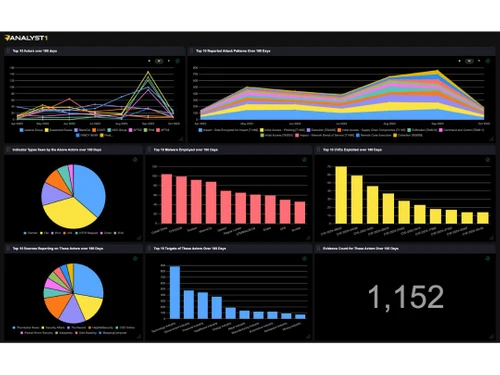
analyst1 dashboard
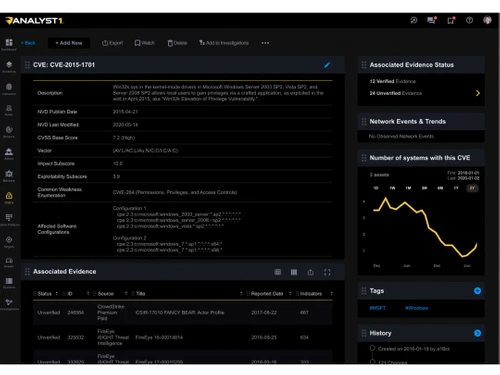
analyst1 cveindicator

Analyst1

Brand: Analyst1

  • 4.1

  • 6 Ratings

Analyst1 specializes in threat intelligence, providing organizations with tools to effectively analyze and respond to cyber threats. It integrates various security functions to enhance its users' overall security posture and incident response capabilities.

See More

Have you used Analyst1 before?

Share your insights for better experience

Add a Review

Price Available on Request

Questions about pricing or customization? We’re here to help, just a click away.

100% Genuine
Products
Best Price
Guaranteed
Safe & Secure
Payment
  • Description

  • Pricing

  • Features

  • Specification

  • Review

  • Compare

  • Alternatives

  • FAQ

Analyst1 Software Overview

What is Analyst1?

Analyst1 is an automated threat intelligence platform designed to help organizations effectively manage and respond to cyber threats. It enables users to collect and analyze vast amounts of threat data from multiple sources, streamlining the entire threat intelligence lifecycle. The platform employs machine learning and natural language processing to transform raw data into actionable insights, allowing analysts to monitor threat actors, malware, and vulnerabilities over time.

It also facilitates the creation and deployment of defense rules, enhancing intrusion detection and prevention capabilities. Automating data collection and processing reduces cybersecurity teams' manual workload, allowing them to focus on strategic responses. The Cybersecurity and Infrastructure Security Agency (CISA) also recognizes Analyst1 as the preferred platform for effectively combating cyber threats.

Why Choose Analyst1 Software?

  • Automated Data Collection: Streamlines threat intelligence gathering and processing, reducing manual efforts and boosting efficiency.
  • Centralized Threat Management: This solution offers a single location for storing and analyzing threat data, simplifying the tracking of evidence and actions.
  • Integration with Security Tools: Integrates seamlessly with SIEM and SOAR platforms for enhanced data sharing and collaboration.
  • Customizable Defense Rules: Users can create, test, and deploy tailored intrusion detection and prevention rules.
  • Real-Time Insights: Provides immediate insights into threats, prioritizing responses and managing incidents efficiently.
  • Proven Effectiveness: Trusted by CISA for its reliability and effectiveness in countering cyber threats.
  • User-Friendly Interface: Designed for easy navigation, analysts can quickly utilize features and make decisions.
  • Enhanced Collaboration: Encourages knowledge sharing among security teams for a coordinated response to threats.

Benefits of Analyst1 Platform

  • Enhanced Threat Visualization: Provides detailed visual representations of threat data, helping teams understand complex threat landscapes.
  • Centralized Threat Data: Consolidates threat information into a single repository, improving accessibility and reducing data fragmentation.
  • Advanced Collaboration Features: Facilitates collaboration between team members and other organizations, enhancing collective threat defense.
  • Customizable Dashboards: Offers customizable dashboards for tailored views of threat data and security metrics, improving monitoring and analysis.
  • Enhanced Reporting Capabilities: Provides robust reporting features to generate detailed reports and insights for stakeholders.

Pricing of Analyst1

Analyst1 price details are available on request at techjockey.com.

The pricing model is based on different parameters, including extra features, deployment type, and the total number of users. If you have further queries related to the product, you can contact our product team to learn more about the pricing and offers.

Read more

Analyst1 Company Details

Founded Year:  2012

Analyst1 allows you to take full control of your cyber security with complete visibility into threat activity.

Director/Founders Jason Smith, Scott Messick
Company Size 1-100 Employees

Analyst1 Pricing & Plans

Looking for The Right Pricing?

Share your requirements and get a plan built around your business.

  • Define your business needs
  • Get customised pricing
  • Choose features that fit your workflow

Price Available on Request

Get personalised Analyst1 pricing that fits your needs. Our team will connect with you.

Analyst1 Features

  • icon_check Data Aggregation and Normalization
    Collects and standardizes threat data from various sources for consistent analysis.
  • icon_check Threat Data Enrichment
    Enhances raw threat data with additional context and details to improve decision-making.
  • icon_check Automated Detection and Response
    Automates identifying and responding to threats to improve efficiency and speed.
  • icon_check Incident Management
    Manages and tracks security incidents from detection to resolution.
  • icon_check Vulnerability Management
    Identifies, assesses, and prioritizes vulnerabilities to strengthen security defenses.
  • icon_check Third Party Integration
    Integrates with other security tools and platforms to enhance overall cybersecurity capabilities.
Analyst1 Demo Video play icon

Get Analyst1 Demo

Watch the demo video to explore key features, real workflows, and how the software fits your business needs.

Understand
Key Features
Personal
Demo Insights
Interactive
Demo Support

Analyst1 Specifications

Supported Platforms
Ubuntu Ubuntu Windows Windows MacOS MacOS Linux Linux
Devices
Desktop Desktop
Deployment
Cloud-Based Cloud-Based
Suitable For
All Industries
Business Specific
All Businesses
Business Size
Small Business Startups Medium Business Enterprises
Customer Support
Email Communities
Language
English
Training Resources
Webinars Documentation Videos

Explore the Best Alternative Solutions Similar to Your Business Size and Needs

Analyst1 Review

4.1

Out of 5

img

Overall Rating

Based on
6 Verified Ratings

Rating Breakdown

  • Features 4.4
  • Value for Money 4.2
  • Ease of Use 4.1
  • Customer Support 3.8

85% Recommend this Product

Add Review

Be the First to Review

This product has no reviews yet. Be the first to leave your feedback.

Add Review

Compare Analyst1 With other Threat Intelligence Platform

Products
Ratings
Pricing
Device Supported
Deployment
Supported Platforms
  • img

    Analyst1

  • 4.1

  • Price On Request

  • Desktop

    Mobile

  • Web based

    On Premises

  • Windows

    Mac OS

  • img

    Maltego

  • 4.2

  • Price On Request

  • Desktop

    Mobile

  • Web based

    On Premises

  • Windows

    Mac OS

  • img

    Cyble Vision

  • 4.5

  • Price On Request

  • Desktop

    Mobile

  • Web based

    On Premises

  • Windows

    Mac OS

  • img

    Seerist

  • 4.4

  • Price On Request

  • Desktop

    Mobile

  • Web based

    On Premises

  • Windows

    Mac OS

  • img

    CloudSEK XVigil

  • 4.3

  • Price On Request

  • Desktop

    Mobile

  • Web based

    On Premises

  • Windows

    Mac OS

  • img

    MISP

  • 4.3

  • Price On Request

  • Desktop

    Mobile

  • Web based

    On Premises

  • Windows

    Mac OS

  • img

    Cyware

  • 4.3

  • Price On Request

  • Desktop

    Mobile

  • Web based

    On Premises

  • Windows

    Mac OS

  • img

    Silobreaker

  • 4.2

  • Price On Request

  • Desktop

    Mobile

  • Web based

    On Premises

  • Windows

    Mac OS

  • img

    IP2Location

  • Price On Request

  • Desktop

    Mobile

  • Web based

    On Premises

  • Windows

    Mac OS

  • img

    ThreatConnect

  • 4.1

  • Price On Request

  • Desktop

    Mobile

  • Web based

    On Premises

  • Windows

    Mac OS

(0) Product(s) selected

Analyst1 Alternatives

See All Analyst1 Alternatives

Available

Price on Request

Available

Price on Request

Available

Price on Request

What is the cost of Analyst1 Software?

Pricing details for Analyst1 Software are available upon request from the vendor.

Is there a mobile app available for Analyst1 Software?

Analyst1 Software does not offer a specific mobile app.

Which operating systems are supported by Analyst1 Software?

Analyst1 Software supports major operating systems, including Ubuntu, MacOS, Windows, and Linux.

Does Analyst1 Software offer a free trial?

No, Analyst1 Software offers a free trial.

How does Analyst1 Software operate?

Analyst1 aggregates and analyzes threat data to automate detection, response, and management.

Who are the ideal users of Analyst1 Software?

Ideal users of Analyst1 include cybersecurity analysts, threat intelligence teams, and security operations centers.

Can I get a free demo of Analyst1 Software?

A free demo of Analyst1 Software is available upon request.

Is Analyst1 Software available at no cost?

No, Analyst1 Software is not available for free.

What types of threats can Analyst1 Software handle?

Analyst1 Software handles various cyber threats, including malware, phishing, and advanced persistent threats (APTs).

20,000+ Software Listed

Best Price Guranteed

Free Expert Consultation

2M+ Happy Customers

Terms and Condtions

close

Users with registered businesses can purchase goods from merchants on the platform to satisfy their business needs. Users are not permitted to utilize any products acquired through the platform for resale, advertising, business, or further distribution.

For each purchase made, users will receive a Tax Invoice (or 'GST invoice') that includes specific details such as:

  • the GSTIN of the user associated with their registered business, and

  • the specified Entity Name for their business.

It should be noted that not all products are eligible for GST Invoice. Only the products displayed by participating sellers with the 'GST-based Invoice Available' callout on the product description page would qualify.

Certain goods and services are not eligible to get a GST Invoice, including items with VAS, i.e., Value Added Services (e.g., Total Mobile Protection/Assured Buyback) and those involving an exchange offer at the time of purchase.

Users must ensure the accuracy of the GSTIN, and business entity name provided for the GST Invoice. Requests for corrections into GST Invoice would not be accommodated by Techjockey.com or any Seller, and any issues arising from user-provided information are the sole responsibility of users.

Techjockey.com is not liable for the GST Invoice or any associated input tax credit. To efficiently claim an input tax credit, users should select the registered place of business address as per the GST authority's data and follow the provisions of the GST Act and rules.

To claim an input tax credit, the delivery and billing addresses must match. Furthermore, input tax credits will not be granted if the delivery address and GSTIN on the invoice are from different states. In case of incorrect GST details provided during the order placement, the order will be canceled automatically.