linkedin
ArborXR logo
play Command Your Fleet of XR Devices
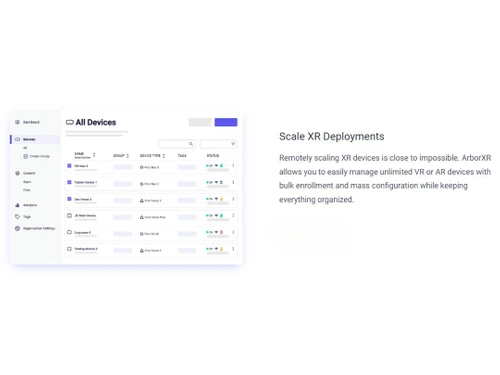
ArborXR Scaling
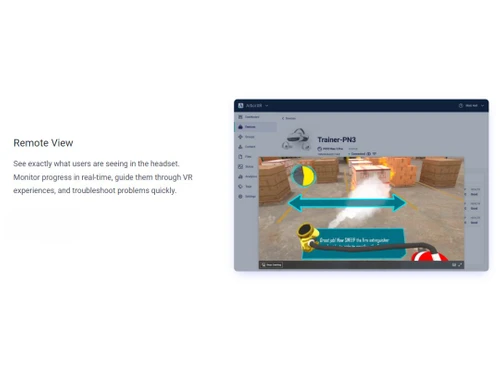
ArborXR Remote View

ArborXR

Brand: ArborXR

  • 4.4

  • 5 Ratings

ArborXR is a mobile device management (MDM) software platform that helps organizations manage and use extended reality (XR) devices, such as virtual reality (VR), augmented reality (AR), and mixed reality (MR) glasses.

See More

Have you used ArborXR before?

Share your insights for better experience

Add a Review
Starting Price
$8

View plans

100% Genuine
Products
Best Price
Guaranteed
Safe & Secure
Payment
  • Description

  • Pricing

  • Features

  • Specification

  • Review

  • Compare

  • Alternatives

  • FAQ

Starting at $8

ArborXR Software Overview

What is ArborXR?

ArborXR is a comprehensive AR and VR device management platform trusted by over 2000 companies across 90+ countries. It allows businesses to remotely manage their AR and VR devices, install applications and updates, and exercise control over user activities within the headset environment.

Built with enterprise-level security measures, IT collaborates closely with numerous Fortune 500 companies to ensure robust protection of sensitive data and assets. The platform allows for streamlined enrollment and bulk provisioning of headsets to simplify the configuration of Wi-Fi settings and other device parameters. It also enables seamless remote deployment and updating of applications and files across the XR fleet.

Why Choose ArborXR

  • The extended reality software allows you to organize devices for easier management of apps, files, and settings.
  • It enables you to gain insights into deployments and identify issues with device analytics.
  • The platform allows you to monitor battery, storage, and network status for all your devices in one place.
  • It enables you to wipe XR devices remotely for complete data security.
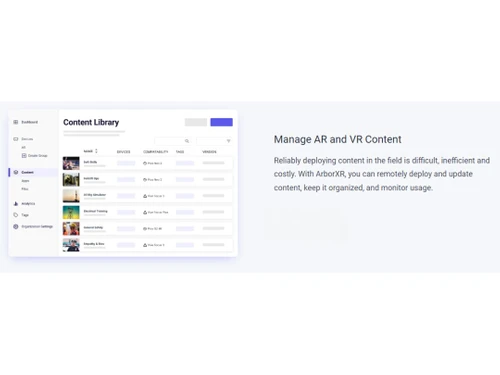
  • The device management platform allows you to create a cloud-based repository for easy access to apps and 360° videos.

Benefits of ArborXR

  • The extended reality software allows you to track content deployment and updates in real-time.
  • It enables you to manage app versions with rollback options and unlimited file sizes.
  • The platform allows you to collaborate with partners to share VR apps and updates remotely.
  • It enables you to host and distribute apps and files to devices, track installation, and manage content sharing.
  • The device management platform allows you to provide users with a menu to choose from pre-approved VR applications.

Pricing of ArborXR

ArborXR price in India starts at $8 on techjockey.com. It comes with multiple pricing plans and caters to a diverse customer base.

For subscription-related details and offers on premium packages, please request a call back from our product experts.

Read more

ArborXR Company Details

Founded Year:  2016

ArborXR is an enterprise XR device management and content deployment solution.

Director/Founders Brad Scoggin, Jordan Williams, Will Stackable
Company Size 1-100 Employees

ArborXR Pricing & Plans

Starter
Key Features
  • Manage Unlimited XR Devices
  • Configure Settings
  • Keep Devices Up to Date
  • Deploy Apps, Videos, Files, WebXR
  • Launch Apps Remotely
  • Single-App Kiosk
Starting at $8
    • Monthly

      Monthly
      Monthly

Key Features

  • Manage Unlimited XR Devices

  • Configure Settings

  • Keep Devices Up to Date

  • Deploy Apps, Videos, Files, WebXR

  • Launch Apps Remotely

  • Single-App Kiosk

ArborXR Features

  • icon_check Virtual Reality
    Effortlessly manage VR devices with full control.
  • icon_check Augmented Reality
    Overlay digital content into the real world to enhance user interactions.
  • icon_check Collaboration
    Remotely deploy and share AR/VR content for a collaborative XR experience.
  • icon_check Mobile Device Management
    Remotely configure settings and manage unlimited XR devices.
  • icon_check Remote View
    Remotely monitor the content being displayed on connected devices.
  • icon_check Security
    Enforce enterprise-grade security policies to safeguard your XR data.
  • icon_check Admin Control
    Gain granular control over VR/AR devices, configuring settings and user permissions.
  • icon_check Friendly Support
    Access helpful and responsive support while using the platform.
ArborXR Demo Video play icon

Get ArborXR Demo

Watch the demo video to explore key features, real workflows, and how the software fits your business needs.

Understand
Key Features
Personal
Demo Insights
Interactive
Demo Support

ArborXR Specifications

Supported Platforms
Ubuntu Ubuntu Windows Windows MacOS MacOS Linux Linux
Devices
Desktop Desktop
Deployment
Cloud-Based Cloud-Based
Suitable For
All Industries
Business Specific
All Businesses
Business Size
Small Business Startups Medium Business Enterprises
Customer Support
Email Communities
Language
English
Training Resources
Videos

ArborXR Review

4.4

Out of 5

img

Overall Rating

Based on
5 Verified Ratings

Rating Breakdown

  • Features 4.5
  • Value for Money 4.4
  • Ease of Use 4.6
  • Customer Support 4.4

98% Recommend this Product

Add Review

Be the First to Review

This product has no reviews yet. Be the first to leave your feedback.

Add Review

Compare ArborXR With other Extended Reality Software

Products
Ratings
Pricing
Device Supported
Deployment
Supported Platforms
  • img

    ArborXR

  • 4.4

  • Price On Request

  • Desktop

    Mobile

  • Web based

    On Premises

  • Windows

    Mac OS

  • img

    VRED

  • 4.2

  • ₹ 7080

  • Desktop

    Mobile

  • Web based

    On Premises

  • Windows

    Mac OS

  • img

    ManageXR

  • 4.2

  • Price On Request

  • Desktop

    Mobile

  • Web based

    On Premises

  • Windows

    Mac OS

  • img

    Pace XR

  • 4.2

  • Price On Request

  • Desktop

    Mobile

  • Web based

    On Premises

  • Windows

    Mac OS

  • img

    Broadcast AR

  • 3.9

  • Price On Request

  • Desktop

    Mobile

  • Web based

    On Premises

  • Windows

    Mac OS

(0) Product(s) selected

ArborXR Alternatives

See All ArborXR Alternatives

Starting Price:

$8 /Month

Available

Price on Request

What are the pricing options for ArborXR's device management platform?

ArborXR provides three pricing tiers catering to various deployment sizes. The Starter plan, priced at $7, is suitable for small deployments, while the Essential plan, priced at $10. For companies with larger needs, ArborXR offers the Enterprise plan at $13. However, its basic plan starts from $8 at techjockey.com.

Can I manage AR/VR devices with an ArborXR app?

ArborXR software is not available to users of Android and iOS devices.

Who are the typical users of ArborXR?

Organizations, healthcare professionals and educators can use ArborXR for training, collaboration, or design purposes.

Can I use ArborXR for free or is there a free trial available?

ArborXR requires a paid subscription to access its services.

How does ArborXR help organizations manage multiple VR and AR headsets?

ArborXR is a VR software that helps organizations to efficiently handle their XR fleets, which can include multiple VR and AR headsets.

What operating system does ArborXR support?

ArborXR operates seamlessly on multiple platforms, including Ubuntu, Windows, MacOS, and Linux.

20,000+ Software Listed

Best Price Guranteed

Free Expert Consultation

2M+ Happy Customers

Terms and Condtions

close

Users with registered businesses can purchase goods from merchants on the platform to satisfy their business needs. Users are not permitted to utilize any products acquired through the platform for resale, advertising, business, or further distribution.

For each purchase made, users will receive a Tax Invoice (or 'GST invoice') that includes specific details such as:

  • the GSTIN of the user associated with their registered business, and

  • the specified Entity Name for their business.

It should be noted that not all products are eligible for GST Invoice. Only the products displayed by participating sellers with the 'GST-based Invoice Available' callout on the product description page would qualify.

Certain goods and services are not eligible to get a GST Invoice, including items with VAS, i.e., Value Added Services (e.g., Total Mobile Protection/Assured Buyback) and those involving an exchange offer at the time of purchase.

Users must ensure the accuracy of the GSTIN, and business entity name provided for the GST Invoice. Requests for corrections into GST Invoice would not be accommodated by Techjockey.com or any Seller, and any issues arising from user-provided information are the sole responsibility of users.

Techjockey.com is not liable for the GST Invoice or any associated input tax credit. To efficiently claim an input tax credit, users should select the registered place of business address as per the GST authority's data and follow the provisions of the GST Act and rules.

To claim an input tax credit, the delivery and billing addresses must match. Furthermore, input tax credits will not be granted if the delivery address and GSTIN on the invoice are from different states. In case of incorrect GST details provided during the order placement, the order will be canceled automatically.