linkedin
Broadcast AR logo
play BroadcastAR 2.0: the new generation of large-screen Augmented Reality experiences by INDE
Broadcast AR
Broadcast AR Interactive

Broadcast AR

Brand: INDE

  • 3.9

  • 3 Ratings

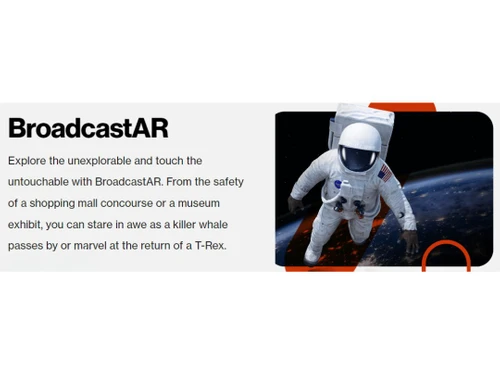
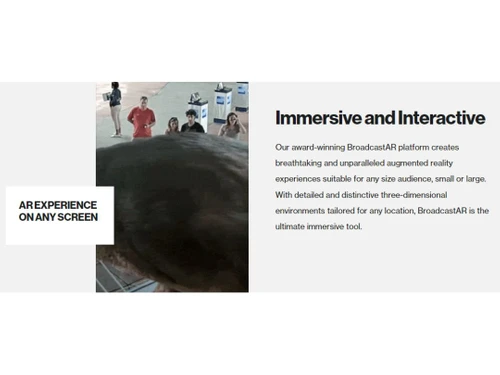
Broadcast AR merges real-world settings with computer-generated virtual objects.

See More

Have you used Broadcast AR before?

Share your insights for better experience

Add a Review

Price Available on Request

Questions about pricing or customization? We’re here to help, just a click away.

100% Genuine
Products
Best Price
Guaranteed
Safe & Secure
Payment
  • Description

  • Pricing

  • Features

  • Specification

  • Review

  • Compare

  • Alternatives

  • FAQ

Broadcast AR Software Overview

What is Broadcast AR?

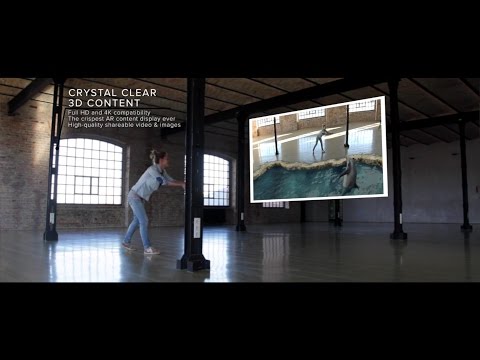
Broadcast AR, also known as Live AR, is an augmented reality software that mixes real-world stuff with virtual things made by computers. It's for the new generation and can be used for fun, learning, and selling stuff. With Broadcast AR, you can play with your favorite characters, see ads in a cool way, or use your phone to connect to the AR world. It lets people take photos and videos with virtual characters and share them on social media.

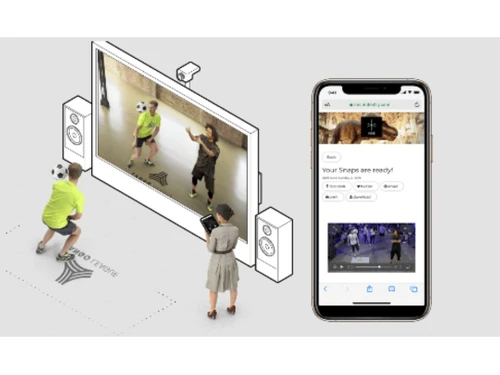
It is great for marketing because it helps brands connect with their audience, entertain them, and make money. You stand in front of a screen, and a virtual character appears next to you. You can play with the character, take pictures or videos, and share them online. It's used in sports, entertainment, and marketing and could change how businesses talk to their customers.

Why Choose Broadcast AR Software?

  • Enhanced Engagement: It captivates audiences by seamlessly integrating interactive digital content into live broadcasts, enriching viewer experiences and keeping them engaged.
  • Immersive Storytelling: It enables broadcasters to tell stories in innovative ways by overlaying virtual elements onto real-world scenes, creating immersive narratives that capture the audience's attention and imagination.
  • Brand Differentiation: By incorporating it into their productions, broadcasters can differentiate themselves from competitors, offering unique and memorable viewing experiences that set their content apart.
  • Audience Interaction: It encourages audience interaction by allowing viewers to interact with virtual objects or participate in augmented experiences during live broadcasts, fostering a deeper connection between broadcasters and their audience.
  • Real-Time Innovation: With it, broadcasters can dynamically adapt content in real-time, responding to audience feedback or changing circumstances to deliver personalized and relevant experiences to viewers.
  • Revenue Opportunities: It opens up new revenue streams for broadcasters through sponsorships, product placements, and interactive advertising within augmented experiences, maximizing monetization potential for live broadcasts.

Benefits of Broadcast AR Platform

  • Enhanced Viewer Engagement: It increases viewer engagement by offering captivating augmented reality experiences that are interactive and immersive, leading to longer watch times and higher audience retention.
  • Increased Audience Reach: By offering unique and engaging augmented reality content, it attracts a broader audience, including tech-savvy viewers who are drawn to innovative and cutting-edge content.
  • Brand Awareness and Recognition: Incorporating it into live broadcasts helps boost brand awareness and recognition as audiences associate the captivating augmented reality experiences with the broadcaster or content creator.
  • Enhanced Sponsorship Opportunities: It creates new sponsorship opportunities as brands are eager to associate themselves with innovative and engaging content, leading to increased revenue streams for broadcasters.
  • Data Analytics and Insights: It provides valuable data analytics and insights into viewer interactions with augmented reality content, enabling broadcasters to understand audience preferences and optimize future broadcasts for maximum impact and engagement.

Pricing of Broadcast AR Augmented Reality Software

Broadcast AR price details are available on request at techjockey.com.

The pricing model is based on different parameters, including extra features, deployment type, and the total number of users. For further queries related to the product, you can contact our product team and learn more about the pricing and offers.

Read more

Broadcast AR Pricing & Plans

Looking for The Right Pricing?

Share your requirements and get a plan built around your business.

  • Define your business needs
  • Get customised pricing
  • Choose features that fit your workflow

Price Available on Request

Get personalised Broadcast AR pricing that fits your needs. Our team will connect with you.

Broadcast AR Features

  • icon_check Title Studio & 3D Objects
    Users can seamlessly add dynamic titles and 3D objects to live broadcasts for enhanced engagement.
  • icon_check Design & Setup
    It offers tools for designing and setting up AR elements in broadcast environments, ensuring smooth integration.
  • icon_check Simulation
    The software allows users to preview AR effects before live broadcasting, ensuring quality.
  • icon_check Virtual Reality
    Supports VR experiences in live broadcasts, enhancing viewer engagement.
  • icon_check Training and Learning
    Integrates educational content into broadcasts for interactive learning experiences.
  • icon_check Simple Installation / Setup
    Features a user-friendly interface for quick and easy setup of AR elements.
Broadcast AR Demo Video play icon

Get Broadcast AR Demo

Watch the demo video to explore key features, real workflows, and how the software fits your business needs.

Understand
Key Features
Personal
Demo Insights
Interactive
Demo Support

Broadcast AR Specifications

Supported Platforms
Ubuntu Ubuntu Windows Windows MacOS MacOS Linux Linux
Devices
Desktop Desktop
Deployment
Cloud-Based Cloud-Based
Suitable For
All Industries
Business Specific
All Businesses
Business Size
Small Business Startups Medium Business Enterprises
Customer Support
Email Communities
Language
English
Training Resources
Videos

Explore the Best Alternative Solutions Similar to Your Business Size and Needs

Medium Business

Built for business growth and flexibility

Streem

4.3

ARKit

4

Vuforia

4.3

See More

Broadcast AR Review

3.9

Out of 5

img

Overall Rating

Based on
3 Verified Ratings

Rating Breakdown

  • Features 3.8
  • Value for Money 4.5
  • Ease of Use 3.6
  • Customer Support 3.8

80% Recommend this Product

Add Review

Be the First to Review

This product has no reviews yet. Be the first to leave your feedback.

Add Review

Compare Broadcast AR With other Augmented Reality Software

Products
Ratings
Pricing
Device Supported
Deployment
Supported Platforms
  • img

    Broadcast AR

  • 3.9

  • Price On Request

  • Desktop

    Mobile

  • Web based

    On Premises

  • Windows

    Mac OS

  • img

    HeroMirror

  • 4.2

  • Price On Request

  • Desktop

    Mobile

  • Web based

    On Premises

  • Windows

    Mac OS

  • img

    Zoho Lens

  • 4.4

  • ₹ 450

  • Desktop

    Mobile

  • Web based

    On Premises

  • Windows

    Mac OS

  • img

    Wikitude

  • 4.3

  • Price On Request

  • Desktop

    Mobile

  • Web based

    On Premises

  • Windows

    Mac OS

  • img

    Streem

  • 4.3

  • Price On Request

  • Desktop

    Mobile

  • Web based

    On Premises

  • Windows

    Mac OS

  • img

    MirrAR

  • 4.4

  • Price On Request

  • Desktop

    Mobile

  • Web based

    On Premises

  • Windows

    Mac OS

  • img

    Vuforia

  • 4.3

  • Price On Request

  • Desktop

    Mobile

  • Web based

    On Premises

  • Windows

    Mac OS

  • img

    ARKit

  • 4

  • Price On Request

  • Desktop

    Mobile

  • Web based

    On Premises

  • Windows

    Mac OS

  • img

    Augment

  • 4.1

  • Price On Request

  • Desktop

    Mobile

  • Web based

    On Premises

  • Windows

    Mac OS

  • img

    EvolveAR

  • 4.3

  • Price On Request

  • Desktop

    Mobile

  • Web based

    On Premises

  • Windows

    Mac OS

  • img

    ARCore

  • 4.2

  • Price On Request

  • Desktop

    Mobile

  • Web based

    On Premises

  • Windows

    Mac OS

(2) Product(s) selected

Broadcast AR Alternatives

See All Broadcast AR Alternatives

Available

Price on Request

Starting Price:

$299 /Month

Starting Price:

$39 /Month

Starting Price:

$95 /Month

Articles for Broadcast AR

See All Related Articles

Which operating system does Broadcast AR Software Support?

Broadcast AR Software is compatible with Ubuntu, Windows, Linux, and MacOS.

Is there any Broadcast AR Software App?

Broadcast AR Software app is not available for Android and iOS app users.

What is the deployment type of Broadcast AR Software?

Broadcast AR Software supports web-based deployment.

How much does Broadcast AR Software Cost?

Broadcast AR price details are available on request at techjockey.com.

Who are the potential users of Broadcast AR Software?

Broadcast AR Software is typically used by all industries to be viewed by a large audience simultaneously, often through live broadcasts or events.

Is there any free demo for Broadcast AR Software?

Yes, a demo of Broadcast AR is available at techjockey.com.

Is Broadcast AR Software Free?

Broadcast AR Software is not available for free. You can connect with our product experts to learn more about the pricing plans.

Does Broadcast AR offer a free trial?

Broadcast AR Software does not offer a free trial.

How can you download Broadcast AR Software?

Broadcast AR Software installation is not required, as it is web-based. Just open the Setup Wizard to get started.

How Does Broadcast AR Software Work?

Broadcast AR software works by overlaying interactive digital content onto live broadcasts, creating immersive augmented reality experiences for viewers.

20,000+ Software Listed

Best Price Guranteed

Free Expert Consultation

2M+ Happy Customers

Terms and Condtions

close

Users with registered businesses can purchase goods from merchants on the platform to satisfy their business needs. Users are not permitted to utilize any products acquired through the platform for resale, advertising, business, or further distribution.

For each purchase made, users will receive a Tax Invoice (or 'GST invoice') that includes specific details such as:

  • the GSTIN of the user associated with their registered business, and

  • the specified Entity Name for their business.

It should be noted that not all products are eligible for GST Invoice. Only the products displayed by participating sellers with the 'GST-based Invoice Available' callout on the product description page would qualify.

Certain goods and services are not eligible to get a GST Invoice, including items with VAS, i.e., Value Added Services (e.g., Total Mobile Protection/Assured Buyback) and those involving an exchange offer at the time of purchase.

Users must ensure the accuracy of the GSTIN, and business entity name provided for the GST Invoice. Requests for corrections into GST Invoice would not be accommodated by Techjockey.com or any Seller, and any issues arising from user-provided information are the sole responsibility of users.

Techjockey.com is not liable for the GST Invoice or any associated input tax credit. To efficiently claim an input tax credit, users should select the registered place of business address as per the GST authority's data and follow the provisions of the GST Act and rules.

To claim an input tax credit, the delivery and billing addresses must match. Furthermore, input tax credits will not be granted if the delivery address and GSTIN on the invoice are from different states. In case of incorrect GST details provided during the order placement, the order will be canceled automatically.