linkedin
Automai Appswatch logo
play Automai's AppsWatch for monitoring your business processes from the user experience.
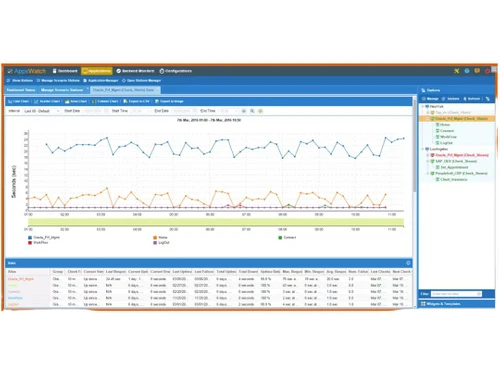
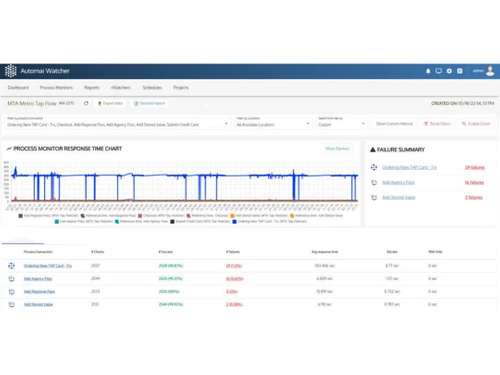
Automai Appswatch Dashboard
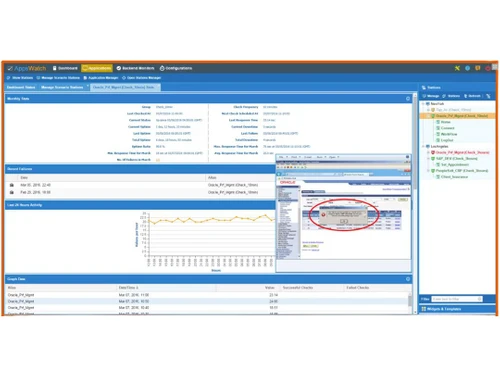
Automai Appswatch Application-Monitor

Automai Appswatch

Brand: Automai

  • 3.9

  • 6 Ratings

An application performance monitoring tool that uses robots to constantly check if applications are working well for real users.

See More

Have you used Automai Appswatch before?

Share your insights for better experience

Add a Review

Price Available on Request

Questions about pricing or customization? We’re here to help, just a click away.

100% Genuine
Products
Best Price
Guaranteed
Safe & Secure
Payment
  • Description

  • Pricing

  • Features

  • Specification

  • Review

  • Compare

  • Alternatives

  • FAQ

Automai Appswatch Software Overview

What is Automai Appswatch?

Automai Appswatch is an application performance monitoring tool that monitors the performance and availability of software applications from the end-user's perspective, meaning it checks exactly what a real user would experience when using an app.

It uses robots to simulate user actions like logging in, filling forms, and switching between apps to spot any slowdowns or failures quickly.

Appswatch can be set up in just a few minutes and monitors any type of application, whether web, client/server, or accessed through virtual desktops.

It gives alerts, screenshots, and detailed reports when there are problems, making it easy to find and fix issues before they affect real users.

The tool is flexible and easy to maintain, requiring no special coding. Appswatch is a proactive way to ensure applications are always running smoothly, helping businesses keep their critical work processes efficient and reliable.

Why Choose Automai Appswatch Software?

  • End-User Perspective Monitoring: Simulates real user actions to measure performance from the user's point of view.
  • Synthetic / Robotic Monitoring: Uses bots to run workflows continuously and detect issues proactively.
  • No Coding Required: Create monitoring workflows without writing a single line of code.
  • Cross-Technology Compatibility: Monitors any application by analyzing screen output, regardless of platform or protocol.
  • Early Issue Detection: Instantly alerts you to failures before they impact users.
  • Visual Diagnostics: Provides screenshots of failures to pinpoint UI or system-level issues.
  • Detailed Performance Breakdown: Identifies slow components, fields, or transactions with precision.
  • Trend & Predictive Analytics: Tracks performance patterns to detect gradual degradation or peak loads.

Benefits of Automai Appswatch Software

  • Root Cause Visibility: Helps isolate whether issues stem from client, network, or server.
  • SLA & Response Tracking: Monitors compliance with performance and uptime agreements.
  • Real-Time Alerts: Sends immediate failure notifications for faster response.
  • Stakeholder Transparency: Offers visual proof of issues to streamline communication.
  • Support for Virtual Apps: Effectively monitors Citrix and VDI-based environments.
  • No Server Installation Needed: Bots monitor externally, keeping server environments untouched.
  • Custom Scenario Builder: Tailor monitoring workflows to fit specific business needs.
  • Reusable Test Assets: Repurpose workflows across different environments and use cases.
  • Branch & Compliance Monitoring: Ensures performance across remote offices and regulated environments.
  • Post-Upgrade Impact Checks: Detects workflow issues after updates or patches.
  • Reduced Manual Effort: Automates complex user flows to cut down on manual monitoring.
  • Deploy Anywhere: Install bots at user-critical locations for localized monitoring.

Automai Appswatch Pricing

Automai Appswatch pricing is available upon request at Techjockey.com. The pricing model is based on different parameters, including extra features, deployment type, and the total number of users. For further queries related to the product, you can contact our product team and learn more about the pricing and offers.

Read more

Automai Company Details

Founded Year:  2000

Automai specializes in automation solutions for load testing, performance monitoring, regression testing, and business automation.

Director/Founders Michael Angelo Amith Fenelon
Company Size 1-100 Employees

Automai Appswatch Pricing & Plans

Looking for The Right Pricing?

Share your requirements and get a plan built around your business.

  • Define your business needs
  • Get customised pricing
  • Choose features that fit your workflow

Price Available on Request

Get personalised Automai Appswatch pricing that fits your needs. Our team will connect with you.

Automai Appswatch Features

  • icon_check Custom Workflows
    Design tailored user journeys to monitor exactly what matters to your business.
  • icon_check Scripts
    Easily create and reuse automation scripts for testing and monitoring.
  • icon_check Maintenance
    Quickly adapt to application changes with minimal script updates.
  • icon_check Load Performance Testing
    Simulate heavy user traffic to evaluate system scalability and reliability.
  • icon_check Data-driven Testing
    Run scenarios with variable input data for more realistic and comprehensive testing.
  • icon_check Application Monitoring
    Continuously track application health, availability, and response times.
  • icon_check Robotic Process Automation
    Automate repetitive tasks across apps with visual, screen-based bots.
  • icon_check Predict with Trends
    Analyze long-term performance data to forecast issues before they occur.
  • icon_check Troubleshooting
    Get screenshots, timing breakdowns, and alerts to quickly identify and fix problems.
Automai Appswatch Demo Video play icon

Get Automai Appswatch Demo

Watch the demo video to explore key features, real workflows, and how the software fits your business needs.

Understand
Key Features
Personal
Demo Insights
Interactive
Demo Support

Automai Appswatch Specifications

Supported Platforms
Windows Windows Linux Linux
Devices
Desktop Desktop
Deployment
Cloud-Based Cloud-Based Perpetual Perpetual
Suitable For
All Industries
Business Specific
All Businesses
Business Size
Small Business Medium Business Enterprises MSMBs MSMEs
Customer Support
Phone Email Communities Forums
Language
English
Integration
API Integration

Explore the Best Alternative Solutions Similar to Your Business Size and Needs

Automai Appswatch Review

3.9

Out of 5

img

Overall Rating

Based on
6 Verified Ratings

Rating Breakdown

  • Features 4.1
  • Value for Money 3.6
  • Ease of Use 3.7
  • Customer Support 4.3

88% Recommend this Product

Add Review

Be the First to Review

This product has no reviews yet. Be the first to leave your feedback.

Add Review

Compare Automai Appswatch With other Application Performance Monitoring Tools

Products
Ratings
Pricing
Device Supported
Deployment
Supported Platforms
  • img

    Automai Appswatch

  • 3.9

  • Price On Request

  • Desktop

    Mobile

  • Web based

    On Premises

  • Windows

    Mac OS

  • img

    Datadog APM

  • 4.1

  • Price On Request

  • Desktop

    Mobile

  • Web based

    On Premises

  • Windows

    Mac OS

  • img

    Scouter APM

  • 4.2

  • Price On Request

  • Desktop

    Mobile

  • Web based

    On Premises

  • Windows

    Mac OS

  • img

    Coroot

  • 4.2

  • Price On Request

  • Desktop

    Mobile

  • Web based

    On Premises

  • Windows

    Mac OS

  • img

    Highlight

  • 4.2

  • Price On Request

  • Desktop

    Mobile

  • Web based

    On Premises

  • Windows

    Mac OS

  • img

    Foglight

  • 4.3

  • Price On Request

  • Desktop

    Mobile

  • Web based

    On Premises

  • Windows

    Mac OS

  • img

    BugSnag

  • 4.2

  • Price On Request

  • Desktop

    Mobile

  • Web based

    On Premises

  • Windows

    Mac OS

  • img

    Netdata

  • 4.4

  • Price On Request

  • Desktop

    Mobile

  • Web based

    On Premises

  • Windows

    Mac OS

  • img

    Raygun

  • 4.1

  • Price On Request

  • Desktop

    Mobile

  • Web based

    On Premises

  • Windows

    Mac OS

(0) Product(s) selected

Automai Appswatch Alternatives

See All Automai Appswatch Alternatives

Starting Price:

$50 /Month

Starting Price:

$120 /Month

Available

Price on Request

Available

Price on Request

Available

Price on Request

Available

Price on Request

Articles for Automai Appswatch

See All Related Articles

How much does Automai Appswatch cost?

Automai Appswatch pricing is available upon request at Techjockey.com.

Is there a mobile app available for Automai Appswatch Software?

No, Automai Appswatch does not offer a mobile app.

Which operating systems are compatible with Automai Appswatch Software?

Automai Appswatch works on Windows and Linux.

Does Automai Appswatch Software offer a free trial?

Yes, Automai Appswatch provides a free trial.

How does Automai Appswatch Software function?

Automai Appswatch uses bots to simulate real user workflows (via mouse/keyboard/screen based interactions) on schedule from key locations to monitor application performance and detect issues proactively.

Who uses Automai Appswatch Software?

Mid to large enterprises (especially in healthcare, virtual desktop/Citrix environments, remote/branch offices) that need end user perspective monitoring across varied applications.

Is a free demo available for Automai Appswatch Software?

Yes, Automai Appswatch free demo is available upon request.

Is Automai Appswatch Software available for free?

No, Automai Appswatch is a paid software.

20,000+ Software Listed

Best Price Guranteed

Free Expert Consultation

2M+ Happy Customers

Terms and Condtions

close

Users with registered businesses can purchase goods from merchants on the platform to satisfy their business needs. Users are not permitted to utilize any products acquired through the platform for resale, advertising, business, or further distribution.

For each purchase made, users will receive a Tax Invoice (or 'GST invoice') that includes specific details such as:

  • the GSTIN of the user associated with their registered business, and

  • the specified Entity Name for their business.

It should be noted that not all products are eligible for GST Invoice. Only the products displayed by participating sellers with the 'GST-based Invoice Available' callout on the product description page would qualify.

Certain goods and services are not eligible to get a GST Invoice, including items with VAS, i.e., Value Added Services (e.g., Total Mobile Protection/Assured Buyback) and those involving an exchange offer at the time of purchase.

Users must ensure the accuracy of the GSTIN, and business entity name provided for the GST Invoice. Requests for corrections into GST Invoice would not be accommodated by Techjockey.com or any Seller, and any issues arising from user-provided information are the sole responsibility of users.

Techjockey.com is not liable for the GST Invoice or any associated input tax credit. To efficiently claim an input tax credit, users should select the registered place of business address as per the GST authority's data and follow the provisions of the GST Act and rules.

To claim an input tax credit, the delivery and billing addresses must match. Furthermore, input tax credits will not be granted if the delivery address and GSTIN on the invoice are from different states. In case of incorrect GST details provided during the order placement, the order will be canceled automatically.