linkedin
Axosoft logo
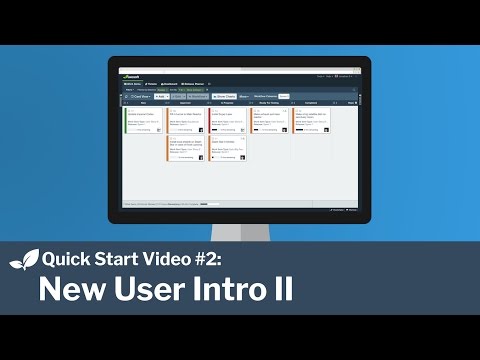
play Axosoft : New User Intro Part II
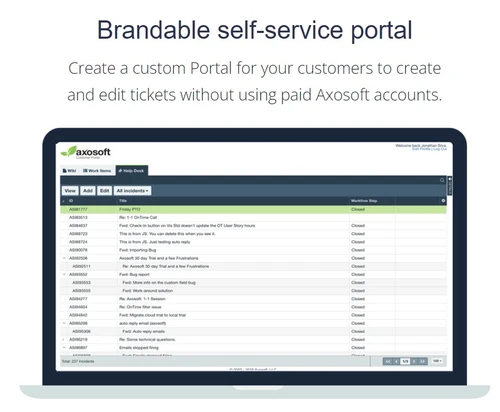
axosoft brandable self service portal
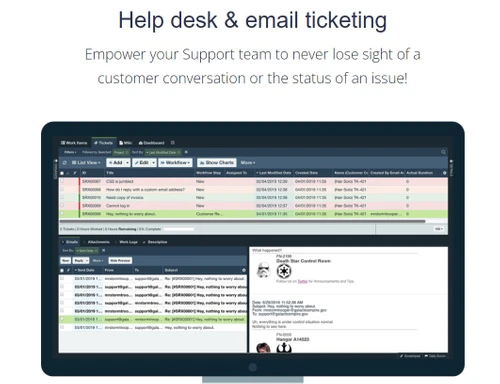
axosoft help desk email ticketing

Axosoft

Brand: Axosoft

  • 4.3

  • 4 Ratings

Axosoft offers a variety of tools like kanban boards, reporting dashboards, and customization options to streamline workflow management. Whether you're tracking bugs, managing customer support tickets, or handling projects, Axosoft is built to simplify the process for your team.

See More

Have you used Axosoft before?

Share your insights for better experience

Add a Review
Starting Price
$126

View plans

100% Genuine
Products
Best Price
Guaranteed
Safe & Secure
Payment
  • Description

  • Pricing

  • Features

  • Specification

  • Review

  • Compare

  • Alternatives

  • FAQ

Starting at $126

Axosoft Software Overview

What is Axosoft?

Axosoft is a project management software and bug tracking solution tailored to meet the needs of software development teams. As a leading business software, it offers scrum tools to track work progress, manage bugs, and organize customer support tickets, all within a unified platform. Axosoft provides features like kanban boards, custom dashboards, templates, and filters to ensure teams have a clear and organized view of their tasks and progress.

For teams focused on delivering high-quality projects within tight deadlines, Axosoft helps streamline the workflow, providing visual and data-driven insights. It offers advanced filtering options to sort tasks, allows teams to customize their workflows, and supports team collaboration. Whether you're managing product backlogs or responding to customer queries, Axosoft brings together all the essential tools to keep your team efficient and focused on what matters most.

With a user-friendly interface and built-in support for email tickets and a knowledge base, Axosoft provides a complete project management experience. It’s ideal for development teams and businesses that need to manage multiple projects while ensuring that issues are tracked and resolved quickly.

Why Choose Axosoft?

  • Team Collaboration: Axosoft enhances team collaboration by providing a clear and organized platform to manage tasks, bugs, and customer support.
  • Real-Time Tracking: Track the progress of projects and bugs in real-time, ensuring that your team remains on top of deadlines.
  • Customizable Interface: Tailor Axosoft’s interface to match your team’s unique workflow and requirements for a smoother project management experience.
  • Centralized Management: Manage all aspects of your projects—from bug tracking to customer queries—under one platform for better organization.
  • Kanban View for Visual Management: The kanban board provides a visual approach to task management, helping teams to prioritize work efficiently.

Benefits of Axosoft Project Management Software

  • Organized Workflow: Axosoft helps keep tasks organized, ensuring all team members know what needs to be done and when.
  • Improved Productivity: By streamlining task management, teams can focus on execution rather than worrying about project tracking.
  • Customizable Dashboards: Create custom dashboards that show the most important metrics, allowing managers to monitor progress at a glance.
  • Streamlined Bug Tracking: Axosoft simplifies bug tracking, enabling development teams to quickly identify and resolve issues before they impact the project.
  • Enhanced Communication: With support for email tickets and a knowledge base, communication between teams and customers becomes seamless and efficient.
  • Self-Service Portal: Customers can resolve their issues through a self-service portal, reducing the need for direct support while ensuring quick solutions.

Pricing Of Axosoft

Axosoft price starts at $ 126 at techjockey.com. The pricing model is based on different parameters, including extra features, deployment type, and the total number of users. For further queries related to the product, you can contact our product team and learn more about the pricing and offers.

Read more

Axosoft Company Details

Founded Year:  2000

Axosoft is a provider of agile project management and bug tracking tools for software development teams.

Director/Founders Hamid Shojaee
Company Size 1-100 Employees

Axosoft Pricing & Plans

Hosted
Key Features
  • Track unlimited work items
  • Epics (big features)
  • User stories (features)
  • Bugs (issues)
  • Tasks (to-do)
  • Hierarchical project tracking
Starting at $126
    • Users

      Users
      Users
    • Monthly

      Monthly
      Monthly

Key Features

  • Track unlimited work items

  • Epics (big features)

  • User stories (features)

  • Bugs (issues)

  • Tasks (to-do)

  • Hierarchical project tracking

Axosoft Features

  • icon_check Tracking
    Monitor project tasks, bug fixes, and support tickets in real-time for better task management and team efficiency.
  • icon_check Groups
    Organize tasks and users into groups for easier team management and project segmentation.
  • icon_check Filters
    Advanced filtering options allow teams to easily sort tasks by priority, status, or deadline.
  • icon_check Templates
    Save time with pre-built templates that streamline task creation, ensuring consistency in project management.
  • icon_check Kanban Boards
    Visualize workflows with kanban boards, making it easier to manage task progression and project milestones.
  • icon_check Customization
    Customize the platform to match your team’s workflow, allowing for greater flexibility in managing tasks and bugs.
  • icon_check Dashboards
    Create personalized dashboards that display key performance indicators for better insight into team productivity.
  • icon_check Reports
    Generate detailed reports that provide insights into project progress, bug resolution, and team performance.
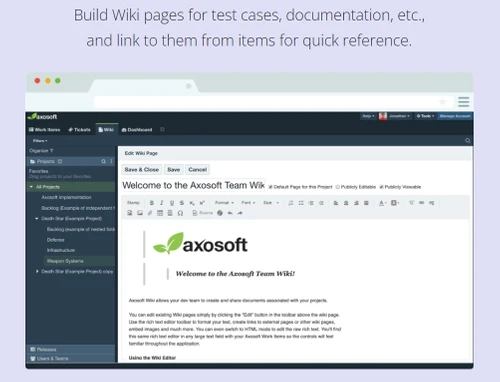
  • icon_check Email Ticket & Knowledge Base Support
    Manage customer support tickets efficiently with email integration, and provide solutions with an accessible knowledge base.
  • icon_check Self Service Portal
    Enable customers to find solutions to their problems independently through a self-service portal.
Axosoft Demo Video play icon

Get Axosoft Demo

Watch the demo video to explore key features, real workflows, and how the software fits your business needs.

Understand
Key Features
Personal
Demo Insights
Interactive
Demo Support

Axosoft Specifications

Supported Platforms
Windows Windows
Devices
Desktop Desktop
Deployment
Cloud-Based Cloud-Based
Suitable For
All Industries
Business Specific
All Businesses
Business Size
Small Business Medium Business
Customer Support
Email Forums
Language
English
Training Resources
Documentation

Explore the Best Alternative Solutions Similar to Your Business Size and Needs

Axosoft Review

4.3

Out of 5

img

Overall Rating

Based on
4 Verified Ratings

Rating Breakdown

  • Features 4.5
  • Value for Money 4.5
  • Ease of Use 4.1
  • Customer Support 4.3

87% Recommend this Product

Add Review

Techjockey Trusted Reviews from Verified Users

No reviews are currently available for Axosoft. Discover similar Scrum Tools reviews

  • Jira

    4.5

    Whats great - Jira's emphasis on visuals when tracking performance and tickets is something I appreciate. Since our project is a support pr... read more

  • Monday.com

    4.0

    Whats great - monday.com’s design and functionality make it a perfect choice for managing projects. read more

  • Wrike

    4.0

    Whats great - ssions and manage user rights, ensuring that sensitive information is only available to the right people. Further, the two-fa... read more

Compare Axosoft With other Scrum Tools

Products
Ratings
Pricing
Device Supported
Deployment
Supported Platforms
  • img

    Axosoft

  • 4.3

  • Price On Request

  • Desktop

    Mobile

  • Web based

    On Premises

  • Windows

    Mac OS

  • img

    Zoho Sprints

  • 4.5

  • ₹ 210

  • Desktop

    Mobile

  • Web based

    On Premises

  • Windows

    Mac OS

  • img

    Sprintly

  • 4.5

  • Price On Request

  • Desktop

    Mobile

  • Web based

    On Premises

  • Windows

    Mac OS

  • img

    FlyingDonut

  • 4.3

  • Price On Request

  • Desktop

    Mobile

  • Web based

    On Premises

  • Windows

    Mac OS

  • img

    VivifyScrum

  • 4.3

  • Price On Request

  • Desktop

    Mobile

  • Web based

    On Premises

  • Windows

    Mac OS

  • img

    Scrumwise

  • 4.1

  • Price On Request

  • Desktop

    Mobile

  • Web based

    On Premises

  • Windows

    Mac OS

  • img

    PivotalTracker

  • 4.4

  • Price On Request

  • Desktop

    Mobile

  • Web based

    On Premises

  • Windows

    Mac OS

  • img

    nTask

  • 4.2

  • Price On Request

  • Desktop

    Mobile

  • Web based

    On Premises

  • Windows

    Mac OS

  • img

    Quickscrum

  • 4.2

  • Price On Request

  • Desktop

    Mobile

  • Web based

    On Premises

  • Windows

    Mac OS

  • img

    Yodiz

  • 4.2

  • Price On Request

  • Desktop

    Mobile

  • Web based

    On Premises

  • Windows

    Mac OS

(2) Product(s) selected

Axosoft Alternatives

See All Axosoft Alternatives

Starting Price:

$19 /Monthly

Starting Price:

$5 /User/Month

Starting Price:

$9 /Monthly

Available

Price on Request

Articles for Axosoft

See All Related Articles

What is Axosoft used for?

Axosoft is used for project management, bug tracking, and customer support ticket management, offering a wide range of tools to streamline workflows.

How does Axosoft help in project management?

Axosoft helps teams track tasks, prioritize bugs, and monitor progress using kanban boards, custom dashboards, and reporting features.

Is Axosoft suitable for small teams?

Yes, Axosoft is scalable and works well for small teams, providing them with the necessary tools to manage projects effectively.

Can Axosoft be customized?

Yes, Axosoft allows users to customize workflows, templates, and dashboards to match their team's specific requirements.

How does Axosoft handle customer support?

Axosoft provides tools for managing email support tickets and a self-service portal for customers to find solutions on their own.

Does Axosoft offer reporting features?

Yes, Axosoft offers reporting features that help teams analyze performance, track progress, and ensure project timelines are met.

Can I integrate Axosoft with other tools?

Yes, Axosoft can be integrated with other tools to provide a more seamless project management experience.

Does Axosoft offer a free demo?

Yes, you can request a free demo of Axosoft at Techjockey.com to explore its features before making a decision.

Is there a knowledge base available in Axosoft?

Yes, Axosoft includes a knowledge base that helps teams document solutions and answer common customer queries.

What is the pricing for Axosoft?

Axosoft's pricing depends on various factors like the number of users and features. You can request pricing details from Techjockey.com.

20,000+ Software Listed

Best Price Guranteed

Free Expert Consultation

2M+ Happy Customers

Terms and Condtions

close

Users with registered businesses can purchase goods from merchants on the platform to satisfy their business needs. Users are not permitted to utilize any products acquired through the platform for resale, advertising, business, or further distribution.

For each purchase made, users will receive a Tax Invoice (or 'GST invoice') that includes specific details such as:

  • the GSTIN of the user associated with their registered business, and

  • the specified Entity Name for their business.

It should be noted that not all products are eligible for GST Invoice. Only the products displayed by participating sellers with the 'GST-based Invoice Available' callout on the product description page would qualify.

Certain goods and services are not eligible to get a GST Invoice, including items with VAS, i.e., Value Added Services (e.g., Total Mobile Protection/Assured Buyback) and those involving an exchange offer at the time of purchase.

Users must ensure the accuracy of the GSTIN, and business entity name provided for the GST Invoice. Requests for corrections into GST Invoice would not be accommodated by Techjockey.com or any Seller, and any issues arising from user-provided information are the sole responsibility of users.

Techjockey.com is not liable for the GST Invoice or any associated input tax credit. To efficiently claim an input tax credit, users should select the registered place of business address as per the GST authority's data and follow the provisions of the GST Act and rules.

To claim an input tax credit, the delivery and billing addresses must match. Furthermore, input tax credits will not be granted if the delivery address and GSTIN on the invoice are from different states. In case of incorrect GST details provided during the order placement, the order will be canceled automatically.