linkedin
Google BigQuery logo
play What is BigQuery demo
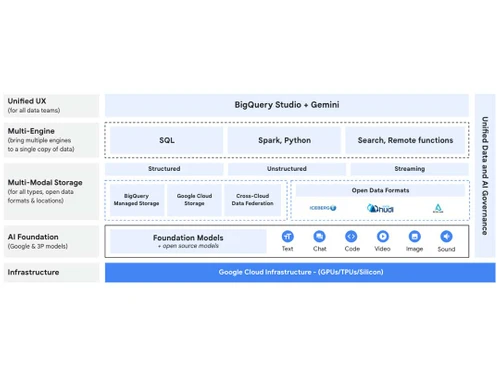
bigquery features
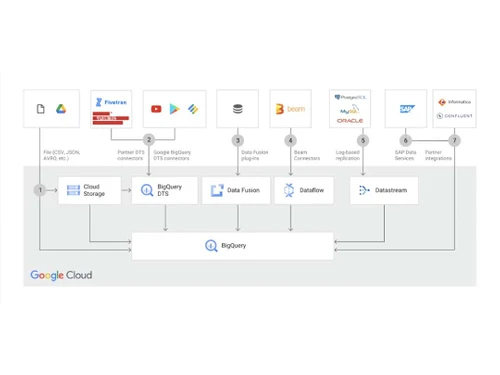
bigquery data sources

Google BigQuery

Brand: Google

  • 3.9

  • 3 Ratings

Google BigQuery enables fast SQL queries and real-time analytics on large datasets. It provides scalable, serverless data processing with built-in machine learning capabilities.

See More

Have you used Google BigQuery before?

Share your insights for better experience

Add a Review

Price Available on Request

Questions about pricing or customization? We’re here to help, just a click away.

100% Genuine
Products
Best Price
Guaranteed
Safe & Secure
Payment
  • Description

  • Pricing

  • Features

  • Specification

  • Review

  • Compare

  • Alternatives

  • FAQ

Google BigQuery Software Overview

What is Google BigQuery?

Google BigQuery is a cloud-based data warehouse software that helps you store, manage, and analyze large amounts of data quickly. It is designed for businesses that need to handle big data without worrying about infrastructure. BigQuery allows users to run fast SQL queries on huge datasets using the power of Google’s infrastructure. You don’t need to set up or manage any servers, Google handles everything for you. It supports real-time data analysis, which means you can get insights as your data updates.

It also works well with other Google Cloud tools like Google Sheets, Looker Studio, and Dataflow. BigQuery uses a pay-as-you-go pricing model, so you only pay for what you use. It supports machine learning with BigQuery ML, allowing data scientists to create and run models directly in the database. Security and compliance are built-in, and it scales automatically based on the size of your data. BigQuery is widely used by analysts, developers, and large companies to make smart data-driven decisions quickly.

Why Choose Google BigQuery Software?

  • Fully Managed & Serverless: No need to manage infrastructure; automatically scales as per workload.
  • High-Speed Query Execution: Uses columnar storage and parallel processing for lightning-fast SQL queries.
  • Cost-Effective & Pay-as-You-Go: Charges based on storage and query usage, making it budget-friendly.
  • Real-Time Data Analysis: Supports streaming data ingestion for real-time analytics.
  • Built-in Machine Learning: Integrates with BigQuery ML for advanced predictive analytics.
  • Secure & Reliable: Offers encryption, access controls, and automatic backups.
  • Seamless Integration: Works with Google Cloud services, third-party tools, and popular BI platforms.

Benefits of Google BigQuery Software

  • Multi-Cloud Flexibility: Supports cross-cloud analytics, allowing users to query data stored in multiple cloud environments.
  • Standard SQL Support: Uses familiar SQL syntax, making it easy for data analysts and engineers to work with.
  • Geospatial Analysis: Provides built-in GIS functions for location-based analytics.
  • Automated Data Transfer: Enables scheduled data imports from Google Ads, YouTube, and other sources.
  • Federated Querying: Allows querying data from external sources like Google Drive, Cloud Storage, and Bigtable without data movement.
  • Data Governance & Compliance: Supports regulatory compliance with audit logs, access control, and governance policies.
  • Persistent Storage with Long-Term Cost Efficiency: Automatically optimizes and moves older data to low-cost, long-term storage.

Google BigQuery Pricing

Google BigQuery price details are available on request at techjockey.com.

The pricing model is based on different parameters, including extra features, deployment type, and the total number of users. For further queries related to the product, you can contact our product team and learn more about the pricing and offers.

Read more

Google Company Details

Founded Year:  1998

Google is a multinational corporation that specializes in Internet-related services and products.

Director/Founders Easir Arafat, Larry Page, Masudur Rahman, Mohammad Faruk, Sergey Brin
Company Size 1000+ Employees

Google BigQuery Pricing & Plans

Looking for The Right Pricing?

Share your requirements and get a plan built around your business.

  • Define your business needs
  • Get customised pricing
  • Choose features that fit your workflow

Price Available on Request

Get personalised Google BigQuery pricing that fits your needs. Our team will connect with you.

Google BigQuery Features

  • icon_check Serverless Architecture
    No infrastructure management; automatically scales based on demand.
  • icon_check Multicloud Capabilities
    Enables querying data across multiple cloud platforms seamlessly.
  • icon_check Natural Language Processing
    Supports NLP for extracting insights from unstructured text data.
  • icon_check Built-in ML & AI Integrations
    Uses BigQuery ML to build and deploy machine learning models within SQL.
  • icon_check Foundation of BI
    Integrates with BI tools like Looker, Tableau, and Google Data Studio for insights.
  • icon_check Spreadsheet Interface
    Allows users to analyze data using Google Sheets for ease of use.
  • icon_check Real Time Analytics
    Processes streaming data instantly for up-to-date insights.
  • icon_check Standard SQL
    Uses familiar SQL syntax for easy querying and data manipulation.
  • icon_check Materialized Views⇥
    Speeds up query performance by precomputing and storing results.
  • icon_check Big Data Ecosystem Integration
    Connects with Google Cloud, Apache Spark, and other big data tools for seamless data workflows.
Google BigQuery Demo Video play icon

Get Google BigQuery Demo

Watch the demo video to explore key features, real workflows, and how the software fits your business needs.

Understand
Key Features
Personal
Demo Insights
Interactive
Demo Support

Google BigQuery Specifications

Supported Platforms
Windows Windows
Devices
Desktop Desktop
Deployment
Cloud-Based Cloud-Based
Suitable For
All Industries
Business Specific
All Businesses
Business Size
Medium Business Enterprises SMEs MSMBs MSMEs
Customer Support
Email
Language
English
Training Resources
Videos

Google BigQuery Review

3.9

Out of 5

img

Overall Rating

Based on
3 Verified Ratings

Rating Breakdown

  • Features 4
  • Value for Money 4.1
  • Ease of Use 3.8
  • Customer Support 3.8

93% Recommend this Product

Add Review

Be the First to Review

This product has no reviews yet. Be the first to leave your feedback.

Add Review

Compare Google BigQuery With other Data Warehouse Software

Products
Ratings
Pricing
Device Supported
Deployment
Supported Platforms
  • img

    Google BigQuery

  • 3.9

  • Price On Request

  • Desktop

    Mobile

  • Web based

    On Premises

  • Windows

    Mac OS

  • img

    Amazon Redshift

  • 4.3

  • Price On Request

  • Desktop

    Mobile

  • Web based

    On Premises

  • Windows

    Mac OS

  • img

    SAP Datasphere

  • 4.2

  • Price On Request

  • Desktop

    Mobile

  • Web based

    On Premises

  • Windows

    Mac OS

  • img

    Panoply

  • Price On Request

  • Desktop

    Mobile

  • Web based

    On Premises

  • Windows

    Mac OS

(0) Product(s) selected

Google BigQuery Alternatives

See All Google BigQuery Alternatives

Starting Price:

$1,558 /Month

Articles for Google BigQuery

See All Related Articles

How much does Google BigQuery Software cost?

Google BigQuery pricing details are available upon request at Techjockey.

Is there a mobile app available for Google BigQuery Software?

No, Google BigQuery does not have a dedicated mobile app.

Which operating systems are compatible with Google BigQuery Software?

Google BigQuery is a cloud-based service accessible via Windows with a web browser.

Does Google BigQuery offer a free trial?

Yes, Google BigQuery offers a free tier with monthly limits on queries and storage.

How does Google BigQuery function?

Google BigQuery is a serverless, cloud-based data warehouse that processes SQL queries on large datasets.

Who uses Google BigQuer?

Data analysts, businesses, and enterprises needing fast and scalable big data analytics uses Google BigQuery.

Is a free demo available for Google BigQuery?

Yes, Google Cloud provides a free demo and hands-on labs for BigQuery.

Is Google BigQuery available for free?

Google BigQuery limited free tier is available, but full usage requires a paid subscription.

How secure is Google BigQuery?

Google BigQuery provides enterprise-grade security with encryption, IAM controls, and audit logs.

Can Google BigQuery handle real-time data processing?

Yes, Google BigQuery supports real-time data ingestion and processing for instant analytics.

20,000+ Software Listed

Best Price Guranteed

Free Expert Consultation

2M+ Happy Customers

Terms and Condtions

close

Users with registered businesses can purchase goods from merchants on the platform to satisfy their business needs. Users are not permitted to utilize any products acquired through the platform for resale, advertising, business, or further distribution.

For each purchase made, users will receive a Tax Invoice (or 'GST invoice') that includes specific details such as:

  • the GSTIN of the user associated with their registered business, and

  • the specified Entity Name for their business.

It should be noted that not all products are eligible for GST Invoice. Only the products displayed by participating sellers with the 'GST-based Invoice Available' callout on the product description page would qualify.

Certain goods and services are not eligible to get a GST Invoice, including items with VAS, i.e., Value Added Services (e.g., Total Mobile Protection/Assured Buyback) and those involving an exchange offer at the time of purchase.

Users must ensure the accuracy of the GSTIN, and business entity name provided for the GST Invoice. Requests for corrections into GST Invoice would not be accommodated by Techjockey.com or any Seller, and any issues arising from user-provided information are the sole responsibility of users.

Techjockey.com is not liable for the GST Invoice or any associated input tax credit. To efficiently claim an input tax credit, users should select the registered place of business address as per the GST authority's data and follow the provisions of the GST Act and rules.

To claim an input tax credit, the delivery and billing addresses must match. Furthermore, input tax credits will not be granted if the delivery address and GSTIN on the invoice are from different states. In case of incorrect GST details provided during the order placement, the order will be canceled automatically.