linkedin
Bugsee logo
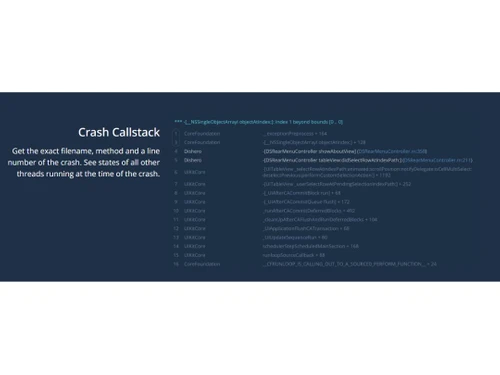
bugsee callstack
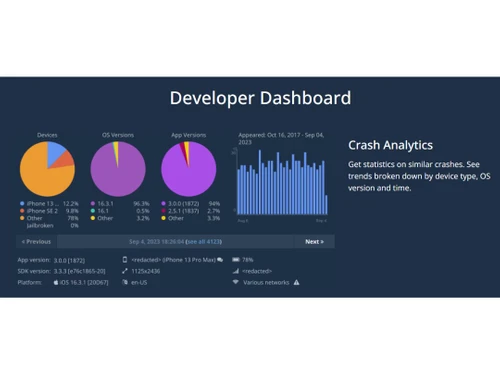
bugsee dashboard
bugsee network

Bugsee

Brand: Bugsee

  • 4.3

  • 3 Ratings

Bugsee is a bug and crash reporting tool for iOS and Android apps that captures video, logs, and network data.

See More

Have you used Bugsee before?

Share your insights for better experience

Add a Review
Starting Price
$139

View plans

100% Genuine
Products
Best Price
Guaranteed
Safe & Secure
Payment
  • Description

  • Pricing

  • Features

  • Specification

  • Review

  • Compare

  • Alternatives

  • FAQ

Starting at $139

Bugsee Software Overview

What is Bugsee?

Bugsee is a debugging tool that reports bugs and crashes for iOS and Android applications. It integrates with the app through one line of code, making its setup easy. The interface offers a developer dashboard that provides an overview of bugs detected, crash analytics, crash call stacks, network traffic, console logs, and system traces.

Its main feature is its flight recorder functionality, which captures video recordings of user actions to understand the interaction of users with different features. It records network traffic to analyze API calls, responses, and potential bottlenecks. It collects console logs to reveal errors, warnings, etc., during app execution. It generates and provides a detailed crash report to determine the root cause. It gives a 3D view hierarchy for inspecting app layouts and supports integrations with popular bug-tracking tools.

Why Choose Bugsee Software?

  • Debugging crashes: It helps developers identify and fix app crashes by providing detailed crash reports and logs.
  • Quality assurance: Ensure app stability and performance by monitoring and addressing issues promptly with detailed crash analytics and call stacks.
  • Network troubleshooting: Analyze network traffic and API calls to detect bottlenecks and improve performance.
  • Error monitoring: Collects console logs to track errors, warnings, and other relevant information during app execution.
  • User experience: Identifies user interaction issues by reviewing video recordings of actions leading to bugs, enhancing overall app usability.
  • Integration: It integrates with bug-tracking tools like Slack, Jira, and Trello to streamline bug management and resolution workflows.

Benefits of Bugsee Platform

  • Better debugging: Captures detailed bug data, including video recordings, logs, and network traffic, to save time and generate reports for knowing the root cause.
  • Improved App quality: Helps to enhance user experience with prompt bug detection and resolution, ensuring app stability.
  • Efficient troubleshooting: It helps to analyze network traffic for performance optimization and error detection.
  • Usability testing: It identifies and addresses user interaction issues with detailed video recordings of app actions.
  • Analytical dashboard: Provides insights from detailed crash analytics, call stacks, network traffic, and system traces for informed decision-making and app improvement.

Pricing of Bugsee Debugging Software

Bugsee price in India starts from $99 at techjockey.com. It comes with multiple pricing plans and caters to a diverse customer base.

For subscription-related details and offers on premium packages, please request a call back from our product experts.

Read more

Bugsee Company Details

Founded Year:  2016

Bugsee is a bug reporting tool with synchronized video, network and logs for Mobile Apps and Web.

Director/Founders Alex Fishman, Dmitry Fink
Company Size 1-100 Employees

Bugsee Pricing & Plans

PRO
Key Features
  • Up to 50 unique devices per month
  • Data is retained for 30 days
  • Priority support
  • In-app bug reporting with video and 3D view hierar
  • Crash reporting & analytics
  • Custom traces/attachements Feedback (aka In-App ch
  • Per-App analytics
  • Detailed session logs and overview
  • Unlimited apps and team members Unlimited bug trac
Starting at $139
    • Licenses

      Licenses
      Licenses
    • Monthly

      Monthly
      Monthly

Key Features

  • Up to 50 unique devices per month

  • Data is retained for 30 days

  • Priority support

  • In-app bug reporting with video and 3D view hierar

  • Crash reporting & analytics

  • Custom traces/attachements Feedback (aka In-App ch

  • Per-App analytics

  • Detailed session logs and overview

  • Unlimited apps and team members Unlimited bug trac

Bugsee Features

  • icon_check Crash Analytics
    Identify trends and device-specific issues and prioritize bug fixes with detailed crash analysis and data visualization.
  • icon_check Crash Callstack
    Pinpoint exact crash locations, methods, and thread states, helping developers in resolving issues.
  • icon_check Network Traffic
    Monitor HTTP and HTTPS requests, responses, and headers to diagnose network-related bugs.
  • icon_check Console Logs
    Access synchronized app logs during bug occurrences for developers to debug and resolve errors.
  • icon_check Dashboard
    Use a centralized platform for data visualization, performance metrics, and actionable insights.
  • icon_check Traces and Events
    Track system-level events such as connectivity changes, orientation shifts, and custom events for issue resolution.
  • icon_check 3D View Hierarchy
    Visualize app view/activity structures in 3D, enabling in-depth inspection of layout issues.
  • icon_check Integrations
    Connect with third-party bug tracking and collaboration tools for efficient bug management and collaboration.
  • icon_check Email Support
    Receive timely and personalized assistance from customer support experts for technical queries.
  • icon_check Security
    Ensure data confidentiality, integrity, and compliance with robust security measures, protecting information.

Bugsee Specifications

Supported Platforms
Ubuntu Ubuntu Windows Windows MacOS MacOS Linux Linux
Devices
Desktop Desktop Mobile Mobile Tablet Tablet iPad iPad
Deployment
Cloud-Based Cloud-Based
Suitable For
Education ITES Universities
Business Specific
All Businesses
Business Size
Small Business Startups Medium Business Enterprises
Customer Support
Email Live Chat Communities
Language
English
Training Resources
Documentation Videos

Explore the Best Alternative Solutions Similar to Your Business Size and Needs

Small Business

Designed for startups and growing businesses

Gdb

4.2

Backtrace

4.5

Lumigo

4.4

See More

Bugsee Review

4.3

Out of 5

img

Overall Rating

Based on
3 Verified Ratings

Rating Breakdown

  • Features 4
  • Value for Money 4.3
  • Ease of Use 4.5
  • Customer Support 4.6

86% Recommend this Product

Add Review

Be the First to Review

This product has no reviews yet. Be the first to leave your feedback.

Add Review

Compare Bugsee With other Debugging Software

Products
Ratings
Pricing
Device Supported
Deployment
Supported Platforms
  • img

    Bugsee

  • 4.3

  • Price On Request

  • Desktop

    Mobile

  • Web based

    On Premises

  • Windows

    Mac OS

  • img

    SonarCloud

  • 4.3

  • Price On Request

  • Desktop

    Mobile

  • Web based

    On Premises

  • Windows

    Mac OS

  • img

    Instabug

  • 4.5

  • Price On Request

  • Desktop

    Mobile

  • Web based

    On Premises

  • Windows

    Mac OS

  • img

    Backtrace

  • 4.5

  • Price On Request

  • Desktop

    Mobile

  • Web based

    On Premises

  • Windows

    Mac OS

  • img

    Fiddler

  • 4.5

  • Price On Request

  • Desktop

    Mobile

  • Web based

    On Premises

  • Windows

    Mac OS

  • img

    Unfold AI

  • 4.2

  • Price On Request

  • Desktop

    Mobile

  • Web based

    On Premises

  • Windows

    Mac OS

  • img

    Lumigo

  • 4.4

  • Price On Request

  • Desktop

    Mobile

  • Web based

    On Premises

  • Windows

    Mac OS

  • img

    Memfault

  • 4.4

  • Price On Request

  • Desktop

    Mobile

  • Web based

    On Premises

  • Windows

    Mac OS

  • img

    Rollbar

  • 4.3

  • Price On Request

  • Desktop

    Mobile

  • Web based

    On Premises

  • Windows

    Mac OS

  • img

    TotalView

  • 4.2

  • Price On Request

  • Desktop

    Mobile

  • Web based

    On Premises

  • Windows

    Mac OS

  • img

    Rookout

  • 4.2

  • Price On Request

  • Desktop

    Mobile

  • Web based

    On Premises

  • Windows

    Mac OS

(0) Product(s) selected

Bugsee Alternatives

See All Bugsee Alternatives

Starting Price:

$299 /Month

Starting Price:

$15 /Month

Starting Price:

$1,500

Available

Price on Request

Available

Price on Request

Articles for Bugsee

See All Related Articles

Which operating system does Bugsee support?

Bugsee is compatible with Cordova and ReactNative operating systems.

Is there any Bugsee app?

Bugsee app is available for Android, iOS mobile devices.

What is the deployment type of Bugsee?

Bugsee supports web-based deployment.

How much does Bugsee cost?

Bugsee pricing starts from $99 for the PRO plan at techjockey.com.

Who are the potential users of Bugsee?

Bugsee is typically used in software development, mobile app companies, and tech startups. Users include developers, QA testers, and project managers for bug tracking, app monitoring, and performance optimization.

Is there any free demo for Bugsee?

Bugsee demo is available with techjockey.com.

Is Bugsee free?

Bugsee is available for free.

Does Bugsee Platform offer a free trial?

No, Bugsee software does not offer a free trial.

How can you download Bugsee?

Bugsee installation is not required, as it is web-based. Just open the Setup Wizard to get started.

How does Bugsee work?

Bugsee helps with bug detection, crash analytics, network monitoring, detailed logs, 3D view hierarchy, integrations with bug tracking tools, and responsive email support, ensuring efficient app development and management.

20,000+ Software Listed

Best Price Guranteed

Free Expert Consultation

2M+ Happy Customers

Terms and Condtions

close

Users with registered businesses can purchase goods from merchants on the platform to satisfy their business needs. Users are not permitted to utilize any products acquired through the platform for resale, advertising, business, or further distribution.

For each purchase made, users will receive a Tax Invoice (or 'GST invoice') that includes specific details such as:

  • the GSTIN of the user associated with their registered business, and

  • the specified Entity Name for their business.

It should be noted that not all products are eligible for GST Invoice. Only the products displayed by participating sellers with the 'GST-based Invoice Available' callout on the product description page would qualify.

Certain goods and services are not eligible to get a GST Invoice, including items with VAS, i.e., Value Added Services (e.g., Total Mobile Protection/Assured Buyback) and those involving an exchange offer at the time of purchase.

Users must ensure the accuracy of the GSTIN, and business entity name provided for the GST Invoice. Requests for corrections into GST Invoice would not be accommodated by Techjockey.com or any Seller, and any issues arising from user-provided information are the sole responsibility of users.

Techjockey.com is not liable for the GST Invoice or any associated input tax credit. To efficiently claim an input tax credit, users should select the registered place of business address as per the GST authority's data and follow the provisions of the GST Act and rules.

To claim an input tax credit, the delivery and billing addresses must match. Furthermore, input tax credits will not be granted if the delivery address and GSTIN on the invoice are from different states. In case of incorrect GST details provided during the order placement, the order will be canceled automatically.