linkedin
BuildBook logo
play Introduction to BuildBook - Construction Management Software for Residential Projects
buildbook dashboard
buildbook profiles

BuildBook

Brand: BuildBook

  • 4.2

  • 3 Ratings

BuildBook is a construction management software for residential home builders, contractors, and remodelers.

See More

Have you used BuildBook before?

Share your insights for better experience

Add a Review
Starting Price
$99

View plans

100% Genuine
Products
Best Price
Guaranteed
Safe & Secure
Payment
  • Description

  • Pricing

  • Features

  • Specification

  • Review

  • Compare

  • Alternatives

  • FAQ

Starting at $99

BuildBook Software Overview

What is BuildBook?

BuildBook is a digital construction management platform designed for home builders and remodelers to manage construction projects smoothly. It has an interactive dashboard that displays information on project status, real-time updates, and progress. It helps in project management, communication, and documentation. It also provides document sharing for collaboration among team members.

It acts like a central hub for giving detailed information on the project activities. It helps to manage the sales pipeline, create accurate estimates, and deliver stunning proposals. It also provides tools for tracking project costs and managing changes in orders. It can be integrated with other tools for better functionality. It helps in reducing manual workload and enhances project efficiency.

Why Choose BuildBook Software?

  • Project Tracking: It helps to monitor project progress in real-time so that the tasks are on schedule and any issues are quickly addressed.
  • Document Management: Helps to store and share project-related documents, blueprints, and contracts securely, keeping all stakeholders informed.
  • Client Communication: Helps facilitate smooth communication between builders and clients, allowing for easy updates, feedback, and approval processes.
  • Budget Management: Allows tracking expenses and managing budgets efficiently, helping to stay within financial limits and avoid unexpected costs.
  • Task Management: Managers can assign, prioritize, and monitor tasks to ensure timely completion and clear accountability among team members.

Benefits of BuildBook Platform

  • Better efficiency: Helps to manage project workflows, reducing administrative tasks and saving time for builders and clients.
  • Better Communication: It helps establish clear and continuous updates and ensures everyone is informed throughout the project.
  • Better Organization: Helps to keep documents centralized, thus reducing confusion and making project management more straightforward.
  • Budget Control: It provides tools to track and manage expenses, helping to avoid budget overruns and financial challenges.
  • Increased Transparency: It offers real-time insights into project progress, building trust and accountability between builders and clients.

Pricing of BuildBook

BuildBook price in India starts at $ 99. BuildBook comes with multiple pricing plans and caters to a diverse customer base.

For subscription-related details and offers on premium packages, please request a call back from our product experts.

Read more

BuildBook Company Details

Founded Year:  2018

BuildBook

Director/Founders Carson Miller, Ryan Miller
Company Size 1-100 Employees

BuildBook Pricing & Plans

Solo
Starting at $99
    • Users

      Users
      Users
    • Monthly

      Monthly
      Monthly

Key Features

  • Sales CRM

  • Custom Estimates

  • Branded Proposals

  • Cost Codes

  • Price Book

  • Estimate Templates

  • Digital Approvals

  • Convert To Project Budget

Team-(2-5 users)
Starting at $179
    • Monthly

      Monthly
      Monthly

Key Features

  • Sales CRM

  • Custom Estimates

  • Branded Proposals

  • Cost Codes

  • Price Book

  • Estimate Templates

  • Digital Approvals

  • Convert To Project Budget

BuildBook Features

  • icon_check Sales CRM
    Enhances customer relationship management by tracking interactions and automating follow-ups.
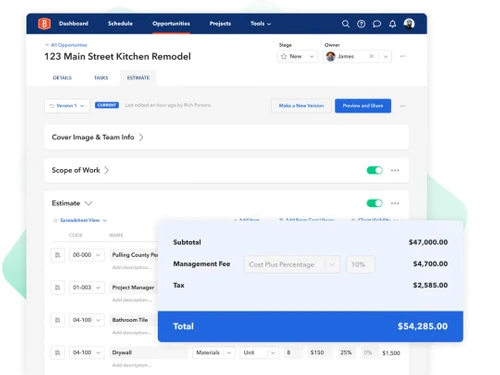
  • icon_check Custom Estimates
    Generates custom cost estimates based on project specifics, ensuring accurate budgeting.
  • icon_check Branded Proposals
    Creates professional, branded proposals that reflect the company’s identity, increasing the chances of winning contracts.
  • icon_check Estimate Templates
    Use pre-designed templates for consistent, quick, and accurate cost estimates, saving time and reducing errors.
  • icon_check Digital Approvals
    Manage approval processes with digital signatures, speeding up project initiation and reducing delays.
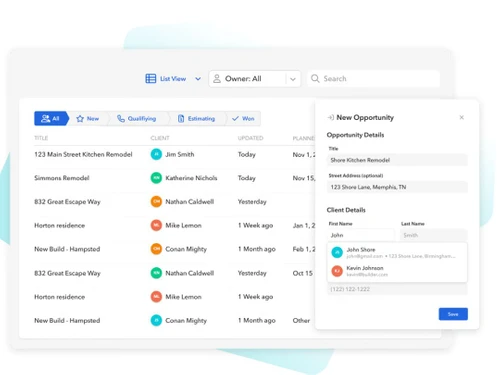
  • icon_check Contact Manager
    Organizes and tracks client and lead information, improving communication and better relationships.
  • icon_check Automated Lead Analysis
    Analyzes and prioritizes leads automatically, allowing for more focused efforts in converting them into clients.
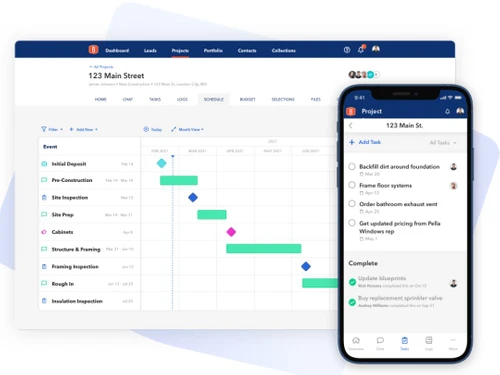
  • icon_check Gantt Chart Scheduling
    Visualizes project timelines and tasks with Gantt charts for better planning and management of projects.
  • icon_check Task Management
    Assigns, tracks, and manages tasks, ensuring team members stay on track and meet deadlines.
  • icon_check Change Orders
    Manages and documents changes in project scope or specifications efficiently and approved properly.
BuildBook Demo Video play icon

Get BuildBook Demo

Watch the demo video to explore key features, real workflows, and how the software fits your business needs.

Understand
Key Features
Personal
Demo Insights
Interactive
Demo Support

BuildBook Specifications

Supported Platforms
Ubuntu Ubuntu Windows Windows iOS iOS Android Android MacOS MacOS Linux Linux
Devices
Desktop Desktop Mobile Mobile Tablet Tablet iPad iPad
Deployment
Cloud-Based Cloud-Based
Suitable For
Construction
Business Specific
All Businesses
Business Size
Small Business Startups Medium Business Enterprises
Customer Support
Phone Email Communities
Language
English
Training Resources
Videos

Explore the Best Alternative Solutions Similar to Your Business Size and Needs

BuildBook Review

4.2

Out of 5

img

Overall Rating

Based on
3 Verified Ratings

Rating Breakdown

  • Features 4.3
  • Value for Money 4
  • Ease of Use 4.3
  • Customer Support 4.1

90% Recommend this Product

Add Review

Techjockey Trusted Reviews from Verified Users

No reviews are currently available for BuildBook. Discover similar Construction Management Software reviews

  • Primus KRONO

    4.1

    Whats great - Great customer service, very quick to reply, had a small issue (my fault) which they responded and resolved quickly. read more

  • Oracle Aconex

    4.3

    Whats great - The best thing about the software is that it lets me organize and manage the meeting documents from a central location. This ... read more

  • QS Plus Builder Plus

    4.7

    Whats great - It is a simple brisk approach to break something. It's decent to see an easy to understand interface that carries administrat... read more

Compare BuildBook With other Construction Management Software

Products
Ratings
Pricing
Device Supported
Deployment
Supported Platforms
  • img

    BuildBook

  • 4.2

  • Price On Request

  • Desktop

    Mobile

  • Web based

    On Premises

  • Windows

    Mac OS

  • img

    SiteSathi

  • ₹ 5999

  • Desktop

    Mobile

  • Web based

    On Premises

  • Windows

    Mac OS

  • img

    Powerplay

  • 4.1

  • ₹ 119999

  • Desktop

    Mobile

  • Web based

    On Premises

  • Windows

    Mac OS

  • img

    Estimator360

  • 4.2

  • Price On Request

  • Desktop

    Mobile

  • Web based

    On Premises

  • Windows

    Mac OS

  • img

    KonstructIQ

  • 4.2

  • Price On Request

  • Desktop

    Mobile

  • Web based

    On Premises

  • Windows

    Mac OS

  • img

    Visibuild

  • 4.0

  • Price On Request

  • Desktop

    Mobile

  • Web based

    On Premises

  • Windows

    Mac OS

  • img

    CoConstruct

  • 4.3

  • Price On Request

  • Desktop

    Mobile

  • Web based

    On Premises

  • Windows

    Mac OS

  • img

    Buildertrend

  • 4.3

  • Price On Request

  • Desktop

    Mobile

  • Web based

    On Premises

  • Windows

    Mac OS

(0) Product(s) selected

BuildBook Alternatives

See All BuildBook Alternatives

Starting Price:

$250 /Location/Month

Available

Price on Request

Starting Price:

$199 /Month
Available

Price on Request

Starting Price:

$54 /Month

Available

Price on Request

Articles for BuildBook

See All Related Articles

Is BuildBook compatible with different operating systems?

BuildBook is a web-based platform accessible from any device with a modern browser.

Who can benefit from using BuildBook?

Residential home builders, remodelers, and custom construction businesses find value in BuildBook.

Does BuildBook have a mobile app?

You can download the BuildBook app from Google Play for on-the-go access.

Is there a demo available for BuildBook?

Yes, users can explore a demo version on their website.

What types of documents can be managed with the BuildBook product?

BuildBook supports various documents, including contracts, blueprints, and invoices.

Can I integrate BuildBook with other software tools?

Yes, BuildBook offers integrations with popular tools like QuickBooks and Xero.

How does BuildBook handle project scheduling?

BuildBook provides scheduling features, allowing you to efficiently create and manage project timelines.

Is there a limit to the number of projects I can manage in BuildBook?

BuildBook’s pricing tiers determine the project limit, so check their website for details.

Can I customize reports and documents in BuildBook?

Users can tailor reports, proposals, and other documents to match their brand.

20,000+ Software Listed

Best Price Guranteed

Free Expert Consultation

2M+ Happy Customers

Terms and Condtions

close

Users with registered businesses can purchase goods from merchants on the platform to satisfy their business needs. Users are not permitted to utilize any products acquired through the platform for resale, advertising, business, or further distribution.

For each purchase made, users will receive a Tax Invoice (or 'GST invoice') that includes specific details such as:

  • the GSTIN of the user associated with their registered business, and

  • the specified Entity Name for their business.

It should be noted that not all products are eligible for GST Invoice. Only the products displayed by participating sellers with the 'GST-based Invoice Available' callout on the product description page would qualify.

Certain goods and services are not eligible to get a GST Invoice, including items with VAS, i.e., Value Added Services (e.g., Total Mobile Protection/Assured Buyback) and those involving an exchange offer at the time of purchase.

Users must ensure the accuracy of the GSTIN, and business entity name provided for the GST Invoice. Requests for corrections into GST Invoice would not be accommodated by Techjockey.com or any Seller, and any issues arising from user-provided information are the sole responsibility of users.

Techjockey.com is not liable for the GST Invoice or any associated input tax credit. To efficiently claim an input tax credit, users should select the registered place of business address as per the GST authority's data and follow the provisions of the GST Act and rules.

To claim an input tax credit, the delivery and billing addresses must match. Furthermore, input tax credits will not be granted if the delivery address and GSTIN on the invoice are from different states. In case of incorrect GST details provided during the order placement, the order will be canceled automatically.