 USA
USA UAE
UAESmall Business
Designed for startups and growing businesses

See More




Brand: Oracle
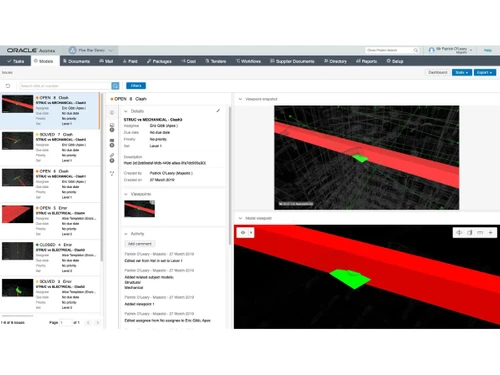
Oracle Aconex is a construction management software that is used for monitoring and managing the design, construction, and infrastructure of various energy and resources projects. This online collaboration platform is known for its transparency, flexibility and its capability to reduce the risks associated with project and field management This easy-to-use tool is also known for enhancing team co...
See MoreHave you used Oracle Aconex before?
Share your insights for better experience
Brand: Oracle
Founded Year: 1977
Oracle is an integrated cloud application and platform services that sells a range of enterprise information technology solutions.
Looking for The Right Pricing?
Share your requirements and get a plan built around your business.
Price Available on Request
Get personalised Oracle Aconex pricing that fits your needs. Our team will connect with you.
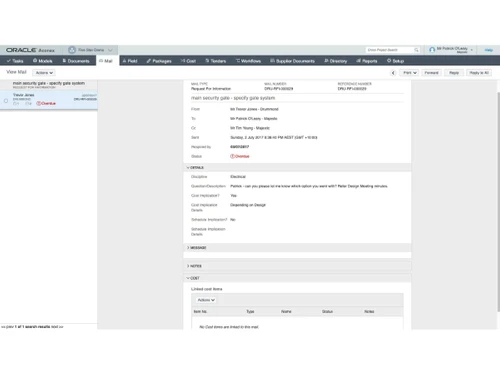
 Document Control Workflow Automation Bid and Tender Management Contract Management Change Management Cost Management Field Management BIM Model Coordination Common Data Environment Package Management Audit Trail Reporting and Dashboard Task Management Payment Application Management Budgeting & Forecasting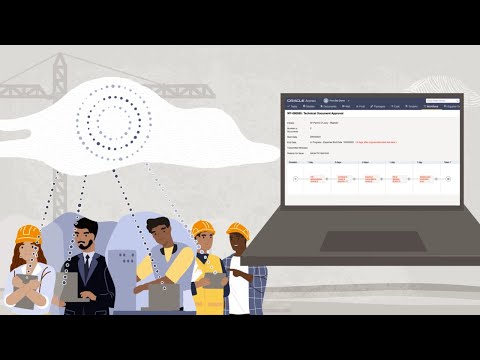

Watch the demo video to explore key features, real workflows, and how the software fits your business needs.
 Ubuntu
  Windows
  MacOS
MacOS  Linux
Linux  Desktop
  Cloud-Based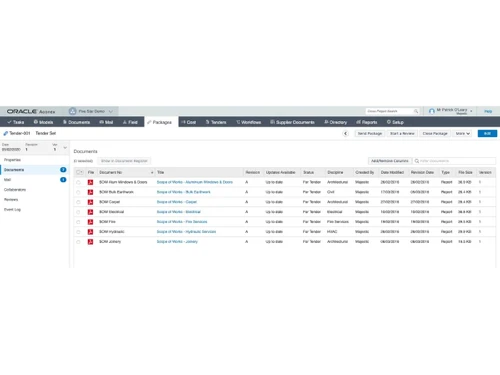
Small Business
Designed for startups and growing businesses
Medium Business
Built for business growth and flexibility
Enterprises
Designed for complex and large-scale business needs
4.2
Out of 5

Overall Rating
Based on
4 Verified Reviews
Rating Breakdown
80% Recommend this Product
Add ReviewUsers generally appreciate Oracle Aconex for its centralized document management capabilities, which enhance visibility and organization for project participants. The software is praised for its secure document handling and responsive customer support, contributing to a sense of trustworthiness among users. However, some common concerns include its initial complexity and high cost, along with issues related to speed and file download times, particularly with larger documents. Overall, while the software offers significant value, there are areas that users feel could be improved.
Pros
"A company to offer you helpful advice is incredible and then to do it for free? un-heard of. I am so glad i chanced upon this company they got me going in the rite direction."
Cons
"The software is a bit complicated to start with but with frequent usage, it should become easy to use. Also, the cost comparatively seemed a little high. "

Apr 15, 2020
Techjockey Verified
“Control from a central location”
Pros
The best thing about the software is that it lets me organize and manage the meeting documents from a central location. This allows me as well as the project participants to have full visibility. This feature really caught my attention.
Cons
The software is a bit complicated to start with but with frequent usage, it should become easy to use. Also, the cost comparatively seemed a little high.
Apr 2, 2020
Techjockey Verified
“Secure management of documents”
Pros
I was eager to keep my documents safe but was not sure which software to choose. So, I called up the support team of techjockey to know which one would be the best for me. They told me of this software and its feature of secure management of documents for quick access including 3D models, design, reports and more. It also lets me access the projects of my clients to get an accurate view.
Cons
The speed is an issue with the software as it depends on the internet connection. Moreover, it takes up a lot of time to download large files. These areas need to be looked into.
Oct 6, 2017
Techjockey Verified
“trustworthy service”
Pros
Very satisfied with the quick response time.
Cons
N/A

Oracle Aconex
Price On Request
Desktop
Mobile
Web based
On Premises
Windows
Mac OS

Houzz Pro
Price On Request
Desktop
Mobile
Web based
On Premises
Windows
Mac OS

Onsite
₹ 12000
Desktop
Mobile
Web based
On Premises
Windows
Mac OS
INAXUS
Price On Request
Desktop
Mobile
Web based
On Premises
Windows
Mac OS
SIGNAX
Price On Request
Desktop
Mobile
Web based
On Premises
Windows
Mac OS
Autodesk Build
₹ 12980
Desktop
Mobile
Web based
On Premises
Windows
Mac OS

Fonn
Price On Request
Desktop
Mobile
Web based
On Premises
Windows
Mac OS
TaskTag
Price On Request
Desktop
Mobile
Web based
On Premises
Windows
Mac OS

Superwise
₹ 6399
Desktop
Mobile
Web based
On Premises
Windows
Mac OS

Sage 100 Contractor
Price On Request
Desktop
Mobile
Web based
On Premises
Windows
Mac OS

Buildern
Price On Request
Desktop
Mobile
Web based
On Premises
Windows
Mac OS
(0) Product(s) selected
Starting Price:
₹12,000 /Month ₹15,600
Available
Price on Request
Starting Price:
£5,500 /Year
Starting Price:
$12 /Month

Available
Price on Request
There are two ways. Either ask a contact or colleague who uses Aconex to search for your organization in the Global Directory, or contact our Service Desk.
Oracle Aconex isn’t like the free online services you may use. New users can’t just sign up and create accounts — for one thing, they wouldn’t be able to see any projects. Also, they wouldn’t be associated with a company in Aconex. If the new user is you, or someone in your organization... Your organization needs to register to use Aconex if it hasn’t already. Then, your Organization Admin needs to create an account for the new user and give them access to projects. If you’re already using Aconex, find out who your Organization Admin is here. If the new user is someone from another organization, you can invite them to your project whether or not they’re already using Aconex. If the new user’s organization isn’t registered to use Aconex, that user will only be able to operate as a guest, with restricted capabilities.
Downloaded the authenticator app, but yet to connect to Aconex and log in using 2 Step Verification? You connect by entering the QR code or “secret key” on your device: Apple iOS Android Blackberry Windows Phone Windows desktop
If you made a mistake entering your password, so your account became locked, you can reset it yourself. Click the Forgotten your login/password? link on the login page and follow the instructions. This will unlock your account. If you leave an organization, the Organization Administrator should lock and disable your account. You’ll need to ask the Organization Administrator at your new organization to create a new account for you. If your account has been locked and disabled in error, ask your Organization Administrator to grant you access.
There are two ways to upload and supersede files in batches. The one you’ll use will probably depend on the number of documents you’re working with.
20,000+ Software Listed
Best Price Guranteed
Free Expert Consultation
2M+ Happy Customers
Terms and Condtions

Users with registered businesses can purchase goods from merchants on the platform to satisfy their business needs. Users are not permitted to utilize any products acquired through the platform for resale, advertising, business, or further distribution.
For each purchase made, users will receive a Tax Invoice (or 'GST invoice') that includes specific details such as:
the GSTIN of the user associated with their registered business, and
the specified Entity Name for their business.
It should be noted that not all products are eligible for GST Invoice. Only the products displayed by participating sellers with the 'GST-based Invoice Available' callout on the product description page would qualify.
Certain goods and services are not eligible to get a GST Invoice, including items with VAS, i.e., Value Added Services (e.g., Total Mobile Protection/Assured Buyback) and those involving an exchange offer at the time of purchase.
Users must ensure the accuracy of the GSTIN, and business entity name provided for the GST Invoice. Requests for corrections into GST Invoice would not be accommodated by Techjockey.com or any Seller, and any issues arising from user-provided information are the sole responsibility of users.
Techjockey.com is not liable for the GST Invoice or any associated input tax credit. To efficiently claim an input tax credit, users should select the registered place of business address as per the GST authority's data and follow the provisions of the GST Act and rules.
To claim an input tax credit, the delivery and billing addresses must match. Furthermore, input tax credits will not be granted if the delivery address and GSTIN on the invoice are from different states. In case of incorrect GST details provided during the order placement, the order will be canceled automatically.



