USA
USA UAE
UAE


Primus KRONO
Whats great - Great customer service, very quick to reply, had a small issue (my fault) which they responded and resolved quickly. read more




Brand: Estimator360
Estimator360 is cloud-based construction estimating software for accurate estimation, bid management, and profitability insights.
See MoreHave you used Estimator360 before?
Share your insights for better experience
Brand: Estimator360
Founded Year: 2016
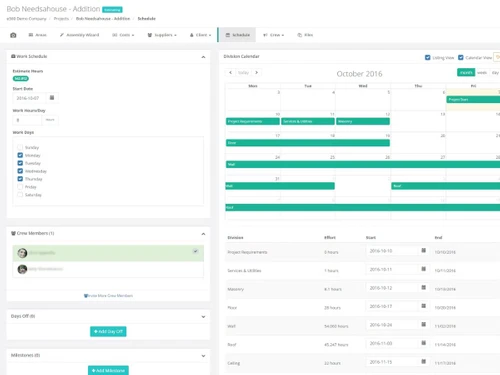
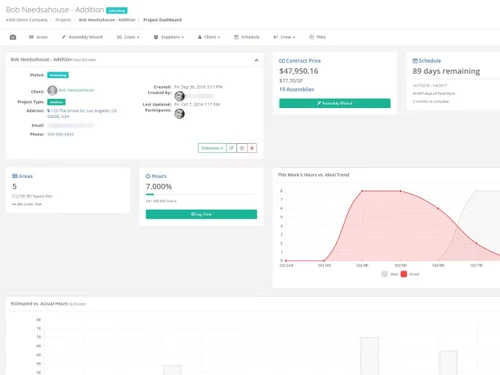
Most contractors feel consumed by manually creating estimates. With Estimator360’s cloud-based digital takeoff tool, you can create accurate estimates in minutes, giving you the freedom to sell more projects and grow your business.
 Customer Relationship Management Quantity Takeoff Estimate Generation Bid Management Proposal Management Scheduling Change Management Third Party Integration Purchase Order Management Time Tracking Document Management Budget Tracking Financial Reporting Templates Material List Generation

Watch the demo video to explore key features, real workflows, and how the software fits your business needs.
 Windows
  Android
  MacOS
MacOS  Desktop
  Mobile
  Cloud-Based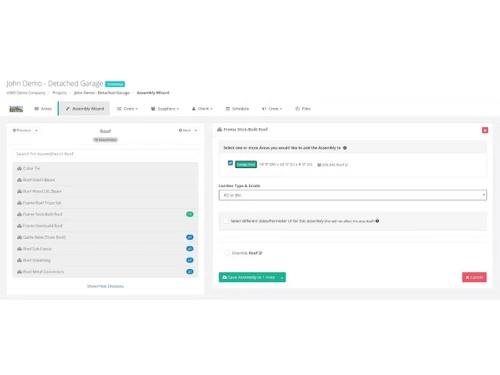
4.2
Out of 5

Overall Rating
Based on
4 Verified Ratings
Rating Breakdown
80% Recommend this Product
Add ReviewTechjockey Trusted Reviews from Verified Users
No reviews are currently available for Estimator360. Discover similar Construction Management Software reviews
Primus KRONO
Whats great - Great customer service, very quick to reply, had a small issue (my fault) which they responded and resolved quickly. read more

Oracle Aconex
Whats great - The best thing about the software is that it lets me organize and manage the meeting documents from a central location. This ... read more

QS Plus Builder Plus
Whats great - It is a simple brisk approach to break something. It's decent to see an easy to understand interface that carries administrat... read more
Estimator360 pricing starts from USD 250 per month at techjockey.com.
Estimator360 is used by builders, contractors, and construction managers for accurate estimating, project management, and client communication.
Estimator360 works by combining digital takeoff, automated estimating, and project templates with a cloud-based interface for streamlined workflows.
Estimator360 Construction Management Software runs smoothly on OS like Windows, macOS, and Android via its mobile application.
Yes, Estimator360 offers a free demo to help users explore features.
Yes, Estimator360 includes CRM tools to manage client relationships, track communications, and improve customer satisfaction.
Estimator360 Construction Management Software provides invoicing, expense tracking, and profitability analysis to support financial control and healthy business margins.
Yes, Estimator360 supports mobile photo uploads and real-time updates, enabling field teams to document and share progress instantly.
Estimator360 requires a stable internet connection, modern browser compatibility, and sufficient device memory for optimal performance.
20,000+ Software Listed
Best Price Guranteed
Free Expert Consultation
2M+ Happy Customers
Terms and Condtions

Users with registered businesses can purchase goods from merchants on the platform to satisfy their business needs. Users are not permitted to utilize any products acquired through the platform for resale, advertising, business, or further distribution.
For each purchase made, users will receive a Tax Invoice (or 'GST invoice') that includes specific details such as:
the GSTIN of the user associated with their registered business, and
the specified Entity Name for their business.
It should be noted that not all products are eligible for GST Invoice. Only the products displayed by participating sellers with the 'GST-based Invoice Available' callout on the product description page would qualify.
Certain goods and services are not eligible to get a GST Invoice, including items with VAS, i.e., Value Added Services (e.g., Total Mobile Protection/Assured Buyback) and those involving an exchange offer at the time of purchase.
Users must ensure the accuracy of the GSTIN, and business entity name provided for the GST Invoice. Requests for corrections into GST Invoice would not be accommodated by Techjockey.com or any Seller, and any issues arising from user-provided information are the sole responsibility of users.
Techjockey.com is not liable for the GST Invoice or any associated input tax credit. To efficiently claim an input tax credit, users should select the registered place of business address as per the GST authority's data and follow the provisions of the GST Act and rules.
To claim an input tax credit, the delivery and billing addresses must match. Furthermore, input tax credits will not be granted if the delivery address and GSTIN on the invoice are from different states. In case of incorrect GST details provided during the order placement, the order will be canceled automatically.