linkedin
Builder io logo
play Introducing Fusion by Builder.io
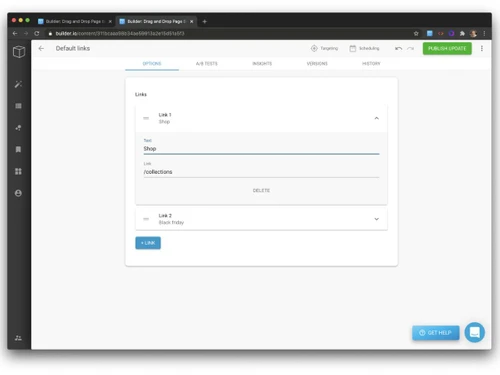
builder io-links
builder io-images

Builder io

Brand: Builder io

  • 4.1

  • 4 Ratings

Builder.io is an AI-powered visual development platform that helps teams design, build, and optimize digital experiences, such as websites and web apps, faster.

See More

Have you used Builder io before?

Share your insights for better experience

Add a Review
Starting Price
$30

View plans

100% Genuine
Products
Best Price
Guaranteed
Safe & Secure
Payment
  • Description

  • Pricing

  • Features

  • Specification

  • Review

  • FAQ

Starting at $30

Builder ioSoftware Overview

What is Builder io?

Builder io is a website development tool and an IDE software that helps teams design, build, and manage digital experiences, such as websites and web apps, using visual tools and AI instead of heavy manual coding. It provides a drag-and-drop editor, headless CMS, and AI design-to-code capabilities, allowing developers, designers, and marketers to collaborate more efficiently.

Builder.io connects with existing tech stacks (like React or Vue projects) so users can create pages, prototype features, and publish updates faster while reducing development bottlenecks.

Why Choose Builder io?

  • AI-Driven Speed & Efficiency: It can convert designs, prompts, or specifications into production-ready UI and code, significantly reducing development time.
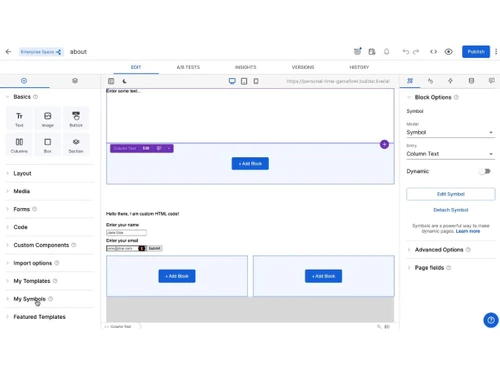
  • Visual Drag-and-Drop Editing: Non-technical users can create and update pages easily without relying heavily on developers.
  • Seamless Integration with Modern Tech Stacks: Builder.io works with frameworks like React, Next.js, and existing repositories, so teams don't need to rebuild projects from scratch.
  • Real-Time Collaboration: Developers, designers, and marketers can work together in one environment with live editing and feedback.
  • Personalization & Optimization Tools: Built-in testing, targeting, and analytics help improve user engagement and conversions.

Benefits of Builder io

  • Faster Development & Time-to-Market: AI-powered design-to-code and automation help teams turn ideas into live products much quicker than traditional development.
  • Reduced Development Costs: Automation and reusable components lower reliance on large engineering teams, saving operational costs.
  • Easy Visual Editing for Non-Developers: Drag-and-drop tools allow marketers and designers to create and update pages without deep coding knowledge.
  • Real-Time Collaboration: Developers, designers, and content teams can work together simultaneously with live editing and feedback features.

Builder io Pricing

Builder io pricing starts at USD 30 at techjockey.com. The pricing model is based on different parameters, including the amount of bandwidth you need, the number of servers you need, and the features you need. For further queries related to the product, you can contact our product team and learn more about the pricing and offers.

Read more

Builder io Company Details

Founded Year:  2018

Builder is the AI-powered visual development platform that turns ideas into production-ready web and mobile experiences in seconds, not sprints.

Director/Founders Brent Locks, Steve Sewell
Company Size 101-500 Employees

Builder io Pricing & Plans

Pro
Key Features
  • Up to 20 users
  • 500 monthly Agent Credits
  • Built-in MCP Servers
  • Pay-as-you-go for more usage
  • 30-day Activity History
  • Password-protected previews
  • Standard Support
Starting at $30
    • Users

      Users
      Users
    • Monthly

      Monthly
      Monthly

Key Features

  • Up to 20 users

  • 500 monthly Agent Credits

  • Built-in MCP Servers

  • Pay-as-you-go for more usage

  • 30-day Activity History

  • Password-protected previews

  • Standard Support

Builder io Features

  • icon_check Bidirectional Figma Sync
    Synchronize design assets from Figma into code components while allowing UI updates to be exported back to design files.
  • icon_check Design System Indexing
    Deeply indexes existing component libraries and documentation to ensure generated code follows established team patterns.
  • icon_check Agentic Pull Requests
    Automates the creation of pull requests where an AI agent responds to peer review comments and fixes build failures.
  • icon_check Visual Code Precision
    Edit layouts and styles in a visual canvas that directly manipulates the underlying codebase without abstraction layers.
  • icon_check MCP Server Integration
    Connects external APIs, databases, and tools like Supabase or Slack via the Model Context Protocol for data operations.
  • icon_check Automated Branching
    Generates dedicated Git branches for every AI-driven task to maintain a clean history and safe production deployments.
  • icon_check Real-Time Collaboration
    Allows multiple team members to edit the same project simultaneously with instant visibility of visual and code changes.
  • icon_check Custom Rule Definition
    Supports .mdc and AGENTS.md files to provide specific architectural instructions and coding standards to the AI engine.
  • icon_check Interactive Flow Testing
    Includes an Interact Mode to validate user journeys, click events, and responsive behaviors in a live environment.
  • icon_check Jira Ticket Integration
    Assigns tasks directly from Jira to the Builder bot, which reads requirements and starts implementing code changes.
  • icon_check Design Token Mapping
    Automatically maps Figma color and spacing tokens to existing CSS variables or Tailwind configuration within the repo.
  • icon_check Code Preview URLs
    Generates unique preview links for every pull request, allowing stakeholders to review functional changes before merging.
  • icon_check Contextual AI Memory
    Learns team-specific UX patterns and naming conventions over time to improve the accuracy of future code generations.
Builder io Demo Video play icon

Get Builder io Demo

Watch the demo video to explore key features, real workflows, and how the software fits your business needs.

Understand
Key Features
Personal
Demo Insights
Interactive
Demo Support

Builder io Specification

Supported Platforms
Ubuntu Ubuntu Windows Windows MacOS MacOS Linux Linux
Devices
Desktop Desktop
Deployment
Web-Based Web-Based
Suitable For
ITES
Business Specific
All Businesses
Business Size
Small Business Startups Medium Business Enterprises SMBs SMEs MSMBs MSMEs
Customer Support
Email Communities
Language
English
Integration
API Integration
Training Resources
Webinars Documentation Videos
AI Features
AI Integrated

Builder io Review

4.1

Out of 5

img

Overall Rating

Based on
4 Verified Ratings

Rating Breakdown

  • Features 4.1
  • Value for Money 4.3
  • Ease of Use 4.2
  • Customer Support 4

80% Recommend this Product

Add Review

Techjockey Trusted Reviews from Verified Users

No reviews are currently available for Builder io. Discover similar IDE Software reviews

  • Eclipse IDE

    4.8

    Whats great - The application has all the modern features required for developing java software, and can be integrated with Github.It fits ... read more

  • PyCharm

    4.8

    Whats great - As a real user of PyCharm, I have found that this IDE offers numerous advantages and useful features to make programming in P... read more

  • Netbeans

    4.0

    Whats great - The Smarter and Faster Way to Code read more

How much does Builder io cost?

Builder io pricing starts at USD 30 at techjockey.com. Pricing is customised based on specific business needs.

Which operating system does Builder io support?

Builder.io is a cloud-based platform that works on any operating system (Windows, macOS, Linux) through a web browser, with integrations for modern development frameworks.

How does Builder io work?

It combines a visual drag-and-drop editor, headless CMS, and AI tools to help teams design, build, and publish websites or apps while integrating with existing codebases.

Is Builder io suitable for small businesses?

Yes, it offers scalable plans and no-code/low-code tools that make it accessible for startups and small businesses as well as enterprises.

Does Builder io offer a free trial or a demo?

Yes, Builder.io provides a free tier and demos so users can explore its features before committing to paid plans.

What features does Builder io offer?

Key features include a visual editor, headless CMS, AI design-to-code, A/B testing, personalization, integrations with frameworks, and collaboration tools.

Is there a Builder io App?

Builder.io primarily operates as a web application, but it integrates with development environments and platforms through plugins and SDKs.

Who are the potential users of Builder io?

Developers, designers, marketers, product teams, agencies, and businesses looking to build and manage digital experiences efficiently.

How secure is Builder io?

It offers enterprise-grade security with role-based access control, secure hosting, and compliance standards suitable for business use.

What is Builder io used for?

It is used to create, manage, and optimize websites, web apps, and digital experiences faster using visual development and AI-powered tools.

20,000+ Software Listed

Best Price Guranteed

Free Expert Consultation

2M+ Happy Customers

Terms and Condtions

close

Users with registered businesses can purchase goods from merchants on the platform to satisfy their business needs. Users are not permitted to utilize any products acquired through the platform for resale, advertising, business, or further distribution.

For each purchase made, users will receive a Tax Invoice (or 'GST invoice') that includes specific details such as:

  • the GSTIN of the user associated with their registered business, and

  • the specified Entity Name for their business.

It should be noted that not all products are eligible for GST Invoice. Only the products displayed by participating sellers with the 'GST-based Invoice Available' callout on the product description page would qualify.

Certain goods and services are not eligible to get a GST Invoice, including items with VAS, i.e., Value Added Services (e.g., Total Mobile Protection/Assured Buyback) and those involving an exchange offer at the time of purchase.

Users must ensure the accuracy of the GSTIN, and business entity name provided for the GST Invoice. Requests for corrections into GST Invoice would not be accommodated by Techjockey.com or any Seller, and any issues arising from user-provided information are the sole responsibility of users.

Techjockey.com is not liable for the GST Invoice or any associated input tax credit. To efficiently claim an input tax credit, users should select the registered place of business address as per the GST authority's data and follow the provisions of the GST Act and rules.

To claim an input tax credit, the delivery and billing addresses must match. Furthermore, input tax credits will not be granted if the delivery address and GSTIN on the invoice are from different states. In case of incorrect GST details provided during the order placement, the order will be canceled automatically.