 USA
USA UAE
UAESmall Business
Designed for startups and growing businesses


See More





Brand: Jet Brains
PyCharm is an integrated apps making software that is used in computer programming primarily for the Python language. It provides developers with smart code completion tools, rich navigation capabilities, code inspection functions, etc. It facilitates quick and safe Python refactoring which includi...
See MoreHave you used PyCharm before?
Share your insights for better experience
Brand: Jet Brains
Founded Year: 2000
JetBrains is a global software company that creates professional software development tools and advanced collaboration solutions.
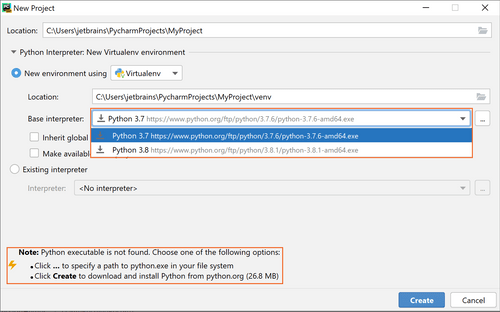
 Intelligent code assist Smart Navigation Debugging and Testing Deployment and Remote Development Database Tools Python Web frameworks Live Edit Integration Plugins and Widgets Customization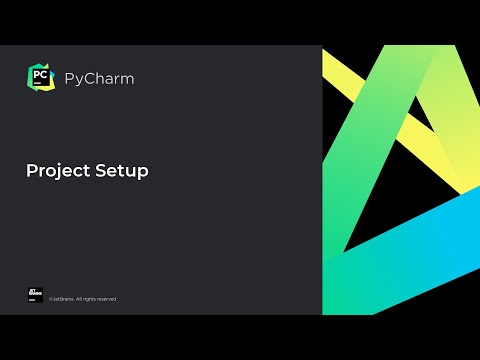

Watch the demo video to explore key features, real workflows, and how the software fits your business needs.
 Windows
  MacOS
MacOS  Linux
Linux  Desktop
  Cloud-Based
  Perpetual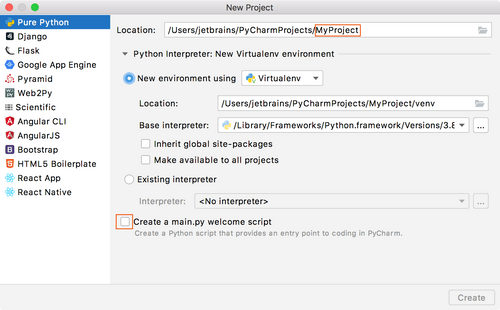
Small Business
Designed for startups and growing businesses
Medium Business
Built for business growth and flexibility
Enterprises
Designed for complex and large-scale business needs
4.7
Out of 5

Overall Rating
Based on
1 Verified Review
Rating Breakdown
100% Recommend this Product
Add Review
Owen Henry 
Web Developer
May 24, 2023
Techjockey Verified
“The Ideal Integrated Development Environment for Pythonists"”
Pros
As a real user of PyCharm, I have found that this IDE offers numerous advantages and useful features to make programming in Python easier. One of the most positive aspects of PyCharm is its ability to improve productivity and efficiency, thanks to features like intelligent code completion, fast file and class navigation, and automated refactoring. Among the best features of PyCharm is its powerful debugger, which makes it easy to identify and fix problems in your code. Plus, native integration with version control systems like Git, Mercurial, and SVN makes it easy to track and collaborate on development projects.
Cons
Although PyCharm is a powerful and comprehensive IDE for Python development, it also has some not-so-positive aspects that users might find unfavorable. First of all, PyCharm can be a bit heavier in terms of system resources compared to other lightweight IDEs, which could result in slower performance, especially on computers with less powerful hardware. Also, the learning curve to get the most out of all of PyCharm's features and functions can be a bit steep for beginning developers or those used to simpler development environments. Lastly, while the Community version of PyCharm is free, some advanced features are only available in the paid Professional version, which could be a drawback for those looking for a totally free solution.
Reason to switch
My decision to switch from AppsGeyser to PyCharm was driven by several key reasons. AppsGeyser is a platform to create mobile applications quickly and easily, specially designed for users without programming knowledge. As my software development skills evolved and my focus shifted to programming in Python, I needed a more robust tool geared towards professional developers.

PyCharm
Price On Request
Desktop
Mobile
Web based
On Premises
Windows
Mac OS

IntelliJ IDEA
Price On Request
Desktop
Mobile
Web based
On Premises
Windows
Mac OS

WebStorm
Price On Request
Desktop
Mobile
Web based
On Premises
Windows
Mac OS

RubyMine
Price On Request
Desktop
Mobile
Web based
On Premises
Windows
Mac OS

nao AI
Price On Request
Desktop
Mobile
Web based
On Premises
Windows
Mac OS

Google Antigravity
Price On Request
Desktop
Mobile
Web based
On Premises
Windows
Mac OS

Qoder
Price On Request
Desktop
Mobile
Web based
On Premises
Windows
Mac OS
StackBlitz
Price On Request
Desktop
Mobile
Web based
On Premises
Windows
Mac OS

Builder io
Price On Request
Desktop
Mobile
Web based
On Premises
Windows
Mac OS

Windsurf
Price On Request
Desktop
Mobile
Web based
On Premises
Windows
Mac OS

PhpStorm
Price On Request
Desktop
Mobile
Web based
On Premises
Windows
Mac OS
(2) Product(s) selected
Starting Price:
$30 /Month
Starting Price:
$20 /Month
Available
Price on Request
Starting Price:
$30 /User/Month
Starting Price:
$15 /User/Month

Available
Price on Request
Starting Price:
$11 /Month
Available
Price on Request

Available
Price on Request

Available
Price on Request

Starting Price:
$170 /Month
Of course! You can see the differences not only between files, folders, and text sources but also between local files and their repository versions.
Yes. PyCharm is a cross-platform IDE and works on Windows, Mac OS or Linux.
20,000+ Software Listed
Best Price Guranteed
Free Expert Consultation
2M+ Happy Customers
Terms and Condtions

Users with registered businesses can purchase goods from merchants on the platform to satisfy their business needs. Users are not permitted to utilize any products acquired through the platform for resale, advertising, business, or further distribution.
For each purchase made, users will receive a Tax Invoice (or 'GST invoice') that includes specific details such as:
the GSTIN of the user associated with their registered business, and
the specified Entity Name for their business.
It should be noted that not all products are eligible for GST Invoice. Only the products displayed by participating sellers with the 'GST-based Invoice Available' callout on the product description page would qualify.
Certain goods and services are not eligible to get a GST Invoice, including items with VAS, i.e., Value Added Services (e.g., Total Mobile Protection/Assured Buyback) and those involving an exchange offer at the time of purchase.
Users must ensure the accuracy of the GSTIN, and business entity name provided for the GST Invoice. Requests for corrections into GST Invoice would not be accommodated by Techjockey.com or any Seller, and any issues arising from user-provided information are the sole responsibility of users.
Techjockey.com is not liable for the GST Invoice or any associated input tax credit. To efficiently claim an input tax credit, users should select the registered place of business address as per the GST authority's data and follow the provisions of the GST Act and rules.
To claim an input tax credit, the delivery and billing addresses must match. Furthermore, input tax credits will not be granted if the delivery address and GSTIN on the invoice are from different states. In case of incorrect GST details provided during the order placement, the order will be canceled automatically.



