linkedin
Microsoft Visual Studio logo
play Welcome to Visual Studio subscriptions: Your guided tour
microsoft visual studio-public
microsoft visual studio-extensions

Microsoft Visual Studio

Brand: Microsoft Corporation

  • 4.5

  • 4 Ratings & 1 Review

Microsoft Visual Studio Game Development Software empowers developers with a comprehensive suite, offering robust tools and frameworks to create immersive gaming experiences easily.

See More

Have you used Microsoft Visual Studio before?

Share your insights for better experience

Add a Review
Starting Price 16% OFF
₹42,395 excl.GST  ₹50,395
₹ 50,026 incl. GST

View plans

offer Save upto 18%, Get GST Invoice on your business purchase T&C
offer Buy Now & Pay Later, Check offer on payment page.
Buy Now
100% Genuine
Products
Best Price
Guaranteed
Safe & Secure
Payment
  • Description

  • Pricing

  • Features

  • Specification

  • Review

  • Compare

  • Alternatives

  • FAQ

Starting at ₹42,395
Buy Now

Microsoft Visual Studio Software Overview

What is Microsoft Visual Studio Software?

Microsoft Visual Studio (MOLP) is an integrated development environment developed by Microsoft. It is used for software development in programming languages like .NET, C++, web development, windows application development, cloud applications development, mobile application development, and games applications. It provides an interactive editor that helps in easy editing, coding, debugging, testing, and publishing applications. The compilers, graphical designer drag and drop tools, code completion tools, etc., make the software development process easier and faster.

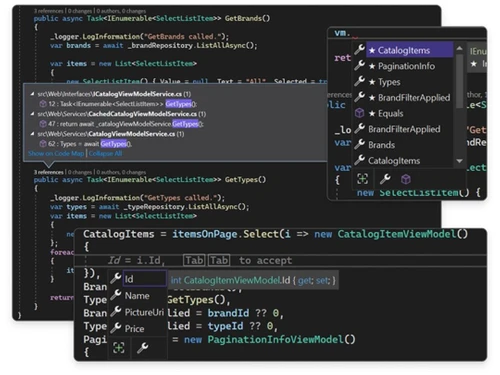
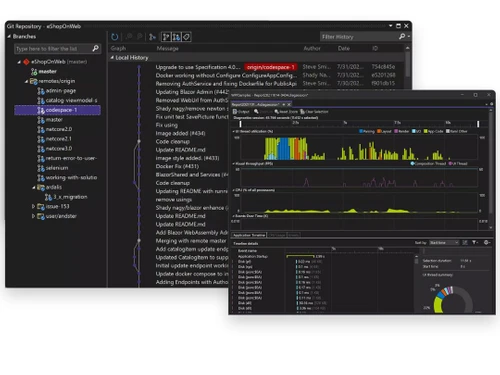
Microsoft Visual Studio provides support for 36 programming languages. This IDE Software provides a code editor and debugger for these different languages. The code editor is powered by IntelliSense, making intelligent code completion possible. It also supports version control integration like Git integration, performance profiling, testing framework, project management framework, code refactoring, designer for GUI building, database schema designing, class designer, etc., making it a single IDE for all programming needs.

Microsoft Visual Studio (MOLP) also enables collaboration among various team members by providing efficient project management and code sharing. It is a desktop IDE, cross-platform compatible, and can be used on Windows, Linux, and Mac operating systems.

Why Choose Microsoft Visual Studio?

  • Robust development environment: It is a powerful IDE that provides numerous features for software development. It makes software development more accessible, from coding, editing, debugging, and deploying applications.
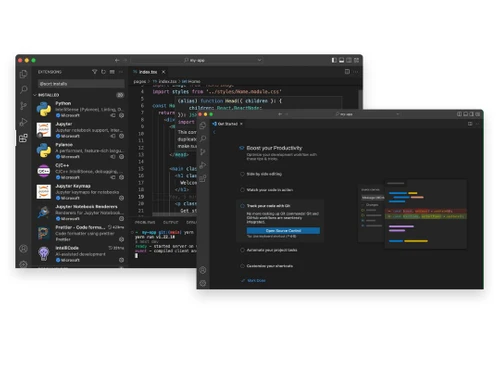
  • Multiple language support: It can be used to develop codes for more than 36 languages, including Visual Basic, C++, C#, F#, JavaScript, .NET framework, and more.
  • Multiple platforms are compatible: It runs on Windows, Linux, Mac operating systems, Web, and cloud applications. It can create Windows, Cloud, Web, Mobile, IoT applications, etc.
  • Debugging and testing: It provides excellent capabilities for debugging, including breakpoint setting, variable inspection, and step-by-step code execution. It also helps in unit and automated testing, making debugging and testing easier.
  • Team development: It can be integrated with applications like Git and allows for collaborative teamwork. With advanced project management tools, teamwork development is smoother and more efficient.

Benefits of Microsoft Visual Studio

  • Versatile tools: It provides multiple tools for software development and management. It also provides interfacing with the database and thus helps in complete full-stack development.
  • Multiple language support: It supports programming for various languages.
  • GUI development: GUI development is easier through drag and drop functions.
  • Debugging capabilities: The powerful tool helps fix errors and real-time code inspection. It helps in enhancing the accuracy of the code.
  • Cloud development: It offers tools that allow Azure application development.
  • Mobile App Development: It supports mobile application development for Android and iOS.
  • Intelligent coding editor: It uses IntelliSense that offers code completion suggestions and thus reduces manual effort and speeds up the development process.

Microsoft Visual Studio Pricing

Microsoft Visual Studio game development software pricing starts at INR 42395 at techjockey.com.

The overall pricing model is based on different factors such as personalization, extra features required, total users, and the deployment type. Please feel free to request a call from our product experts if you want to learn more about our subscription plans or premium package deals.

Read more

Microsoft Corporation Company Details

Founded Year:  1975

Microsoft Corporation is an American multinational technology company with headquarters in Redmond, Washington.

Director/Founders Paul Allen , Bill Gates
Company Size 1000+ Employees

Microsoft Visual Studio Pricing & Plans

Visual Studio Professional 2026

Calculated Price

42395 ₹50395
SAVE UPTO 16%
Exclusive of all taxes
    • Quantity

      Quantity
      Quantity

Microsoft Visual Studio Features

  • icon_check Collaboration
    It allows teamwork through version control integration allowing collaborative coding and management.
  • icon_check Flexibility
    It supports multiple languages, frameworks, and compatibility with platforms.
  • icon_check Production Management
    Supports tools and features for project planning, tracking, management, collaboration, & production management.
  • icon_check Database Integration
    It can integrate with databases like MySQL and SQL Server for database interactions.
  • icon_check API Integration
    It provides tools and libraries for API integration to extend application capabilities.
Microsoft Visual Studio Demo Video play icon

Get Microsoft Visual Studio Demo

Watch the demo video to explore key features, real workflows, and how the software fits your business needs.

Understand
Key Features
Personal
Demo Insights
Interactive
Demo Support

Microsoft Visual Studio Specifications

Supported Platforms
Windows Windows
Devices
Desktop Desktop
Deployment
Perpetual Perpetual
Suitable For
All Industries
Business Specific
All Businesses
Language
English

Explore the Best Alternative Solutions Similar to Your Business Size and Needs

Microsoft Visual Studio Review

4.5

Out of 5

img

Overall Rating

Based on
1 Verified Review

Rating Breakdown

  • Features 4.3
  • Value for Money 4.5
  • Ease of Use 4.2
  • Customer Support 4.8

87% Recommend this Product

Add Review

Microsoft Visual Studio Video Review

youtubeVideoId

4.6

“Visual Studio 2022 Review and First Thoughts”

Review by: SkillsBuild

Compare Microsoft Visual Studio With other IDE Software

Products
Ratings
Pricing
Device Supported
Deployment
Supported Platforms
  • img

    Microsoft Visual Studio

  • 4.5

  • ₹ 42395.00 excl. GST

  • Desktop

    Mobile

  • Web based

    On Premises

  • Windows

    Mac OS

  • img

    nao AI

  • 4.6

  • Price On Request

  • Desktop

    Mobile

  • Web based

    On Premises

  • Windows

    Mac OS

  • img

    Google Antigravity

  • 4.1

  • Price On Request

  • Desktop

    Mobile

  • Web based

    On Premises

  • Windows

    Mac OS

  • img

    Qoder

  • 4.4

  • Price On Request

  • Desktop

    Mobile

  • Web based

    On Premises

  • Windows

    Mac OS

  • img

    StackBlitz

  • 4.3

  • Price On Request

  • Desktop

    Mobile

  • Web based

    On Premises

  • Windows

    Mac OS

  • img

    Builder io

  • 4.1

  • Price On Request

  • Desktop

    Mobile

  • Web based

    On Premises

  • Windows

    Mac OS

  • img

    IntelliJ IDEA

  • 4.7

  • Price On Request

  • Desktop

    Mobile

  • Web based

    On Premises

  • Windows

    Mac OS

  • img

    Windsurf

  • 4.2

  • Price On Request

  • Desktop

    Mobile

  • Web based

    On Premises

  • Windows

    Mac OS

  • img

    PhpStorm

  • 4.5

  • Price On Request

  • Desktop

    Mobile

  • Web based

    On Premises

  • Windows

    Mac OS

  • img

    Qt Creator

  • 4.4

  • Price On Request

  • Desktop

    Mobile

  • Web based

    On Premises

  • Windows

    Mac OS

  • img

    WebStorm

  • 4.4

  • Price On Request

  • Desktop

    Mobile

  • Web based

    On Premises

  • Windows

    Mac OS

(0) Product(s) selected

Microsoft Visual Studio Alternatives

See All Microsoft Visual Studio Alternatives

Starting Price:

$30 /Month

Starting Price:

$20 /Month

Available

Price on Request

Starting Price:

$30 /User/Month

Starting Price:

$15 /User/Month

Available

Price on Request

Starting Price:

$11 /Month

Available

Price on Request

Which operating Software does Microsoft Visual Studio Support?

Microsoft Visual Studio is compatible with Windows and macOS operating Software.

Is there any Microsoft Visual Studio App?

Microsoft Visual Studio app is unavailable on Android and iOS devices.

What is the deployment type of the Microsoft Visual Studio?

Microsoft Visual Studio system supports on-premises deployment.

How much does the Microsoft Visual Studio cost?

The pricing for Microsoft Visual Studio starts from INR 42395 at techjockey.com.

Who uses Microsoft Visual Studio?

Microsoft Visual Studio is a popular game development software utilized by professional game developers, independent game studios, and individuals who want to develop a game.

Is there any free trial or demo for the Microsoft Visual Studio Game Development Software?

Microsoft Visual Studio Game Development system demo is available for free with techjockey.com.

Is Microsoft Visual Studio Free?

Microsoft Visual Studio offers a free trial.

How can you download the Microsoft Visual Studio?

You can download Microsoft Visual Studio from their official website.

How does the Microsoft Visual Studio Game Development Software work?

Microsoft Visual Studio is a comprehensive software development tool that facilitates game development. It provides a user-friendly interface, powerful code editing capabilities, debugging tools, and integrated collaboration features. It helps to streamline the game development process, making it easier for developers to create, test, and deploy games efficiently.

20,000+ Software Listed

Best Price Guranteed

Free Expert Consultation

2M+ Happy Customers

Terms and Condtions

close

Users with registered businesses can purchase goods from merchants on the platform to satisfy their business needs. Users are not permitted to utilize any products acquired through the platform for resale, advertising, business, or further distribution.

For each purchase made, users will receive a Tax Invoice (or 'GST invoice') that includes specific details such as:

  • the GSTIN of the user associated with their registered business, and

  • the specified Entity Name for their business.

It should be noted that not all products are eligible for GST Invoice. Only the products displayed by participating sellers with the 'GST-based Invoice Available' callout on the product description page would qualify.

Certain goods and services are not eligible to get a GST Invoice, including items with VAS, i.e., Value Added Services (e.g., Total Mobile Protection/Assured Buyback) and those involving an exchange offer at the time of purchase.

Users must ensure the accuracy of the GSTIN, and business entity name provided for the GST Invoice. Requests for corrections into GST Invoice would not be accommodated by Techjockey.com or any Seller, and any issues arising from user-provided information are the sole responsibility of users.

Techjockey.com is not liable for the GST Invoice or any associated input tax credit. To efficiently claim an input tax credit, users should select the registered place of business address as per the GST authority's data and follow the provisions of the GST Act and rules.

To claim an input tax credit, the delivery and billing addresses must match. Furthermore, input tax credits will not be granted if the delivery address and GSTIN on the invoice are from different states. In case of incorrect GST details provided during the order placement, the order will be canceled automatically.