linkedin
WebStorm logo
play WebStorm Fundamentals: Creating Your First Project
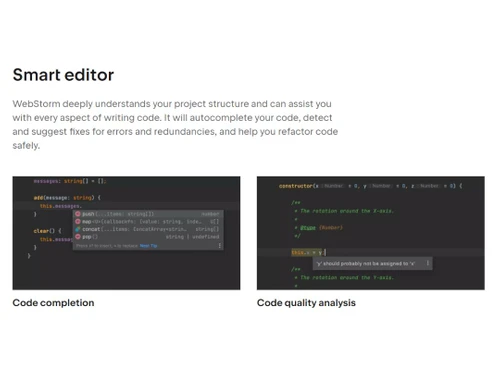
WebStorm Smart editor
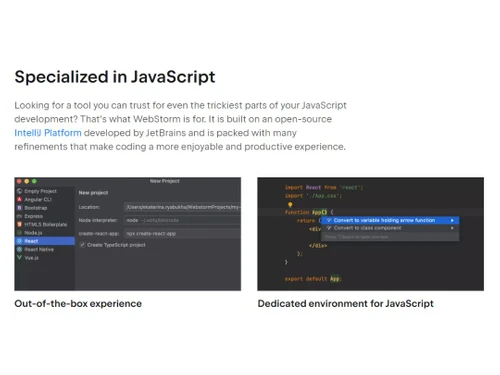
WebStorm Specialized in JavaScript

WebStorm

Brand: Jet Brains

  • 4.4

  • 5 Ratings

Boost your web development productivity with a powerful WebStorm IDE that offers intelligent code completion, real-time error detection, and integrated version control.

See More

Have you used WebStorm before?

Share your insights for better experience

Add a Review
Starting Price
$7

View plans

100% Genuine
Products
Best Price
Guaranteed
Safe & Secure
Payment
  • Description

  • Pricing

  • Features

  • Specification

  • Review

  • Compare

  • Alternatives

  • FAQ

Starting at $7

WebStorm Software Overview

What is WebStorm Software?

WebStorm is an integrated development environment primarily designed for JavaScript and its associated technologies. It offers detailed tools and features that streamline Java application development. It helps in the development of client-side and server-side Java applications. But it also can be used for JavaScript frameworks like Node.js, Angular, React, and Vue, js. It has a powerful editor that supports editing, copies, paste functions, auto-code completion, and syntax highlighting features.

WebStorm provides support for refactoring of entire codebase within a few clicks. It helps in implementing significant structural changes. Its strong debugging capabilities allow developers to set breakpoints, step through code execution and inspect variables. This platform also supports unit testing frameworks.

It can also be integrated with various testing platforms. It has excellent navigational control support. Jump to any section or code component through search and find its usage in a few clicks. It can also be integrated with version control systems like SVN, Mercurial, and Git. This platform includes hundreds of inspections, spelling, and grammar checkers for all supported languages.

Why Choose WebStorm?

  • Robust JavaScript Development: It provides excellent support for JavaScript development with its powerful editor and developing environment. It provides advanced code completion, code navigation, syntax highlighting, refactoring, and error detection. It is the preferred choice of JavaScript developers.
  • Smart Code Assistance: productivity gets significantly boosted by the intelligent code assistance provided by this platform. It offers quick fixes, refactoring, and code suggestions. It helps the developers in catching errors early along with writing cleaner codes.
  • Extensive automated process: it offers a detailed automated process and built-in tools that write complex programming tasks. Its features include advanced version control, built-in HTTP client, and unit testing.
  • Seamless integration with tools: this platform can be easily integrated with popular tools, task runners and version control systems like Git. This platform's seamless integration helps simplify tasks like managing code changes, running tests, and collaborating with team members.
  • Cross-platform support: being a cross-platform IDE, it is available for Windows, MacOS, and Linux. Thus, developers can work with their preferred operating system without compromising on the features and functionalities of the IDE.
  • Web Technologies Support: a wide range of web technologies like HTML, CSS and more are comprehensively supported by this platform. Each technology offers advanced features like code completion, live editing, and formatting.

Benefits of WebStorm IDE Software

  • Greater control and powerful IDE: This IDE provides a powerful editor giving programmers greater control.
  • Easy to use: The software is highly user-friendly and easy to work with.
  • Multiple web technology support: It can be used for coding with Java, JavaScript, HTML, CSS, and TypeScript and client and server-side application development.
  • Increased productivity features: There is a built-in terminal for quick access to regularly used code snippets, customizable project templates, keyboard shortcuts and running commands. It helps the developers remain focused on development.
  • Time-Saving: with features like refactoring, code analysis, live editing, and debugging, a lot of time taken for development gets reduced. It helps the developers efficiently write the coding.

WebStorm IDE Pricing

WebStorm IDE system pricing starts at $7 at techjockey.com.

The overall pricing model is based on different factors such as personalization, extra features required, total users, and the deployment type. Please feel free to request a call from our product experts if you want to learn more about our subscription plans or premium package deals.

Read more

Jet Brains Company Details

Founded Year:  2000

JetBrains is a global software company that creates professional software development tools and advanced collaboration solutions.

Director/Founders Eugene Belyaev, Sergey Dmitriev, Valentin Kipiatkov
Company Size 1000+ Employees

WebStorm Pricing & Plans

Basic
Key Features
  • Debugging
  • Code Development
  • Code Editing
  • Graphical User Interface
  • For Developers
  • Customizable environment
  • Efficient Teamwork
  • Built-in developer tools
  • Code completion
  • Quick Documentation
Starting at $7
    • Licenses

      Licenses
      Licenses
    • Monthly

      Monthly
      Monthly

Key Features

  • Debugging

  • Code Development

  • Code Editing

  • Graphical User Interface

  • For Developers

  • Customizable environment

  • Efficient Teamwork

  • Built-in developer tools

  • Code completion

  • Quick Documentation

WebStorm Features

  • icon_check Debugging
    Provides comprehensive debugging tools for identifying and fixing errors in code.
  • icon_check Code Development
    It offers a great editor, auto-completion, and other feature-rich environments for high-quality code development.
  • icon_check Code Editing
    Its powerful code editor provides auto-completion, error-free coding with advanced editing capabilities.
  • icon_check Graphical User Interface
    A user-friendly and visually appealing interface for an ideal development experience.
  • icon_check For Developers
    It is specifically designed to meet the requirements of web developers.
  • icon_check Customizable environment
    To suit the preferences and workflow of the developers, it offers a customizable development environment.
  • icon_check Efficient Teamwork
    It offers features that enable collaboration for smooth and efficient teamwork.
  • icon_check Built-in developer tools
    It offers a wide range of built-in tools for a seamless code development process.
  • icon_check Code completion
    Intelligent code completion feature helps reduce errors and increase productivity.
  • icon_check Quick Documentation
    It offers instant access to documentation, helping the developers to get relevant information about IDE.
WebStorm Demo Video play icon

Get WebStorm Demo

Watch the demo video to explore key features, real workflows, and how the software fits your business needs.

Understand
Key Features
Personal
Demo Insights
Interactive
Demo Support

WebStorm Specifications

Supported Platforms
Windows Windows MacOS MacOS Linux Linux
Devices
Desktop Desktop
Deployment
Cloud-Based Cloud-Based Perpetual Perpetual
Suitable For
All Industries
Business Specific
All Businesses
Business Size
Small Business Medium Business Enterprises
Customer Support
Phone Email
Language
English
Integration
API Integration
Training Resources
Webinars Documentation Videos

Explore the Best Alternative Solutions Similar to Your Business Size and Needs

WebStorm Review

4.4

Out of 5

img

Overall Rating

Based on
5 Verified Ratings

Rating Breakdown

  • Features 4.4
  • Value for Money 4.5
  • Ease of Use 4.4
  • Customer Support 4.4

88% Recommend this Product

Add Review

Techjockey Trusted Reviews from Verified Users

No reviews are currently available for WebStorm. Discover similar IDE Software reviews

  • PyCharm

    4.8

    Whats great - As a real user of PyCharm, I have found that this IDE offers numerous advantages and useful features to make programming in P... read more

  • Eclipse IDE

    4.8

    Whats great - The application has all the modern features required for developing java software, and can be integrated with Github.It fits ... read more

  • Netbeans

    4.0

    Whats great - The Smarter and Faster Way to Code read more

Compare WebStorm With other IDE Software

Products
Ratings
Pricing
Device Supported
Deployment
Supported Platforms
  • img

    WebStorm

  • 4.4

  • Price On Request

  • Desktop

    Mobile

  • Web based

    On Premises

  • Windows

    Mac OS

  • img

    IntelliJ IDEA

  • 4.7

  • Price On Request

  • Desktop

    Mobile

  • Web based

    On Premises

  • Windows

    Mac OS

  • img

    RubyMine

  • 4.7

  • Price On Request

  • Desktop

    Mobile

  • Web based

    On Premises

  • Windows

    Mac OS

  • img

    PyCharm

  • 4.7

  • Price On Request

  • Desktop

    Mobile

  • Web based

    On Premises

  • Windows

    Mac OS

  • img

    nao AI

  • 4.6

  • Price On Request

  • Desktop

    Mobile

  • Web based

    On Premises

  • Windows

    Mac OS

  • img

    Google Antigravity

  • 4.1

  • Price On Request

  • Desktop

    Mobile

  • Web based

    On Premises

  • Windows

    Mac OS

  • img

    Qoder

  • 4.4

  • Price On Request

  • Desktop

    Mobile

  • Web based

    On Premises

  • Windows

    Mac OS

  • img

    StackBlitz

  • 4.3

  • Price On Request

  • Desktop

    Mobile

  • Web based

    On Premises

  • Windows

    Mac OS

  • img

    Builder io

  • 4.1

  • Price On Request

  • Desktop

    Mobile

  • Web based

    On Premises

  • Windows

    Mac OS

  • img

    Windsurf

  • 4.2

  • Price On Request

  • Desktop

    Mobile

  • Web based

    On Premises

  • Windows

    Mac OS

  • img

    PhpStorm

  • 4.5

  • Price On Request

  • Desktop

    Mobile

  • Web based

    On Premises

  • Windows

    Mac OS

(2) Product(s) selected

WebStorm Alternatives

See All WebStorm Alternatives

Starting Price:

$30 /Month

Starting Price:

$20 /Month

Available

Price on Request

Starting Price:

$30 /User/Month

Starting Price:

$15 /User/Month

Available

Price on Request

Starting Price:

$11 /Month
Available

Price on Request

Which operating system does the WebStorm Software Support?

WebStorm software is compatible with Windows and macOS operating systems.

Is there any WebStorm App?

WebStorm app is unavailable on Android and iOS devices.

What is the deployment type of the WebStorm Software?

WebStorm system supports on-premises deployment.

How much does the WebStorm cost?

WebStorm pricing starts from $7 at techjockey.com.

Who are the potential users of the WebStorm?

WebStorm can be used by researchers, students, app developers, web developers, coders, and individuals needing IDE software.

Is there any free trial or demo for WebStorm?

WebStorm demo is available for free with techjockey.com.

Is WebStorm Free?

WebStorm offers a 30-day free trial.

How can you download the WebStorm?

You can download WebStorm software through their official website.

How does WebStorm work?

WebStorm is an IDE designed for JavaScript and related technologies. It enhances the development process by automating repetitive tasks and assisting with intricate coding challenges, resulting in a more enjoyable and efficient programming experience.

20,000+ Software Listed

Best Price Guranteed

Free Expert Consultation

2M+ Happy Customers

Terms and Condtions

close

Users with registered businesses can purchase goods from merchants on the platform to satisfy their business needs. Users are not permitted to utilize any products acquired through the platform for resale, advertising, business, or further distribution.

For each purchase made, users will receive a Tax Invoice (or 'GST invoice') that includes specific details such as:

  • the GSTIN of the user associated with their registered business, and

  • the specified Entity Name for their business.

It should be noted that not all products are eligible for GST Invoice. Only the products displayed by participating sellers with the 'GST-based Invoice Available' callout on the product description page would qualify.

Certain goods and services are not eligible to get a GST Invoice, including items with VAS, i.e., Value Added Services (e.g., Total Mobile Protection/Assured Buyback) and those involving an exchange offer at the time of purchase.

Users must ensure the accuracy of the GSTIN, and business entity name provided for the GST Invoice. Requests for corrections into GST Invoice would not be accommodated by Techjockey.com or any Seller, and any issues arising from user-provided information are the sole responsibility of users.

Techjockey.com is not liable for the GST Invoice or any associated input tax credit. To efficiently claim an input tax credit, users should select the registered place of business address as per the GST authority's data and follow the provisions of the GST Act and rules.

To claim an input tax credit, the delivery and billing addresses must match. Furthermore, input tax credits will not be granted if the delivery address and GSTIN on the invoice are from different states. In case of incorrect GST details provided during the order placement, the order will be canceled automatically.