linkedin
Classbot logo
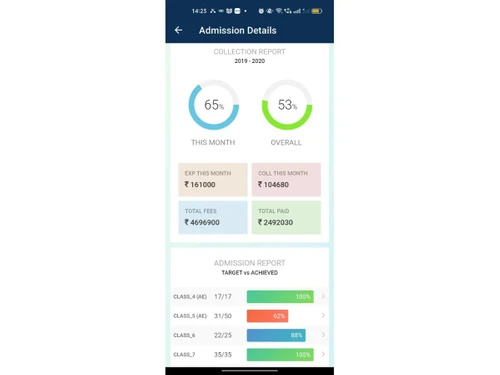
Classbot admin details
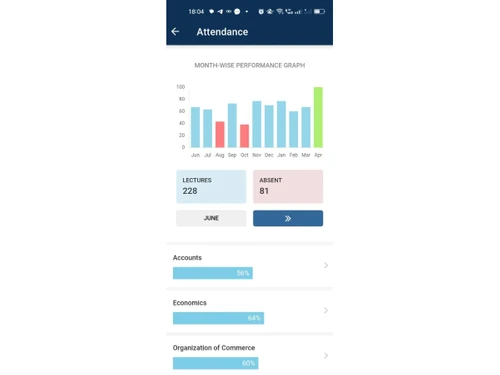
Classbot attendance
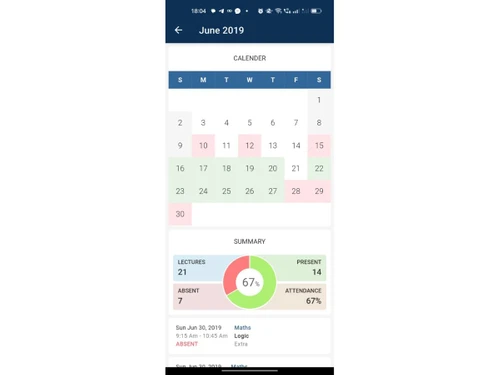
Classbot summary

Classbot

Brand: Hyperbot Technologies

  • 4.1

  • 5 Ratings

A smart education tool that helps schools manage classes, attendance, reports, and fees with full automation.

See More

Have you used Classbot before?

Share your insights for better experience

Add a Review
Starting Price
₹5,000 excl.GST
₹ 5,900 incl. GST

View plans

100% Genuine
Products
Best Price
Guaranteed
Safe & Secure
Payment
  • Description

  • Pricing

  • Features

  • Specification

  • Review

  • Compare

  • Alternatives

  • FAQ

Starting at ₹5,000

Classbot Software Overview

What is Classbot?

Classbot is a complete educational software that helps schools, colleges, and coaching centres manage their daily tasks. It includes everything from attendance and fee tracking to performance reports and class schedules. The platform brings all student data to one place and makes managing academic activities much easier. It is built to reduce paperwork and improve communication between teachers, students, and parents.

This business software offers smart solutions like a timetable planner, syllabus tracker, and dashboard analytics to give real-time updates on student progress. It helps institutes stay organized by automating many processes. Classbot is ideal for institutions that want to save time, improve teaching quality, and manage operations in a simpler way.

Why Choose Classbot?

  • Complete academic management: Handles all school-related tasks from attendance to exams and scheduling.
  • Saves manual work: Reduces daily paperwork with digital tools and automation features.
  • Smart attendance tracking: Automatically marks and records student attendance daily.
  • Improves fee tracking: Tracks pending, paid, and upcoming fee payments in one place.
  • Quick performance review: Generates marksheets and performance reports instantly.
  • Tracks lesson progress: Teachers can update and monitor syllabus completion easily.
  • Custom dashboards: Gives a complete view of activities and performance in real time.
  • Secure access control: Role-based login for admins, teachers, and students ensures data safety.
  • Organizes class schedules: Plans and adjusts timetables automatically when needed.
  • Easy to use: No technical knowledge is needed for teachers and staff to operate.

Benefits of Classbot

  • Better student insights: Provides detailed reports on attendance, marks, and activities.
  • Improves learning outcomes: Helps teachers focus on teaching by reducing admin work.
  • Boosts parent communication: Keeps parents informed about their child's performance.
  • Faster administrative work: Automates routine school tasks like fee collection and timetable planning.
  • Saves cost and effort: Reduces the need for physical records and manual processes.
  • Instant report generation: Create reports for students and classes within minutes.
  • No data loss risk: Everything is saved securely in the cloud with backup options.
  • Helps in audits and planning: Real-time analytics support academic and admin planning.
  • Works on all devices: Staff and students can use it on mobile, tablet, or desktop.
  • Scales with your institute: Whether 50 students or 5,000, it handles growth easily.

Classbot Pricing

Classbot price starts at INR 5000 per year at Techjockey.com. The pricing model is based on different parameters, including extra features, deployment type, and the total number of users. For further queries related to the product, you can contact our product team and learn more about the pricing and offers.

Read more

Classbot Pricing & Plans

Classbot
Key Features
  • Fee Management
  • Automated Attendance
  • Smart Timetable Planner
  • Performance Reports
  • Syllabus Tracker
  • Analytics Dashboard

Calculated Price

5000 Exclusive of all taxes
    • Users

      Users
      Users
    • Yearly

      Yearly
      Yearly

Key Features

  • Fee Management

  • Automated Attendance

  • Smart Timetable Planner

  • Performance Reports

  • Syllabus Tracker

  • Analytics Dashboard

Classbot Features

  • icon_check Automated Attendance
    Tracks and records daily student attendance without manual entry.
  • icon_check Fee Management
    Manages all types of school fees and generates payment receipts easily.
  • icon_check Smart Timetable Planner
    Auto-creates class schedules and allows quick updates or changes.
  • icon_check Performance Reports
    Generates student report cards and performance analytics instantly.
  • icon_check Syllabus Tracker
    Monitors lesson progress and helps teachers complete the syllabus on time.
  • icon_check Analytics Dashboard
    Shows a summary of attendance, performance, and academic progress visually.
  • icon_check Role-Based Access Control (RBAC)
    Allows secure login with different access for admins, teachers, and students.
  • icon_check Enquiry Management
    Efficiently capture and organize student leads while streamlining follow-up reminders to boost your admission conversion.
  • icon_check Admission Funnel Tracking
    Monitor the entire journey of a prospective student from the initial inquiry stage to the final successful enrollment.
  • icon_check Real-Time Biometric
    Automate student and staff attendance tracking with biometric integration that updates your centralized records instantly.
  • icon_check Syllabus Tracking
    Monitor the progress of your curriculum in real-time to ensure every topic is completed according to your academic schedule.
  • icon_check Insightful Admin Dashboard
    Gain a comprehensive overview of your institute's operations, finances, and academic performance through a visual board.
  • icon_check Academic Planner
    Prepare structured batch-wise academic plans to ensure a consistent and high-quality educational delivery for all students.
  • icon_check Payroll and Expense Records
    Effectively manage staff salaries and track daily operational expenses to maintain a transparent and accurate account book.
  • icon_check Admin Control
    Ensure data security by defining specific roles and permission levels for different members of your administrative staff.

Classbot Specifications

Supported Platforms
Windows Windows iOS iOS Android Android MacOS MacOS
Devices
Desktop Desktop Mobile Mobile Tablet Tablet iPad iPad
Deployment
Cloud-Based Cloud-Based
Suitable For
Schools & Institutes College Schools Universities
Business Specific
School/Colleges University
Business Size
Small Business Startups Medium Business Enterprises
Customer Support
Phone Email Communities
Language
English
Training Resources
Videos

Explore the Best Alternative Solutions Similar to Your Business Size and Needs

Classbot Review

4.1

Out of 5

img

Overall Rating

Based on
5 Verified Ratings

Rating Breakdown

  • Features 4.1
  • Value for Money 4
  • Ease of Use 4.3
  • Customer Support 4.2

80% Recommend this Product

Add Review

Techjockey Trusted Reviews from Verified Users

No reviews are currently available for Classbot. Discover similar Educational Software reviews

  • Megam Education

    4.6

    Whats great - The user interface is simple and contemporary, and device checkout is simple and convenient. These are perhaps its best quali... read more

  • School Console

    4.6

    Whats great - The overall experience is great, and the team support is also excellent. read more

  • EDUPI

    4.7

    Whats great - I could contact with my kids' instructors and gather information about them, and it was simple to use. working well read more

Compare Classbot With other Educational Software

Products
Ratings
Pricing
Device Supported
Deployment
Supported Platforms
  • img

    Classbot

  • 4.1

  • ₹ 5000.00 excl. GST

  • Desktop

    Mobile

  • Web based

    On Premises

  • Windows

    Mac OS

  • img

    iCloudEMS

  • 4.3

  • Price On Request

  • Desktop

    Mobile

  • Web based

    On Premises

  • Windows

    Mac OS

  • img

    Chegg

  • 4.4

  • Price On Request

  • Desktop

    Mobile

  • Web based

    On Premises

  • Windows

    Mac OS

  • img

    Kuta Software

  • 4.7

  • Price On Request

  • Desktop

    Mobile

  • Web based

    On Premises

  • Windows

    Mac OS

  • img

    Megam Education

  • 4.6

  • Price On Request

  • Desktop

    Mobile

  • Web based

    On Premises

  • Windows

    Mac OS

  • img

    Fliplearn

  • 4.5

  • Price On Request

  • Desktop

    Mobile

  • Web based

    On Premises

  • Windows

    Mac OS

  • img

    Copilot

  • 4.5

  • Price On Request

  • Desktop

    Mobile

  • Web based

    On Premises

  • Windows

    Mac OS

  • img

    Elicit

  • 4.7

  • Price On Request

  • Desktop

    Mobile

  • Web based

    On Premises

  • Windows

    Mac OS

  • img

    Canvas Studio

  • 4.4

  • Price On Request

  • Desktop

    Mobile

  • Web based

    On Premises

  • Windows

    Mac OS

  • img

    MSP EDUCARE

  • 5

  • ₹ 32603

  • Desktop

    Mobile

  • Web based

    On Premises

  • Windows

    Mac OS

(0) Product(s) selected

Classbot Alternatives

See All Classbot Alternatives

Available

Price on Request

Starting Price:

$20 /month

Available

Price on Request

Starting Price:

$12 /Month

Starting Price:

$75

Starting Price:

$149 /Year

Available

Price on Request

Starting Price:

$5 /Month

Articles for Classbot

See All Related Articles

How much does Classbot cost?

Classbot price starts at INR 5000 at Techjockey.com. It offers a full education management system for schools and coaching centres.

How does Classbot work?

Classbot automates daily school tasks like attendance, fee tracking, reporting, and syllabus updates with one easy-to-use dashboard.

Who uses Classbot?

Classbot is used by schools, colleges, tutors, coaching centres, and educational institutions looking for smart admin tools.

Can Classbot manage attendance automatically?

Yes, Classbot offers automated attendance tracking with real-time records of absentees and present students.

Does Classbot help in planning class timetables?

Yes, Classbot includes a smart timetable planner that creates and updates class schedules with ease.

Can I track syllabus completion with this tool?

Yes, teachers can update and track syllabus progress to ensure on-time curriculum completion.

Is the data stored safely on Classbot?

Yes, Classbot uses secure cloud storage and access controls to keep all student and staff data protected.

Does it support different user roles?

Yes, the RBAC feature lets admins, teachers, and students access only the data relevant to them.

Can I generate student reports with Classbot?

Yes, Classbot makes performance reports, marksheets, and academic summaries instantly.

Is Classbot easy for teachers to use?

Yes, the interface is user-friendly and does not need any technical knowledge to operate.

20,000+ Software Listed

Best Price Guranteed

Free Expert Consultation

2M+ Happy Customers

Terms and Condtions

close

Users with registered businesses can purchase goods from merchants on the platform to satisfy their business needs. Users are not permitted to utilize any products acquired through the platform for resale, advertising, business, or further distribution.

For each purchase made, users will receive a Tax Invoice (or 'GST invoice') that includes specific details such as:

  • the GSTIN of the user associated with their registered business, and

  • the specified Entity Name for their business.

It should be noted that not all products are eligible for GST Invoice. Only the products displayed by participating sellers with the 'GST-based Invoice Available' callout on the product description page would qualify.

Certain goods and services are not eligible to get a GST Invoice, including items with VAS, i.e., Value Added Services (e.g., Total Mobile Protection/Assured Buyback) and those involving an exchange offer at the time of purchase.

Users must ensure the accuracy of the GSTIN, and business entity name provided for the GST Invoice. Requests for corrections into GST Invoice would not be accommodated by Techjockey.com or any Seller, and any issues arising from user-provided information are the sole responsibility of users.

Techjockey.com is not liable for the GST Invoice or any associated input tax credit. To efficiently claim an input tax credit, users should select the registered place of business address as per the GST authority's data and follow the provisions of the GST Act and rules.

To claim an input tax credit, the delivery and billing addresses must match. Furthermore, input tax credits will not be granted if the delivery address and GSTIN on the invoice are from different states. In case of incorrect GST details provided during the order placement, the order will be canceled automatically.