linkedin
Cafelive logo
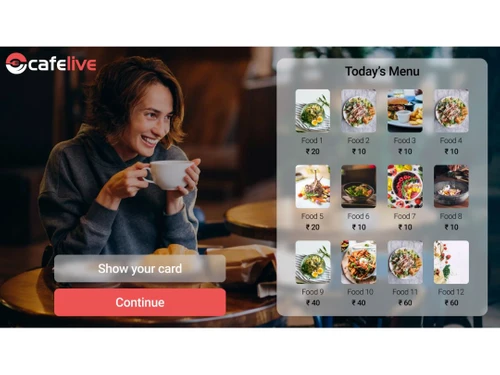
Cafelive menu
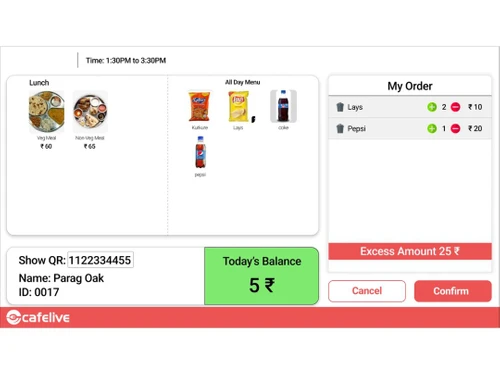
Cafelive cart
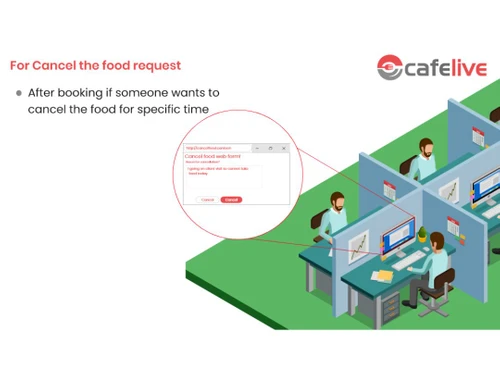
Cafelive cancel request

Cafelive

Brand: DAccess Security

  • 4.9

  • 5 Ratings & 5 Reviews

Cafelive Canteen Management system is an advanced combination between canteen management software and hardware devices. The system is specially designed to cover big canteen facilities that feed a large number of employees on a regular basis. It provides a friendly user interface for food outlets, besides top graded functionalities that can be used to streamline business-appropriate tasks like, m...

See More

Have you used Cafelive before?

Share your insights for better experience

Add a Review
Starting Price
₹45,000 excl.GST
₹ 53,100 incl. GST

View plans

offer Save upto 18%, Get GST Invoice on your business purchase T&C
offer Buy Now & Pay Later, Check offer on payment page.
Buy Now
100% Genuine
Products
Best Price
Guaranteed
Safe & Secure
Payment
  • Description

  • Pricing

  • Features

  • Specification

  • Review

  • Compare

  • Alternatives

  • FAQ

Starting at ₹45,000
Buy Now

Cafelive Software Overview

What is Cafelive Canteen Management System?

Cafelive Canteen Management system is an advanced combination between canteen management software and hardware devices. The system is specially designed to cover big canteen facilities that feed a large number of employees on a regular basis. It provides a friendly user interface for food outlets, besides top graded functionalities that can be used to streamline business-appropriate tasks like, menu designs, bills, employee shifts and a lot more.

Right from ordering food till the time it gets served on the table Cafelive Canteen Management System makes the entire process quite seamless. Other notable features of DAccess canteen management system are inventory management, centralized employee engagement, touch screen operations, salary debit facility and smart billing designs.

Why Use Cafelive Canteen Management System?

  1. Make Accounting Easy: The software with its inbuilt functionalities makes accounting related tasks a lot easier for canteen managers.
  2. Credit Scheme for Employees: It comes equipped with an advanced credit-debit facility for employees.
  3. Optimised Utilisation of Food Products: Seamless inventory management facilities and real-time notifications reduce food wastage.
  4. Cash Alternatives: Cafelive Canteen Management System allows customers to pay for their food with prepaid cards or coupons rather than cash.
  5. Employee ID Card: Helps create lucrative offers for customers who are using the same employee ID card every time they come to eat.

Benefits of Using Cafelive Canteen Management Software

  1. Simple Interface: The system comes equipped with a user-friendly interface, which is fast to install and easy to learn. Canteen supervisors can start using the software after a short training session.
  2. Centralised System: Cafelive Canteen Management System comes equipped with a central CMS server, making it easy for supervisors to streamline multiple canteen related tasks through a unified platform.
  3. Paperless Transactions: It ensures cashless and paperless transactions, preventing the chance of maintaining registers.
  4. Prepaid Cards & Coupons: Coupon facility makes it easier for customers to pay for food online without standing in the cash queue.
  5. Employee ID Card: The employee ID card facility helps your employees avail canteen facility anytime.

Pricing of Cafelive Canteen Management

Cafelive Canteen Management System’s price in India starts at INR 45,000 at techjockey.com.

Read more

DAccess Security Company Details

Founded Year:  2006

Daccess Security Systems is a provider of state-of-the-art integrated security systems and custom software development.

Director/Founders Dhananjay Sonawane
Company Size 1-100 Employees

Cafelive Pricing & Plans

Cafelive Canteen Management Software
Key Features
  • Canteen Management
  • Manual Entry
  • Shift Management
  • Menu Management
  • Vital Information
  • Inventory Management

Calculated Price

45000 Exclusive of all taxes
    • Quantity

      Quantity
      Quantity

Key Features

  • Canteen Management

  • Manual Entry

  • Shift Management

  • Menu Management

  • Vital Information

  • Inventory Management

Cafelive Features

  • icon_check User Interface
    Intuitive, user-friendly dashboard for smooth canteen operations.
  • icon_check Billing & Invoicing
    Automated bill generation and invoice tracking for fast checkouts.
  • icon_check Inventory Management
    Real-time stock monitoring and low-inventory alerts.
  • icon_check Touch Screen
    Optimized for quick touch-based ordering and billing.
  • icon_check Canteen Management
    CMS takes care of subsidies provided by the companies to their employees.
  • icon_check Manual Entry
    Manual entry of transactions is feasible.
  • icon_check Shift Management
    CMS can be linked with shift management system.
  • icon_check Menu Management
    Daily menu creation by the caterer is possible using CMS.
  • icon_check Vital Information
    Advance notice of employee canteen usage for any day or shift can be communicated to the caterers for preparation.
  • icon_check Go Paperless
    Cashlessand paperless transactions.

Cafelive Specifications

Supported Platforms
Windows Windows
Devices
Desktop Desktop
Deployment
Cloud-Based Cloud-Based
Suitable For
Hospitality
Business Specific
All Businesses
Business Size
Small Business Startups Medium Business Enterprises
Customer Support
Email Communities
Language
English
Training Resources
Videos

Cafelive Reviews

4.9

Out of 5

img

Overall Rating

Based on
5 Verified Reviews

Rating Breakdown

  • Features 5
  • Value for Money 4.7
  • Ease of Use 5
  • Customer Support 4.9

90% Recommend this Product

Add Review

Pros

  • "Quick and easy way to get advice regarding software options to fit your business."

    ARADHANA SHRIVASTWAJul 13, 2017

  • "Had a great experience. Our service agent was very knowledgeable and wanted to now how to help our organization. It was wonderful and would use again if we have a need!"

    Jitender KumarJul 6, 2017

Cons

  • " If it had the cloud-based version, that would also be useful. On-premise servers can have issues at times. "

    Parvesh Aug 5, 2020

  • "There are random server issues at times. But again the 24/7 support helps in resolving the issue really quick."

    Rajeev SaxenaFeb 5, 2020

Parvesh

Owner

Industry: Retail User since: 6-12 months

4.8

Reviewed on: Aug 5, 2020

Techjockey Verified

“Helps manage canteen inventory & billing”

Pros

Daily transactions, menu creation and invoicing, everything has been made easy by DAccess canteen management solution. Managing orders and billing is easy as our customers get the prepaid card system to avoid queues and make payment instantly.

Cons

If it had the cloud-based version, that would also be useful. On-premise servers can have issues at times.

Reason to switch

The last canteen software lacked robust accounting features, which is important for managing the business.

Ramesh Bisht

Industry: Retail User since: < 6 months

4.8

Reviewed on: Mar 20, 2021

Techjockey Verified

“Best for managing large canteens”

Pros

The best part about using DAccess is that it is suitable for large canteens where hundreds of employees visit every day. We also have to manage a huge inventory stock that is easily possible with DAccess. I have linked it with our shift management software and everything is so streamlined now. We have happy staff & customers.

Cons

Server issues really affected our work in the beginning and we were worried if this is going to be long term. But then the support team helped us resolve the matter. It was due to some faulty settings that the server was down.

Switched from Aathitya

Reason to switch

The last canteen management software had issues with customer service team availability and there were limited accounting modules.

Rajeev Saxena

Administrator

Industry: Retail User since: < 6 months

4.7

Reviewed on: Feb 5, 2020

Techjockey Verified

“Good for centralized canteen management”

Pros

As the number of employees using our office’s canteen increased, we felt the need to get rid of manual processes. DAccess canteen management app did that for us. This canteen management software helps in managing coupons, menu management, staff management, and more.

Cons

There are random server issues at times. But again the 24/7 support helps in resolving the issue really quick.

Switched from Goodbox Mini App

Reason to switch

DAccess is designed especially for managing office canteens with exclusive features for employees.

See All Cafelive Reviews

Compare Cafelive With other Canteen Management System

Products
Ratings
Pricing
Device Supported
Deployment
Supported Platforms
  • img

    Cafelive

  • 4.9

  • ₹ 45000.00 excl. GST

  • Desktop

    Mobile

  • Web based

    On Premises

  • Windows

    Mac OS

  • img

    Xperts Ccs

  • 4.0

  • Price On Request

  • Desktop

    Mobile

  • Web based

    On Premises

  • Windows

    Mac OS

(0) Product(s) selected

Cafelive Alternatives

See All Cafelive Alternatives

Available

Price on Request

Can I integrate more than one canteen device with Cafelive Canteen Management system?

Yes, you can integrate more than one canteen device with Cafelive Canteen management System. All the devices will be connected to a central CMS server, facilitating easy management.

Is Cafelive Canteen Management System a software or a device?

Cafelive Canteen Management System components include a comprehensive CMS server that can be used to operate multiple canteen operating devices over LAN/WAN networks.

Can I book a Cafelive Canteen Management System demo online?

Yes, Cafelive Canteen Management System is available for an online demo at Techjockey.

Can I use Cafelive Canteen Management System to manage employee wise shifts?

Yes, you can plan and schedule employee wise shifts for upcoming working days with the Cafelive Canteen Management system.

Does Cafelive Canteen Management have a mobile app of its own?

No, Cafelive Canteen management System does not have a mobile app.

20,000+ Software Listed

Best Price Guranteed

Free Expert Consultation

2M+ Happy Customers

Terms and Condtions

close

Users with registered businesses can purchase goods from merchants on the platform to satisfy their business needs. Users are not permitted to utilize any products acquired through the platform for resale, advertising, business, or further distribution.

For each purchase made, users will receive a Tax Invoice (or 'GST invoice') that includes specific details such as:

  • the GSTIN of the user associated with their registered business, and

  • the specified Entity Name for their business.

It should be noted that not all products are eligible for GST Invoice. Only the products displayed by participating sellers with the 'GST-based Invoice Available' callout on the product description page would qualify.

Certain goods and services are not eligible to get a GST Invoice, including items with VAS, i.e., Value Added Services (e.g., Total Mobile Protection/Assured Buyback) and those involving an exchange offer at the time of purchase.

Users must ensure the accuracy of the GSTIN, and business entity name provided for the GST Invoice. Requests for corrections into GST Invoice would not be accommodated by Techjockey.com or any Seller, and any issues arising from user-provided information are the sole responsibility of users.

Techjockey.com is not liable for the GST Invoice or any associated input tax credit. To efficiently claim an input tax credit, users should select the registered place of business address as per the GST authority's data and follow the provisions of the GST Act and rules.

To claim an input tax credit, the delivery and billing addresses must match. Furthermore, input tax credits will not be granted if the delivery address and GSTIN on the invoice are from different states. In case of incorrect GST details provided during the order placement, the order will be canceled automatically.