linkedin
Databar logo
play Databar Introduction | Enrich at scale
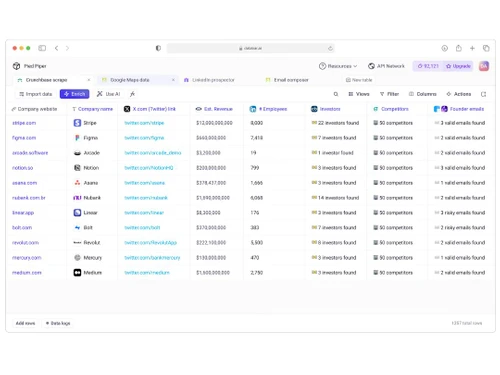
databar-datasources
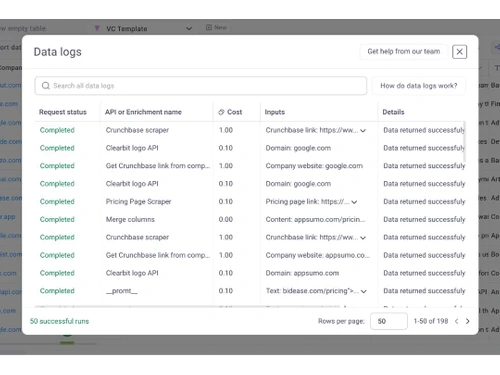
databar-datalogs

Databar

Brand: Databar

  • 4.1

  • 3 Ratings

Databar is a data integration software that facilitates seamless data exchange and transformation across different systems and applications.

See More

Have you used Databar before?

Share your insights for better experience

Add a Review
Starting Price
$39

View plans

100% Genuine
Products
Best Price
Guaranteed
Safe & Secure
Payment
  • Description

  • Pricing

  • Features

  • Specification

  • Review

  • Compare

  • Alternatives

  • FAQ

Starting at $39

Databar Software Overview

What is Databar?

Databar is a data integration software designed to simplify the process of connecting, transforming, and exchanging data between various systems, applications, and platforms. It helps businesses streamline their data flow by automating data extraction, transformation, and loading (ETL) processes.

With robust connectors and support for different data formats, Databar ensures accurate and efficient data synchronization across diverse environments. This enables organizations to maintain data consistency, improve decision-making, and optimize overall data management strategies.

Why Choose Databar?

  • No-Code Data Integration: Databar enables users to connect to over 1,200 APIs without any coding, making it accessible for non-technical users.
  • Extensive Integration Library: Access to more than 1,200 API connectors allows seamless data enrichment and collection from various sources.
  • Real-Time Data Enrichment: Automate data refreshes and dynamic enrichments to ensure your data is always up-to-date.
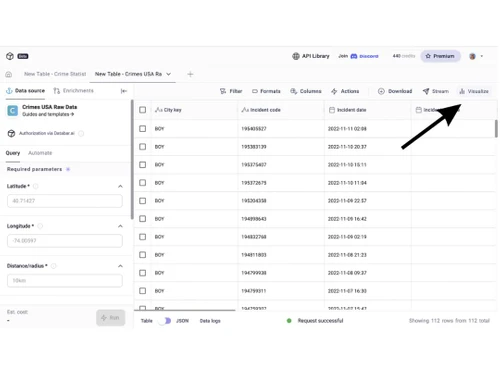
  • Custom REST API Creation: Create custom REST APIs and visualize data to tailor the platform to your specific needs.
  • User-Friendly Interface: The intuitive spreadsheet-like interface allows users to manage data effortlessly, even without technical expertise.
  • Advanced Web Scraping: Utilize advanced web scraping capabilities to gather data from various online sources efficiently.

Benefits of Databar

  • Automated Workflows: Design and automate workflows with a drag-and-drop interface, streamlining data processing tasks.
  • OpenAI API Integration: Leverage OpenAI API for advanced natural language processing tasks, enhancing data analysis capabilities.
  • Seamless CRM Integration: Integrate with popular CRM systems like HubSpot and Salesforce to enrich and manage customer data effectively.
  • Cross-Departmental Functionality: Databar caters to various departments, including sales, marketing, finance, and HR, providing tailored data solutions.
  • Cost-Effective Pricing Plans: Offers flexible pricing plans starting at $39 per month, accommodating businesses of different sizes.
  • Comprehensive Data Security: Ensures data security with encryption, access controls, and compliance with industry standards.

Databar Pricing

Databar price in India starts at $39 per month at techjockey.com. The pricing model is based on different parameters, including extra features, deployment type, and the total number of users. For further queries related to the product, you can contact our product team and learn more about the pricing and offers.

Read more

Databar Company Details

Founded Year:  2020

Scale your GTM with our AI Web Scraper, Waterfall Enrichments, and access to 80+ data providers (access included!).

Director/Founders Adilet Sarsembaev, David Abaev
Company Size 1-100 Employees

Databar Pricing & Plans

Launch
Starting at $39
    • Licenses

      Licenses
      Licenses
    • Monthly

      Monthly
      Monthly

Key Features

  • 1,000 credits per month

  • Access 80+ data providers

  • Unlimited tables & automations

  • AI Scraper & Prompts

  • 10x data coverage with waterfalls

  • Integrate Webhooks and Google Sheets

Scale
Starting at $129
    • Licenses

      Licenses
      Licenses
    • Monthly

      Monthly
      Monthly

Key Features

  • 8,000 credits per month

  • Everything in Launch, plus:

  • CRM and email integrations

  • Bring your own API keys

  • Up to 5 custom Http APIs

  • Unlimited pre-built datasets

  • Batch enrich up to 10k rows

Expand
Starting at $449
    • Licenses

      Licenses
      Licenses
    • Monthly

      Monthly
      Monthly

Key Features

  • 50,000 credits per month

  • Everything in Scale, plus:

  • Batch enrich unlimited rows

  • Unlimited custom Http APIs

  • Dedicated support and prompting assistance

  • Unlimited CSV upload size

  • Turbo enrichment queue

Databar Features

  • icon_check Automated Web Scraping
    Quickly set up web scrapers without needing proxies or developers.
  • icon_check Google Sheets Integration
    Import data directly into Google Sheets for convenient analysis.
  • icon_check CRM Synchronization
    Effortlessly sync enriched data with your CRM system.
  • icon_check OAuth Connectors
    Securely connect to various services using OAuth authentication.
  • icon_check Concurrent Requests
    Execute multiple data requests simultaneously for enhanced efficiency.
  • icon_check AI Powered Query Builder
    Use AI to easily create complex data queries.
  • icon_check Custom Crypto Trackers
    Build auto-updating crypto trackers with real-time data and advanced stats.
  • icon_check Email Verification Services
    Verify email addresses in real time to maintain quality contact lists.
  • icon_check Market Trend Analysis
    Monitor and analyze market trends to stay competitive.
  • icon_check API Rate Limiting Management
    Effectively manage API rate limits to ensure continuous data access.
Databar Demo Video play icon

Get Databar Demo

Watch the demo video to explore key features, real workflows, and how the software fits your business needs.

Understand
Key Features
Personal
Demo Insights
Interactive
Demo Support

Databar Specifications

Supported Platforms
Ubuntu Ubuntu Windows Windows MacOS MacOS Linux Linux
Devices
Desktop Desktop
Deployment
Cloud-Based Cloud-Based
Suitable For
All Industries
Business Specific
All Businesses
Business Size
Small Business Startups Medium Business Enterprises SMBs SMEs MSMBs MSMEs Freelancers
Customer Support
Email Communities
Language
English
Integration
API Integration
Training Resources
Documentation Videos
AI Features
AI Integrated

Explore the Best Alternative Solutions Similar to Your Business Size and Needs

Databar Review

4.1

Out of 5

img

Overall Rating

Based on
3 Verified Ratings

Rating Breakdown

  • Features 4.1
  • Value for Money 4.3
  • Ease of Use 4
  • Customer Support 4

93% Recommend this Product

Add Review

Be the First to Review

This product has no reviews yet. Be the first to leave your feedback.

Add Review

Compare Databar With other Data Integration Software

Products
Ratings
Pricing
Device Supported
Deployment
Supported Platforms
  • img

    Databar

  • 4.1

  • Price On Request

  • Desktop

    Mobile

  • Web based

    On Premises

  • Windows

    Mac OS

  • img

    Fivetran

  • 4.7

  • Price On Request

  • Desktop

    Mobile

  • Web based

    On Premises

  • Windows

    Mac OS

  • img

    Coupler io

  • 4.2

  • Price On Request

  • Desktop

    Mobile

  • Web based

    On Premises

  • Windows

    Mac OS

  • img

    Adverity

  • 4.5

  • Price On Request

  • Desktop

    Mobile

  • Web based

    On Premises

  • Windows

    Mac OS

  • img

    Adeptia Connect

  • 4.1

  • Price On Request

  • Desktop

    Mobile

  • Web based

    On Premises

  • Windows

    Mac OS

  • img

    Unito

  • 4.5

  • Price On Request

  • Desktop

    Mobile

  • Web based

    On Premises

  • Windows

    Mac OS

  • img

    Boomi AI

  • 4.2

  • Price On Request

  • Desktop

    Mobile

  • Web based

    On Premises

  • Windows

    Mac OS

  • img

    OMNIdash

  • 5

  • Price On Request

  • Desktop

    Mobile

  • Web based

    On Premises

  • Windows

    Mac OS

  • img

    IDPA 8TB

  • 4.5

  • Price On Request

  • Desktop

    Mobile

  • Web based

    On Premises

  • Windows

    Mac OS

  • img

    Data Flow Manager

  • 4.3

  • Price On Request

  • Desktop

    Mobile

  • Web based

    On Premises

  • Windows

    Mac OS

(2) Product(s) selected

Databar Alternatives

See All Databar Alternatives

Starting Price:

$32 /Month

Starting Price:

€500

Starting Price:

$124 /Month

Available

Price on Request

Articles for Databar

See All Related Articles

How much does Databar Software cost?

The price of Databar in India starts at $39 per month on Techjockey.com.

Is there a mobile app available for Databar Software?

Currently, Databar Software does not have a dedicated mobile app.

Which operating systems are compatible with Databar Software?

Databar Software is compatible with Ubuntu, Windows, macOS, and Linux operating systems.

Does Databar Software offer a free trial?

Yes, Databar.ai provides 100 free trial credits for API requests and data enrichment tasks upon workspace creation.

How does Databar Software function?

Databar.ai is a no-code platform that enables users to collect, enrich, and automate data from over 120 providers through a spreadsheet-like interface.

Who uses Databar Software?

Professionals in sales, marketing, finance, HR, and operations seeking to automate data workflows and enhance data quality without coding can benefit from Databar.ai.

Is a free demo available for Databar Software?

Yes, Databar.ai offers introductory videos and tutorials demonstrating its features and functionalities.

Is Databar Software available for free?

Databar.ai offers a free trial with 100 credits, but does not have a permanently free plan; paid plans start at $39/month.

What types of data can be integrated with Databar Software?

Databar supports integration with various data sources, including APIs, databases, web scraping, and cloud applications.

Can Databar Software handle large volumes of data?

Yes, Databar is designed to efficiently handle large datasets and ensure quick data processing.

20,000+ Software Listed

Best Price Guranteed

Free Expert Consultation

2M+ Happy Customers

Terms and Condtions

close

Users with registered businesses can purchase goods from merchants on the platform to satisfy their business needs. Users are not permitted to utilize any products acquired through the platform for resale, advertising, business, or further distribution.

For each purchase made, users will receive a Tax Invoice (or 'GST invoice') that includes specific details such as:

  • the GSTIN of the user associated with their registered business, and

  • the specified Entity Name for their business.

It should be noted that not all products are eligible for GST Invoice. Only the products displayed by participating sellers with the 'GST-based Invoice Available' callout on the product description page would qualify.

Certain goods and services are not eligible to get a GST Invoice, including items with VAS, i.e., Value Added Services (e.g., Total Mobile Protection/Assured Buyback) and those involving an exchange offer at the time of purchase.

Users must ensure the accuracy of the GSTIN, and business entity name provided for the GST Invoice. Requests for corrections into GST Invoice would not be accommodated by Techjockey.com or any Seller, and any issues arising from user-provided information are the sole responsibility of users.

Techjockey.com is not liable for the GST Invoice or any associated input tax credit. To efficiently claim an input tax credit, users should select the registered place of business address as per the GST authority's data and follow the provisions of the GST Act and rules.

To claim an input tax credit, the delivery and billing addresses must match. Furthermore, input tax credits will not be granted if the delivery address and GSTIN on the invoice are from different states. In case of incorrect GST details provided during the order placement, the order will be canceled automatically.