linkedin
Datamolino logo
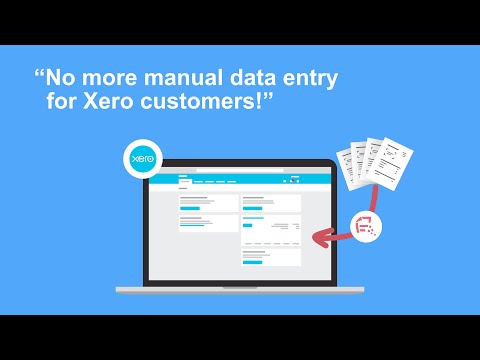
play How to use Datamolino with Xero - in 5 minutes
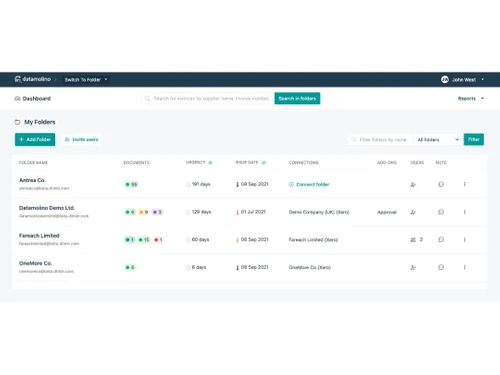
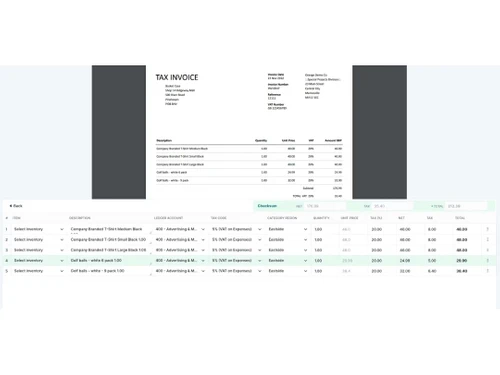
datamolino dashboard
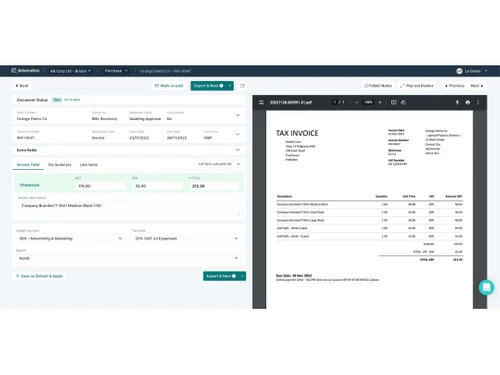
datamolino document

Datamolino

Brand: Datamolino

  • 4.0

  • 4 Ratings

Datamolino simplifies your bookkeeping by automatically extracting data from invoices and receipts. It eliminates manual data entry, saving time and reducing errors.

See More

Have you used Datamolino before?

Share your insights for better experience

Add a Review
Starting Price
$30

View plans

100% Genuine
Products
Best Price
Guaranteed
Safe & Secure
Payment
  • Description

  • Pricing

  • Features

  • Specification

  • Review

  • Compare

  • Alternatives

  • FAQ

Starting at $30

Datamolino Software Overview

What is Datamolino?

Datamolino is a cloud-based API management software which is designed to automate the process of extracting data from invoices, receipts, and other financial documents. It essentially acts as a digital data entry clerk, freeing up accountants, bookkeepers, and business owners from the tedious task of manually inputting information into accounting software.

Datamolino utilizes Optical Character Recognition (OCR) technology and smart extraction algorithms to accurately capture key data points, such as vendor names, invoice numbers, dates, amounts, and line items. The software supports multiple document formats, including PDFs and scanned images, and can be accessed across various platforms, including web browsers, iOS, and Android devices.

The primary use case for Datamolino is to automate invoice processing and streamline accounting workflows. Businesses of all sizes, from small startups to medium-sized enterprises, can benefit from its ability to reduce manual data entry, minimize errors, and accelerate the reconciliation process. Datamolino offers seamless integration with popular accounting platforms, further simplifying the accounting process and improving overall efficiency.

Why Choose Datamolino API Management Software?

  • Cross-Platform Accessibility: Datamolino is available on a wide range of devices, including Windows, iOS, Android, and web browsers. This allows you to access and manage your invoices from anywhere, at any time, providing ultimate flexibility.
  • Multiple Format Support: Forget about manually entering data from different invoice formats. Datamolino intelligently extracts information from various file types, eliminating tedious data entry and minimizing errors.
  • Smart Data Extraction: Datamolino goes beyond basic OCR. Its smart extraction technology accurately captures key invoice data, including line items, amounts, and vendor information, reducing manual review and validation.
  • Unlimited User Access: Collaborate seamlessly with your team. Datamolino allows unlimited users, enabling efficient invoice processing workflows across your organization, regardless of size.
  • Duplicate Detection: Avoid costly errors and redundant payments. Datamolino automatically detects duplicate invoices, preventing accidental overpayments and maintaining accurate financial records.
  • Automated Workflows: Streamline your invoice approval process with Datamolino's automated workflows. Route invoices to the appropriate approvers, set up approval rules, and track the status of each invoice, ensuring timely payments.
  • Seamless Integrations: Datamolino integrates with popular accounting software and other business applications, allowing you to seamlessly transfer invoice data and automate your financial processes.

Benefits of Datamolino

  • Time Savings: Automate manual data entry and invoice processing tasks, freeing up valuable time for your team to focus on more strategic activities.
  • Reduced Errors: Minimize data entry errors with Datamolino's smart data extraction and duplicate detection features, ensuring accurate financial records.
  • Improved Efficiency: Streamline your invoice processing workflows, from data capture to approval, increasing overall efficiency and productivity.
  • Enhanced Collaboration: Enable seamless collaboration with your team through unlimited user access and automated approval workflows.
  • Better Financial Control: Gain better visibility into your accounts payable, track invoice status, and ensure timely payments, improving your overall financial control.
  • Cost Savings: Reduce manual labor costs, eliminate errors, and avoid duplicate payments, resulting in significant cost savings for your business.
  • Scalability: Datamolino is designed to scale with your business. Whether you're a small startup or a growing enterprise, Datamolino can adapt to your changing needs.
  • Easy to Use: Datamolino offers a user-friendly interface and intuitive workflows, making it easy for anyone to learn and use, regardless of their technical expertise.

Pricing of Datamolino

Datamolino pricing starts at $30 per month at techjockey.com.

The pricing model is based on different parameters, including the amount of bandwidth you need, the number of servers you need, and the features you need. For further queries related to the product, you can contact our product team and learn more about the pricing and offers.

Read more

Datamolino Company Details

Founded Year:  2013

Datamolino removes the pain of manual data entry for accountants, bookkeepers and SMEs by automatically capturing data including line items from invoices, bills, receipts, and bank statements.

Director/Founders Andrej Glezl, Jan Korecky
Company Size 1-100 Employees

Datamolino Pricing & Plans

Starter
Starting at $30
    • Monthly

      Monthly
      Monthly

Key Features

  • Bills & Receipts /document-£ 0.28

  • Bank statement /page-£ 0.70

Small
Starting at $45
    • Monthly

      Monthly
      Monthly

Key Features

  • Bills & Receipts /document-£ 0.26

  • Bank statement /page-£ 0.60

Medium
Starting at $120
    • Monthly

      Monthly
      Monthly

Key Features

  • Bills & Receipts /document-£ 0.24

  • Bank statement /page-£ 0.55

Large
Starting at $250
    • Monthly

      Monthly
      Monthly

Key Features

  • Bills & Receipts /document-£ 0.20

  • Bank statement /page-£ 0.50

Datamolino Features

  • icon_check Multiple Format
    Process documents in various formats like PDF, JPG, PNG, and more.
  • icon_check Cross-Platform Invoice Support
    Works seamlessly across different platforms and devices.
  • icon_check Data Extraction
    Automatically extract essential data from invoices and documents.
  • icon_check Smart Extraction
    Uses advanced AI for accurate and intelligent data capture.
  • icon_check Capture Line Items
    Capture detailed information from invoice line items.
  • icon_check Unlimited User
    Allow access to the system for unlimited users.
  • icon_check Detecting Duplicates
    Identify and prevent duplicate invoice entries.
  • icon_check Automation
    Automate invoice processing workflows.
  • icon_check Approval Workflow
    Set up custom approval workflows for invoices
Datamolino Demo Video play icon

Get Datamolino Demo

Watch the demo video to explore key features, real workflows, and how the software fits your business needs.

Understand
Key Features
Personal
Demo Insights
Interactive
Demo Support

Datamolino Specifications

Supported Platforms
Windows Windows iOS iOS Android Android
Devices
Desktop Desktop Mobile Mobile Tablet Tablet iPad iPad
Deployment
Cloud-Based Cloud-Based
Suitable For
All Industries
Business Specific
All Businesses
Business Size
Small Business Startups Medium Business SMBs
Customer Support
Phone Email
Language
English
Integration
API Integration
Training Resources
Videos

Explore the Best Alternative Solutions Similar to Your Business Size and Needs

Datamolino Review

4.0

Out of 5

img

Overall Rating

Based on
4 Verified Ratings

Rating Breakdown

  • Features 3.8
  • Value for Money 3.8
  • Ease of Use 4.8
  • Customer Support 3.7

85% Recommend this Product

Add Review

Techjockey Trusted Reviews from Verified Users

No reviews are currently available for Datamolino. Discover similar API Management Software reviews

  • Supermetrics

    4.7

    Whats great - Supermetrics integrates seamlessly with popular tools like Google Data Studio, Excel, Google Sheets, and others, making it ea... read more

  • Dell Boomi

    4.0

    Whats great - This software enables organizations to design cloud-based integration processes which made my work really easy and optimizati... read more

  • RoundPay

    5.0

    Whats great - My name is Harish Sahu and my company name is http://safalrecharge.com/ . I am using roundpay last 1 yr and I am totally sati... read more

Compare Datamolino With other API Management Software

Products
Ratings
Pricing
Device Supported
Deployment
Supported Platforms
  • img

    Datamolino

  • 4.0

  • Price On Request

  • Desktop

    Mobile

  • Web based

    On Premises

  • Windows

    Mac OS

  • img

    Bannerbear

  • 4.6

  • Price On Request

  • Desktop

    Mobile

  • Web based

    On Premises

  • Windows

    Mac OS

  • img

    Supermetrics

  • 4.6

  • Price On Request

  • Desktop

    Mobile

  • Web based

    On Premises

  • Windows

    Mac OS

  • img

    One AI

  • 4.3

  • Price On Request

  • Desktop

    Mobile

  • Web based

    On Premises

  • Windows

    Mac OS

  • img

    Xano

  • 4.0

  • Price On Request

  • Desktop

    Mobile

  • Web based

    On Premises

  • Windows

    Mac OS

  • img

    Dell Boomi

  • 4.2

  • Price On Request

  • Desktop

    Mobile

  • Web based

    On Premises

  • Windows

    Mac OS

  • img

    KrakenD

  • Price On Request

  • Desktop

    Mobile

  • Web based

    On Premises

  • Windows

    Mac OS

  • img

    SheetDB

  • 4.2

  • Price On Request

  • Desktop

    Mobile

  • Web based

    On Premises

  • Windows

    Mac OS

  • img

    SyncTree

  • 4.3

  • Price On Request

  • Desktop

    Mobile

  • Web based

    On Premises

  • Windows

    Mac OS

(0) Product(s) selected

Datamolino Alternatives

See All Datamolino Alternatives

Starting Price:

$49 /month

Starting Price:

$29

Xano

4.0

Starting Price:

$85 /Month

Available

Price on Request

Starting Price:

$30

Available

Price on Request

Starting Price:

$2,095 /Month

Which operating systems does Datamolino support?

Datamolino supports Windows, iOS, and Android operating systems, allowing it to be used on various devices.

Is there a Datamolino app for mobile devices?

Yes, Datamolino offers a mobile app for both Android and iOS platforms, providing users with flexibility and convenience.

How much does Datamolino API Management Software cost?

Pricing for Datamolino starts at $30 per month at techjockey.com. Contact techjockey.com for more detailed pricing options.

Who are the potential users of Datamolino?

Datamolino is ideal for small businesses, startups, and medium enterprises that require efficient invoice processing and data extraction to streamline their financial operations.

Does Datamolino offer a free trial or demo?

A demo of Datamolino is available at techjockey.com. You can also reach out to our product experts to explore trial options.

Is Datamolino suitable for small businesses?

Yes, Datamolino is specifically designed to assist small businesses in automating their invoice management and enhancing productivity, making workflows more efficient.

How secure is Datamolino API Management Software?

Datamolino employs robust security measures, including data encryption and secure access controls, to protect sensitive information and ensure user privacy.

How does Datamolino work?

Datamolino API Management Software works by providing advanced data extraction and automation tools for invoice processing, allowing users to capture line items, detect duplicates, and manage approval workflows seamlessly.

What features does Datamolino offer?

Key features of Datamolino include multiple format cross-platform invoice support, smart extraction, automation, approval workflow, and unlimited user access. For more details, please contact our product experts.

20,000+ Software Listed

Best Price Guranteed

Free Expert Consultation

2M+ Happy Customers

Terms and Condtions

close

Users with registered businesses can purchase goods from merchants on the platform to satisfy their business needs. Users are not permitted to utilize any products acquired through the platform for resale, advertising, business, or further distribution.

For each purchase made, users will receive a Tax Invoice (or 'GST invoice') that includes specific details such as:

  • the GSTIN of the user associated with their registered business, and

  • the specified Entity Name for their business.

It should be noted that not all products are eligible for GST Invoice. Only the products displayed by participating sellers with the 'GST-based Invoice Available' callout on the product description page would qualify.

Certain goods and services are not eligible to get a GST Invoice, including items with VAS, i.e., Value Added Services (e.g., Total Mobile Protection/Assured Buyback) and those involving an exchange offer at the time of purchase.

Users must ensure the accuracy of the GSTIN, and business entity name provided for the GST Invoice. Requests for corrections into GST Invoice would not be accommodated by Techjockey.com or any Seller, and any issues arising from user-provided information are the sole responsibility of users.

Techjockey.com is not liable for the GST Invoice or any associated input tax credit. To efficiently claim an input tax credit, users should select the registered place of business address as per the GST authority's data and follow the provisions of the GST Act and rules.

To claim an input tax credit, the delivery and billing addresses must match. Furthermore, input tax credits will not be granted if the delivery address and GSTIN on the invoice are from different states. In case of incorrect GST details provided during the order placement, the order will be canceled automatically.