linkedin
Supermetrics logo
play Enhance marketing efficiency | Supermetrics Hub
Supermetrics Data Source
Supermetrics Integrations

Supermetrics

Brand: Supermetrics

  • 4.6

  • 4 Ratings & 5 Reviews

Supermetrics API Management Software empowers seamless data integration by providing a robust platform for connecting and orchestrating APIs.

See More

Have you used Supermetrics before?

Share your insights for better experience

Add a Review
Starting Price
$19

View plans

100% Genuine
Products
Best Price
Guaranteed
Safe & Secure
Payment
  • Description

  • Pricing

  • Features

  • Specification

  • Review

  • Compare

  • Alternatives

  • FAQ

Starting at $19

Supermetrics Software Overview

What is Supermetrics?

Supermetrics API Management Software is an online platform that integrates marketing data from multiple platforms and makes it available in a ready-to-use format for business analysis. It can connect more than hundreds of different marketing platforms, extract data from these platforms, and transform this data into readily usable data for business analysis. The integrated data can be readily used with any business analytical tool for research and finding key business opportunities. It is highly used in diverse industries where business data analysis is vital for business success.

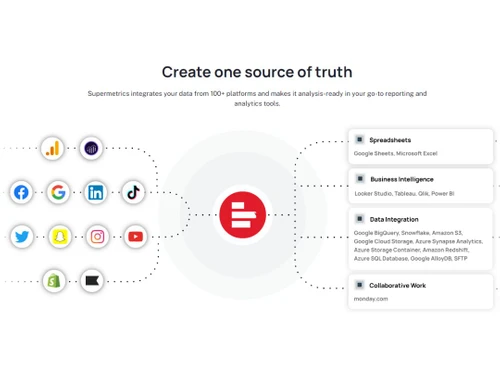
Its key features include data integration from different platforms like Looker Studio, Google Sheets, and Google BigQuery, and creating a single data source. It comes with an automated reporting facility that helps generate reports and quick optimization of marketing campaigns, thus giving sound data insights. It, therefore, offers a centralized data source that is easily manageable and can be integrated with various tools for further analysis. It can be used with business intelligence tools, spreadsheets, etc., for visualization and analysis. It also supports data sources for collaborative work for teamwork.

Supermetrics is an easy-to-use tool where users must start by selecting their desired data sources and destinations. Various marketing data platforms relate to it, and relevant data is extracted. The data is configured, and data transformation settings are carried out. The integrated data is then transferred to the desired destination tool, a reporting or analytics tool. It can then be used for analysis and creating reports for informed decision-making.

Why Choose Supermetrics?

It is an essential tool for marketing professionals as it helps collect data from multiple platforms, integrates it, and creates a central source for data. This central data source can then be exported into analytical and report generation tools for business analysis. It thus offers a platform that serves as a platform for comprehensive data integration, aggregating information from diverse marketing platforms, thus creating a unified data source for analysis. This reduces the effort of gathering data manually from various sources, processing it, transforming it, and integrating it. It thus saves time and effort.

This platform helps enhance the company's operational efficiency by improving company marketing efforts. Its automated reporting features help minimize the time spent on manual data transfer and report creation. It thus allows the businesses to allocate resources more effectively, reducing 80% of integration costs compared to building custom data source solutions. It also increases the reporting processes by 50%, resulting in the efficient use of marketing teams. All these benefits increase ROI and help the company to focus on growth and valuable insights.

Benefits of Supermetrics API Management Software

  • Data Centralization: It helps create a unified data source by integrating data from over 100 platforms.
  • Automated Reporting: Create reports automatically and effortlessly, resulting in better campaigns with higher ROI and performance.
  • Cost Efficiency: It reduces data integration costs by up to 80% compared to other custom data integration and manual solutions.
  • Time Savings: It reduces the reporting time by 50%, thus giving more time to focus on strategic analysis.
  • Versatile Use: It generates data that can be used readily for analysis, visualization, and reporting by different companies and industries.

Supermetrics Pricing

Supermetrics pricing starts from $19 at techjockey.com.

The pricing model is based on different parameters, including extra features, deployment type, and total users. For further queries related to the product, you can contact our product team and learn more about the pricing and offers.

Read more

Supermetrics Company Details

Founded Year:  2013

Supermetrics is a B2B software company that pulls data from various sources to use for web analytics, social media, and online marketing.

Director/Founders Mikael Thuneberg
Company Size 101-500 Employees

Supermetrics Pricing & Plans

Supermetrics for monday
Key Features
  • 1 data source category
  • 10 accounts per data source
  • Daily automated refreshes
Starting at $19
    • Quantity

      Quantity
      Quantity
    • Monthly

      Monthly
      Monthly

Key Features

  • 1 data source category

  • 10 accounts per data source

  • Daily automated refreshes

Supermetrics Features

  • icon_check Customizable Dashboard
    It has a customizable dashboard displaying key metrics and insights according to user preferences.
  • icon_check Data Source Connectors
    Integrate with diverse data sources to generate centralized data sources for analysis and reporting.
  • icon_check Drill Down
    Get details into specific data points for deeper insights and better decision-making.
  • icon_check Forecasting
    Predict future trends from the data based on historical data analysis.
  • icon_check Marketing Reports
    Generate detailed reports for marketing performance and campaign effectiveness.
  • icon_check Reporting & Analytics
    Using reporting and analytical tools to gain insights from integrated data sources.
  • icon_check Digital Analytics
    Analyze digital marketing efforts to optimize campaigns and enhance online presence.
  • icon_check Scheduled / Automated Reports
    Set up automated report scheduling for seamless distribution and time-saving convenience.
Supermetrics Demo Video play icon

Get Supermetrics Demo

Watch the demo video to explore key features, real workflows, and how the software fits your business needs.

Understand
Key Features
Personal
Demo Insights
Interactive
Demo Support

Supermetrics Specification

Supported Platforms
Ubuntu Ubuntu Windows Windows MacOS MacOS Linux Linux
Devices
Desktop Desktop Mobile Mobile Tablet Tablet iPad iPad
Deployment
Web-Based Web-Based
Suitable For
All Industries
Business Specific
All Businesses
Business Size
Small Business Startups Medium Business Enterprises
Customer Support
Email Live Chat Communities
Language
English
Integration
API Integration
Training Resources
Documentation Videos

Explore the Best Alternative Solutions Similar to Your Business Size and Needs

Supermetrics Reviews

4.6

Out of 5

img

Overall Rating

Based on
5 Verified Reviews

Rating Breakdown

  • Features 4.8
  • Value for Money 4.5
  • Ease of Use 4.7
  • Customer Support 4.5

90% Recommend this Product

Add Review

Pros

  • "Supermetrics integrates seamlessly with popular tools like Google Data Studio, Excel, Google Sheets, and others, making it easy to use within existing workflows."

    Vikas Jul 22, 2024

  • "Supermetrics offers numerous connectors to various data sources, including social media platforms, advertising networks, analytics tools, and more."

    Sam LozanoNov 2, 2023

Cons

  • "Some data connectors have limitations on the amount of data that can be pulled, which might be restrictive for large datasets or detailed historical analyses."

    Vikas Jul 22, 2024

  • "The pricing can be relatively high, especially for small businesses or individuals, depending on the number of connectors and data sources required."

    Sam LozanoNov 2, 2023

Supermetrics Video Reviews

youtubeVideoId

4.8

“Supermetrics Review: The Game-Changer for Data Analytics”

Review by: Sam Lozano

youtubeVideoId

4.8

“Supermetrics Review: the Best Facebook Marketing Tool”

Review by: Jacob LE

youtubeVideoId

4.5

“Supermetrics Review: How to Use Tutorial ”

Review by: Jitendra Vaswani

Vikas

Digital Marketer

Industry: Marketing and Advertising User since: 6-12 months

4.6

Reviewed on: Jul 22, 2024

Techjockey Verified

“A Go To Tool for Data seggregation from multiple platforms”

Supermetrics is a popular tool used for data integration and reporting, particularly in marketing analytics. It helps pull data from various sources into analytics platforms like Google Data Studio, Excel, Google Sheets, and other BI tools.

Pros

Supermetrics integrates seamlessly with popular tools like Google Data Studio, Excel, Google Sheets, and others, making it easy to use within existing workflows.

Cons

Some data connectors have limitations on the amount of data that can be pulled, which might be restrictive for large datasets or detailed historical analyses.

See All Supermetrics Reviews

Compare Supermetrics With other API Management Software

Products
Ratings
Pricing
Device Supported
Deployment
Supported Platforms
  • img

    Supermetrics

  • 4.6

  • Price On Request

  • Desktop

    Mobile

  • Web based

    On Premises

  • Windows

    Mac OS

  • img

    Bannerbear

  • 4.6

  • Price On Request

  • Desktop

    Mobile

  • Web based

    On Premises

  • Windows

    Mac OS

  • img

    One AI

  • 4.3

  • Price On Request

  • Desktop

    Mobile

  • Web based

    On Premises

  • Windows

    Mac OS

  • img

    Xano

  • 4.0

  • Price On Request

  • Desktop

    Mobile

  • Web based

    On Premises

  • Windows

    Mac OS

  • img

    Dell Boomi

  • 4.2

  • Price On Request

  • Desktop

    Mobile

  • Web based

    On Premises

  • Windows

    Mac OS

  • img

    KrakenD

  • Price On Request

  • Desktop

    Mobile

  • Web based

    On Premises

  • Windows

    Mac OS

  • img

    Datamolino

  • 4.0

  • Price On Request

  • Desktop

    Mobile

  • Web based

    On Premises

  • Windows

    Mac OS

  • img

    SheetDB

  • 4.2

  • Price On Request

  • Desktop

    Mobile

  • Web based

    On Premises

  • Windows

    Mac OS

  • img

    SyncTree

  • 4.3

  • Price On Request

  • Desktop

    Mobile

  • Web based

    On Premises

  • Windows

    Mac OS

(0) Product(s) selected

Supermetrics Alternatives

See All Supermetrics Alternatives

Starting Price:

$49 /month

Starting Price:

$29

Xano

4.0

Starting Price:

$85 /Month

Available

Price on Request

Available

Price on Request

Starting Price:

$2,095 /Month

Which operating system does the Supermetrics Software Support?

Supermetrics software is compatible with Windows and macOS operating systems.

Is there any Supermetrics App?

Supermetrics app is unavailable on Android and iOS devices.

What is the deployment type of the Supermetrics Software?

Supermetrics Software supports web-based deployment.

How much does the Supermetrics Software Cost?

Supermetrics pricing starts from $19 at techjockey.com.

Who are the potential users of the Supermetrics Software?

Supermetrics Software can be used by marketers, businesses, enterprises, and entrepreneurs who need API Management software.

Is there any free trial or demo for the Supermetrics Software?

Supermetrics demo is available for free with techjockey.com.

Is Supermetrics Free?

Supermetrics offers a 14-day free trial.

How can you download the Supermetrics software?

Supermetrics is a web-based platform. So, you need not download any software or app to use it.

How Does the Supermetrics API Management Software Work?

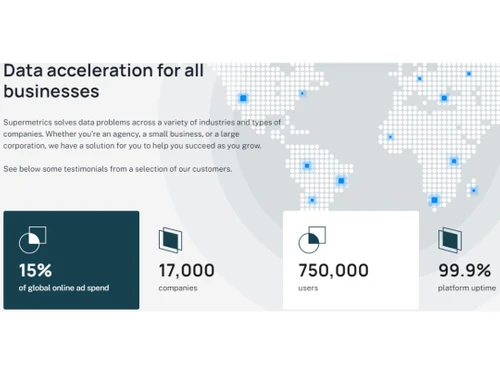
Supermetrics is a versatile API Management Software designed to address data challenges across different industries and businesses. By transforming marketing data into actionable insights, it empowers companies to focus on growth instead of getting bogged down in data silos. With streamlined marketing data, businesses gain greater control over crucial aspects, unlocking new opportunities for success.

20,000+ Software Listed

Best Price Guranteed

Free Expert Consultation

2M+ Happy Customers

Terms and Condtions

close

Users with registered businesses can purchase goods from merchants on the platform to satisfy their business needs. Users are not permitted to utilize any products acquired through the platform for resale, advertising, business, or further distribution.

For each purchase made, users will receive a Tax Invoice (or 'GST invoice') that includes specific details such as:

  • the GSTIN of the user associated with their registered business, and

  • the specified Entity Name for their business.

It should be noted that not all products are eligible for GST Invoice. Only the products displayed by participating sellers with the 'GST-based Invoice Available' callout on the product description page would qualify.

Certain goods and services are not eligible to get a GST Invoice, including items with VAS, i.e., Value Added Services (e.g., Total Mobile Protection/Assured Buyback) and those involving an exchange offer at the time of purchase.

Users must ensure the accuracy of the GSTIN, and business entity name provided for the GST Invoice. Requests for corrections into GST Invoice would not be accommodated by Techjockey.com or any Seller, and any issues arising from user-provided information are the sole responsibility of users.

Techjockey.com is not liable for the GST Invoice or any associated input tax credit. To efficiently claim an input tax credit, users should select the registered place of business address as per the GST authority's data and follow the provisions of the GST Act and rules.

To claim an input tax credit, the delivery and billing addresses must match. Furthermore, input tax credits will not be granted if the delivery address and GSTIN on the invoice are from different states. In case of incorrect GST details provided during the order placement, the order will be canceled automatically.