linkedin
DebugBear logo
play Site Speed Monitoring with DebugBear
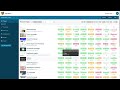
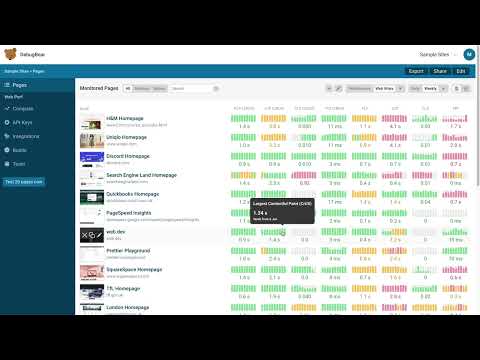
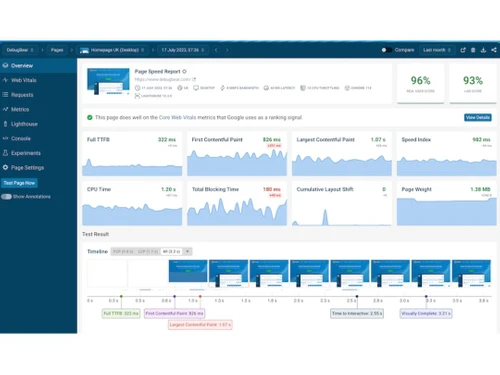
DebugBear-Dashboard
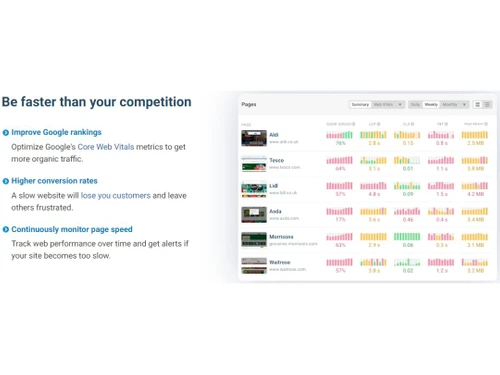
DebugBear Competitor Analysis

DebugBear

Brand: DebugBear

  • 4.5

  • 3 Ratings

DebugBear is a comprehensive website monitoring platform that provides in-depth insights into site performance and quality.

See More

Have you used DebugBear before?

Share your insights for better experience

Add a Review
Starting Price
$39

View plans

100% Genuine
Products
Best Price
Guaranteed
Safe & Secure
Payment
  • Description

  • Pricing

  • Features

  • Specification

  • Review

  • Compare

  • Alternatives

  • FAQ

Starting at $39

DebugBear Software Overview

What is DebugBear Software?

DebugBear is a website monitoring solution designed to assist businesses in monitoring and improving their website's performance over time. With a focus on page speed and Google Core Web Vitals, the platform offers a unified interface for tracking and optimizing website metrics.

The web monitoring tool provides continuous monitoring of page speed to ensure that businesses stay informed about their website's performance and user experience. It offers a detailed performance analysis that includes actionable recommendations aimed at enhancing page load times. These recommendations are invaluable for improving website speed, which is crucial for retaining visitors and achieving higher search engine rankings.

Each test conducted through the platform generates a comprehensive Lighthouse report and incorporates data from Google's Chrome User Experience Report, which plays a vital role in SEO rankings. This rich data ensures that businesses have a holistic view of their website's performance and can make informed decisions to optimize their online presence. It offers companies the flexibility to conduct site speed experiments by testing their site in controlled lab environments from over 20 different locations. Alternatively, they can gather real user data to gain insights into which changes have the most significant impact on their website's performance.

Why Choose DebugBear System?

DebugBear allows you to assess the performance of your API endpoints to optimize data retrieval and delivery. It enables you to detect and track errors that may impact your website's performance and user experience. The website monitoring tool allows you to compare your website's speed against competitors or industry benchmarks. It enables you to optimize content delivery through CDNs and assess their impact on performance.

The software sends alerts when your website exceeds predefined performance budgets to maintain optimal speed. It allows you to automate performance tests at specified intervals to ensure continuous monitoring. The website monitoring tool allows you to analyze server response times to optimize backend performance. You can utilize performance data to improve SEO rankings and user engagement.

Benefits of DebugBear Website Monitoring Solution

  • The website monitoring solution allows you to conduct synthetic tests from various locations to assess website performance under different conditions.
  • It offers insights into page load times, speed scores, and optimization opportunities.
  • You can access historical performance data to compare changes and gauge the impact of optimizations.
  • The platform allows you to define and track performance budgets to ensure your website meets specific speed goals.
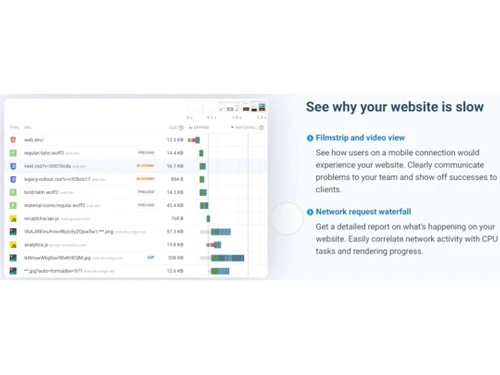
  • It allows you to analyze page load sequences with detailed waterfall charts to pinpoint bottlenecks.

Pricing of DebugBear Website Monitoring System

DebugBear website monitoring system pricing starts from $39 at techjockey.com.

The pricing model is based on different parameters, including extra features, deployment type, and total users. For further queries related to the product, you can contact our product team and learn more about the pricing and offers.

Read more

DebugBear Company Details

Founded Year:  2018

DebugBear is a SaaS platform for website performance monitoring.

Director/Founders Matt Zeunert
Company Size 1-100 Employees

DebugBear Pricing & Plans

Personal
Key Features
  • Lab tests
  • Google CrUX data
  • Up to 3 users
Starting at $39
    • Quantity

      Quantity
      Quantity
    • Monthly

      Monthly
      Monthly

Key Features

  • Lab tests

  • Google CrUX data

  • Up to 3 users

DebugBear Features

  • icon_check Website Monitoring
    Continuously monitors your website performance to keep you informed about speed or user experience issues.
  • icon_check Data Retention
    This allows you to retain historical performance data to gauge long-term trends and improvements.
  • icon_check Performance Metrics
    This helps you understand how your website performs in terms of speed and user experience.
  • icon_check Real User Monitoring
    Provides insights into how actual visitors experience your website's performance.
  • icon_check Debugging
    Allows you to identify and resolve issues that may be affecting your website's speed and performance.
  • icon_check Website Analysis
    Provides a detailed analysis of the website, including actionable recommendations for improvement.
  • icon_check Advanced Test Configuration
    You can configure and customize tests to match your specific needs and requirements.
  • icon_check Improve Site Speed
    This empowers you to make changes that improve your website's speed and overall user experience.
DebugBear Demo Video play icon

Get DebugBear Demo

Watch the demo video to explore key features, real workflows, and how the software fits your business needs.

Understand
Key Features
Personal
Demo Insights
Interactive
Demo Support

DebugBear Specifications

Supported Platforms
Ubuntu Ubuntu Windows Windows MacOS MacOS Linux Linux
Devices
Desktop Desktop Mobile Mobile Tablet Tablet iPad iPad
Deployment
Cloud-Based Cloud-Based
Suitable For
All Industries
Business Specific
All Businesses
Business Size
Small Business Startups Medium Business Enterprises
Customer Support
Email Communities
Language
English
Training Resources
Documentation Videos

Explore the Best Alternative Solutions Similar to Your Business Size and Needs

DebugBear Review

4.5

Out of 5

img

Overall Rating

Based on
3 Verified Ratings

Rating Breakdown

  • Features 4.3
  • Value for Money 4.8
  • Ease of Use 4.5
  • Customer Support 4.3

100% Recommend this Product

Add Review

Techjockey Trusted Reviews from Verified Users

No reviews are currently available for DebugBear. Discover similar Website Monitoring Tools reviews

  • New Relic

    4.5

    Whats great - The real-time app monitoring, deep visibility, and unified views are very helpful. read more

  • Netumo

    5.0

    Whats great - With Netumo I could easily monitor my website for any issues which could arise and I was up to date with my SSL Certificate t... read more

  • Freshping

    4.5

    Whats great - Easy to understand and navigate with its user friendly navigation read more

Compare DebugBear With other Website Monitoring Tools

Products
Ratings
Pricing
Device Supported
Deployment
Supported Platforms
  • img

    DebugBear

  • 4.5

  • Price On Request

  • Desktop

    Mobile

  • Web based

    On Premises

  • Windows

    Mac OS

  • img

    Hexowatch

  • 4.5

  • Price On Request

  • Desktop

    Mobile

  • Web based

    On Premises

  • Windows

    Mac OS

  • img

    SmarterStats

  • 4.3

  • Price On Request

  • Desktop

    Mobile

  • Web based

    On Premises

  • Windows

    Mac OS

  • img

    Site24x7

  • 4.5

  • Price On Request

  • Desktop

    Mobile

  • Web based

    On Premises

  • Windows

    Mac OS

  • img

    New Relic

  • 4.4

  • Price On Request

  • Desktop

    Mobile

  • Web based

    On Premises

  • Windows

    Mac OS

  • img

    UptimeRobot

  • 4.6

  • Price On Request

  • Desktop

    Mobile

  • Web based

    On Premises

  • Windows

    Mac OS

  • img

    Freshping

  • 4.5

  • Price On Request

  • Desktop

    Mobile

  • Web based

    On Premises

  • Windows

    Mac OS

  • img

    Dyno Mapper

  • 4.5

  • Price On Request

  • Desktop

    Mobile

  • Web based

    On Premises

  • Windows

    Mac OS

  • img

    Brandly360

  • 4.5

  • Price On Request

  • Desktop

    Mobile

  • Web based

    On Premises

  • Windows

    Mac OS

  • img

    Auditzy

  • 4.5

  • Price On Request

  • Desktop

    Mobile

  • Web based

    On Premises

  • Windows

    Mac OS

  • img

    StatusCake

  • 4.5

  • Price On Request

  • Desktop

    Mobile

  • Web based

    On Premises

  • Windows

    Mac OS

(0) Product(s) selected

DebugBear Alternatives

See All DebugBear Alternatives

Starting Price:

$29 /Month

Starting Price:

$30 /Month

Starting Price:

$129 /Month

Available

Price on Request

Starting Price:

€5 /month

Starting Price:

€50 /month

Starting Price:

$20 /Month

Starting Price:

$5

Which operating system does the DebugBear support?

DebugBear is compatible with Windows and macOS device systems.

Is there any DebugBear App?

The DebugBear app is not available on Android and iOS devices.

What is the deployment type of the DebugBear?

DebugBear system supports web-based deployment.

How much does the DebugBear Software cost?

DebugBear pricing starts at $39 on techjockey.com.

Who are the potential users of the DebugBear?

DebugBear is used by web developers, site owners, and performance optimization teams who want to ensure their websites load quickly and meet Core Web Vitals standards, enhancing user experience and search engine ranking.

Is there any free trial or demo for DebugBear?

The DebugBear demo is available for free with techjockey.com.

Is the DebugBear Solution free?

DebugBear solution does not offer a free trial.

How can you download the DebugBear?

For DebugBear Software, installation is not required, as it is web-based. Just open the Setup Wizard to get started.

How does DebugBear work?

DebugBear is a web monitoring tool that assesses your website's performance and Core Web Vitals. It conducts automated tests to pinpoint issues affecting site speed, presenting essential data for problem resolution. This helps users optimize their websites for better performance and user experience.

20,000+ Software Listed

Best Price Guranteed

Free Expert Consultation

2M+ Happy Customers

Terms and Condtions

close

Users with registered businesses can purchase goods from merchants on the platform to satisfy their business needs. Users are not permitted to utilize any products acquired through the platform for resale, advertising, business, or further distribution.

For each purchase made, users will receive a Tax Invoice (or 'GST invoice') that includes specific details such as:

  • the GSTIN of the user associated with their registered business, and

  • the specified Entity Name for their business.

It should be noted that not all products are eligible for GST Invoice. Only the products displayed by participating sellers with the 'GST-based Invoice Available' callout on the product description page would qualify.

Certain goods and services are not eligible to get a GST Invoice, including items with VAS, i.e., Value Added Services (e.g., Total Mobile Protection/Assured Buyback) and those involving an exchange offer at the time of purchase.

Users must ensure the accuracy of the GSTIN, and business entity name provided for the GST Invoice. Requests for corrections into GST Invoice would not be accommodated by Techjockey.com or any Seller, and any issues arising from user-provided information are the sole responsibility of users.

Techjockey.com is not liable for the GST Invoice or any associated input tax credit. To efficiently claim an input tax credit, users should select the registered place of business address as per the GST authority's data and follow the provisions of the GST Act and rules.

To claim an input tax credit, the delivery and billing addresses must match. Furthermore, input tax credits will not be granted if the delivery address and GSTIN on the invoice are from different states. In case of incorrect GST details provided during the order placement, the order will be canceled automatically.