linkedin
Dell 3070 Desktop logo
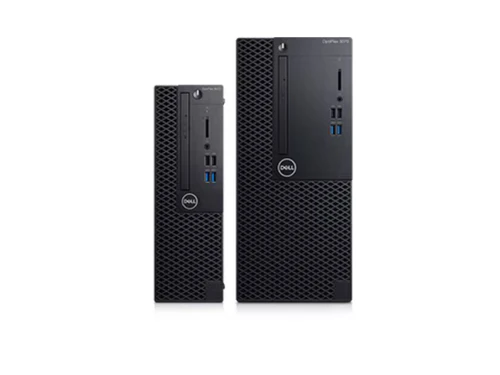
Dell 3070 Desktop
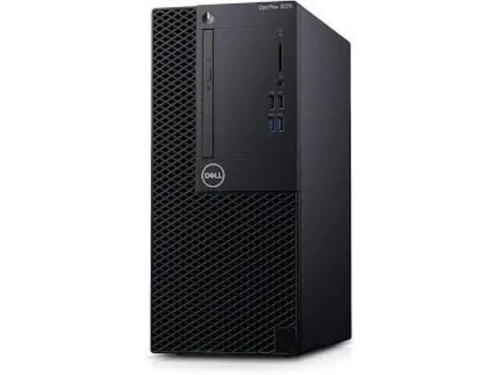
Dell 3070 Desktop
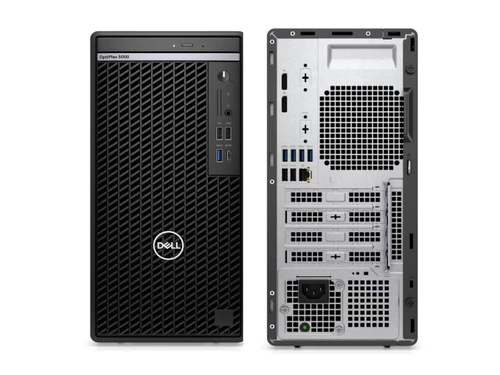
Dell 3070 Desktop

Dell 3070 Desktop

Brand: Dell Technologies

  • 4.2

  • 13 Ratings & 10 Reviews

1 OptiPlex 3070 MT BTX 1 Dell 20 Monitor - E2016H 1 OptiPlex 3070 Tower with 260W up to 85% efficient Power Supply (80Plus Bronze) 1 TPM Enabled 1 Emerging Market Use Only Intel Core i5-9500;supports Windows 10/Linux 1 DVD+/-RW Bezel 1 8GB 1X8GB DDR4 2666MHz UDIMM Non-ECC 1 3.5" 1TB 7200rpm SATA Har...

See More

Have you used Dell 3070 Desktop before?

Share your insights for better experience

Add a Review

Price Available on Request

Questions about pricing or customization? We’re here to help, just a click away.

100% Genuine
Products
Best Price
Guaranteed
Safe & Secure
Payment
  • Specification

  • Pricing

  • Features

  • Description

  • Review

  • Compare

  • Alternatives

  • FAQ

Dell 3070 Desktop Specifications

Supported Platforms
Ubuntu Ubuntu Windows Windows Linux Linux
Devices
Desktop Desktop
Deployment
Perpetual Perpetual
Suitable For
All Industries
Business Specific
All Businesses
Business Size
Individual Small Business Startups Medium Business Enterprises SMBs SMEs MSMBs MSMEs Freelancers
Customer Support
Phone Email Live Chat Communities Forums
Training Resources
In Person Live Online Webinars Documentation Videos
Compliance Regulation
HIPAA CCPA CPRA ECPA

Dell 3070 Desktop Pricing & Plans

Looking for The Right Pricing?

Share your requirements and get a plan built around your business.

  • Define your business needs
  • Get customised pricing
  • Choose features that fit your workflow

Price Available on Request

Get personalised Dell 3070 Desktop pricing that fits your needs. Our team will connect with you.

Dell 3070 Desktop Features

  • icon_check Technical Support
  • icon_check Antivirus
  • icon_check Operating System
  • icon_check Processor Options
    A mission-critical engine powered by 9th Gen Intel Core (up to i7-9700) or 8th Gen processors for seamless multitasking now.
  • icon_check Form Factor Versatility
    A specialized design suite offering an Ultra-compact Micro, a Small Form Factor (SFF), and a Mini Tower to fit any desk space
  • icon_check Memory Capacity
    A high-precision utility supporting up to 32GB of 2666MHz DDR4 RAM (64GB in some configurations) for fast file access now.
  • icon_check Storage Flexibility
    A specialized dual drive bridge that supports both high-speed M.2 NVMe SSDs and large-capacity SATA HDDs simultaneously today.
  • icon_check Connectivity Ports
    A versatile communication hub featuring DisplayPort 1.2, HDMI 1.4, and multiple USB 3.1 Gen 1 ports for modern peripherals now.
  • icon_check Advanced Security
    A mission-critical framework including TPM 2.0, chassis intrusion switches, and optional cable covers for total data protection
  • icon_check Sustainably Built
    A specialized environmental design using at least 39% post-consumer recycled plastics to promote green workplace initiatives now.
  • icon_check Management Suite
    A high efficiency admin tool integrating with Dell Client Command Suite for unified endpoint management across your network today.

Dell 3070 Desktop Overview

1 OptiPlex 3070 MT BTX

1 Dell 20 Monitor - E2016H

1 OptiPlex 3070 Tower with 260W up to 85% efficient Power Supply (80Plus Bronze)

1 TPM Enabled

1 Emerging Market Use Only Intel Core i5-9500;supports Windows 10/Linux

1 DVD+/-RW Bezel

1 8GB 1X8GB DDR4 2666MHz UDIMM Non-ECC

1 3.5" 1TB 7200rpm SATA Hard Disk Drive

1 8x DVD+/-RW 9.5mm Optical Disk Drive

1 Power Cord (EURO-INDIA),6A

1 No UPC Label

1 Intel Integrated Graphics, Dell OptiPlex

1 No Additional Add In Cards

1 No PCIe add-in card

1 No Wireless LAN Card

1 Dell Optical Mouse - MS116 - Black

1 Dell Wired Keyboard KB216 Black (US/International)

1 Waves Maxx Audio

1 Dell Developed Recovery Environment

1 SupportAssist

1 Screws for 3.5 inch Hard Drive Disk, Mini Tower, OptiPlex

1 Fixed Hardware Configuration

Read more

Dell Technologies Company Details

Founded Year:  1984

Dell is an American multinational computer technology company that develops, sells, repairs, and supports computers and related products and services, and is owned by its parent company of Dell Technologies.

Director/Founders Michael Dell
Company Size 1000+ Employees

Dell 3070 Desktop Reviews

4.2

Out of 5

img

Overall Rating

Based on
10 Verified Reviews

Rating Breakdown

  • Features 4.1
  • Value for Money 4.2
  • Ease of Use 4.3
  • Customer Support 4.3

86% Recommend this Product

Add Review

Anna Himmelstrup

Product Manager

Industry: Wellness and Fitness User since: 1-2 years

4.3

Reviewed on: Mar 10, 2025

Techjockey Verified

“Excellent for Home Office Use”

I use the Dell 3070 in my home office, and it’s been a great investment. It’s reliable and runs all my work applications smoothly. I just wish it had an HDMI port instead of just a DisplayPort.

Pros

Stable, reliable, and performs well at work.

Cons

No HDMI port.

Switched from Lenovo ThinkBook 13s

Reason to switch

I use the Dell 3070 in my home office, and it’s been a great investment. It’s reliable and runs all my work applications smoothly. I just wish it had an HDMI port instead of just a DisplayPort.

Adarsh HP

Systems Engineer

Industry: Telecommunication User since: 1-2 years

4.3

Reviewed on: Mar 5, 2025

Techjockey Verified

“Solid Performance and Easy Setup”

Setting up the Dell 3070 was a breeze. It runs well and doesn’t freeze. However, I had to install an SSD to make it even faster.

Pros

Simple to set up, good performance, no issues.

Cons

No SSD by default.

Switched from Kunpeng Desktop Boards

Reason to switch

Dell had better customer service.

Inder sharma

Analyst

Industry: Software Development User since: < 6 months

4.2

Reviewed on: Feb 20, 2025

Techjockey Verified

“Good for Basic Use but Not for Heavy Workloads”

If you need a desktop for emails, web browsing, and office work, the Dell 3070 is perfect. But if you’re running heavy software, it might slow down a bit.

Pros

Smooth performance for basic tasks, affordable.

Cons

Slows down with heavy software.

Switched from 13 Inch MacBook Pro

Reason to switch

Dell had better long-term durability.

See All Dell 3070 Reviews

Compare Dell 3070 Desktop With other Laptops & PCs

Products
Ratings
Pricing
Device Supported
Deployment
Supported Platforms
  • img

    Dell 3070 Desktop

  • 4.2

  • Price On Request

  • Desktop

    Mobile

  • Web based

    On Premises

  • Windows

    Mac OS

  • img

    Dell Latitude 3410

  • 4.7

  • Price On Request

  • Desktop

    Mobile

  • Web based

    On Premises

  • Windows

    Mac OS

  • img

    Dell Latitude 5410

  • 4.6

  • Price On Request

  • Desktop

    Mobile

  • Web based

    On Premises

  • Windows

    Mac OS

(0) Product(s) selected

Dell 3070 Desktop Alternatives

See All Dell 3070 Desktop Alternatives

Starting Price:

₹59,900

Articles for Dell 3070 Desktop

See All Related Articles

How much does Dell 3070 Desktop cost?

Dell 3070 Desktop Laptops & PCs pricing starts at Rs.47500.

Who are the potential users of Dell 3070 Desktop?

Dell 3070 Desktop Laptops & PCs is typically used in All Industries.

Is there any free trial or demo for Dell 3070 Desktop?

Dell 3070 Desktop Laptops & PCs demo is available for free at techjockey.

Is Dell 3070 Desktop free?

Dell 3070 Desktop Laptops & PCs offers a free trial. However, the premium plan with advanced features available at Techjockey.

How can you download Dell 3070 Desktop?

For Dell 3070 Desktop Laptops & PCs installation, insert the given CD/USB flash storage in your system and open the Setup Wizard to get started.

How does Dell 3070 Desktop work?

Dell 3070 Desktop Laptops & PCs helps with Technical Support,Antivirus and Operating System.

20,000+ Software Listed

Best Price Guranteed

Free Expert Consultation

2M+ Happy Customers

Terms and Condtions

close

Users with registered businesses can purchase goods from merchants on the platform to satisfy their business needs. Users are not permitted to utilize any products acquired through the platform for resale, advertising, business, or further distribution.

For each purchase made, users will receive a Tax Invoice (or 'GST invoice') that includes specific details such as:

  • the GSTIN of the user associated with their registered business, and

  • the specified Entity Name for their business.

It should be noted that not all products are eligible for GST Invoice. Only the products displayed by participating sellers with the 'GST-based Invoice Available' callout on the product description page would qualify.

Certain goods and services are not eligible to get a GST Invoice, including items with VAS, i.e., Value Added Services (e.g., Total Mobile Protection/Assured Buyback) and those involving an exchange offer at the time of purchase.

Users must ensure the accuracy of the GSTIN, and business entity name provided for the GST Invoice. Requests for corrections into GST Invoice would not be accommodated by Techjockey.com or any Seller, and any issues arising from user-provided information are the sole responsibility of users.

Techjockey.com is not liable for the GST Invoice or any associated input tax credit. To efficiently claim an input tax credit, users should select the registered place of business address as per the GST authority's data and follow the provisions of the GST Act and rules.

To claim an input tax credit, the delivery and billing addresses must match. Furthermore, input tax credits will not be granted if the delivery address and GSTIN on the invoice are from different states. In case of incorrect GST details provided during the order placement, the order will be canceled automatically.