 USA
USA UAE
UAESmall Business
Designed for startups and growing businesses


See More





Brand: Dezgo
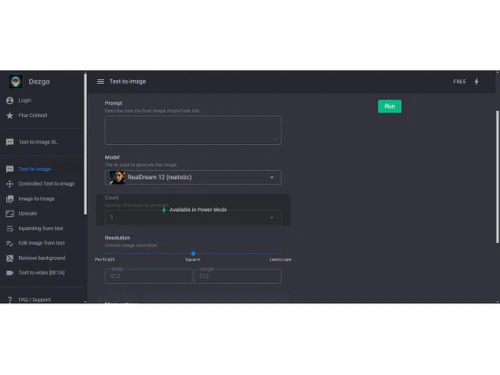
Dezgo is a business software that uses artificial intelligence to generate and edit high-quality images from simple text descriptions.
See MoreHave you used Dezgo before?
Share your insights for better experience
Looking for The Right Pricing?
Share your requirements and get a plan built around your business.
Price Available on Request
Get personalised Dezgo pricing that fits your needs. Our team will connect with you.
Image Generation and Processing
 Text-to-Image Generation Image-to-Image Transformation High-Resolution Output Drag and Drop Preset Styles Real-time Preview Real-Time Rendering Multi-Layer Image Processing Batch Generation
 Editing and Customization Tools
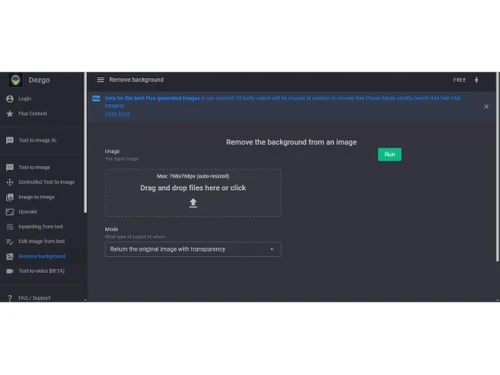
Background Removal Resolution Control Image Upscaling Object Removal Image Weights Adjustable Parameters Realistic Object Generation AI Editor 3D Effects Content Filters Style Transfer Layer Control Text Overlay Image Tiling Denoising Style Adaptation Prompt Control and Enhancements
Negative Prompt Seed Prompt Sensitivity Prompt Flexibility Prompt Editing Prompt Enhancer Prompt Matrix Real-Time Generation Model and AI Capabilities
Multi-Model Support Fine Tuning Model Merging Collaboration and Sharing
Prompt Libraries Collaboration Tools Image Sharing Custom Templates Branding and Commercial Use
Commercial Rights Data Privacy Brand Kit Integration Integration Supported
API Integration Content Management Systems (CMS) Integration Design and Editing Software Integration Cloud Storage and Collaboration Tools Integration E-Commerce Platforms Integration 3D Modeling Software Integration Game Engines Integration Video Editing Tools Integration Animation Tools Integration NFT Marketplaces Plugin & Extensions 

Watch the demo video to explore key features, real workflows, and how the software fits your business needs.
 Ubuntu
  Windows
  MacOS
MacOS  Linux
Linux  Desktop
  Mobile
  Cloud-Based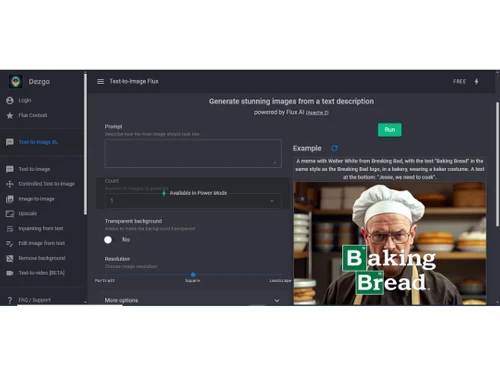
Small Business
Designed for startups and growing businesses
Medium Business
Built for business growth and flexibility
Enterprises
Designed for complex and large-scale business needs
4.3
Out of 5

Overall Rating
Based on
5 Verified Ratings
Rating Breakdown
86% Recommend this Product
Add ReviewTechjockey Trusted Reviews from Verified Users
No reviews are currently available for Dezgo. Discover similar AI Image Generators reviews

Voge AI
Whats great - Offers a range of avatar styles and easy sharing options. read more

DeepDream
Whats great - What stands out about DeepDream 2 is how much fun it is to create abstract and dreamlike art. It gives you so many different ... read more

Artbreeder
Whats great - The software allows me to see my ideas turn into images quickly. The variety of styles available is really impressive, and I ... read more

Dezgo
Price On Request
Desktop
Mobile
Web based
On Premises
Windows
Mac OS

Remaker AI
Price On Request
Desktop
Mobile
Web based
On Premises
Windows
Mac OS

Deepnude
Price On Request
Desktop
Mobile
Web based
On Premises
Windows
Mac OS

Leonardo AI
Price On Request
Desktop
Mobile
Web based
On Premises
Windows
Mac OS

Adobe Firefly
Price On Request
Desktop
Mobile
Web based
On Premises
Windows
Mac OS

DeepSukebe
Price On Request
Desktop
Mobile
Web based
On Premises
Windows
Mac OS

Facet AI
Price On Request
Desktop
Mobile
Web based
On Premises
Windows
Mac OS

SUPERMACHINE
Price On Request
Desktop
Mobile
Web based
On Premises
Windows
Mac OS

GoEnhance AI
Price On Request
Desktop
Mobile
Web based
On Premises
Windows
Mac OS

DiffusionBee
Price On Request
Desktop
Mobile
Web based
On Premises
Windows
Mac OS

Getimg AI
₹ 850
Desktop
Mobile
Web based
On Premises
Windows
Mac OS
(2) Product(s) selected
Starting Price:
$30 /Month
Starting Price:
$19 /Month
Starting Price:
$10 /Month
Available
Price on Request

Available
Price on Request

Starting Price:
$9 /Month

Available
Price on Request

Available
Price on Request

Starting Price:
$5
Starting Price:
$12 /Month







Dezgo pricing is available on request at techjockey.com. Contact experts for detailed quotes and packages.
You visit the Dezgo website, type a descriptive text prompt into a box, and select your desired style and settings. The AI then processes your request and generates one or multiple images for you to download or edit further.
It is used by digital marketers, content creators, graphic designers, product developers, advertising agencies, and businesses of all sizes that need to produce original visual content efficiently.
Yes, Dezgo includes a powerful built-in AI editor that lets you upscale resolution, remove objects or backgrounds, change styles, and add text overlays to the generated images.
Yes, it offers API integration and can connect with various Content Management Systems (CMS), e-commerce platforms, and cloud storage tools for a smooth workflow.
This is a feature where you can type words describing elements you do not want to appear in the generated image, giving you more control over the final result.
20,000+ Software Listed
Best Price Guranteed
Free Expert Consultation
2M+ Happy Customers
Terms and Condtions

Users with registered businesses can purchase goods from merchants on the platform to satisfy their business needs. Users are not permitted to utilize any products acquired through the platform for resale, advertising, business, or further distribution.
For each purchase made, users will receive a Tax Invoice (or 'GST invoice') that includes specific details such as:
the GSTIN of the user associated with their registered business, and
the specified Entity Name for their business.
It should be noted that not all products are eligible for GST Invoice. Only the products displayed by participating sellers with the 'GST-based Invoice Available' callout on the product description page would qualify.
Certain goods and services are not eligible to get a GST Invoice, including items with VAS, i.e., Value Added Services (e.g., Total Mobile Protection/Assured Buyback) and those involving an exchange offer at the time of purchase.
Users must ensure the accuracy of the GSTIN, and business entity name provided for the GST Invoice. Requests for corrections into GST Invoice would not be accommodated by Techjockey.com or any Seller, and any issues arising from user-provided information are the sole responsibility of users.
Techjockey.com is not liable for the GST Invoice or any associated input tax credit. To efficiently claim an input tax credit, users should select the registered place of business address as per the GST authority's data and follow the provisions of the GST Act and rules.
To claim an input tax credit, the delivery and billing addresses must match. Furthermore, input tax credits will not be granted if the delivery address and GSTIN on the invoice are from different states. In case of incorrect GST details provided during the order placement, the order will be canceled automatically.



