linkedin
Docparser logo
play What is Docparser?
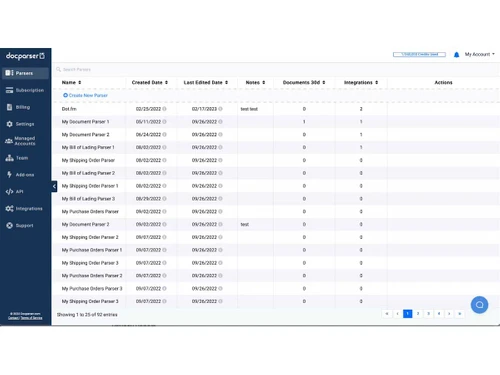
Docparser parsers
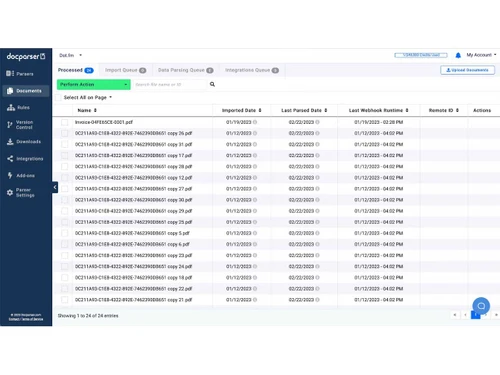
Docparser documents

Docparser

Brand: Docparser

  • 4.0

  • 4 Ratings

A data extraction software that extracts structured data from PDFs, Word files, and images using OCR and parsing rules, then exports it to various formats or integrations.

See More

Have you used Docparser before?

Share your insights for better experience

Add a Review
Starting Price
$39

View plans

100% Genuine
Products
Best Price
Guaranteed
Safe & Secure
Payment
  • Description

  • Pricing

  • Features

  • Specification

  • Review

  • Compare

  • Alternatives

  • FAQ

Starting at $39

DocparserSoftware Overview

What is Docparser?

Docparser is a data extraction software that helps businesses convert PDFs, Word files, and scanned images into structured data. It uses OCR, pattern recognition, and customizable parsing rules to capture information accurately.

Users can import documents through uploads, email, cloud storage, or API, and then export the parsed data into formats like Excel, CSV, JSON, or XML.

Commonly used for invoices, purchase orders, contracts, and HR forms, Docparser eliminates manual data entry with an easy no-code setup.

Why Choose Docparser Software?

  • Automated Data Extraction: Automatically pulls key information from documents, removing manual data entry.
  • Supports Multiple File Types: Works with PDFs, Word files, scanned images, and more.
  • Powerful OCR Technology: Accurately processes scanned and image-based documents.
  • Custom Parsing Rules: Create flexible rules tailored to your document layouts.
  • No Coding Required: Easy setup without technical expertise.
  • Ready-Made Templates: Pre-built templates for invoices, orders, and contracts.
  • Bulk Document Processing: Quickly handles large volumes of documents.
  • Cloud-Based Access: Accessible anywhere with internet, no installation needed.
  • Secure Storage & Processing: Data safety ensured with encryption and compliance.
  • Easy Integrations: Connects with Google Sheets, Zapier, Salesforce, and more.

Benefits of Docparser Software

  • Multiple Export Options: Export in CSV, Excel, JSON, or XML formats.
  • API Support: Developers can integrate parsing into workflows via API.
  • Time Savings: Cuts down hours of repetitive manual tasks.
  • Cost-Effective: Reduces staffing and operational expenses.
  • Scalable Solution: Expands to handle growing document volumes.
  • Consistent Accuracy: Minimizes human errors with rule-based capture.
  • Email-to-Parser Functionality: Automatically parses documents sent via email.
  • Cloud Storage Integration: Works with Google Drive, Dropbox, and other tools.
  • Real-Time Processing: Instantly delivers extracted data for quick decisions.
  • Wide Use Cases: Useful across finance, HR, logistics, retail, and healthcare.

Docparser Pricing

Docparser price starts at $39 at techjockey.com. The pricing model is based on different parameters, including extra features, deployment type, and the total number of users. For further queries related to the product, you can contact our product team and learn more about the pricing and offers.

Read more

Docparser Company Details

Founded Year:  2016

Docparser is the most advanced cloud-based document data extraction and automation tool in the market today.Extract data from your recurring documents - such as PDFs, Word docs and scanned image files. Users love parsing invoices, shipping documents, bank statements, HR forms, sales projections and

Director/Founders Docparser
Company Size 1-100 Employees

Docparser Pricing & Plans

Starter
Starting at $39
    • Licenses

      Licenses
      Licenses
    • Monthly

      Monthly
      Monthly

Key Features

  • 100 Parsing Credits Per Month

  • Create up to 15 different parsers

  • Premium Template Access Smart Checkboxes

  • Parse PDF, Word & Image Files

Professional
Starting at $74
    • Licenses

      Licenses
      Licenses
    • Monthly

      Monthly
      Monthly

Key Features

  • Everything in Starter, Plus

  • 250 Parsing Credits Per Month

  • Create up to 50 different parsers

  • Teams & Managed Users Smart Tables

Business
Starting at $159
    • Licenses

      Licenses
      Licenses
    • Monthly

      Monthly
      Monthly

Key Features

  • Everything in Pro, Plus

  • 1000 Parsing Credits Per Month

  • Create up to 500 different parsers

  • Parser Version Control Multi-Layout Parsers

Docparser Features

  • icon_check OCR PDF & Image Data Extraction
    Captures text from PDFs and scanned images using OCR.
  • icon_check Table Parsing
    Extracts structured data from tables inside documents.
  • icon_check Smart Checkboxes & Radio Buttons
    Recognizes and reads form checkboxes or radio button selections.
  • icon_check Handwriting Recognition
    Converts handwritten text into digital data.
  • icon_check Barcode & QR Code Extraction
    Scans and pulls data from barcodes and QR codes.
  • icon_check Multi-Format Support
    Works with PDFs, images, Word, and other file types.
  • icon_check Template Library & Custom Rules
    Offers pre-made templates and flexible rule creation for parsing.
  • icon_check Batch Processing & Webhooks
    Processes large document sets and automates workflows via webhooks.
  • icon_check Security & Unlimited Rules
    Ensures secure processing with no limit on the parsing rules you can create.
Docparser Demo Video play icon

Get Docparser Demo

Watch the demo video to explore key features, real workflows, and how the software fits your business needs.

Understand
Key Features
Personal
Demo Insights
Interactive
Demo Support

Docparser Specification

Supported Platforms
Windows Windows MacOS MacOS Linux Linux
Devices
Desktop Desktop
Deployment
Web-Based Web-Based
Suitable For
All Industries
Business Specific
All Businesses
Business Size
Small Business Startups Medium Business Enterprises SMBs SMEs MSMBs MSMEs Freelancers
Customer Support
Email
Language
English
Training Resources
Live Online

Docparser Review

4.0

Out of 5

img

Overall Rating

Based on
4 Verified Ratings

Rating Breakdown

  • Features 4.1
  • Value for Money 4.2
  • Ease of Use 3.7
  • Customer Support 4.1

80% Recommend this Product

Add Review

Be the First to Review

This product has no reviews yet. Be the first to leave your feedback.

Add Review

Compare Docparser With other Data Extraction Software

Products
Ratings
Pricing
Device Supported
Deployment
Supported Platforms
  • img

    Docparser

  • 4.0

  • Price On Request

  • Desktop

    Mobile

  • Web based

    On Premises

  • Windows

    Mac OS

  • img

    Pline

  • 4.3

  • Price On Request

  • Desktop

    Mobile

  • Web based

    On Premises

  • Windows

    Mac OS

  • img

    G-EXTRACTOR

  • 4.3

  • Price On Request

  • Desktop

    Mobile

  • Web based

    On Premises

  • Windows

    Mac OS

  • img

    DocExtract

  • 4.4

  • Price On Request

  • Desktop

    Mobile

  • Web based

    On Premises

  • Windows

    Mac OS

  • img

    ExtractDoc

  • 4.1

  • Price On Request

  • Desktop

    Mobile

  • Web based

    On Premises

  • Windows

    Mac OS

  • img

    Mindee

  • Price On Request

  • Desktop

    Mobile

  • Web based

    On Premises

  • Windows

    Mac OS

  • img

    Extracta AI

  • Price On Request

  • Desktop

    Mobile

  • Web based

    On Premises

  • Windows

    Mac OS

  • img

    Parseur

  • 4.6

  • Price On Request

  • Desktop

    Mobile

  • Web based

    On Premises

  • Windows

    Mac OS

(0) Product(s) selected

Docparser Alternatives

See All Docparser Alternatives

Starting Price:

$39 /Month

Starting Price:

₹490 ₹1,490

SAVE UPTO 67%

Starting Price:

$299 /Month

Available

Price on Request

Starting Price:

€49 /Month

SAVE UPTO 30%

Starting Price:

$49 /Month

How much does Docparser cost?

Docparser pricing begins at $39 on Techjockey.com.

Is there a mobile app available for Docparser Software?

No, Docparser is web-based and accessible via browser only.

Which operating systems are compatible with Docparser Software?

Docparser works on Windows, macOS, and Linux.

Does Docparser Software offer a free trial?

Yes, a Docparser free trial is available.

How does Docparser Software function?

Docparser extracts data from documents using OCR and parsing rules, then exports it to desired formats or apps.

Who uses Docparser Software?

Businesses across finance, logistics, retail, HR, and healthcare use Docparser.

Is a free demo available for Docparser Software?

Yes, a Docparser demo can be requested.

Is Docparser Software available for free?

No, Docparser is a paid tool, but offers a free trial.

20,000+ Software Listed

Best Price Guranteed

Free Expert Consultation

2M+ Happy Customers

Terms and Condtions

close

Users with registered businesses can purchase goods from merchants on the platform to satisfy their business needs. Users are not permitted to utilize any products acquired through the platform for resale, advertising, business, or further distribution.

For each purchase made, users will receive a Tax Invoice (or 'GST invoice') that includes specific details such as:

  • the GSTIN of the user associated with their registered business, and

  • the specified Entity Name for their business.

It should be noted that not all products are eligible for GST Invoice. Only the products displayed by participating sellers with the 'GST-based Invoice Available' callout on the product description page would qualify.

Certain goods and services are not eligible to get a GST Invoice, including items with VAS, i.e., Value Added Services (e.g., Total Mobile Protection/Assured Buyback) and those involving an exchange offer at the time of purchase.

Users must ensure the accuracy of the GSTIN, and business entity name provided for the GST Invoice. Requests for corrections into GST Invoice would not be accommodated by Techjockey.com or any Seller, and any issues arising from user-provided information are the sole responsibility of users.

Techjockey.com is not liable for the GST Invoice or any associated input tax credit. To efficiently claim an input tax credit, users should select the registered place of business address as per the GST authority's data and follow the provisions of the GST Act and rules.

To claim an input tax credit, the delivery and billing addresses must match. Furthermore, input tax credits will not be granted if the delivery address and GSTIN on the invoice are from different states. In case of incorrect GST details provided during the order placement, the order will be canceled automatically.