linkedin
Documentation AI logo
play Introducing Documentation.AI
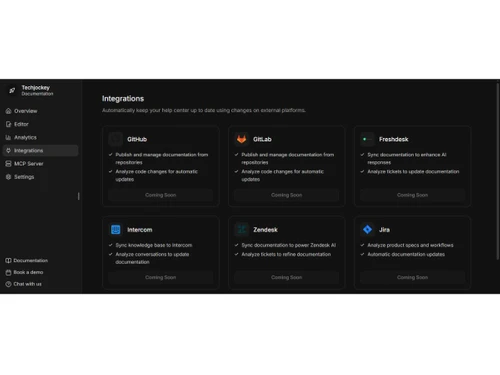
documentation ai-dashboard
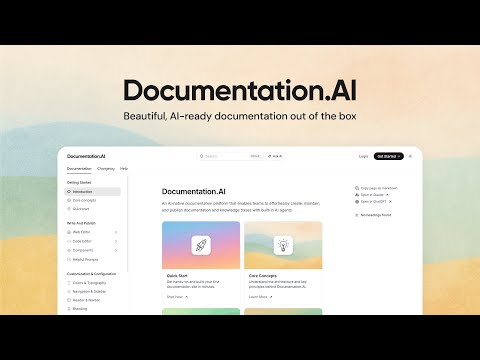
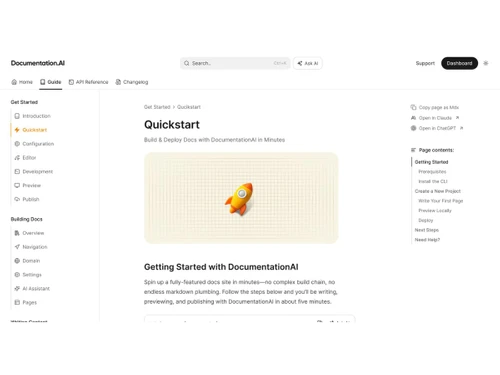
documentation ai-intro

Documentation AI

Brand: Documentation AI

  • 4.3

  • 3 Ratings

Documentation AI is an AI-powered documentation and knowledge base platform designed to help teams create, manage, and maintain product, technical, and API documentation efficiently.

See More

Have you used Documentation AI before?

Share your insights for better experience

Add a Review
Starting Price
$39

View plans

100% Genuine
Products
Best Price
Guaranteed
Safe & Secure
Payment
  • Description

  • Pricing

  • Features

  • Specification

  • Review

  • FAQ

Starting at $39

Documentation AI Software Overview

What is Documentation AI?

Documentation AI is an AI tool that helps teams create, manage, and maintain technical documentation, product guides, and knowledge bases more efficiently. It uses artificial intelligence to generate content, organize information, and keep documentation updated automatically.

The platform streamlines documentation workflows by enabling collaboration, search optimization, and instant answers within documents, making it useful for developers, businesses, and support teams.

Why Choose Documentation AI?

  • AI-Powered Documentation Creation: It uses an AI agent to automatically write, update, and improve documentation, reducing manual effort and keeping content aligned with product changes.
  • Faster Publishing & Updates: Teams can create and publish docs quickly through a web editor or docs-as-code workflows, enabling real-time updates whenever features change.
  • Interactive AI Assistant for Users: Built-in AI allows readers to ask questions directly inside documentation and receive instant, accurate, cited answers, improving user experience.
  • Developer-Friendly Integrations: The platform integrates with tools like Git, Slack, and project management systems, helping teams maintain documentation alongside development workflows.

Benefits of Documentation AI

  • Saves Time and Effort: Automates documentation creation and updates, reducing manual work for teams.
  • Improves Accuracy: AI helps keep documentation consistent and aligned with product or process changes.
  • Enhances Collaboration: Centralized workflows allow teams to create, edit, and manage content together efficiently.
  • Better User Support: Built-in AI search and assistants provide instant answers, improving user experience.
  • Scalable Knowledge Management: Supports growing documentation needs without increasing workload significantly.

Documentation AI Pricing

Documentation AI pricing starts at USD 39 at techjockey.com. The pricing model is based on different parameters, including the amount of bandwidth you need, the number of servers you need, and the features you need. For further queries related to the product, you can contact our product team and learn more about the pricing and offers.

Read more

Documentation AI Pricing & Plans

Standard
Starting at $39
    • Licenses

      Licenses
      Licenses
    • Monthly

      Monthly
      Monthly

Key Features

  • 2 editor seats

  • 200 AI credits per month

  • Visual web editor & live Markdown preview

  • Global search & advanced analytics

  • API Playground

  • MCP Server

Professional
Starting at $99
    • Licenses

      Licenses
      Licenses
    • Monthly

      Monthly
      Monthly

Key Features

  • Everything in Standard

  • 5 editor seats

  • 500 AI credits per month

  • Preview deployments for safe reviews

  • Role-based permissions

  • Private, password-protected docs

  • Dedicated CSM channel

Documentation AI Features

  • icon_check Dynamic Web Editor
    Features a block-based interface with slash commands and drag-and-drop elements for intuitive technical content creation.
  • icon_check AI Assistant
    Embeds an AI assistant within pages to provide users with instant, cited answers based on the latest platform information.
  • icon_check MCP Server Integration
    Implements Model Context Protocol to stream real-time specification changes to compatible coding agents and AI models.
  • icon_check Semantic Data Structure
    Organizes headings and code blocks specifically for precise LLM chunking to ensure high-quality information retrieval.
  • icon_check Dark Mode Support
    Includes native dark mode compatibility to ensure documentation remains readable and visually consistent in all environments.
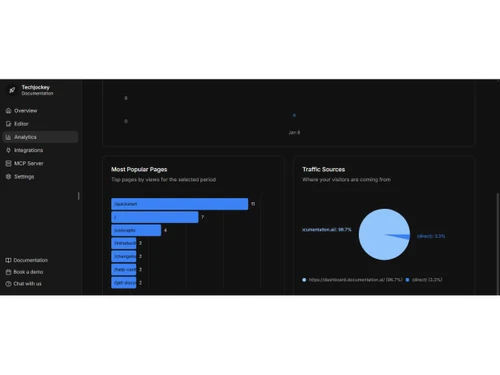
  • icon_check Performance Analytics
    Tracks page views, search terms, and user drop-off points to identify areas requiring content updates or improvements.
  • icon_check Reusable Block Library
    Offers over 100 pre-built components like callouts and code tabs to maintain structural consistency across all pages.
  • icon_check Git Synchronization
    Connects directly to GitHub to monitor commits and trigger updates when functional changes are detected in the codebase.
  • icon_check User Feedback Loops
    Collects precise sentiment data and comments on every page to help teams refine documentation based on reader input.
  • icon_check SEO Optimization
    Maintains a perfect lighthouse score for search engine visibility, helping users find relevant help articles via search.
  • icon_check Third-party Integration
    Connects with tools like Slack, Jira, and Linear to unify the documentation workflow with existing project management.
  • icon_check Automated Summaries
    Generates concise summaries of long technical articles or change logs to help users quickly grasp core software updates.
  • icon_check Version Management
    Tracks historical changes and updates to ensure that users can reference documentation for specific software versions.
Documentation AI Demo Video play icon

Get Documentation AI Demo

Watch the demo video to explore key features, real workflows, and how the software fits your business needs.

Understand
Key Features
Personal
Demo Insights
Interactive
Demo Support

Documentation AI Specifications

Supported Platforms
Ubuntu Ubuntu Windows Windows MacOS MacOS Linux Linux
Devices
Desktop Desktop
Deployment
Cloud-Based Cloud-Based
Suitable For
All Industries
Business Specific
All Businesses
Business Size
Small Business Startups Medium Business Enterprises SMBs SMEs MSMBs MSMEs
Customer Support
Email Communities
Language
English
Training Resources
Documentation Videos
AI Features
AI Integrated

Documentation AI Review

4.3

Out of 5

img

Overall Rating

Based on
3 Verified Ratings

Rating Breakdown

  • Features 4.3
  • Value for Money 4
  • Ease of Use 4.3
  • Customer Support 4.6

80% Recommend this Product

Add Review

Techjockey Trusted Reviews from Verified Users

No reviews are currently available for Documentation AI. Discover similar AI Tools reviews

  • Chatrly

    5.0

    Whats great - Natural voice and chat experience, easy integration, real-time responsiveness, lead generation, user-friendly interface, exce... read more

  • SyncMonster

    4.3

    Whats great - syncMonster is a User-friendly product and its provides high-quality results read more

  • Krutrim AI

    4.4

    Whats great - It helped me communicate and get information in my preferred language. The AI is also easy to use and helped me generate good... read more
Articles for Documentation AI

See All Related Articles

How much does Documentation AI cost?

Documentation AI pricing starts at USD 39 at techjockey.com. Pricing is customised based on specific business needs.

Which operating system does Documentation AI support?

Documentation AI is a cloud-based platform accessible through web browsers, so it works on operating systems like Windows, macOS, and Linux. Users only need an internet connection to use it.

How does Documentation AI work?

Documentation AI uses artificial intelligence to generate, organize, and update documentation based on user inputs, existing files, or connected tools.

Is Documentation AI suitable for small businesses?

Yes, Documentation AI is suitable for small businesses as it simplifies documentation management without requiring large teams.

Does Documentation AI offer a free trial or a demo?

Documentation AI typically offers demos or trial options so users can explore features before purchasing a subscription.

What features does Documentation AI offer?

Key features include AI-generated documentation, content editing tools, collaboration workflows, version control, integrations, AI search, and knowledge base management.

Is there a Documentation AI App?

Documentation AI mainly operates as a web-based platform rather than a standalone mobile app. However, it can usually be accessed through mobile browsers.

Who are the potential users of Documentation AI?

Potential users include developers, product teams, technical writers, customer support teams, startups, and enterprises that need structured documentation and knowledge management.

How secure is Documentation AI?

Documentation AI generally follows standard cloud security practices such as secure access controls and data protection measures.

What is Documentation AI used for?

Documentation AI is used to create, manage, and maintain product documentation, technical guides, knowledge bases, and internal resources. It helps teams share information efficiently and improve user support.

20,000+ Software Listed

Best Price Guranteed

Free Expert Consultation

2M+ Happy Customers

Terms and Condtions

close

Users with registered businesses can purchase goods from merchants on the platform to satisfy their business needs. Users are not permitted to utilize any products acquired through the platform for resale, advertising, business, or further distribution.

For each purchase made, users will receive a Tax Invoice (or 'GST invoice') that includes specific details such as:

  • the GSTIN of the user associated with their registered business, and

  • the specified Entity Name for their business.

It should be noted that not all products are eligible for GST Invoice. Only the products displayed by participating sellers with the 'GST-based Invoice Available' callout on the product description page would qualify.

Certain goods and services are not eligible to get a GST Invoice, including items with VAS, i.e., Value Added Services (e.g., Total Mobile Protection/Assured Buyback) and those involving an exchange offer at the time of purchase.

Users must ensure the accuracy of the GSTIN, and business entity name provided for the GST Invoice. Requests for corrections into GST Invoice would not be accommodated by Techjockey.com or any Seller, and any issues arising from user-provided information are the sole responsibility of users.

Techjockey.com is not liable for the GST Invoice or any associated input tax credit. To efficiently claim an input tax credit, users should select the registered place of business address as per the GST authority's data and follow the provisions of the GST Act and rules.

To claim an input tax credit, the delivery and billing addresses must match. Furthermore, input tax credits will not be granted if the delivery address and GSTIN on the invoice are from different states. In case of incorrect GST details provided during the order placement, the order will be canceled automatically.