linkedin
Facelift Data Studio logo
play Social Media Tips: Facebook Reach Explained
Facelift Data Studio-dashboard
Facelift Data Studio-discover

Facelift Data Studio

Brand: Facelift

  • No Ratings & Reviews

A social media analytics tool that tracks performance metrics and benchmarks competitors across multiple platforms.

See More

Have you used Facelift Data Studio before?

Share your insights for better experience

Add a Review

Price Available on Request

Questions about pricing or customization? We’re here to help, just a click away.

100% Genuine
Products
Best Price
Guaranteed
Safe & Secure
Payment
  • Description

  • Pricing

  • Features

  • Specification

  • Review

  • FAQ

Facelift Data Studio Software Overview

What is Facelift Data Studio?

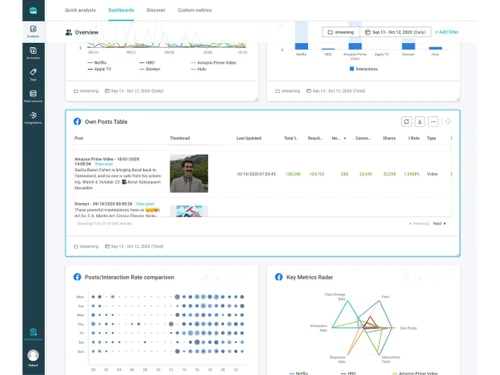
Facelift Data Studio is a powerful social media analytics tool for data-driven professionals, agencies, and brands. This digital marketing tools software centralizes performance metrics from Facebook, Instagram, LinkedIn, YouTube, TikTok, and Snapchat. It offers deep benchmarking against competitors, over 700 customizable metrics, and automated branded reporting.

The platform includes QQL for creating custom KPIs, ad analytics for paid campaigns, and API integration with BI tools like Tableau and data warehouses. It excels at transforming raw social data into actionable insights for strategic decision-making.

Why Choose Facelift Data Studio?

  • Cross-Platform Analytics: Centralize and track metrics from all major social networks in one interface.
  • Deep Benchmarking: Compare brand performance against competitors or industry standards.
  • Custom Metrics via QQL: Create unique KPIs to meet specific business needs using quintly Query Language.
  • 700+ Pre-Defined Metrics: Access comprehensive, customizable metrics for in-depth channel analysis.
  • Automated Reporting: Schedule and deliver personalized, branded PDF or XLSX reports to stakeholders.
  • Competitive Analysis: Monitor competitor public social activities to identify content gaps and refine strategy.
  • Content Optimization: Determine best posting times, frequency, and engaging content types using engagement patterns.

Benefits of Facelift Data Studio

  • Provides Unrivaled Data Quality: Average data refresh rate of 6 hours for timely insights.
  • Enables Flexible Customization: Dashboards and metrics adapt to high-level overviews or deep investigations.
  • Validates Marketing ROI: Track key metrics and campaign performance to prove content and ad returns.
  • Offers Free Data Migration: Assisted migration of historical audience data when switching from other tools.
  • Supports Agency Workflows: Separate client spaces with no password sharing and branded reporting.
  • Tracks Audience Demographics: Monitor follower behavior and demographic changes over time.
  • Centralizes Organic and Paid Analytics: Unified view of Meta ad campaigns alongside organic performance.
  • Integrates with Data Ecosystem: API access to push social data into existing BI and data warehouse infrastructure.

Facelift Data Studio Pricing

Facelift Data Studio pricing is available on request at techjockey.com. The pricing model is based on different parameters, including extra features, deployment type, and the total number of users. For further queries related to the product, you can contact our product team and learn more about the pricing and offers.

Read more

Facelift Company Details

Founded Year:  2011

Facelift is a social marketing technology provider.

Director/Founders Benjamin Schroeter, Teja Topfer
Company Size 101-500 Employees

Facelift Data Studio Pricing & Plans

Looking for The Right Pricing?

Share your requirements and get a plan built around your business.

  • Define your business needs
  • Get customised pricing
  • Choose features that fit your workflow

Price Available on Request

Get personalised Facelift Data Studio pricing that fits your needs. Our team will connect with you.

Facelift Data Studio Features

  • icon_check Dashboards
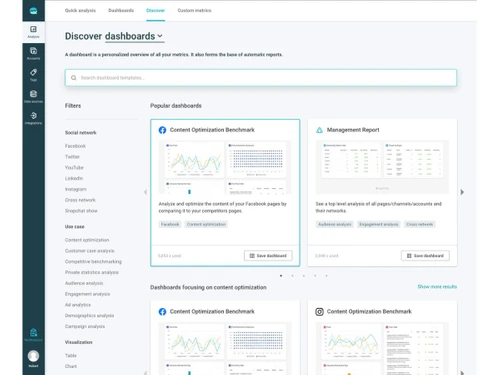
    Build personalized dashboards combining metrics across multiple social networks for unified insights.
  • icon_check Automated Reports
    Schedule and send reports automatically (daily, weekly, monthly) to teams or clients.
  • icon_check Cross-Network Analytics
    Analyze performance across multiple social media platforms in one centralized interface.
  • icon_check Competitive Benchmarking
    Compare your performance with competitors and industry averages to identify gaps.
  • icon_check KPI Tracking
    Track key metrics like engagement rate, followers growth, impressions, and reach.
  • icon_check API Access
    Pull social data into external tools or BI systems for advanced analysis and automation.
  • icon_check Data Export
    Export analytics reports in formats like PDF or CSV for sharing and presentations.
  • icon_check Custom Metrics
    Create tailored metrics using query language for deeper and business-specific insights.
  • icon_check Performance Analysis
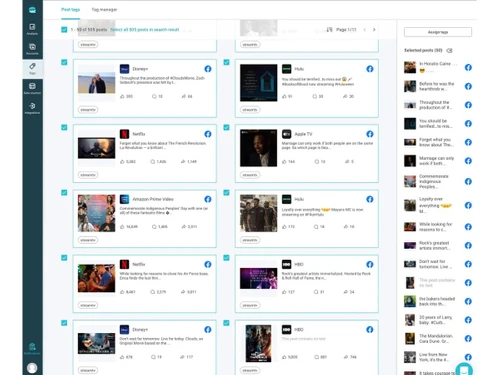
    Evaluate which posts perform best across channels to optimize strategy.
  • icon_check Campaign Analytics
    Track and measure social media campaigns in real time with detailed metrics.
  • icon_check Influencer Tracking
    Monitor influencer campaigns and evaluate ROI across social platforms.
  • icon_check Social listening
    Track mentions, keywords, and conversations related to your brand or competitors.
  • icon_check Social Audience Insights
    Understand follower growth, behavior trends, and audience demographics.
  • icon_check Data Centralization
    Consolidate all social media data into one platform for easier management.
  • icon_check User Management
    Manage team roles, permissions, and collaboration within the platform.
Facelift Data Studio Demo Video play icon

Get Facelift Data Studio Demo

Watch the demo video to explore key features, real workflows, and how the software fits your business needs.

Understand
Key Features
Personal
Demo Insights
Interactive
Demo Support

Facelift Data Studio Specifications

Supported Platforms
Windows Windows MacOS MacOS
Devices
Desktop Desktop
Deployment
Cloud-Based Cloud-Based
Suitable For
All Industries
Business Specific
All Businesses
Business Size
Small Business Startups Medium Business Enterprises
Customer Support
Email Communities
Language
English
Training Resources
Videos

Facelift Data Studio Review

Techjockey Trusted Reviews from Verified Users

No reviews are currently available for Facelift Data Studio. Discover similar Social Media Analytics Tools reviews

  • Social Blade

    3.8

    Whats great - Social Blade is analytics made easy. They track user statistics for many of the biggest social media platforms in the world. ... read more
  • TubeBuddy

    4.6

    Whats great - Give detailed info about a channel or video. Also, give SEO Insights which is beneficial for video or a channel growth read more

  • Inflact

    4.5

    Whats great - From post-scheduling to engagement automation, Inflact offers an array of tools that cater to various aspects of Instagram ma... read more

Articles for Facelift Data Studio

See All Related Articles

How much does Facelift Data Studio cost?

Facelift Data Studio pricing is available on request at Techjockey.com, with scalable tiered plans based on profiles and metrics.

How does Facelift Data Studio work?

You connect your social media profiles to the platform, select from 700+ metrics or create custom ones using QQL, build dashboards, and schedule automated reports.

Who uses Facelift Data Studio?

It is used by data analysts, digital marketing strategists, marketing agencies, and medium to large brands needing advanced social analytics.

What is QQL?

Quintly Query Language allows advanced users to create custom metrics and KPIs tailored to specific business requirements.

What platforms does it support?

It supports Facebook, Instagram, LinkedIn, YouTube, TikTok, Snapchat, and Meta Ads for both organic and paid analytics.

Does it offer competitor analysis?

Yes, it provides deep benchmarking and competitive analysis to compare performance against industry standards.

Can I export data to other tools?

Yes, the API allows pushing social data into Tableau, Google BigQuery, Amazon AWS S3, and other BI systems.

What is the data refresh rate?

The platform maintains an average data refresh rate of 6 hours for timely performance tracking.

Is there support for agencies?

Yes, agencies get multi-client management, shared profile authentication, and co-branded reporting capabilities.

Does it include ad analytics?

Yes, it provides comprehensive Meta Ad Analytics for analyzing paid campaigns alongside organic content.

20,000+ Software Listed

Best Price Guranteed

Free Expert Consultation

2M+ Happy Customers

Terms and Condtions

close

Users with registered businesses can purchase goods from merchants on the platform to satisfy their business needs. Users are not permitted to utilize any products acquired through the platform for resale, advertising, business, or further distribution.

For each purchase made, users will receive a Tax Invoice (or 'GST invoice') that includes specific details such as:

  • the GSTIN of the user associated with their registered business, and

  • the specified Entity Name for their business.

It should be noted that not all products are eligible for GST Invoice. Only the products displayed by participating sellers with the 'GST-based Invoice Available' callout on the product description page would qualify.

Certain goods and services are not eligible to get a GST Invoice, including items with VAS, i.e., Value Added Services (e.g., Total Mobile Protection/Assured Buyback) and those involving an exchange offer at the time of purchase.

Users must ensure the accuracy of the GSTIN, and business entity name provided for the GST Invoice. Requests for corrections into GST Invoice would not be accommodated by Techjockey.com or any Seller, and any issues arising from user-provided information are the sole responsibility of users.

Techjockey.com is not liable for the GST Invoice or any associated input tax credit. To efficiently claim an input tax credit, users should select the registered place of business address as per the GST authority's data and follow the provisions of the GST Act and rules.

To claim an input tax credit, the delivery and billing addresses must match. Furthermore, input tax credits will not be granted if the delivery address and GSTIN on the invoice are from different states. In case of incorrect GST details provided during the order placement, the order will be canceled automatically.