linkedin
Fast Forward TMS logo
play How Fast Forward TMS Delivers Big Results: Features That Boost ROI
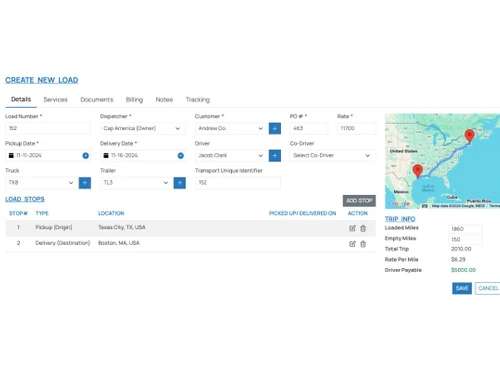
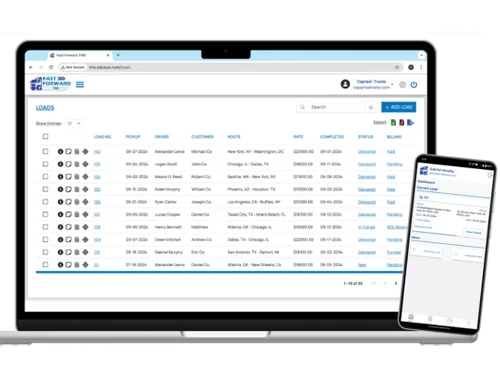
fastforwardtms-loads
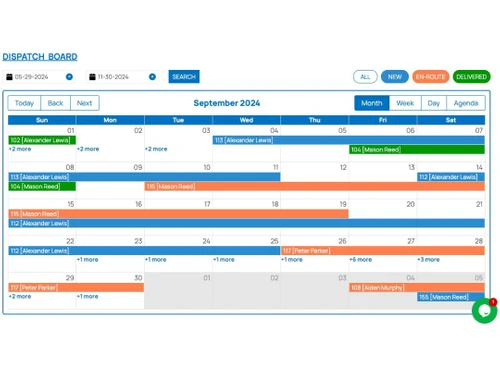
fastforwardtms-board

Fast Forward TMS

Brand: Pysar Infotech Private Limited

  • 4.0

  • 3 Ratings

A smart supply chain management software to manage transport, fleet, and supply chain operations easily and efficiently.

See More

Have you used Fast Forward TMS before?

Share your insights for better experience

Add a Review

Price Available on Request

Questions about pricing or customization? We’re here to help, just a click away.

100% Genuine
Products
Best Price
Guaranteed
Safe & Secure
Payment
  • Description

  • Pricing

  • Features

  • Specification

  • Review

  • Compare

  • Alternatives

  • FAQ

Fast Forward TMS Software Overview

What is Fast Forward TMS?

Fast Forward TMS is a powerful transport management software made for businesses that want full control over their supply chain. It covers everything from order dispatching to delivery tracking and financial reporting.

This business software helps logistics companies simplify daily operations like load management, route optimization, billing, driver scheduling, and more in one place. It is perfect for managing large fleets, keeping track of cargo, and automating routine transport tasks.

Why Choose Fast Forward TMS?

  • Covers end-to-end logistics needs: From booking to delivery and billing, it manages everything in one platform.
  • Simplifies vehicle management: It tracks fuel, service dates, and live locations of all your vehicles.
  • Helps manage drivers smartly: Assign tasks, monitor driver behavior, and receive performance alerts.
  • Boosts delivery performance: With route optimization and tracking, deliveries happen faster and on time.
  • Strong HR and payroll tools: Manages employee payroll, attendance, and roles in one place.

Benefits of Fast Forward TMS

  • Makes fleet tracking easier: Monitor fuel usage, repairs, and vehicle schedules without manual checks.
  • Improves customer satisfaction: With timely updates and faster deliveries, clients are happier.
  • Saves money on operations: Reduces fuel waste, delays, and manual errors with automation.
  • Ensures government compliance: Comes with built-in tools for data security and transport regulations.
  • Easy team coordination: Share tasks, documents, and updates across teams without delays.

Fast Forward TMS Pricing

Fast Forward TMS pricing is available on request at Techjockey.com. The pricing model is based on different parameters, including extra features, deployment type, and the total number of users. For further queries related to the product, you can contact our product team and learn more about the pricing and offers.

Read more

Pysar Infotech Private Limited Company Details

Founded Year:  2019

Fast Forward TMS empowers you to take control of your fleet like never before. With cutting-edge technology and intuitive tools, we help you streamline operations, optimize routes, and maximize efficiency, all while ensuring timely deliveries and satisfied customers.

Director/Founders Pysar Infotech
Company Size 1-100 Employees

Fast Forward TMS Pricing & Plans

Looking for The Right Pricing?

Share your requirements and get a plan built around your business.

  • Define your business needs
  • Get customised pricing
  • Choose features that fit your workflow

Price Available on Request

Get personalised Fast Forward TMS pricing that fits your needs. Our team will connect with you.

Fast Forward TMS Features

Core Functionalities

  • icon_check Fleet Management
    Monitors vehicle usage, service, and repairs.
  • icon_check Order Management
    Manages transport requests and deliveries
  • icon_check Dispatch Management
    Assigns and tracks dispatch status
  • icon_check Transportation Management
    Controls all movements and routes
  • icon_check Route Management
    Suggests best routes for cost and time saving.
  • icon_check Logistics Management
    Oversees complete supply operations
  • icon_check Load Management
    Handles all cargo assignments and schedules
  • icon_check Freight Management
    Tracks freight status from pickup to delivery.
  • icon_check Carrier Management
    Maintains data of third-party transporters
  • icon_check Inventory Management
    Monitor and control inventory levels, track stock movements, and ensure that goods are available to meet demand without
  • icon_check Warehouse Management
    Coordinate the storage and movement of goods within a warehouse, optimizing space utilization and improving inventory accuracy.
  • icon_check Reverse Logistics
    Manage the return of goods from customers back to the warehouse or supplier

Financial and Accounting Management

  • icon_check Billing & Invoicing
    Creates and manages client invoices.
  • icon_check Financial Management
    Tracks earnings and transport spending.
  • icon_check Expense Management
    Keeps record of every transport expense
  • icon_check MIS Reports
    Generates business reports for transport managers
  • icon_check Budgeting And Forecasting
    Helps plan future logistics costs
  • icon_check Accounts Receivable
    Track and manage money owed by customers, ensuring timely collection of payments to maintain cash flow.
  • icon_check Accounts Payable
    Manage the company's short-term liabilities by tracking and processing payments to suppliers and vendors.
  • icon_check Audit Management
    Automate the auditing process, ensuring compliance with financial regulations and reducing the risk of errors and fraud.
  • icon_check Freight Auditing
    Audit freight bills to ensure accuracy and compliance, identifying discrepancies and recovering overpayments.

Vehicle and Driver Management

  • icon_check GPS Tracking
    Gives live location of vehicles.
  • icon_check Fuel Management
    Monitors fuel use and controls wastage
  • icon_check Driver Management
    Records performance and work history.
  • icon_check Delivery Tracking
    Tracks progress of active deliveries
  • icon_check Vehicle Maintenance
    Reminds for servicing and checks.
  • icon_check Fleet Operations
    Tracks all vehicle movements
  • icon_check Tire Management
    Monitor tire usage and performance, scheduling maintenance and replacements to ensure safety and efficiency.
  • icon_check Container Load Optimization
    Optimizes the loading of goods into containers to maximize space and reduce costs.
  • icon_check Driver Behavior Monitoring
    Tracks and analyzes driver behavior to improve safety and efficiency.

Supply Chain Management

  • icon_check Shipment Tracking
    Updates location and delivery status.
  • icon_check Supply Chain Collaboration
    Facilitate collaboration between supply chain partners, improving communication, coordination, and efficiency.
  • icon_check Distribution Management
    Manage the distribution of goods from the warehouse to the end customer, optimizing routes and ensuring timely delivery.
  • icon_check Hub Operations
    Coordinate activities at logistics hubs, including sorting, storage, and dispatching, to streamline the movement of goods.
  • icon_check Procurement Management
    Manage the procurement process, including supplier selection, contract management, and order processing
  • icon_check Cross Docking
    Direct transfer of goods from inbound to outbound transportation without storage.

Task and Project Management

  • icon_check Task Management
    Assigns and monitors logistics tasks.
  • icon_check Document Management
    Saves all related project files
  • icon_check Project Management
    Plan, execute, and monitor projects, coordinating resources and activities to achieve project goals.
  • icon_check Workflow Management
    Automate and optimize workflows, ensuring that tasks are completed efficiently and according to standard operating procedures.

HR and Payroll Management

  • icon_check Payroll Management
    Calculates salaries and taxes.
  • icon_check Employee Management
    Stores staff data and work roles
  • icon_check Leave Management
    Manage employee leave requests and approvals, ensuring that leave policies are followed and staffing levels are maintained.
  • icon_check Time and Attendance
    Track employee time and attendance, ensuring that hours worked are accurately recorded

Compliance and Security

  • icon_check Compliance Management
    Ensures transport rules are followed.
  • icon_check Data Encryption
    Keeps company data safe.
  • icon_check Electronic Documentation
    Avoids paper and saves files online
  • icon_check Audit Trail
    Track and record system activities, enabling traceability and accountability for compliance audits.
  • icon_check Two-Factor Authentication (2FA)
    Add an extra layer of security with two-factor authentication to protect against unauthorized access.
  • icon_check GDPR Compliant
    Ensure data handling practices comply with GDPR, protecting customer privacy and avoiding fines.
  • icon_check E Way Bill Integration
    Integrates with the E-Way Bill system for generating and tracking transport documents.

Integrations

  • icon_check API Integration
    Enable seamless data exchange between the TMS and other systems, such as ERP, WMS, and CRM
  • icon_check EDI Integration
    Automate the exchange of business documents between the company and its trading partners
  • icon_check 3PL Management
    Manage third-party logistics providers, including tracking shipments, managing contracts etc.
  • icon_check Customizable Workflows
    Ability to modify workflows to suit business needs.
  • icon_check Electronic Logging Device (ELD) Integration
    Integrates with ELDs to log driving hours and ensure compliance with regulations.
  • icon_check Email & SMS Integration
    Sends automated email and SMS notifications for alerts and updates.
  • icon_check Warehouse Management System (WMS) Integration
    Integration with a dedicated Warehouse Management System to handle complex warehouse operations
  • icon_check Third Party Integration
    Connect the TMS with third-party applications and services, to extend its functionality.

Analytics and Reporting

  • icon_check Performance Metrics
    Tracks delivery and transport KPIs
  • icon_check Dashboards
    Real-time data charts for managers.
  • icon_check Compliance Reporting
    Generate automated reports to meet regulatory requirements, reducing manual effort and errors.

Administrative Features

  • icon_check Cloud and Mobile Access
    Work from desktop or mobile anywhere.
  • icon_check User Access Management
    Control access to the system, assign roles and permissions, and manage user accounts to ensure security and compliance.
  • icon_check Booking and Reservations
    Manage the booking and reservation process, ensuring that resources are allocated efficiently

Alerts And Notifications

  • icon_check Real-Time GPS Location
    Shows current position of all vehicles
  • icon_check Delivery Confirmation Alerts
    Notifies when delivery is complete.
  • icon_check Driver Performance Alerts
    Sends alerts about delays or bad driving.
  • icon_check Automatic Triggers
    Automates specific actions (e.g., sending alerts, updating statuses) when certain conditions are met.
  • icon_check Incident Notifications
    Immediate alerts for incidents like accidents, vehicle malfunctions, or security breaches, enabling quick response and resolution.
  • icon_check Custom Alerts
    User-defined alerts that can be customized based on specific business rules or operational needs, such as temperature variations
Fast Forward TMS Demo Video play icon

Get Fast Forward TMS Demo

Watch the demo video to explore key features, real workflows, and how the software fits your business needs.

Understand
Key Features
Personal
Demo Insights
Interactive
Demo Support

Fast Forward TMS Specifications

Supported Platforms
Ubuntu Ubuntu Windows Windows Android Android MacOS MacOS Linux Linux
Devices
Desktop Desktop Mobile Mobile
Deployment
Cloud-Based Cloud-Based
Suitable For
Logistics Transportation
Business Specific
All Businesses
Business Size
Small Business Startups Medium Business Enterprises SMBs SMEs MSMBs MSMEs
Customer Support
Email Communities
Language
English

Explore the Best Alternative Solutions Similar to Your Business Size and Needs

Fast Forward TMS Review

4.0

Out of 5

img

Overall Rating

Based on
3 Verified Ratings

Rating Breakdown

  • Features 4.1
  • Value for Money 3.6
  • Ease of Use 4
  • Customer Support 4.3

93% Recommend this Product

Add Review

Techjockey Trusted Reviews from Verified Users

No reviews are currently available for Fast Forward TMS. Discover similar Transport Management Software reviews

  • SuperProcure

    4.7

    Whats great - The support given by the team is very useful and effective read more

  • Sahiwala TMS

    4.3

    Whats great - Apps contain Like LR, Delivery Challan for Drivers, Monthly Billing, Discovery feature is Active Reports like Daily 'To Pa... read more

  • truePilot

    4.6

    Whats great - Affordable and easy to use, making it a practical choice for small businesses looking to manage and display customer feedback... read more

Compare Fast Forward TMS With other Transport Management Software

Products
Ratings
Pricing
Device Supported
Deployment
Supported Platforms
  • img

    Fast Forward TMS

  • 4.0

  • Price On Request

  • Desktop

    Mobile

  • Web based

    On Premises

  • Windows

    Mac OS

  • img

    LOZICS

  • 4.7

  • Price On Request

  • Desktop

    Mobile

  • Web based

    On Premises

  • Windows

    Mac OS

  • img

    SuperProcure

  • 4.6

  • ₹ 14850

  • Desktop

    Mobile

  • Web based

    On Premises

  • Windows

    Mac OS

  • img

    SBX TMS

  • 4.3

  • Price On Request

  • Desktop

    Mobile

  • Web based

    On Premises

  • Windows

    Mac OS

  • img

    Project44

  • 4.3

  • Price On Request

  • Desktop

    Mobile

  • Web based

    On Premises

  • Windows

    Mac OS

  • img

    Rose Rocket

  • 4.2

  • Price On Request

  • Desktop

    Mobile

  • Web based

    On Premises

  • Windows

    Mac OS

  • img

    Vishwa TMS

  • 4.3

  • Price On Request

  • Desktop

    Mobile

  • Web based

    On Premises

  • Windows

    Mac OS

  • img

    Oracle TMS

  • 4.1

  • Price On Request

  • Desktop

    Mobile

  • Web based

    On Premises

  • Windows

    Mac OS

  • img

    Transporeon

  • 4.1

  • Price On Request

  • Desktop

    Mobile

  • Web based

    On Premises

  • Windows

    Mac OS

  • img

    Transkey ERP

  • 4.4

  • Price On Request

  • Desktop

    Mobile

  • Web based

    On Premises

  • Windows

    Mac OS

(0) Product(s) selected

Fast Forward TMS Alternatives

See All Fast Forward TMS Alternatives

Available

Price on Request

Available

Price on Request

Available

Price on Request

Available

Price on Request

Starting Price:

₹46,610 /License

Available

Price on Request

Articles for Fast Forward TMS

See All Related Articles

How much does Fast Forward TMS cost?

The Fast Forward TMS pricing is available on request at Techjockey.

How does Fast Forward TMS work?

Fast Forward TMS helps you manage loads, drivers, delivery, accounts, and fleet in one place. You get real-time tracking, alerts, billing tools, and driver info easily.

Who uses Fast Forward TMS?

Fast Forward TMS is used by logistics firms, delivery companies, transport businesses, and fleet owners who want full control over their daily operations.

Can I track my drivers with this software?

Yes, Fast Forward TMS allows real-time GPS tracking of your drivers, delivery status, and vehicle routes to ensure timely updates.

Does it support invoicing and expense management?

Yes, it has built-in billing, invoicing, and complete expense tracking tools that help you manage payments and budgets properly.

20,000+ Software Listed

Best Price Guranteed

Free Expert Consultation

2M+ Happy Customers

Terms and Condtions

close

Users with registered businesses can purchase goods from merchants on the platform to satisfy their business needs. Users are not permitted to utilize any products acquired through the platform for resale, advertising, business, or further distribution.

For each purchase made, users will receive a Tax Invoice (or 'GST invoice') that includes specific details such as:

  • the GSTIN of the user associated with their registered business, and

  • the specified Entity Name for their business.

It should be noted that not all products are eligible for GST Invoice. Only the products displayed by participating sellers with the 'GST-based Invoice Available' callout on the product description page would qualify.

Certain goods and services are not eligible to get a GST Invoice, including items with VAS, i.e., Value Added Services (e.g., Total Mobile Protection/Assured Buyback) and those involving an exchange offer at the time of purchase.

Users must ensure the accuracy of the GSTIN, and business entity name provided for the GST Invoice. Requests for corrections into GST Invoice would not be accommodated by Techjockey.com or any Seller, and any issues arising from user-provided information are the sole responsibility of users.

Techjockey.com is not liable for the GST Invoice or any associated input tax credit. To efficiently claim an input tax credit, users should select the registered place of business address as per the GST authority's data and follow the provisions of the GST Act and rules.

To claim an input tax credit, the delivery and billing addresses must match. Furthermore, input tax credits will not be granted if the delivery address and GSTIN on the invoice are from different states. In case of incorrect GST details provided during the order placement, the order will be canceled automatically.