linkedin
Fieldbook logo
fieldbook group
fieldbook logistics
fieldbook tours

Fieldbook

Brand: Fieldbook

  • 4.6

  • 5 Ratings

Fieldbook helps tour operators manage tours efficiently with flexible plans, personalized setup, and comprehensive support, providing an alternative to spreadsheets.

See More

Have you used Fieldbook before?

Share your insights for better experience

Add a Review
Starting Price
$44

View plans

100% Genuine
Products
Best Price
Guaranteed
Safe & Secure
Payment
  • Description

  • Pricing

  • Features

  • Specification

  • Review

  • Compare

  • Alternatives

  • FAQ

Starting at $44

Fieldbook Software Overview

What is Fieldbook?

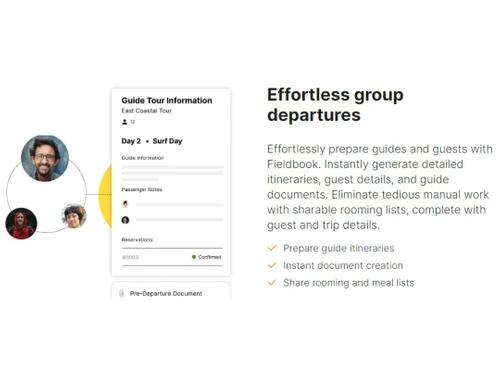
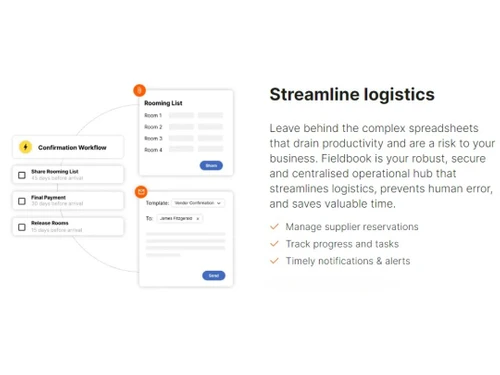
Fieldbook is a specialized Tour Travel Management Software designed to help tour operators transition from manual processes, like spreadsheets, to a streamlined, automated, and centralized platform. It provides a comprehensive solution for managing the entire lifecycle of a tour, from scheduling and itinerary planning to coordinating guides and engaging with guests. The software is engineered to bring efficiency and clarity to tour operations, allowing businesses to focus on delivering exceptional travel experiences rather than getting bogged down in administrative tasks. With features tailored for different stages of business growth, Fieldbook serves as a scalable partner for tour operators aiming to optimize their operational workflow and enhance stakeholder communication.

Why Choose Fieldbook?

  • Seamless Transition from Manual Systems: Fieldbook is the ideal next step for operators currently relying on spreadsheets. It provides a structured environment to manage tour days, staff, and guest information, reducing errors and saving significant time.
  • Scalable for Business Growth: With flexible plans designed for different operational volumes, from 30 tour days a year to unlimited, the software grows with your business. You can easily upgrade your plan as your departure frequency increases.
  • Personalized and Rapid Onboarding: The company ensures you are operational quickly. Their tailored implementation plan, which includes pre-loading one of your itineraries, aims to have your team fully functional on the platform within 14 days.
  • Unlimited Stakeholder Access: All plans include unlimited access for guides and guests, fostering clear communication and ensuring everyone has the information they need, when they need it.
  • Dedicated, High-Touch Support: Beyond standard email and chat support, higher-tier plans offer a dedicated account manager. This provides a single point of contact for personalized support, strategic advice, and troubleshooting, ensuring you maximize the platform's value.

Advanced Features of Fieldbook

  • Tour Day Management System: The platform's pricing and usage are uniquely structured around ""tour days"" - each day a tour is actively running. This metric provides a clear and fair way to measure operational volume and scale your subscription accordingly.
  • Comprehensive User Roles: The system allows for unlimited guide and guest access, ensuring that field staff and customers can view relevant information without occupying a paid user seat, which is reserved for administrative staff.
  • Proactive Onboarding Service: To accelerate user adoption, the Fieldbook team kickstarts your setup by pre-loading a complete tour itinerary for you. This hands-on approach ensures the platform is configured to your specific needs from day one.
  • Dedicated Account Management: The Scale plan includes a dedicated account manager who acts as a strategic partner. They provide personalized support, assist with training, and offer advice to help optimize your use of the software for maximum business impact.
  • Flexible Subscription Handling: The platform allows for mid-cycle plan upgrades with prorated charges, offering the flexibility to adapt to seasonal or unexpected growth in tour demand without administrative hurdles.

Key Capabilities of Fieldbook

  • Operations and Scheduling: At its core, Fieldbook excels at scheduling and managing tour departures. The ""tour day"" limit system provides a clear framework for planning your calendar year, from single-day excursions to multi-day trips.
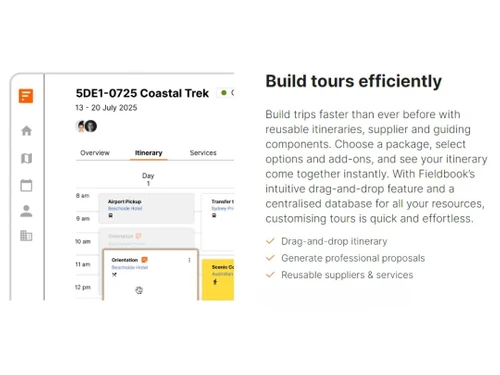
  • Itinerary Organization: The software serves as a central repository for all your tour itineraries. The ability to have itineraries pre-loaded during setup highlights its capability to handle detailed, structured tour information.
  • User and Access Control: Manage different levels of access for your team. The platform distinguishes between administrative users (who occupy paid seats) and operational stakeholders like guides and guests, who are granted unlimited access.
  • Customer and Team Support: Fieldbook provides robust support channels, including email and chat, with 24/7 availability on higher-tier plans. This ensures that operational issues can be resolved promptly, minimizing disruption.
  • Billing and Account Management: A self-service billing portal allows you to easily manage your subscription, enter payment details, and cancel at any time, providing transparency and control over your account.

How to Use Fieldbook?

  1. Initiate a Free Trial: Begin by signing up for a 14-day, risk-free trial, which grants full access to all platform features.
  2. Engage in a Personalized Consultation: After signing up, the Fieldbook team schedules a call to understand your specific business needs and operational challenges.
  3. Experience Guided Setup: During the initial call, the team assists with the setup process. They kickstart your account by pre-loading one of your tour itineraries, ensuring the platform is immediately useful.
  4. Explore and Implement: Over the 14-day trial, you can explore the software's full capabilities with the goal of having your team fully operational by the end of the period.
  5. Activate Your Subscription: To continue after the trial, simply enter your payment details in the billing portal to subscribe to the plan that best fits your needs. Your subscription will then renew automatically.

Fieldbook Pricing

Fieldbook price starts at USD 44 at techjockey.com.

The pricing model is based on different parameters, including extra features, deployment type, and the total number of users. For further queries related to the product, you can contact our product team and learn more about the pricing and offers.

Read more

Fieldbook Pricing & Plans

Starter
Starting at $44
    • Users

      Users
      Users
    • Monthly

      Monthly
      Monthly

Key Features

  • Manage 30 tour days a year?

  • Tailored onboarding & training

  • 1 user?

  • Unlimited guide access

  • Unlimited guest access

Growth
Starting at $99
    • Users

      Users
      Users
    • Monthly

      Monthly
      Monthly

Key Features

  • Manage 250 tour days a year?

  • 2 user?

  • Unlimited guide access

  • Unlimited guest access

  • Tailored onboarding & training

Scale
Starting at $169
    • Users

      Users
      Users
    • Monthly

      Monthly
      Monthly

Key Features

  • Unlimited tour days a year?

  • Unlimited users?

  • Unlimited guide access

  • Unlimited guest access

  • Tailored onboarding & training

Fieldbook Features

  • icon_check Logistics
  • icon_check Tour Workspace
  • icon_check Workflow Automation
  • icon_check Staff Management
  • icon_check Task & Alerts
  • icon_check Proposal Generator
  • icon_check Operations

Fieldbook Specifications

Supported Platforms
Windows Windows
Devices
Desktop Desktop Mobile Mobile
Deployment
Cloud-Based Cloud-Based
Suitable For
All Industries
Business Specific
All Businesses
Business Size
Small Business Startups Medium Business
Customer Support
Email
Language
English
Training Resources
Documentation

Explore the Best Alternative Solutions Similar to Your Business Size and Needs

Fieldbook Review

4.6

Out of 5

img

Overall Rating

Based on
5 Verified Ratings

Rating Breakdown

  • Features 4.6
  • Value for Money 4.3
  • Ease of Use 4.8
  • Customer Support 4.9

90% Recommend this Product

Add Review

Techjockey Trusted Reviews from Verified Users

No reviews are currently available for Fieldbook. Discover similar Tour Travel Management Software reviews

  • Sembark

    4.8

    Whats great - The platform is easy to use and logically designed, specifically for the needs of Destination Management Companies (DMCs) and... read more

  • Travelopro

    5.0

    Whats great - Travelopro offers an easy-to-use platform for automating customer communication through WhatsApp, with instant booking update... read more

  • iTours- Tour Operator Software

    4.6

    Whats great - iTours comes with automated features so it completely let's you get rid of manual tasks in your travel business like managing... read more

Compare Fieldbook With other Tour Travel Management Software

Products
Ratings
Pricing
Device Supported
Deployment
Supported Platforms
  • img

    Fieldbook

  • 4.6

  • Price On Request

  • Desktop

    Mobile

  • Web based

    On Premises

  • Windows

    Mac OS

  • img

    Sembark

  • 4.7

  • ₹ 3000

  • Desktop

    Mobile

  • Web based

    On Premises

  • Windows

    Mac OS

  • img

    Tide Software

  • 4.4

  • Price On Request

  • Desktop

    Mobile

  • Web based

    On Premises

  • Windows

    Mac OS

  • img

    Lemax

  • 4.1

  • Price On Request

  • Desktop

    Mobile

  • Web based

    On Premises

  • Windows

    Mac OS

  • img

    Travelopro

  • 4.9

  • Price On Request

  • Desktop

    Mobile

  • Web based

    On Premises

  • Windows

    Mac OS

  • img

    Travefy

  • 4.4

  • Price On Request

  • Desktop

    Mobile

  • Web based

    On Premises

  • Windows

    Mac OS

  • img

    Perk

  • 4.3

  • Price On Request

  • Desktop

    Mobile

  • Web based

    On Premises

  • Windows

    Mac OS

  • img

    ePrompt 6 Cloud

  • 4.4

  • Price On Request

  • Desktop

    Mobile

  • Web based

    On Premises

  • Windows

    Mac OS

  • img

    Bókun

  • 4.3

  • Price On Request

  • Desktop

    Mobile

  • Web based

    On Premises

  • Windows

    Mac OS

  • img

    Xola

  • 4.3

  • Price On Request

  • Desktop

    Mobile

  • Web based

    On Premises

  • Windows

    Mac OS

(0) Product(s) selected

Fieldbook Alternatives

See All Fieldbook Alternatives

Available

Price on Request

Starting Price:

$39

Perk

4.3

Starting Price:

$99 /Month

Starting Price:

$49 /Month

Xola

4.3

Available

Price on Request

Starting Price:

$49 /Month

Starting Price:

€140 /Month

Available

Price on Request

Articles for Fieldbook

See All Related Articles

What is Fieldbook by Tourwriter?

Fieldbook by Tourwriter is a tour travel management software designed to help tour operators streamline their tours and manage various aspects of their business efficiently.

How much does Fieldbook software cost?

Fieldbook price starts at USD 44 at techjockey.com.

What features does Fieldbook CRM offer?

Fieldbook includes features such as unlimited guide and guest access, tailored onboarding and training, email and chat support, and for higher plans, pre-loaded itineraries and a dedicated account manager.

Is Fieldbook good for tour operators?

Yes, Fieldbook is specifically designed for tour operators at every stage, offering flexible plans to help them streamline operations, manage frequent departures, and coordinate multiple tours and staff.

How to use Fieldbook by Tourwriter?

To get started with Fieldbook, you can sign up for a 14-day free trial, after which a personalized call will help set up your specific needs, including pre-loading a tour to get you running quickly.

Who can use Fieldbook?

Fieldbook is designed for tour operators at all stages, from those moving away from spreadsheets to growing businesses with frequent departures and larger teams coordinating multiple tours and staff.

What is a tour day in Fieldbook's pricing?

A tour day in Fieldbook refers to each day you are actively running a tour, where a single-day tour counts as one tour day and a multi-day tour counts for each day it runs.

What happens if I exceed my tour day limit in Fieldbook?

If your scheduled tour days exceed the limit of your current Fieldbook plan, you will need to upgrade to the next available plan to continue scheduling more tours for the year.

How does the free trial work for Fieldbook?

Fieldbook offers a 14-day risk-free trial with full access to all features, which begins after signing up and scheduling a personalized call to discuss your needs and get you set up.

Can I cancel my Fieldbook subscription anytime?

Yes, you can cancel your Fieldbook plan at any time with just a few clicks, as the process is designed to be simple and transparent without hidden catches.

20,000+ Software Listed

Best Price Guranteed

Free Expert Consultation

2M+ Happy Customers

Terms and Condtions

close

Users with registered businesses can purchase goods from merchants on the platform to satisfy their business needs. Users are not permitted to utilize any products acquired through the platform for resale, advertising, business, or further distribution.

For each purchase made, users will receive a Tax Invoice (or 'GST invoice') that includes specific details such as:

  • the GSTIN of the user associated with their registered business, and

  • the specified Entity Name for their business.

It should be noted that not all products are eligible for GST Invoice. Only the products displayed by participating sellers with the 'GST-based Invoice Available' callout on the product description page would qualify.

Certain goods and services are not eligible to get a GST Invoice, including items with VAS, i.e., Value Added Services (e.g., Total Mobile Protection/Assured Buyback) and those involving an exchange offer at the time of purchase.

Users must ensure the accuracy of the GSTIN, and business entity name provided for the GST Invoice. Requests for corrections into GST Invoice would not be accommodated by Techjockey.com or any Seller, and any issues arising from user-provided information are the sole responsibility of users.

Techjockey.com is not liable for the GST Invoice or any associated input tax credit. To efficiently claim an input tax credit, users should select the registered place of business address as per the GST authority's data and follow the provisions of the GST Act and rules.

To claim an input tax credit, the delivery and billing addresses must match. Furthermore, input tax credits will not be granted if the delivery address and GSTIN on the invoice are from different states. In case of incorrect GST details provided during the order placement, the order will be canceled automatically.