linkedin
FlexiSign logo
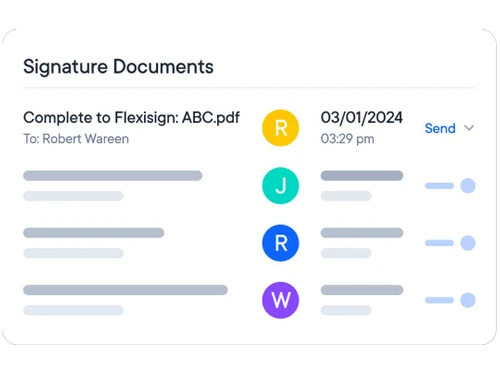
FlexiSign-documents
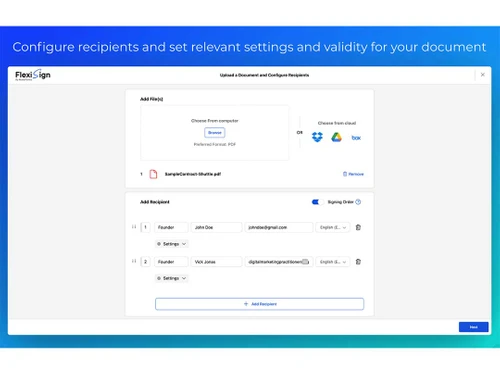
FlexiSign files
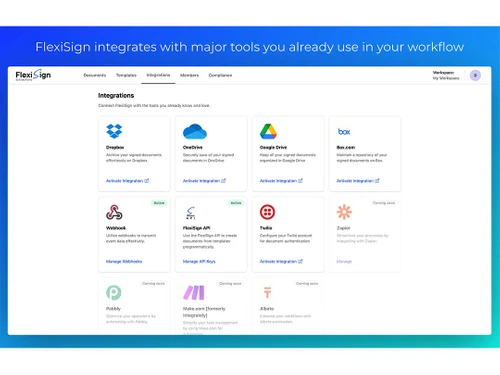
FlexiSign integrations

FlexiSign

Brand: FlexiSign

  • 4.0

  • 4 Ratings

A digital signage software that combines design power with precision cutting tools. It's made for professionals who value speed, control, and impeccable results.

See More

Have you used FlexiSign before?

Share your insights for better experience

Add a Review
Starting Price
$14

View plans

100% Genuine
Products
Best Price
Guaranteed
Safe & Secure
Payment
  • Description

  • Pricing

  • Features

  • Specification

  • Review

  • Compare

  • Alternatives

  • FAQ

Starting at $14

FlexiSignSoftware Overview

What is FlexiSign Software?

FlexiSign is best described as a complete digital signage software package for digital signage. It assists in both the creation and management of signage designs. Users can design vector compositions and send them right to print or cut. Additionally, FlexiSign is compatible with various production processes, including vinyl cutting and print-and-cut methods.

The solution also includes handy job tracking and production control tools. Users can effortlessly access cloud features, keep tabs on jobs, or submit artwork for customer approval. FlexiSign helps reduce errors and speeds up output. Whether in a shop or studio, it ensures a smooth workflow.

Why Choose FlexiSign Software?

  • Smooth Signing Workflow: FlexiSign lets you handle digital documents without long steps or confusing tools.
  • Supports All Common File Types: Users can upload PDFs, Word files, or image formats without any conversions.
  • Branding That Feels Personal: You can add your logo and company (or business) name. Everything looks absolutely clean and professional.
  • Signer Order Made Simple: Who signs first remains under your control. You can even make it simple for everyone to sign together.
  • Your Data Remains Safe, Always: The software follows strict privacy rules. The aim is to protect user data during every step.
  • Clean, Easy-To-Use Dashboard: Users can easily track which files are signed, pending, or declined in one clear view.
  • Effortless Team Management: You can add teammates, assign roles, and keep every user's access under full control.

Benefits of FlexiSign Software

  • Automated Task Handling: Routine processes become absolutely effortless with smart automation built-in.
  • Time-Saving Templates: Users can easily create and save templates to create identical documents each time.
  • Global Language Support: Supports documents signed in any preferred language worldwide.
  • Easily Connects to Other Apps: Offers integration options to connect with apps you already use.
  • Trackable Signature History: Every action during signing is clearly recorded and easy to review.
  • Easy-to-use Interface: Created with simplicity in mind for use by every level of ability or skill.
  • Automatic Reminder System: Signers are automatically reminded to prevent them from missing deadlines.
  • Data Security Compliance: The solution keeps user data totally safe and intact under strict data protection policies.

FlexiSign Pricing

FlexiSign price in India starts at $14 per month at techjockey.com. The pricing model is based on different parameters, including extra features, deployment type, and the total number of users. For further queries related to the product, you can contact our product team and learn more about the pricing and offers.

Read more

FlexiSign Pricing & Plans

Standard
Starting at $14
    • Monthly

      Monthly
      Monthly

Key Features

  • Sign upto 100 documents per month

  • Send documents for e-signature

  • WorkSpaces/Signing workflow

  • Real-time audit trail/Multiple languages

  • Notifications & reminders

  • Scheduled sending/Pre-filled fields

  • Customized branding/Add multiple users

Business
Starting at $49
    • Monthly

      Monthly
      Monthly

Key Features

  • Sign upto 350 documents per month

  • Send documents for e-signature

  • WorkSpaces/Signing workflow

  • Real-time audit trail/Multiple languages

  • Notifications & reminders

  • Scheduled sending/Pre-filled fields

  • Customized branding/Add multiple users

  • Knowledge-based authentication

  • ID verification authentication

  • HIPAA support through BAA

FlexiSign Features

  • icon_check Audit Trail
    Every signing activity is recorded in a detailed log for complete traceability and transparency.
  • icon_check Custom Branding
    You can include your logo and brand details to give a custom signing experience.
  • icon_check Multilingual Support
    Easily sign or send documents in your language across any device or platform.
  • icon_check Reusable Templates
    Create document templates once and reuse them anytime to speed up your workflow.
  • icon_check Team Management
    Add team members and assign roles to keep access organized and secure.
  • icon_check Document Status Dashboard
    Quickly view which documents are signed, pending, or declined from one dashboard.
  • icon_check Automated Reminder
    Send reminders automatically or manually to make sure no one forgets to sign.
  • icon_check Signature Sequencing
    Choose if signers must follow a sequence or sign at the same time.
  • icon_check Signature Requests
    Send one document to multiple people and collect signatures from each.
  • icon_check GDPR Compliant
    Keeps personal data protected according to the rules of the GDPR law.
  • icon_check Zapier Integration
    Link FlexiSign with other apps to automate your regular tasks easily.

FlexiSign Specification

Supported Platforms
Windows Windows MacOS MacOS
Devices
Desktop Desktop
Deployment
Web-Based Web-Based
Suitable For
All Industries
Business Specific
All Businesses
Business Size
Small Business Startups Medium Business Enterprises SMBs SMEs MSMEs Freelancers
Customer Support
Phone Email
Language
English
Training Resources
Live Online

Explore the Best Alternative Solutions Similar to Your Business Size and Needs

FlexiSign Review

4.0

Out of 5

img

Overall Rating

Based on
4 Verified Ratings

Rating Breakdown

  • Features 4
  • Value for Money 4.1
  • Ease of Use 4
  • Customer Support 4.2

80% Recommend this Product

Add Review

Be the First to Review

This product has no reviews yet. Be the first to leave your feedback.

Add Review

Compare FlexiSign With other Digital Signage Software

Products
Ratings
Pricing
Device Supported
Deployment
Supported Platforms
  • img

    FlexiSign

  • 4.0

  • Price On Request

  • Desktop

    Mobile

  • Web based

    On Premises

  • Windows

    Mac OS

  • img

    Lira Screen

  • 4.5

  • Price On Request

  • Desktop

    Mobile

  • Web based

    On Premises

  • Windows

    Mac OS

  • img

    OptiSigns

  • 4.5

  • Price On Request

  • Desktop

    Mobile

  • Web based

    On Premises

  • Windows

    Mac OS

  • img

    PosterBooking

  • 4.6

  • Price On Request

  • Desktop

    Mobile

  • Web based

    On Premises

  • Windows

    Mac OS

  • img

    DISPL

  • 4.5

  • Price On Request

  • Desktop

    Mobile

  • Web based

    On Premises

  • Windows

    Mac OS

  • img

    Screencloud

  • 4.7

  • Price On Request

  • Desktop

    Mobile

  • Web based

    On Premises

  • Windows

    Mac OS

  • img

    Korbyt

  • 4.3

  • Price On Request

  • Desktop

    Mobile

  • Web based

    On Premises

  • Windows

    Mac OS

  • img

    Intuiface

  • 4.2

  • Price On Request

  • Desktop

    Mobile

  • Web based

    On Premises

  • Windows

    Mac OS

  • img

    piSignage

  • 4.5

  • Price On Request

  • Desktop

    Mobile

  • Web based

    On Premises

  • Windows

    Mac OS

(0) Product(s) selected

FlexiSign Alternatives

See All FlexiSign Alternatives

Starting Price:

$206

Available

Price on Request

Starting Price:

$1,020

Starting Price:

$50

Available

Price on Request

Starting Price:

€15

Starting Price:

$9

How much does FlexiSign cost?

The software's price starts at $14 per month at techjockey.com. Final pricing, however, depends on the chosen features, users, and setup.

Who uses FlexiSign Software?

FlexiSign is typically used by designers, print shops, and sign-making professionals for production and layout work.

Is there a mobile app available for FlexiSign Software?

No, FlexiSign Software does not offer a mobile app version at this time.

Which operating systems are compatible with FlexiSign Software?

FlexiSign digital signage software works smoothly with both Windows and MacOS operating systems for desktop use.

Does FlexiSign Software offer a free trial?

Yes, the software solution comes with a free trial option for new users to explore its features.

How does FlexiSign Software function?

FlexiSign combines design, printing, and cutting tools in one platform to manage signage production. It helps users create, edit, and send jobs directly to printers or cutters. The software streamlines the entire process from artwork to output.

20,000+ Software Listed

Best Price Guranteed

Free Expert Consultation

2M+ Happy Customers

Terms and Condtions

close

Users with registered businesses can purchase goods from merchants on the platform to satisfy their business needs. Users are not permitted to utilize any products acquired through the platform for resale, advertising, business, or further distribution.

For each purchase made, users will receive a Tax Invoice (or 'GST invoice') that includes specific details such as:

  • the GSTIN of the user associated with their registered business, and

  • the specified Entity Name for their business.

It should be noted that not all products are eligible for GST Invoice. Only the products displayed by participating sellers with the 'GST-based Invoice Available' callout on the product description page would qualify.

Certain goods and services are not eligible to get a GST Invoice, including items with VAS, i.e., Value Added Services (e.g., Total Mobile Protection/Assured Buyback) and those involving an exchange offer at the time of purchase.

Users must ensure the accuracy of the GSTIN, and business entity name provided for the GST Invoice. Requests for corrections into GST Invoice would not be accommodated by Techjockey.com or any Seller, and any issues arising from user-provided information are the sole responsibility of users.

Techjockey.com is not liable for the GST Invoice or any associated input tax credit. To efficiently claim an input tax credit, users should select the registered place of business address as per the GST authority's data and follow the provisions of the GST Act and rules.

To claim an input tax credit, the delivery and billing addresses must match. Furthermore, input tax credits will not be granted if the delivery address and GSTIN on the invoice are from different states. In case of incorrect GST details provided during the order placement, the order will be canceled automatically.