USA
USA UAE
UAESmall Business
Designed for startups and growing businesses

See More





Brand: Intellistack
Formstack Documents is a no-code document generation platform that automates the creation and delivery of customized documents, such as contracts, invoices, and proposals, by merging data from various sources like forms, CRMs, and databases.
See MoreHave you used Formstack before?
Share your insights for better experience
Brand: Intellistack
Founded Year: 2006
Founded with the belief that work should be simplified, Intellistack (formerly Formstack) has grown into a leading provider of powerful, no-code productivity solutions that help teams do more with less.
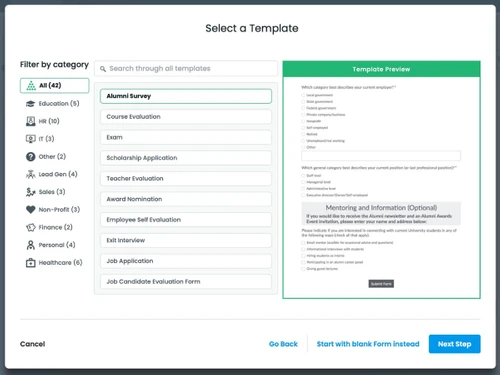
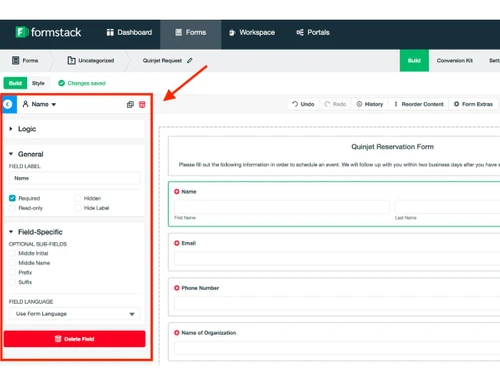
 Drag and Drop Functionality Theme Management Subdomains Electronic Signature Payments and PCI Compliance Progress Bar Anonymous Submissions Net Promoter Score Multi-Language Support Templates

Watch the demo video to explore key features, real workflows, and how the software fits your business needs.
 Ubuntu
  Windows
  MacOS
MacOS  Linux
Linux  Desktop
  Cloud-Based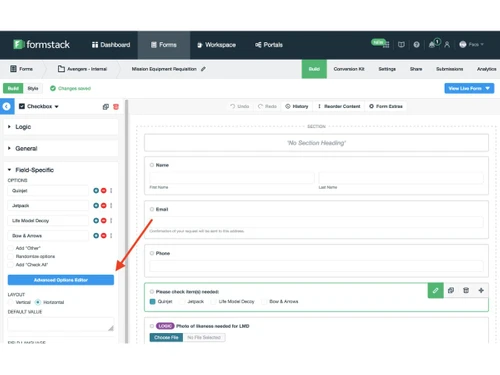
Small Business
Designed for startups and growing businesses
Medium Business
Built for business growth and flexibility
Enterprises
Designed for complex and large-scale business needs
4.1
Out of 5

Overall Rating
Based on
4 Verified Ratings
Rating Breakdown
97% Recommend this Product
Add ReviewTechjockey Trusted Reviews from Verified Users
No reviews are currently available for Formstack. Discover similar Survey Software reviews

QS Plus Quantity surveying software
Whats great - Jon from Techjockey was very in tune with our requirements, and after a good discussion recommended some good products/vendor... read more

SurveySparrow
Whats great - Perfectly planned front and back end. Exceptionally simple to set up a study, send it by means of email by their administrati... read more

Zoho Survey
Whats great - Zoho Survey is really clear to utilize in the event that you know about making studies. Some overviews can get very intricate... read more

Formstack
Price On Request
Desktop
Mobile
Web based
On Premises
Windows
Mac OS
Zoho Survey
₹ 4992
Desktop
Mobile
Web based
On Premises
Windows
Mac OS
QS Plus Quantity surveying software
Price On Request
Desktop
Mobile
Web based
On Premises
Windows
Mac OS

Jotform
Price On Request
Desktop
Mobile
Web based
On Premises
Windows
Mac OS

Formium
Price On Request
Desktop
Mobile
Web based
On Premises
Windows
Mac OS

SurveyMonkey
₹ 899
Desktop
Mobile
Web based
On Premises
Windows
Mac OS

ERP Launchpad
Price On Request
Desktop
Mobile
Web based
On Premises
Windows
Mac OS

Typeform
Price On Request
Desktop
Mobile
Web based
On Premises
Windows
Mac OS
SogoSurvey
Price On Request
Desktop
Mobile
Web based
On Premises
Windows
Mac OS

Google Forms
Price On Request
Desktop
Mobile
Web based
On Premises
Windows
Mac OS

MakeStories
Price On Request
Desktop
Mobile
Web based
On Premises
Windows
Mac OS
(0) Product(s) selected
Starting Price:
$39 /Month
Starting Price:
$20 /Month
Starting Price:
₹899 /Month
Starting Price:
$29 /Month

Available
Price on Request

Starting Price:
$55 /User/Month

Starting Price:
$19 /Month

Available
Price on Request

Starting Price:
$10 /Month
Formstack (Webmerge) pricing starts from USD 99 at Techjockey.com.
Formstack Documents is a cloud-based platform, accessible via any modern web browser, so it works on Windows, macOS, Linux, and mobile devices.
It automates document generation by merging data from forms, CRMs, or databases into customizable templates and then delivers the documents via email, cloud storage, or integrated apps.
Yes, it is ideal for small to large businesses looking to automate document creation, reduce manual work, and streamline workflows efficiently.
Yes, Formstack Documents offers a free demo to let businesses explore its features before committing.
Key features include document templates, alerts and notifications, template sharing, form builder, data mapping, and task management.
Formstack Documents is primarily web-based; it can be accessed via mobile browsers but does not have a dedicated mobile app.
Potential users include businesses of all sizes across industries like legal, healthcare, education, and finance that require automated and professional document generation.
It ensures security through encryption, secure access protocols, and compliance with standards like HIPAA for handling sensitive data.
It is used to automate the creation, management, and delivery of professional documents such as contracts, invoices, proposals, and reports, reducing errors and saving time.
20,000+ Software Listed
Best Price Guranteed
Free Expert Consultation
2M+ Happy Customers
Terms and Condtions

Users with registered businesses can purchase goods from merchants on the platform to satisfy their business needs. Users are not permitted to utilize any products acquired through the platform for resale, advertising, business, or further distribution.
For each purchase made, users will receive a Tax Invoice (or 'GST invoice') that includes specific details such as:
the GSTIN of the user associated with their registered business, and
the specified Entity Name for their business.
It should be noted that not all products are eligible for GST Invoice. Only the products displayed by participating sellers with the 'GST-based Invoice Available' callout on the product description page would qualify.
Certain goods and services are not eligible to get a GST Invoice, including items with VAS, i.e., Value Added Services (e.g., Total Mobile Protection/Assured Buyback) and those involving an exchange offer at the time of purchase.
Users must ensure the accuracy of the GSTIN, and business entity name provided for the GST Invoice. Requests for corrections into GST Invoice would not be accommodated by Techjockey.com or any Seller, and any issues arising from user-provided information are the sole responsibility of users.
Techjockey.com is not liable for the GST Invoice or any associated input tax credit. To efficiently claim an input tax credit, users should select the registered place of business address as per the GST authority's data and follow the provisions of the GST Act and rules.
To claim an input tax credit, the delivery and billing addresses must match. Furthermore, input tax credits will not be granted if the delivery address and GSTIN on the invoice are from different states. In case of incorrect GST details provided during the order placement, the order will be canceled automatically.