USA
USA UAE
UAESmall Business
Designed for startups and growing businesses
See More





Brand: FORTINET
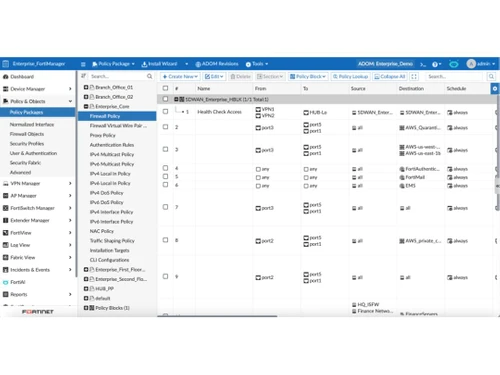
The FortiGate NGFW Firewall Platform offers robust threat protection & centralized network control.
See MoreHave you used FortiGate NGFW before?
Share your insights for better experience
Brand: FORTINET
Founded Year: 2000
Fortinet is a provider of network security appliances that include firewalls, security gateways, and complementary products.
Looking for The Right Pricing?
Share your requirements and get a plan built around your business.
Price Available on Request
Get personalised FortiGate NGFW pricing that fits your needs. Our team will connect with you.
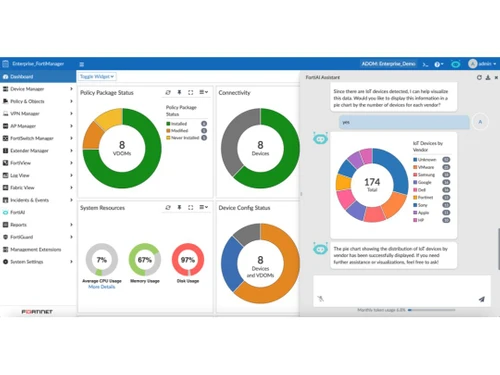
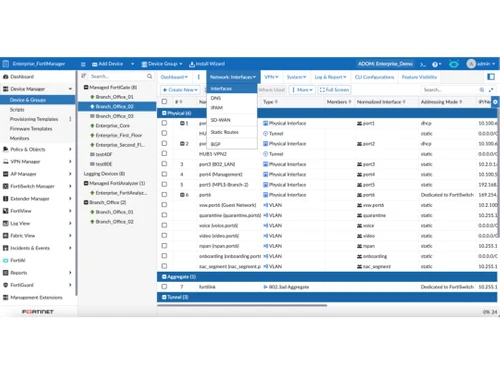
 Network Monitoring Segmentation Malware Detection Security Validation Antispam Filtering Dashboards API Integration Cloud Data Protection Load Balancing

Watch the demo video to explore key features, real workflows, and how the software fits your business needs.
 Windows
  MacOS
MacOS  Desktop
  Tablet
  Cloud-Based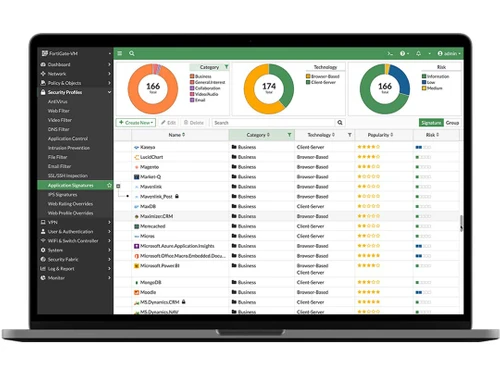
Small Business
Designed for startups and growing businesses
Medium Business
Built for business growth and flexibility
Enterprises
Designed for complex and large-scale business needs
4.6
Out of 5

Overall Rating
Based on
6 Verified Reviews
Rating Breakdown
100% Recommend this Product
Add ReviewCustomers generally express high satisfaction with FortiGate NGFW, praising its user-friendly interface and comprehensive security features, including URL filtering and antivirus protection. Users appreciate its effectiveness in managing network threats and the overall performance as a Unified Threat Management (UTM) solution. However, some common concerns include difficulties in mobile administration and challenges with web filtering. Additionally, users note that updates can sometimes require adjustments to existing rules, and sizing complexities may lead to unexpected limitations in capacity.
Pros
"The importance of its management for all of its operations and for all of the peripherals that are attached to it."
Cons
"Certain rules and parameters need to be changed with every release update because they are no longer compatible with the latest version"



Mar 25, 2023
Techjockey Verified
“"Best UTM box in the market"”
Pros
-About UTM characteristics, Fortigate NGFW leads the market. It is incredibly user-friendly and boasts the greatest graphical user interface. The majority of the features and options are simple to find and use
Cons
Fortigate NGFW sizing is complex and difficult to calculate. When a product box is put into production, it is often discovered to be undersized, despite the datasheets indicating otherwise.
Jul 2, 2023
Techjockey Verified
“"A firewall that lives up to the times"”
Pros
The importance of its management for all of its operations and for all of the peripherals that are attached to it.
Cons
Certain rules and parameters need to be changed with every release update because they are no longer compatible with the latest version
Feb 28, 2023
Techjockey Verified
“"Very efficient and competitive NGFW firewall."”
Pros
-A firewall called Fortigate NGFW offers both conventional firewall functionality and cutting-edge technologies including URL filtering, antivirus protection, and intrusion detection. Its graphical user interface is the easiest to use out of all the firewalls. It prevents dangerous resources and offers real-time defence against network-based threats.
Cons
A website's content may occasionally become difficult to ban with web filtering because web pages may incorporate websites that use more resources. It is quite difficult to administer on a mobile device because it does not adjust to the screen size of smartphones or tablets, and using FortiExplore is an extra fee in online retailers.

FortiGate NGFW
Price On Request
Desktop
Mobile
Web based
On Premises
Windows
Mac OS

SonicWall TZ Series (NGFW)
₹ 70639
Desktop
Mobile
Web based
On Premises
Windows
Mac OS

Checkpoint Quantum Spark
Price On Request
Desktop
Mobile
Web based
On Premises
Windows
Mac OS

SonicWall NSsp Series
Price On Request
Desktop
Mobile
Web based
On Premises
Windows
Mac OS
Cisco Firepower 1000 Series
Price On Request
Desktop
Mobile
Web based
On Premises
Windows
Mac OS
Cisco Firewall 1200 Series
Price On Request
Desktop
Mobile
Web based
On Premises
Windows
Mac OS

Check Point Next Generation Firewalls (NGFWs)
Price On Request
Desktop
Mobile
Web based
On Premises
Windows
Mac OS

Cisco Firewall 1010E
Price On Request
Desktop
Mobile
Web based
On Premises
Windows
Mac OS

Sophos Firewall
Price On Request
Desktop
Mobile
Web based
On Premises
Windows
Mac OS

SonicWall NSa Series (NGFW)
Price On Request
Desktop
Mobile
Web based
On Premises
Windows
Mac OS

Palo Alto Networks PA-400 Series Firewall
Price On Request
Desktop
Mobile
Web based
On Premises
Windows
Mac OS
(0) Product(s) selected
Available
Price on Request
Available
Price on Request
Available
Price on Request
Available
Price on Request

Available
Price on Request

Available
Price on Request

Starting Price:
€149 User/Year

Available
Price on Request

Available
Price on Request

Available
Price on Request

Available
Price on Request
FortiGate NGFW is compatible with Windows and macOS operating systems.
The FortiGate NGFW Firewall Security Management app is unavailable for Android and iOS devices.
NGFW mode in FortiGate is a conventional manner of establishing a profile and linking it to a policy.
FortiGate NGFW pricing is available on request at techjockey.com.
FortiGate NGFW can be used by businesses, governments, large enterprises, Institutions, and individuals who need a firewall security tool.
The FortiGate NGFW demo is available for free with techjockey.com.
FortiGate NGFW does not offer a free trial.
FortiGate NGFW installation is not required, as it is cloud-based. Just open the Setup Wizard to get started.
FortiGate NGFW is a widely used network firewall that employs advanced AI-driven security and threat intelligence. It safeguards networks by analyzing incoming and outgoing traffic, identifying potential threats, and applying security measures to block or mitigate them. This enhances overall network protection and ensures data remains secure.
Yes, FortiGate is a next generation firewall. It is laced with features like SD-WAN, routing and WAN optimization which provide AI/ML powered threat protection and security.
Yes, FortiGate is a Layer 7 firewall that can watch over an application and spot any suspicious activity.
20,000+ Software Listed
Best Price Guranteed
Free Expert Consultation
2M+ Happy Customers
Terms and Condtions

Users with registered businesses can purchase goods from merchants on the platform to satisfy their business needs. Users are not permitted to utilize any products acquired through the platform for resale, advertising, business, or further distribution.
For each purchase made, users will receive a Tax Invoice (or 'GST invoice') that includes specific details such as:
the GSTIN of the user associated with their registered business, and
the specified Entity Name for their business.
It should be noted that not all products are eligible for GST Invoice. Only the products displayed by participating sellers with the 'GST-based Invoice Available' callout on the product description page would qualify.
Certain goods and services are not eligible to get a GST Invoice, including items with VAS, i.e., Value Added Services (e.g., Total Mobile Protection/Assured Buyback) and those involving an exchange offer at the time of purchase.
Users must ensure the accuracy of the GSTIN, and business entity name provided for the GST Invoice. Requests for corrections into GST Invoice would not be accommodated by Techjockey.com or any Seller, and any issues arising from user-provided information are the sole responsibility of users.
Techjockey.com is not liable for the GST Invoice or any associated input tax credit. To efficiently claim an input tax credit, users should select the registered place of business address as per the GST authority's data and follow the provisions of the GST Act and rules.
To claim an input tax credit, the delivery and billing addresses must match. Furthermore, input tax credits will not be granted if the delivery address and GSTIN on the invoice are from different states. In case of incorrect GST details provided during the order placement, the order will be canceled automatically.