linkedin
GOM Player logo
gom player
gom player
gom player

GOM Player

Brand: GOM & COMPANY

  • 4.6

  • 4 Ratings & 4 Reviews

GOM Player Plus Media Player is a premium quality media player software free of advertisements. It helps users see their video in almost any format without worrying about their data being sold to any third-party operator. The Windows media player software offers an optimal control panel for video playback. The software provides essential playback options along with the subtitle support, automated...

See More

Have you used GOM Player before?

Share your insights for better experience

Add a Review
Starting Price
$11

View plans

100% Genuine
Products
Best Price
Guaranteed
Safe & Secure
Payment
  • Description

  • Pricing

  • Features

  • Specification

  • Review

  • Compare

  • Alternatives

  • FAQ

Starting at $11

GOM Player Software Overview

What is GOM Player Plus Media Player?

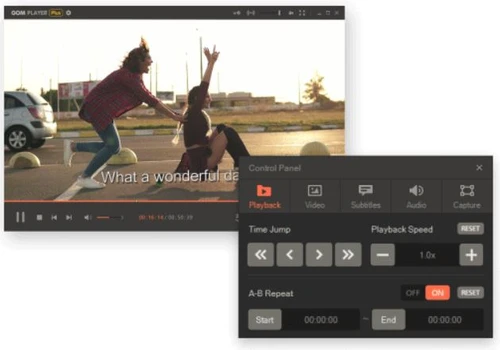
GOM Player Plus Media Player is a premium quality media player software free of advertisements. It helps users see their video in almost any format without worrying about their data being sold to any third-party operator. The Windows media player software offers an optimal control panel for video playback. The software provides essential playback options along with the subtitle support, automated subtitle synchronizer, instant screen capturing, and more.

GOM Player Plus Windows Media Player is specifically built for computers with 64-bit rate processors, which results in supporting the highest resolution and video player performance. The video and audio player has an advertisement free interface to improve user experience and decrease the response time to read and run the multimedia file. One of the key benefits of using GOM Player Plus Media Player is that the wide range of video files it supports. The video player can easily play 360 degrees VR format videos.

What are the technical specifications required to operate GOM Player Plus Media Player for PC?

Here are all the key system requirements for seamless installation and running of GOM Player Plus Media Player:

  1. Operating System: Windows 98, Windows 2000, Windows 2008 (server edition), Windows 2003 (server edition), Windows 2012 (server edition), Windows XP, Windows Vista, Windows 7, Windows 8, Windows 8.1, Windows 10,
     
  2. RAM: 2 GB RAM or more
     
  3. Hard Disk Space: 200 MB (minimum)
     
  4. DirectX requirement: Yes, DirectX 11 or higher

What is the price for GOM Player Plus Media Player download?

The Pricing of GOM Player Plus Media Player is available at USD 11 at techjockey.com.

Why should I use GOM Player Plus Media Player Plus Full?

GOM Player Plus Media Player offers a consistently updating system, which helps users fix errors, bugs, and VOCs. It ensures zero downtime or system crash while playing a certain media with embedded subtitles. Users can report their errors through a built-in mail communications system.

In the recent update of GOM Player Plus Media Player, the development team behind the software fixed the navigation bar which was earlier not playing specific types of H264 and MP4 files. The media player software is constantly being updated without any extra surcharge on the user.

Read more

GOM & COMPANY Company Details

Founded Year:  1999

Since its establishment in 1999, GOM & Company has grown to become one of Korea's leading IT companies.

Director/Founders Byung-ki Lee
Company Size 101-500 Employees

GOM Player Pricing & Plans

GOM Player Plus
Key Features
  • Wide Compatibility
  • Codec Finder
  • Subtitle Library
  • 360° VR
  • YouTube Playback
  • Damaged Files
Starting at $11
    • Credits

      Credits
      Credits
    • Licenses (Lifetime)

      Licenses (Lifetime)
      Licenses (Lifetime)

Key Features

  • Wide Compatibility

  • Codec Finder

  • Subtitle Library

  • 360° VR

  • YouTube Playback

  • Damaged Files

GOM Player Features

  • icon_check Damaged File Playback
    Play broken or partially downloaded AVI files using GOM Player's unique patented technology for media restoration.
  • icon_check Audio Extraction Feature
    Extract high-quality audio tracks from your favorite videos and save them as MP3 files with just a few simple clicks.
  • icon_check Customizable Skin Design
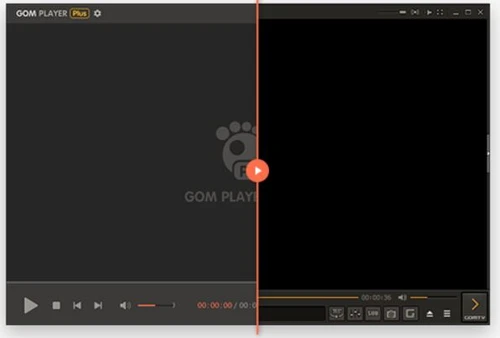
    Personalize your media player’s appearance with various downloadable skins to match your own unique aesthetic style.
  • icon_check Recording Modes
    Set specific times for GOM Cam to automatically start and stop recording, ensuring you never miss a live stream event.
  • icon_check Control Panel
    The control panel dashboard provides access to all the features and configuration menu.
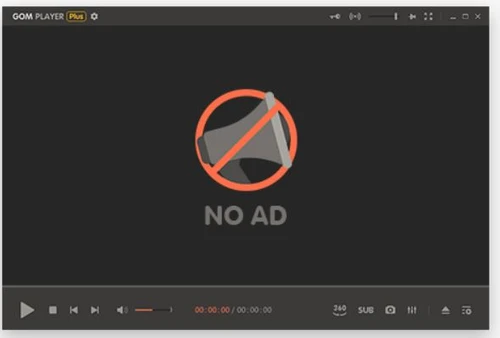
  • icon_check Ad-Free Premium Video Player
    It’s an advertisement free, premium quality video player for running Windows media audio.  
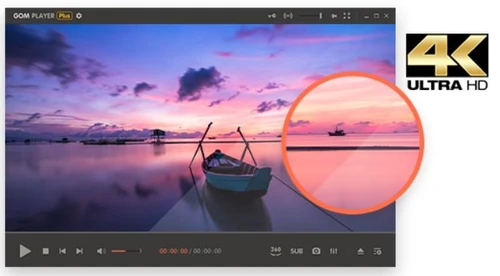
  • icon_check 4K High-Resolution Playback
    The software supports high resolution video files, e.g., in 4K.
  • icon_check User Friendly
    GOM Player Plus Media Player offers a user-friendly interface which facilitates easy acquaintance and learning of the
  • icon_check Product Design
    This movie player has a unique user-friendly design with a customizable outlay for visual appeal.
  • icon_check AI Video Upscaling
    Enhance your video playback with lifelike clarity using advanced AI upscaling for vivid, high-resolution quality.
  • icon_check Subtitle Generation
    Use AI to automatically generate precise subtitles from voice recordings, making video editing faster and much easier.
  • icon_check 360-Degree VR Playback
    Experience immersive VR technology with support for 360-degree videos and convenient arrow key camera controls.
  • icon_check Codec Search Utility
    Automatically find and install missing codecs with a built-in search tool to ensure all video formats play smoothly.
  • icon_check High-Definition Recording
    Capture your screen in crystal-clear high definition with GOM Cam, perfect for tutorials and professional demos.
  • icon_check Animation Maker
    Easily create custom GIF animations from your recorded screen footage with a clean and user-friendly software interface.
  • icon_check Multi-Track Video Editing
    Edit complex video projects using multiple tracks for audio, video, and text overlays within the GOM Mix Max engine.
  • icon_check Music library
    Choose from a wide variety of emotional BGM tracks and AI voices to perfectly express the mood of your video content.

GOM Player Specifications

Supported Platforms
Windows Windows iOS iOS Android Android MacOS MacOS
Devices
Desktop Desktop Mobile Mobile Tablet Tablet iPad iPad
Deployment
Perpetual Perpetual
Suitable For
All Industries
Business Specific
All Businesses
Business Size
Individual Small Business Medium Business Enterprises Freelancers
Customer Support
Email
Language
English
Training Resources
Documentation Videos
AI Features
AI Integrated
Technology
Next Generation

GOM Player Reviews

4.6

Out of 5

img

Overall Rating

Based on
4 Verified Reviews

Rating Breakdown

  • Features 4.7
  • Value for Money 5
  • Ease of Use 5
  • Customer Support 3.7

77% Recommend this Product

Add Review

Pros

  • "Easy to use and supports almost all video formats. Best Video Player for pc"

    Konul BvaSep 1, 2020

  • "I don't like to be bothered, but it was very easy to me. And, It has good picture quality! I want to keep watching videos on this program."

    Yoon Seon ChoiAug 26, 2020

Cons

  • "I sent 7 reports that my license fails every time i start it and they never responded. The player pro has no adware but my license fails daily"

    Richard DePriestJun 19, 2023

Richard DePriest

Founder

Industry: IT User since: 2+ years

4

Reviewed on: Jun 19, 2023

Techjockey Verified

“GOM ignores my requests”

Pros

None found

Cons

I sent 7 reports that my license fails every time i start it and they never responded. The player pro has no adware but my license fails daily

Reason to switch

Because I wanted the plus version. Might switch back.

Konul Bva

User

User since: < 6 months

5

Reviewed on: Sep 1, 2020

Techjockey Verified

“Can play almost all video formats”

Pros

Easy to use and supports almost all video formats. Best Video Player for pc

Cons

way too cheap

yoon seon choi

User

User since: < 6 months

4.5

Reviewed on: Aug 26, 2020

Techjockey Verified

“I think It is an easy-to-manipulate player”

Pros

I don't like to be bothered, but it was very easy to me. And, It has good picture quality! I want to keep watching videos on this program.

Cons

N/A

See All GOM Player Reviews

Compare GOM Player With other Video Players

Products
Ratings
Pricing
Device Supported
Deployment
Supported Platforms
  • img

    GOM Player

  • 4.6

  • Price On Request

  • Desktop

    Mobile

  • Web based

    On Premises

  • Windows

    Mac OS

  • img

    VLC media player

  • 4.3

  • Price On Request

  • Desktop

    Mobile

  • Web based

    On Premises

  • Windows

    Mac OS

  • img

    JW Player

  • 4.2

  • Price On Request

  • Desktop

    Mobile

  • Web based

    On Premises

  • Windows

    Mac OS

(0) Product(s) selected

GOM Player Alternatives

See All GOM Player Alternatives

Available

Price on Request

Q.1. What is the most recent version of GOM Player Plus Media Player?

The most recent version of this media player software is GOM Player Plus Media Player 2.3.56.5320 released as of 25th August 2020.

Q.2. Does GOM Player Plus Media Player has a multilingual interface?

Yes, GOM Player Plus Media Player has a multilingual interface. It supports languages like English, Japanese, Mandarin, Renminbi, Italian, Russian, Polish, Portuguese, Turkish, among many others.

Q.3. Does GOM Player Plus Media Player support audio files?

Yes, you can play audio files in GOM Player Plus Media Player Software.

Q.4. What are the playlist formats supported by GOM Player Plus Media Player?

GOM Player Plus Media Player supports two types of playlist formats, they are .asx and .pls.

Q.5. Can I use dvb subtitles in GOM Player?

Yes, GOM Player Plus Media Player supports a wide range of subtitle files, such as, vobsub (embedded sub), vtt (text sub), dvb, ass, smi, srt, rt, txt, etc.

Q.6. How much does GOM Player Plus Media Player cost?

The Pricing of GOM Player Plus Media Player is available at USD 11 at techjockey.com.

20,000+ Software Listed

Best Price Guranteed

Free Expert Consultation

2M+ Happy Customers

Terms and Condtions

close

Users with registered businesses can purchase goods from merchants on the platform to satisfy their business needs. Users are not permitted to utilize any products acquired through the platform for resale, advertising, business, or further distribution.

For each purchase made, users will receive a Tax Invoice (or 'GST invoice') that includes specific details such as:

  • the GSTIN of the user associated with their registered business, and

  • the specified Entity Name for their business.

It should be noted that not all products are eligible for GST Invoice. Only the products displayed by participating sellers with the 'GST-based Invoice Available' callout on the product description page would qualify.

Certain goods and services are not eligible to get a GST Invoice, including items with VAS, i.e., Value Added Services (e.g., Total Mobile Protection/Assured Buyback) and those involving an exchange offer at the time of purchase.

Users must ensure the accuracy of the GSTIN, and business entity name provided for the GST Invoice. Requests for corrections into GST Invoice would not be accommodated by Techjockey.com or any Seller, and any issues arising from user-provided information are the sole responsibility of users.

Techjockey.com is not liable for the GST Invoice or any associated input tax credit. To efficiently claim an input tax credit, users should select the registered place of business address as per the GST authority's data and follow the provisions of the GST Act and rules.

To claim an input tax credit, the delivery and billing addresses must match. Furthermore, input tax credits will not be granted if the delivery address and GSTIN on the invoice are from different states. In case of incorrect GST details provided during the order placement, the order will be canceled automatically.