linkedin
Google Cloud Functions logo
play Cloud Functions quickstart
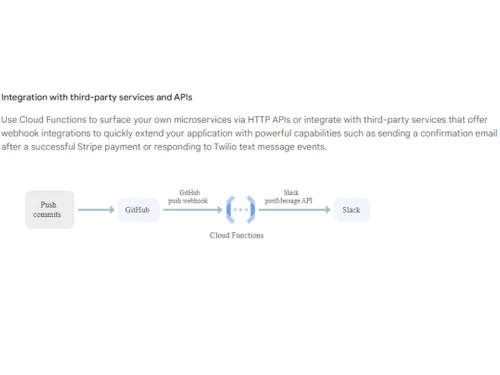
Google Cloud Functions Integration
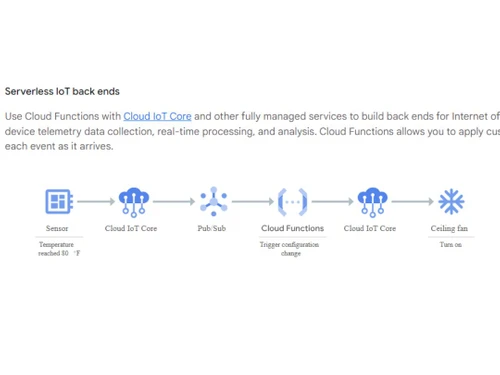
Google Cloud Functions IoT back ends

Google Cloud Functions

Brand: Google

  • 4.1

  • 3 Ratings

Google Cloud Functions is a serverless computing service that lets businesses run code without managing servers.

See More

Have you used Google Cloud Functions before?

Share your insights for better experience

Add a Review

Price Available on Request

Questions about pricing or customization? We’re here to help, just a click away.

100% Genuine
Products
Best Price
Guaranteed
Safe & Secure
Payment
  • Description

  • Pricing

  • Features

  • Specification

  • Review

  • Compare

  • Alternatives

  • FAQ

Google Cloud Functions Software Overview

What is Google Cloud Functions?

Google Cloud Functions is a part of Googles cloud computing platforms. It is a serverless computing service that runs your code in response to events. You simply upload your code, set triggers (like an HTTP request or a file upload), and Google handles the rest. There is no need to provision or manage servers. You only pay for the actual compute time used when your function is running. This simplifies development and lets you focus on writing business logic rather than managing infrastructure.

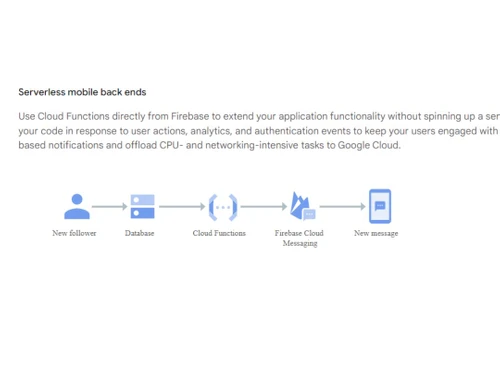
This tool integrates with many Google services such as Cloud Storage, Pub/Sub, and Firebase as well as third-party APIs. It is often used to build lightweight web applications, process data, or act as a glue between different services. Because it is fully managed, Google handles scaling, security patches, and server maintenance. Developers can write functions in languages like JavaScript (Node.js), Python, Go, and more. Whether you need to automate a task, build a quick API endpoint, or process data streams in real time, Google Cloud Functions provides the flexibility and power you need without the overhead of traditional servers.

Why Choose Google Cloud Functions

  • No Server Management: Focus on your code while Google handles all server setup and scaling.
  • Fast Development: Launch new features quickly without waiting for infrastructure setup.
  • Flexible Use: Use it for simple tasks or complex systems with full scalability.
  • Cost-Efficient: Only pay when your code runs,no charges when it idle.
  • Built-In Security: Secured by Google with identity, permissions, and threat detection.
  • Works with Other Google Tools: Easily integrates with Firebase, Cloud Pub/Sub, and more.
  • Automatic Scaling: Scales instantly based on traffic and usage needs.
  • Global Deployment: Deploy functions close to your users with Googles global network.
  • Event-Driven: Triggers your functions automatically from cloud events.
  • Trusted Platform: Runs on Google Cloud,reliable, fast, and supported.

Benefits of Using Google Cloud Functions

  • No Hardware Worries: Avoid buying or maintaining servers,Google does it all.
  • Save Development Time: Speeds up coding and testing, helping you meet deadlines.
  • Easy to Maintain: Update, fix, or scale without downtime or complex setup.
  • Pay As You Go: Your bill reflects actual usage,perfect for any budget.
  • Quick Integration: Connect easily with third-party tools and Google services.
  • Better Team Productivity: Focus on features and performance, not server issues.
  • Reliable Performance: Delivers fast, consistent response times for all users.
  • Real-Time Processing: Handle data in real-time with automatic function triggers.
  • Reduced Operational Costs: Cut down infrastructure and maintenance expenses.
  • Support for Modern Development: Use popular languages like Node.js, Python, and Go.

Google Cloud Functions Pricing

Google Cloud Functions pricing is available on request at Techjockey.com. The pricing model is based on different parameters, including extra features, deployment type, and the total number of users. For further queries related to the product, you can contact our product team and learn more about the pricing and offers.

Read more

Google Company Details

Founded Year:  1998

Google is a multinational corporation that specializes in Internet-related services and products.

Director/Founders Easir Arafat, Larry Page, Masudur Rahman, Mohammad Faruk, Sergey Brin
Company Size 1000+ Employees

Google Cloud Functions Pricing & Plans

Looking for The Right Pricing?

Share your requirements and get a plan built around your business.

  • Define your business needs
  • Get customised pricing
  • Choose features that fit your workflow

Price Available on Request

Get personalised Google Cloud Functions pricing that fits your needs. Our team will connect with you.

Google Cloud Functions Features

  • icon_check Serverless
    Run code without provisioning or managing any servers.
  • icon_check Application Integration
    Seamlessly connect functions with other cloud services.
  • icon_check API Proxy
    Expose functions as HTTP APIs to quickly build serverless endpoints.
  • icon_check Developer Tools
    Access built-in debugging, testing, and monitoring features.
  • icon_check Orchestration
    Coordinate multiple functions into complex workflows and pipelines.
  • icon_check Serverless Computing
    Functions execute automatically in response to events.
  • icon_check Reporting & Analytics
    View logs and metrics to track performance and usage.
  • icon_check Sentiment Analysis
    Use AI tools to analyze text for positive or negative sentiment.
  • icon_check Virtual Assistant
    Build chatbots or assistants by calling AI models in functions.
Google Cloud Functions Demo Video play icon

Get Google Cloud Functions Demo

Watch the demo video to explore key features, real workflows, and how the software fits your business needs.

Understand
Key Features
Personal
Demo Insights
Interactive
Demo Support

Google Cloud Functions Specifications

Supported Platforms
Ubuntu Ubuntu Windows Windows MacOS MacOS Linux Linux
Devices
Desktop Desktop
Deployment
Cloud-Based Cloud-Based
Suitable For
All Industries
Business Specific
All Businesses
Business Size
Medium Business Enterprises SMEs MSMBs MSMEs
Customer Support
Email Communities
Language
English
Integration
API Integration
Training Resources
Documentation Videos

Google Cloud Functions Review

4.1

Out of 5

img

Overall Rating

Based on
3 Verified Ratings

Rating Breakdown

  • Features 4.3
  • Value for Money 3.5
  • Ease of Use 4.5
  • Customer Support 4.1

83% Recommend this Product

Add Review

Be the First to Review

This product has no reviews yet. Be the first to leave your feedback.

Add Review

Compare Google Cloud Functions With other Serverless Computing Services

Products
Ratings
Pricing
Device Supported
Deployment
Supported Platforms
  • img

    Google Cloud Functions

  • 4.1

  • Price On Request

  • Desktop

    Mobile

  • Web based

    On Premises

  • Windows

    Mac OS

  • img

    Cloudflare Workers

  • 4.6

  • Price On Request

  • Desktop

    Mobile

  • Web based

    On Premises

  • Windows

    Mac OS

  • img

    Netlify Functions

  • 4.5

  • Price On Request

  • Desktop

    Mobile

  • Web based

    On Premises

  • Windows

    Mac OS

  • img

    Amazon EventBridge

  • 4.2

  • Price On Request

  • Desktop

    Mobile

  • Web based

    On Premises

  • Windows

    Mac OS

  • img

    Function Compute

  • 4.6

  • Price On Request

  • Desktop

    Mobile

  • Web based

    On Premises

  • Windows

    Mac OS

  • img

    AWS Lambda

  • 4.4

  • Price On Request

  • Desktop

    Mobile

  • Web based

    On Premises

  • Windows

    Mac OS

  • img

    Azure Functions

  • 4

  • Price On Request

  • Desktop

    Mobile

  • Web based

    On Premises

  • Windows

    Mac OS

(2) Product(s) selected

Google Cloud Functions Alternatives

See All Google Cloud Functions Alternatives

Available

Price on Request

How much does Google Cloud Functions cost?

Google Cloud Functions pricing is available on request at Techjockey.com.

How does Google Cloud Functions work?

You upload your code and set triggers (like HTTP requests or cloud events). When the trigger happens, Google runs your function in a secure, isolated environment, then scales resources automatically as needed.

Who uses Google Cloud Functions?

Developers, DevOps engineers, startups, and large enterprises use it to build microservices, data processing pipelines, and event-driven applications without managing servers.

Can Google Cloud Functions run on a schedule?

Yes. You can use Cloud Scheduler to trigger functions at regular intervals, allowing you to run cron-like tasks in a serverless environment.

Is Google Cloud Functions secure for sensitive data?

Yes. It integrates with Identity and Access Management (IAM), supports private network access, and runs on Google’s secure infrastructure with automatic patching.

Can I connect Google Cloud Functions to other Google services?

Absolutely. Functions can be triggered by Cloud Storage, Pub/Sub, Firebase, BigQuery, and many other Google Cloud services, making integration simple.

What programming languages can I use?

Google Cloud Functions supports JavaScript (Node.js), Python, Go, Java, and custom runtimes via containers, so you can use your preferred language.

How does it handle high traffic?

Functions automatically scale to handle increased requests. Google allocates more instances as needed, so your function remains responsive under heavy load.

Can I debug and monitor my functions?

Yes. Google Cloud Functions integrates with Cloud Logging and Cloud Monitoring, providing real-time logs, metrics, and tracing for quick troubleshooting.

Is it suitable for building chatbots or virtual assistants?

Yes. You can write a function that calls natural language APIs to process user messages and respond, enabling easy creation of chatbots or virtual assistants.

20,000+ Software Listed

Best Price Guranteed

Free Expert Consultation

2M+ Happy Customers

Terms and Condtions

close

Users with registered businesses can purchase goods from merchants on the platform to satisfy their business needs. Users are not permitted to utilize any products acquired through the platform for resale, advertising, business, or further distribution.

For each purchase made, users will receive a Tax Invoice (or 'GST invoice') that includes specific details such as:

  • the GSTIN of the user associated with their registered business, and

  • the specified Entity Name for their business.

It should be noted that not all products are eligible for GST Invoice. Only the products displayed by participating sellers with the 'GST-based Invoice Available' callout on the product description page would qualify.

Certain goods and services are not eligible to get a GST Invoice, including items with VAS, i.e., Value Added Services (e.g., Total Mobile Protection/Assured Buyback) and those involving an exchange offer at the time of purchase.

Users must ensure the accuracy of the GSTIN, and business entity name provided for the GST Invoice. Requests for corrections into GST Invoice would not be accommodated by Techjockey.com or any Seller, and any issues arising from user-provided information are the sole responsibility of users.

Techjockey.com is not liable for the GST Invoice or any associated input tax credit. To efficiently claim an input tax credit, users should select the registered place of business address as per the GST authority's data and follow the provisions of the GST Act and rules.

To claim an input tax credit, the delivery and billing addresses must match. Furthermore, input tax credits will not be granted if the delivery address and GSTIN on the invoice are from different states. In case of incorrect GST details provided during the order placement, the order will be canceled automatically.