linkedin
HubBroker ApS logo
hubbroker asp
hubbroker-asp account
hubbroker asp documents

HubBroker ApS

Brand: HubBroker

  • 4.0

  • 5 Ratings

HubBroker ApS is a smart and secure data integration solution that connects business systems to streamline electronic transactions.

See More

Have you used HubBroker ApS before?

Share your insights for better experience

Add a Review

Price Available on Request

Questions about pricing or customization? We’re here to help, just a click away.

100% Genuine
Products
Best Price
Guaranteed
Safe & Secure
Payment
  • Description

  • Pricing

  • Features

  • Specification

  • Review

  • Compare

  • Alternatives

  • FAQ

HubBroker ApS Software Overview

What is HubBroker ApS?

HubBroker ApS is an advanced business software that simplifies and automates data exchange between different systems, vendors, and trading partners. It connects ERP, CRM, and other internal applications with external business networks through seamless integrations. As a reliable data integration software, it eliminates manual data entry, ensures smooth communication between systems, and improves accuracy and efficiency.

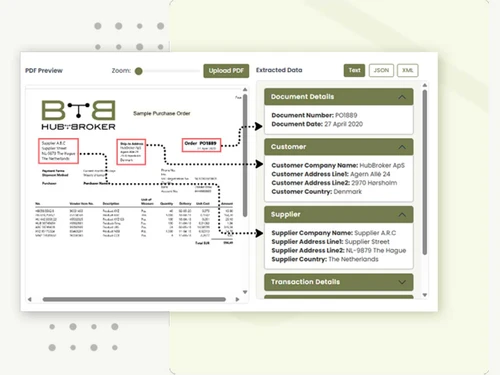
This Electronic Data Interchange Software also works as an electronic data interchange software, helping companies send and receive invoices, purchase orders, and other business documents electronically. It ensures all communications between your organization and partners happen securely, quickly, and accurately. HubBroker ApS serves as a bridge between multiple platforms, enabling faster data movement, better collaboration, and streamlined business operations.

Why Choose HubBroker ApS?

  • Seamless Integration: Easily connects multiple business applications for smooth data sharing.
  • High Accuracy: Automation reduces human errors in daily transactions.
  • Faster Operations: Real-time exchange ensures quicker responses and improved decision-making.
  • Scalable Design: Adapts to growing business needs and supports multiple integrations.
  • Secure Communication: Ensures encrypted and compliant data transfer between partners.
  • Flexible Setup: Offers custom configurations suitable for various industries.
  • Cloud Access: Access the platform from anywhere, anytime, with cloud reliability.
  • Easy to Use: Simple and user-friendly interface for non-technical users.
  • Quick Setup: Pre-built templates and connectors make integration faster.
  • Dedicated Support: Offers technical guidance and system updates for smooth operations.

Benefits of HubBroker Electronic Data Interchange Software

  • Improved Efficiency: Reduces manual work and automates data exchange between systems.
  • Better Collaboration: Strengthens communication between customers, vendors, and partners.
  • Cost Saving: Lowers administrative costs by eliminating paperwork and manual entries.
  • Compliance Ready: Meets required data and communication regulations for your industry.
  • Higher Accuracy: Maintains consistent and error-free data across all systems.
  • Time Saving: Frees up employee time by automating document handling.
  • Transparency: Provides full visibility into data flow and system activities.
  • Scalable Growth: Easily scales as your business and data volume grow.
  • Reliability: Offers stable performance with high uptime and minimal disruption.
  • Customer Satisfaction: Faster processes and accurate data improve client trust.

Pricing of HubBroker Electronic Data Interchange Software

HubBroker ApS pricing is available on request at Techjockey.com. The pricing model is based on different parameters, including extra features, deployment type, and the total number of users. For further queries related to the product, you can contact our product team and learn more about the pricing and offers.

Read more

HubBroker Company Details

Founded Year:  2012

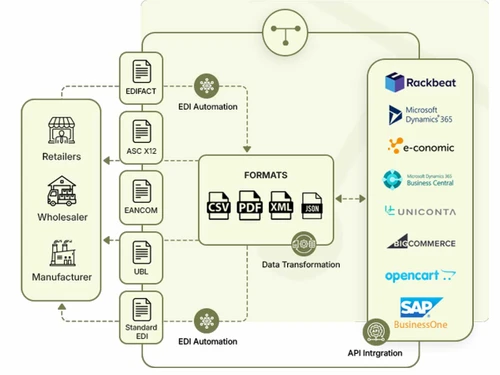
HubBroker specializes in providing flexible and scalable EDI solutions tailored for small, medium, and large-scale businesses. Our expertise includes seamless EDI integration with many ERPs (Dynamics 365 F&O & BC, e-conomic, Uniconta, SAP B1, etc.), Webshops (Amazon, Shopify, BigCommerce, etc.)

Director/Founders Jens Toke
Company Size 1-100 Employees

HubBroker ApS Pricing & Plans

Looking for The Right Pricing?

Share your requirements and get a plan built around your business.

  • Define your business needs
  • Get customised pricing
  • Choose features that fit your workflow

Price Available on Request

Get personalised HubBroker ApS pricing that fits your needs. Our team will connect with you.

HubBroker ApS Features

  • icon_check Secure Integrations
    Protects all data transfers between systems with encryption and authentication.
  • icon_check Process Automations
    Automates document exchange and repetitive workflows for higher productivity.
  • icon_check Import/Export Management
    Streamlines data import and export processes from multiple systems.
  • icon_check Communication Gateway
    Acts as a bridge for quick and safe partner communication.
  • icon_check ERP Integration
    Works with major ERP systems for real-time and accurate data exchange.
  • icon_check Data Security
    Keeps business data safe using strong encryption and access control.
  • icon_check Alerts & Notifications
    Sends instant alerts for updates, changes, or system errors.
  • icon_check Scheduled Exchanges
    Allows automated data transfers at specific scheduled times.
  • icon_check Custom Workflow Mapping
    Lets businesses design workflows to suit their processes.
  • icon_check Validation Tools
    Checks and validates data before it is shared or processed.
  • icon_check Multi Format Support
    Supports different data formats like XML, CSV, and EDI.
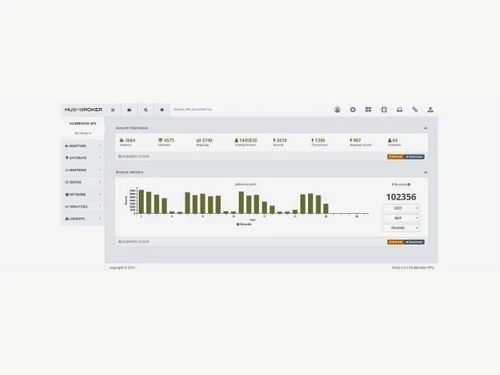
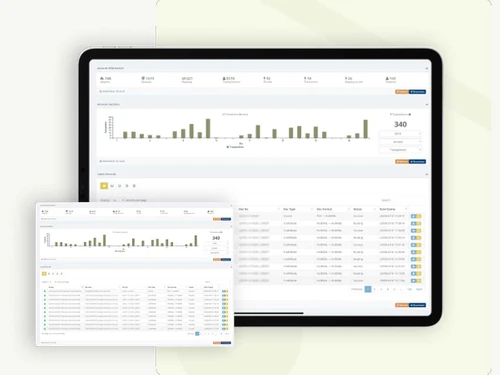
  • icon_check Dashboards
    Displays clear visual insights for easy tracking of data and performance.
  • icon_check Real-Time Alerts
    Provides instant notifications about completed or failed exchanges.
  • icon_check Regulatory Compliance
    Meets international data and security standards for safe use.

HubBroker ApS Specifications

Supported Platforms
Ubuntu Ubuntu Windows Windows iOS iOS MacOS MacOS Linux Linux
Devices
Desktop Desktop
Deployment
Cloud-Based Cloud-Based
Suitable For
All Industries
Business Specific
All Businesses
Business Size
Medium Business Enterprises MSMBs MSMEs
Customer Support
Phone Email
Language
English
Training Resources
Live Online Documentation

HubBroker ApS Review

4.0

Out of 5

img

Overall Rating

Based on
5 Verified Ratings

Rating Breakdown

  • Features 4.6
  • Value for Money 3.7
  • Ease of Use 4.1
  • Customer Support 4

80% Recommend this Product

Add Review

Be the First to Review

This product has no reviews yet. Be the first to leave your feedback.

Add Review

Compare HubBroker ApS With other Electronic Data Interchange Software

Products
Ratings
Pricing
Device Supported
Deployment
Supported Platforms
  • img

    HubBroker ApS

  • 4.0

  • Price On Request

  • Desktop

    Mobile

  • Web based

    On Premises

  • Windows

    Mac OS

  • img

    Jitterbit

  • 4.4

  • Price On Request

  • Desktop

    Mobile

  • Web based

    On Premises

  • Windows

    Mac OS

  • img

    Covalentworks

  • 4.2

  • Price On Request

  • Desktop

    Mobile

  • Web based

    On Premises

  • Windows

    Mac OS

  • img

    Snaplogic

  • 4.2

  • Price On Request

  • Desktop

    Mobile

  • Web based

    On Premises

  • Windows

    Mac OS

  • img

    Truecommerce Edi

  • 4.1

  • Price On Request

  • Desktop

    Mobile

  • Web based

    On Premises

  • Windows

    Mac OS

  • img

    Redtail Edi

  • 4.3

  • Price On Request

  • Desktop

    Mobile

  • Web based

    On Premises

  • Windows

    Mac OS

(0) Product(s) selected

HubBroker ApS Alternatives

See All HubBroker ApS Alternatives

Available

Price on Request

Available

Price on Request

Articles for HubBroker ApS

See All Related Articles

How much does HubBroker ApS cost?

HubBroker ApS pricing is available as Price On Request at Techjockey.com.

How does HubBroker Electronic Data Interchange Software work?

HubBroker ApS connects your ERP, CRM, and partner systems to exchange data automatically. It transfers documents like invoices or orders electronically to save time and avoid errors.

Who uses HubBroker ApS?

This Electronic Data Interchange Software is used by manufacturers, retailers, distributors, and logistics companies that handle large data transactions.

Can HubBroker ApS integrate with ERP systems?

Yes, it integrates with popular ERP systems like SAP, Microsoft Dynamics, and others.

Is HubBroker ApS cloud-based?

Yes, it is a cloud-based solution that provides secure access from anywhere.

Does HubBroker ApS support multiple data formats?

Yes, it supports XML, EDI, CSV, and JSON formats for flexibility.

How does HubBroker ApS ensure data security?

It uses encryption, user authentication, and strict access control to protect data.

Can HubBroker ApS Electronic Data Interchange Software manage large data volumes?

Yes, it can process high data loads smoothly without slowing down system performance.

Does HubBroker ApS help with compliance?

Yes, it ensures your data management meets industry and regional regulations.

Is HubBroker ApS Electronic Data Interchange Software suitable for small businesses?

Yes, it works for both small and large organizations and scales as your company grows.

20,000+ Software Listed

Best Price Guranteed

Free Expert Consultation

2M+ Happy Customers

Terms and Condtions

close

Users with registered businesses can purchase goods from merchants on the platform to satisfy their business needs. Users are not permitted to utilize any products acquired through the platform for resale, advertising, business, or further distribution.

For each purchase made, users will receive a Tax Invoice (or 'GST invoice') that includes specific details such as:

  • the GSTIN of the user associated with their registered business, and

  • the specified Entity Name for their business.

It should be noted that not all products are eligible for GST Invoice. Only the products displayed by participating sellers with the 'GST-based Invoice Available' callout on the product description page would qualify.

Certain goods and services are not eligible to get a GST Invoice, including items with VAS, i.e., Value Added Services (e.g., Total Mobile Protection/Assured Buyback) and those involving an exchange offer at the time of purchase.

Users must ensure the accuracy of the GSTIN, and business entity name provided for the GST Invoice. Requests for corrections into GST Invoice would not be accommodated by Techjockey.com or any Seller, and any issues arising from user-provided information are the sole responsibility of users.

Techjockey.com is not liable for the GST Invoice or any associated input tax credit. To efficiently claim an input tax credit, users should select the registered place of business address as per the GST authority's data and follow the provisions of the GST Act and rules.

To claim an input tax credit, the delivery and billing addresses must match. Furthermore, input tax credits will not be granted if the delivery address and GSTIN on the invoice are from different states. In case of incorrect GST details provided during the order placement, the order will be canceled automatically.