 USA
USA UAE
UAESmall Business
Designed for startups and growing businesses


See More


Brand: Vyro AI
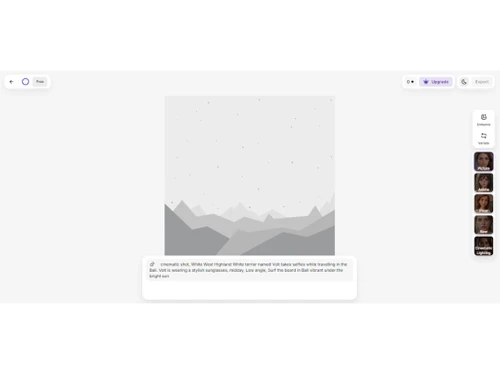
ImagineArt is a generative AI tool that lets users create unique images and artwork from text prompts, using advanced machine learning to generate high-quality visuals.
See MoreHave you used ImagineArt before?
Share your insights for better experience
View plans
 Save upto 18%, Get GST Invoice on your business purchase T&C Buy Now & Pay Later, Check offer on payment page.
 Image Generation and Processing
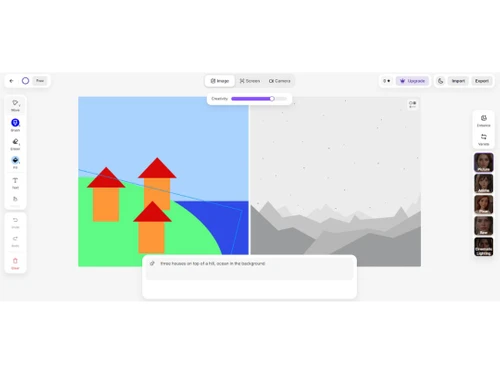
 Real-time Preview Text-to-Image Generation Image-to-Image Transformation High-Resolution Output Preset Styles Drag and Drop Real-Time Rendering Multi-Layer Image Processing Batch Generation
 Editing and Customization Tools
Image Upscaling Denoising Image Weights Content Filters Style Transfer Adjustable Parameters AI Editor 3D Effects Layer Control Realistic Object Generation Resolution Control Object Removal Background Removal Text Overlay Image Tiling Style Adaptation Prompt Control and Enhancements
Prompt Editing Negative Prompt Seed Prompt Sensitivity Prompt Flexibility Prompt Enhancer Prompt Matrix Real-Time Generation Model and AI Capabilities
Multi-Model Support Fine Tuning Model Merging Collaboration and Sharing
Image Sharing Custom Templates Prompt Libraries Collaboration Tools Branding and Commercial Use
Commercial Rights Data Privacy Brand Kit Integration Integration Supported
API Integration Content Management Systems (CMS) Integration Design and Editing Software Integration Cloud Storage and Collaboration Tools Integration E-Commerce Platforms Integration 3D Modeling Software Integration Game Engines Integration Video Editing Tools Integration Animation Tools Integration NFT Marketplaces Plugin & Extensions  Ubuntu
  Windows
  Android
  MacOS
MacOS  Linux
Linux  Desktop
  Mobile
  Cloud-Based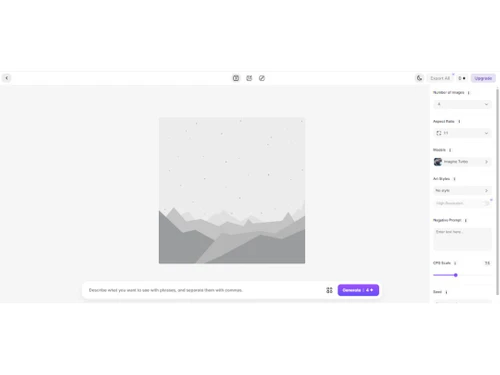
Small Business
Designed for startups and growing businesses
Medium Business
Built for business growth and flexibility
Enterprises
Designed for complex and large-scale business needs
4.2
Out of 5

Overall Rating
Based on
11 Verified Reviews
Rating Breakdown
84% Recommend this Product
Add ReviewOverall, users appreciate ImagineArt for its ability to quickly generate visually appealing images from simple prompts, making it a valuable tool for creative professionals. Many find the interface user-friendly and enjoy the variety of styles available. However, some common concerns include occasional inconsistencies in image quality, particularly with complex details like text and faces, which can lead to frustration. Despite these limitations, users generally recommend the tool for its creative potential and efficiency.
Pros
"Imagine AI Art Generator helps me to create stunning images from simple prompts. I love being able to experiment with various styles and see what comes out."
"Imagine AI Art Generator is a wonderful tool for anyone looking to create art quickly. I really like the way it translates my text based prompts into images."
"Imagine AI Art Generator offers a range of features including text to image, prompt editing, multi model support. It also offers to fine tune your image for better results."
Cons
"On the other hand, I do wish the tool had more options for refining images after they’ve been created. "
" I’ve encountered some issues with the detail in certain images. Some elements, particularly text and faces, can end up looking a bit awkward, which affects my designs. "
"I’ve experienced inconsistencies in quality. Some images turn out beautifully, while others can lack detail or clarity, which can be frustrating. "

Sep 10, 2024
Techjockey Verified
“Imagine Art: A Creative Powerhouse for Stunning Artwork”
Imagine Art allows me to create detailed and beautiful images with ease. The AI is fantastic at handling various styles, and the results are always visually impressive. It’s easy to use, which is great for beginners like me, but also offers depth for more advanced users. The only downside is that the AI can occasionally miss the mark on complex ideas, but overall, it’s a great tool for creative exploration.
Pros
Imagine Art has a great variety of creative tools to bring your ideas to life. The quality of the images it generates is impressive, and it’s easy to create something beautiful in just a few steps. The AI does a great job of enhancing details, and I’ve managed to produce some truly professional-looking art with it. The interface is also simple, so you don’t need to spend a lot of time learning how it works.
Cons
One thing I noticed is that the AI sometimes struggles with more complex ideas or specific requests. You don’t always get the exact result you’re looking for. Also, some of the advanced settings can be a bit hidden or difficult to navigate if you’re not familiar with similar tools.
Reason to switch
I chose Imagine Art because I needed a tool that was more intuitive and gave me better results for the type of creative projects I work on regularly.
Jul 9, 2024
Techjockey Verified
“Changing Ideas into images”
Pros
I find Imagine AI Art Generator to be a valuable tool for transforming my thoughts into art. It’s amazing how quickly it can generate images from simple prompts, and the variety it offers keeps my projects fresh.
Cons
Nothing to dislike
Reason to switch
I switched to Imagine AI because it offers a more dynamic way to generate art, allowing me to explore my ideas without much hassle.
Aug 5, 2024
Techjockey Verified
“Quick Art Generation with Room for Improvement”
Pros
Imagine AI Art Generator has made creating art a lot more accessible for me. I appreciate how quickly it generates images based on my ideas, allowing for a smooth creative process.
Cons
I’ve encountered some issues with the detail in certain images. Some elements, particularly text and faces, can end up looking a bit awkward, which affects my designs.
Reason to switch
Switching to Imagine AI has simplified my process and opened up new avenues for creativity.

ImagineArt
₹ 2646.00 excl. GST
Desktop
Mobile
Web based
On Premises
Windows
Mac OS

Remaker AI
Price On Request
Desktop
Mobile
Web based
On Premises
Windows
Mac OS

Deepnude
Price On Request
Desktop
Mobile
Web based
On Premises
Windows
Mac OS

Leonardo AI
Price On Request
Desktop
Mobile
Web based
On Premises
Windows
Mac OS

Adobe Firefly
Price On Request
Desktop
Mobile
Web based
On Premises
Windows
Mac OS

DeepSukebe
Price On Request
Desktop
Mobile
Web based
On Premises
Windows
Mac OS

Facet AI
Price On Request
Desktop
Mobile
Web based
On Premises
Windows
Mac OS

SUPERMACHINE
Price On Request
Desktop
Mobile
Web based
On Premises
Windows
Mac OS

GoEnhance AI
Price On Request
Desktop
Mobile
Web based
On Premises
Windows
Mac OS

Getimg AI
₹ 850
Desktop
Mobile
Web based
On Premises
Windows
Mac OS

DiffusionBee
Price On Request
Desktop
Mobile
Web based
On Premises
Windows
Mac OS
(0) Product(s) selected
Starting Price:
$30 /Month
Starting Price:
$19 /Month
Starting Price:
$10 /Month
Available
Price on Request

Available
Price on Request

Starting Price:
$9 /Month

Available
Price on Request

Available
Price on Request

Starting Price:
$5
Starting Price:
$12 /Month



ImagineArt price in India starts at INR 2646 per month at techjockey.com.
Yes, an Android app is available for ImagineArt software.
ImagineArt supports Ubuntu, Android, Windows, MacOS and Linux.
Yes, ImagineArt free trial is available.
ImagineArt software works by allowing users to input text prompts, which the AI then processes to generate unique images and videos in real-time, creating stunning visual content based on the provided descriptions.
Businesses, creatives, developers, and designers are potential users of ImagineArt.
Yes, a free demo is available ImagineArt upon request at techjockey.com
No, ImagineArt offers paid plans, though free trials and demos are available.
ImagineArt supports popular formats like JPG, PNG, MP4, and GIF for images and videos.
Yes, ImagineArt intuitive interface makes it easy for non-designers to create visuals.
To permanently delete images from ImagineAI, follow the steps given below:
0 0
Depending on the kind of image creation being done, ImagineAI uses a range of AI models. To produce high-quality photos, it usually makes use of sophisticated deep learning models like Diffusion Models and Generative Adversarial Networks (GANs). To comprehend and produce intricate, imaginative visualizations based on user inputs, these models are trained on enormous datasets of images and text prompts. Depending on the platform's changes and version, a different model might be used.
0 0
In order to create a coherent image, ImagineAIArt breaks down complex prompts into their component parts and analyzes the connections between them. The AI can handle complexity better when the query is more explicit.
0 0
To save a project in Imagine AI, follow the steps given below:
0 0
To make crowds or groups in ImagineAIArt, follow the steps given below:
0 0
20,000+ Software Listed
Best Price Guranteed
Free Expert Consultation
2M+ Happy Customers
Terms and Condtions

Users with registered businesses can purchase goods from merchants on the platform to satisfy their business needs. Users are not permitted to utilize any products acquired through the platform for resale, advertising, business, or further distribution.
For each purchase made, users will receive a Tax Invoice (or 'GST invoice') that includes specific details such as:
the GSTIN of the user associated with their registered business, and
the specified Entity Name for their business.
It should be noted that not all products are eligible for GST Invoice. Only the products displayed by participating sellers with the 'GST-based Invoice Available' callout on the product description page would qualify.
Certain goods and services are not eligible to get a GST Invoice, including items with VAS, i.e., Value Added Services (e.g., Total Mobile Protection/Assured Buyback) and those involving an exchange offer at the time of purchase.
Users must ensure the accuracy of the GSTIN, and business entity name provided for the GST Invoice. Requests for corrections into GST Invoice would not be accommodated by Techjockey.com or any Seller, and any issues arising from user-provided information are the sole responsibility of users.
Techjockey.com is not liable for the GST Invoice or any associated input tax credit. To efficiently claim an input tax credit, users should select the registered place of business address as per the GST authority's data and follow the provisions of the GST Act and rules.
To claim an input tax credit, the delivery and billing addresses must match. Furthermore, input tax credits will not be granted if the delivery address and GSTIN on the invoice are from different states. In case of incorrect GST details provided during the order placement, the order will be canceled automatically.



