linkedin
Isetia logo
play ISETIA
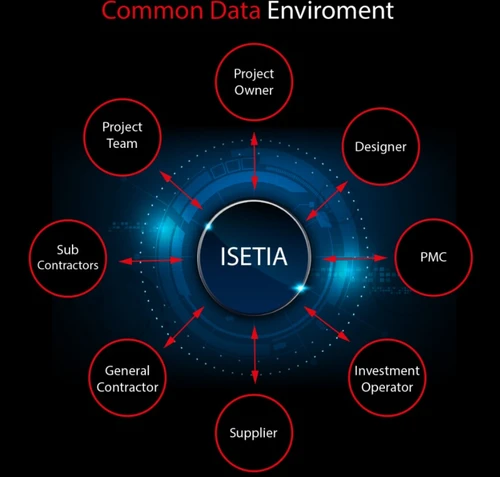
isetia common data environment
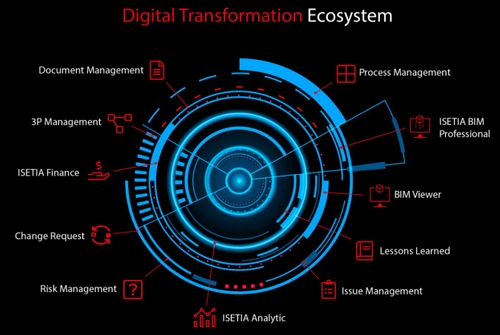
isetia digital transformation ecosystem

Isetia

Brand: ISETIA

  • 4.3

  • 4 Ratings

Isetia blends structure with simplicity for seamless project delivery. It helps teams stay informed, organized, and always on track.

See More

Have you used Isetia before?

Share your insights for better experience

Add a Review

Price Available on Request

Questions about pricing or customization? We’re here to help, just a click away.

100% Genuine
Products
Best Price
Guaranteed
Safe & Secure
Payment
  • Description

  • Pricing

  • Features

  • Specification

  • Review

  • Compare

  • Alternatives

  • FAQ

Isetia Software Overview

What is Isetia Software?

Isetia is a highly advanced project and portfolio management software solution created for smart modern enterprises. The platform allows professional teams to manage every stage of a project in one secure place.

It connects planning, communication, and reporting through a clean, organized interface. Every step of your project(s) becomes much easier, faster, and way more dependable with Isetia.

Built for flexibility, the trusted project portfolio management solution suits diverse industries and working methods. It helps decision-makers maintain full visibility over progress and performance.

Why Choose Isetia Project Portfolio Management Software?

  • Unified Workspace: Isetia brings every task, file, and update into one shared environment. It reduces clutter and keeps projects flowing without confusion or overlap.
  • Smooth Coordination: Teams certainly work better when everything stays connected. Isetia keeps communication open and helps everyone stay on the same page.
  • Real-Time Clarity: With this Project Portfolio Management Software, managers can view live progress across all active projects. Every small detail becomes visible, removing surprises later.
  • Flexible Framework: The platform supports various project styles with equal ease. Whether it's Agile or traditional, the platform fits perfectly.
  • Reliable Storage: Files remain safe within controlled access limits. No document gets misplaced or exposed accidentally.
  • Intuitive Reporting: Reports turn complicated figures into insights that everyone can follow. Teams can get results right away and proceed confidently.
  • Dependable Speed: Even during heavy use, performance stays steady. Isetia project management solution delivers consistent results without unnecessary lag.

Benefits of Isetia Software

  • Smarter Work Routine: Isetia streamlines daily project flow for smoother coordination. It keeps every process well-aligned and purposeful.
  • Better Visibility: Progress updates appear clearly for all team members. Everyone stays aware of ongoing changes and goals.
  • Quick Access to Data: All information remains securely stored and easy to locate. It eliminates the stress of searching through folders.
  • Reduced Manual Errors: This Project Portfolio Management Software offers automated systems to minimize chances of calculation or reporting mistakes. Projects stay clean and accurate throughout.
  • Balanced Resources: Every resource gets used wisely with real-time insights. Overuse and downtime both stay under control.
  • Simple File Sharing: Files move safely between users with no risk of loss. Collaboration becomes fast and reliable.
  • Time Savings: Routine approvals and reports take less effort to complete. Teams work faster with fewer delays.

Isetia Software Pricing

Isetia Software price is available on request at Techjockey.com.

The pricing model is based on different parameters, including extra features, deployment type, and the total number of users. For further queries related to the product, you can contact our product team and learn more about the pricing and offers.

Read more

ISETIA Company Details

Founded Year:  2001

ISETIA is a software company that helps firms to manage their projects, programs, and portfolios of projects on a cloud-based platform.

Director/Founders ISETIA
Company Size 501-1000 Employees

Isetia Pricing & Plans

Looking for The Right Pricing?

Share your requirements and get a plan built around your business.

  • Define your business needs
  • Get customised pricing
  • Choose features that fit your workflow

Price Available on Request

Get personalised Isetia pricing that fits your needs. Our team will connect with you.

Isetia Features

  • icon_check Process Management
    Configurable dashboards, boards and cards merge macro planning with micro tasks, streamlining all processes into one transparent
  • icon_check BIM Viewer
    View, mark up IFC models online with clash detection, issue tracking, sectioning, and 3D navigation directly in the browser.
  • icon_check Issue Management
    Assign, track, comment, escalate and convert issues into action cards with dashboard alerts and BIM-linked resolution flow.
  • icon_check Reporting & Analytics
    Design dashboards, simulate scenarios, integrate with Excel and BI tools for self-service reporting and predictive insights.
  • icon_check Risk Management
    Identify, log and assess risks using customizable forms, assign ownership, quantify exposure and plan responses proactively.
  • icon_check Change Request
    Digital change requests with role‑based approvals, dynamic workflows, unlimited custom fields, logging and traceable history.
  • icon_check 3P Management
    Unified management of projects, programs & portfolios via WBS, Gantt and agile boards, linked with scopes, costs, HR, issues,
  • icon_check Document Management
    Secure, version‑controlled, multidimensional docs with flows, visual comments, flexible structures and encrypted cloud storage.
  • icon_check Workflow Automation
    Supports configurable multi-step workflows to digitize reviews, approvals, and routing processes, reducing manual coordination
  • icon_check Common Data Environment (CDE)
    Provides a unified data environment where project files, models, and discussions are consolidated, ensuring consistency and
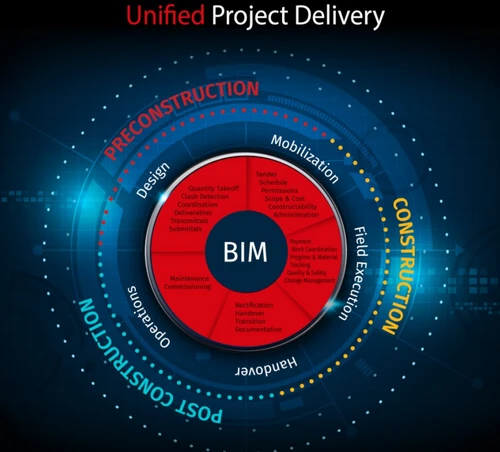
  • icon_check BIM Integration
    Integrates BIM models directly into project workflows, linking documents, issues, and tasks to 3D objects for improved project
  • icon_check Clash Detection
    Identifies conflicts between different building elements in BIM models, helping teams resolve design issues before construction
  • icon_check Change Management
    Manages change requests with structured reviews, approvals, documentation updates, and process tracking to maintain project
  • icon_check Dashboard & Analytics
    Offers configurable dashboards and reporting tools that transform raw project data into insights for monitoring progress and
Isetia Demo Video play icon

Get Isetia Demo

Watch the demo video to explore key features, real workflows, and how the software fits your business needs.

Understand
Key Features
Personal
Demo Insights
Interactive
Demo Support

Isetia Specifications

Supported Platforms
Ubuntu Ubuntu Windows Windows MacOS MacOS Linux Linux
Devices
Desktop Desktop
Deployment
Cloud-Based Cloud-Based
Suitable For
Real Estate Construction
Business Specific
Real Estate
Business Size
Enterprises
Customer Support
Email Communities Forums
Language
English
Training Resources
Documentation Videos

Explore the Best Alternative Solutions Similar to Your Business Size and Needs

Isetia Review

4.3

Out of 5

img

Overall Rating

Based on
4 Verified Ratings

Rating Breakdown

  • Features 4.6
  • Value for Money 4
  • Ease of Use 4.1
  • Customer Support 4.5

90% Recommend this Product

Add Review

Be the First to Review

This product has no reviews yet. Be the first to leave your feedback.

Add Review

Compare Isetia With other Project Portfolio Management Software

Products
Ratings
Pricing
Device Supported
Deployment
Supported Platforms
  • img

    Isetia

  • 4.3

  • Price On Request

  • Desktop

    Mobile

  • Web based

    On Premises

  • Windows

    Mac OS

  • img

    Tempo PPM

  • 4.3

  • Price On Request

  • Desktop

    Mobile

  • Web based

    On Premises

  • Windows

    Mac OS

  • img

    PMPeople

  • 4.4

  • Price On Request

  • Desktop

    Mobile

  • Web based

    On Premises

  • Windows

    Mac OS

  • img

    Primavera P6

  • 4.2

  • Price On Request

  • Desktop

    Mobile

  • Web based

    On Premises

  • Windows

    Mac OS

  • img

    OpenText PPM

  • 4.0

  • Price On Request

  • Desktop

    Mobile

  • Web based

    On Premises

  • Windows

    Mac OS

  • img

    Triskell

  • 4.3

  • Price On Request

  • Desktop

    Mobile

  • Web based

    On Premises

  • Windows

    Mac OS

  • img

    Meisterplan

  • 4.1

  • Price On Request

  • Desktop

    Mobile

  • Web based

    On Premises

  • Windows

    Mac OS

  • img

    Acuity PPM

  • 4.0

  • Price On Request

  • Desktop

    Mobile

  • Web based

    On Premises

  • Windows

    Mac OS

  • img

    Primetric

  • 4.0

  • Price On Request

  • Desktop

    Mobile

  • Web based

    On Premises

  • Windows

    Mac OS

  • img

    SoftExpert PPM

  • 4.2

  • Price On Request

  • Desktop

    Mobile

  • Web based

    On Premises

  • Windows

    Mac OS

  • img

    Planforge

  • 4.4

  • Price On Request

  • Desktop

    Mobile

  • Web based

    On Premises

  • Windows

    Mac OS

(0) Product(s) selected

Isetia Alternatives

See All Isetia Alternatives

Starting Price:

€45 /User/Month

Available

Price on Request

Starting Price:

€25 /Month

How much does Isetia Software cost?

The pricing for Isetia Software is available on request through techjockey.com. It must be noted that the final cost depends largely on user count, chosen features, and deployment type.

Who uses Isetia Project Portfolio Management Software?

Isetia is mainly used by project-driven organizations and construction teams. It best suits industries that handle complex portfolios, documentation, and multi-stage workflows.

Is there a mobile app available for Isetia Software?

Yes, Isetia Project Portfolio Management Software can be accessed through purpose-built mobile applications. These allow users to manage issues, update progress, and access project data directly from the field.

Which operating systems are compatible with Isetia Project Portfolio Management Software?

Isetia runs smoothly on Ubuntu, Windows, MacOS, and Linux systems. Its browser-based access also ensures easy use across different devices.

Does Isetia Software offer a free trial?

Yes, the software solution does provide a free trial option. Users can explore all its tools and features prior to going for a full plan.

How does Isetia Project Portfolio Management Software Work?

Isetia works as a cloud-based system that brings together planning, execution, and reporting. It helps teams manage documents, risks, budgets, and performance within one integrated platform.

20,000+ Software Listed

Best Price Guranteed

Free Expert Consultation

2M+ Happy Customers

Terms and Condtions

close

Users with registered businesses can purchase goods from merchants on the platform to satisfy their business needs. Users are not permitted to utilize any products acquired through the platform for resale, advertising, business, or further distribution.

For each purchase made, users will receive a Tax Invoice (or 'GST invoice') that includes specific details such as:

  • the GSTIN of the user associated with their registered business, and

  • the specified Entity Name for their business.

It should be noted that not all products are eligible for GST Invoice. Only the products displayed by participating sellers with the 'GST-based Invoice Available' callout on the product description page would qualify.

Certain goods and services are not eligible to get a GST Invoice, including items with VAS, i.e., Value Added Services (e.g., Total Mobile Protection/Assured Buyback) and those involving an exchange offer at the time of purchase.

Users must ensure the accuracy of the GSTIN, and business entity name provided for the GST Invoice. Requests for corrections into GST Invoice would not be accommodated by Techjockey.com or any Seller, and any issues arising from user-provided information are the sole responsibility of users.

Techjockey.com is not liable for the GST Invoice or any associated input tax credit. To efficiently claim an input tax credit, users should select the registered place of business address as per the GST authority's data and follow the provisions of the GST Act and rules.

To claim an input tax credit, the delivery and billing addresses must match. Furthermore, input tax credits will not be granted if the delivery address and GSTIN on the invoice are from different states. In case of incorrect GST details provided during the order placement, the order will be canceled automatically.