linkedin
JR Typing Tutor logo
play How to use jr typing tutor Full version free | bssc mains typing test | jr typing free full version
JR Typing Tutor
jr typing tutor entry

JR Typing Tutor

Brand: JR Infotech Services

  • 4

  • 2 Ratings & 2 Reviews

JR Typing Tutor helps users practice Hindi and English typing for government exams like SSC, CHSL, and stenographer tests, while also improving everyday typing speed and accuracy.

See More

Have you used JR Typing Tutor before?

Share your insights for better experience

Add a Review
Starting Price
₹423 excl.GST
₹ 499 incl. GST

View plans

offer Save upto 18%, Get GST Invoice on your business purchase T&C
offer Buy Now & Pay Later, Check offer on payment page.
Buy Now
100% Genuine
Products
Best Price
Guaranteed
Safe & Secure
Payment
  • Description

  • Pricing

  • Features

  • Specification

  • Review

  • Compare

  • Alternatives

  • FAQ

Starting at ₹423
Buy Now

JR Typing Tutor Software Overview

What is JR Typing software?

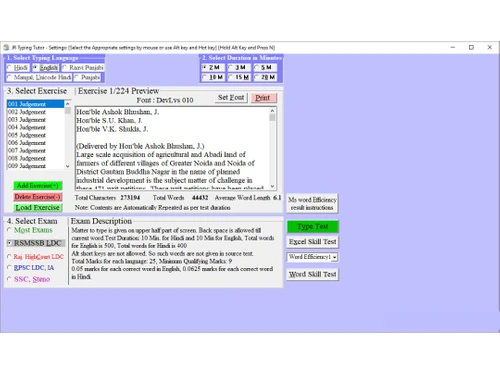
JR Typing Tutor software allows users to practice typing in Hindi and English. The typing software is a great tool for those who wish to work as a stenographer in the Indian government. This typing software consists of various mock tests to prepare for government examinations.

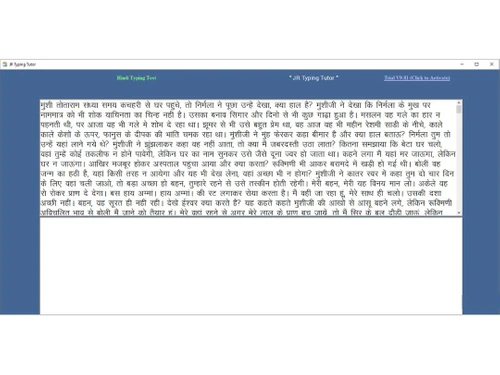
JR Typing Software offers high-quality typing features, where users are provided with a visual Hindi keyboard. JR Hindi typing software facilitates beginners to learn typing from the bare basics and achieve accuracy with speed.

JR Typing Tutor online provides three major modules, which are:

  • Learn Typing: This feature of JR Typing Master teaches users how to type and get better at it.
  • B Type Test: These are the tests that users can take after learning how to type. B-type tests are designed for beginners.
  • C Type Test: C-type tests are designed for advanced-level typists who have mastered the B type.

JR Hindi English typing tutor generates results based on the following aspects:

  • Word Per Minute
  • Character Per Minute
  • Backspace Count
  • Wrong Character Count
  • Total Words, and many others.

Why Choose JR Typing Tutor?

  • Customized Lessons: Individuals are provided customized typing lessons according to their needs and in order to accelerate the progression in skills.
  • Bilingual Support: Gives lessons in Hindi and English to a broader audience and enhances language skills.
  • Varied Exercises: Offers a wide selection of exercises that help enhance learning, accuracy and typing speed.
  • User-Friendly Interface: It has a user-friendly interface allowing easy navigation and the convenient learning of any users of any skill level.
  • Windows Compatibility: JR typing software is compatible with all window systems with or without Internet.

Benefits of JR Typing Tutor

  • Improves typing skills with organized lessons and a variety of activities which makes them more productive and efficient.
  • Provides personalized lessons to fit individual learning styles to guarantee successful skills development to users at any level.
  • Allows a user to practice typing on their time, their convenience and comfort of their own seat.
  • Enables tracking and watching the progress which gives an idea of the improvement in skills and training on typing.

JR Typing Tutor Pricing

JR Typing Tutor pricing starts at INR 423 per month at Techjockey.com.

The pricing model is based on different parameters, including the amount of bandwidth you need, the number of servers you need, and the features you need. For further queries related to the product, you can contact our product team and learn more about the pricing and offers.

Read more

JR Infotech Services Company Details

Founded Year:  2005

Jr Infotech Private Limited is a Private incorporated on 25 January 2005. It is classified as Non-govt company and is registered at Registrar of Companies, Delhi. Its authorized share capital is Rs. 100,000 and its paid up capital is Rs. 100,000.

Director/Founders AJAY SINGH PATHANIA
Company Size 1-100 Employees

JR Typing Tutor Pricing & Plans

JR Typing Tutor
Key Features
  • Skill Tests
  • Multi Language Support
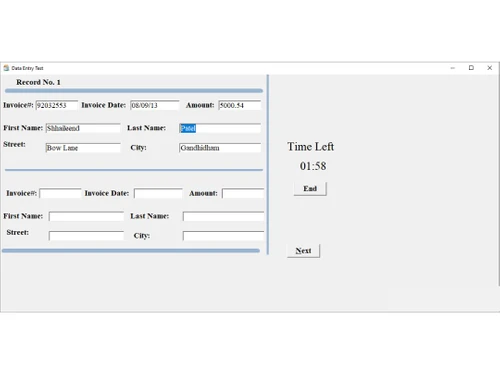
  • Data Entry

Calculated Price

423 Exclusive of all taxes
  • Options

    • Licenses (PC)

      Licenses (PC)
      Licenses (PC)
    • Monthly

      Monthly
      Monthly

Key Features

  • Skill Tests

  • Multi Language Support

  • Data Entry

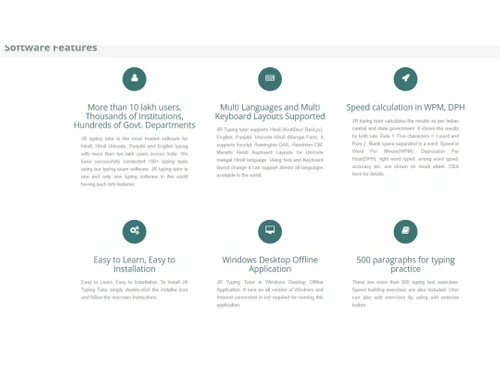
JR Typing Tutor Features

  • icon_check Real-Time Speedometer
    Features a live on-screen speedometer that calculates and shows your current typing speed in words per minute while you type.
  • icon_check Multi-Keyboard Support
    Supports various layouts including KrutiDev, DevLys, and Mangal Unicode with Remington GAIL or Inscript keyboard structures.
  • icon_check Steno Typing Support
    Provides specialized features and exercises for stenography students to practice shorthand transcription with high accuracy.
  • icon_check Unicode Hindi Support
    Includes full support for Mangal font, making it the ideal choice for modern government exams that require Unicode standards.
  • icon_check Offline Desktop App
    Operates as a standalone Windows application that does not require an active internet connection for regular practice sessions.
  • icon_check Font Size Adjustment
    Provides a flexible interface where users can easily increase or decrease the font size of the text for better visual comfort.
  • icon_check Text Color Options
    Allows users to change the foreground and background colors of the text area to reduce eye strain during long practice hours.
  • icon_check Skill Tests
    Monitor your typing with progress with inbuilt tests which evaluate speed and accuracy.
  • icon_check Multi Language Support
    You can practice typing in Hindi, English, Marathi, and Punjabi and other local languages easily. Data Entry Practice: Boost
  • icon_check Data Entry
    Improve data entry speed and efficiency via JR typing software’s practice options.
  • icon_check Speedometer
    Track your typing pace in real time and receive suggestions to type faster and with less errors.
  • icon_check Easy to use and Customizable
    It is easy to change the language and to change the settings according to your typing needs.
  • icon_check Touch Typing
    With a touchscreen system, you can now type faster with the on-screen keyboard by using finger memory type.
  • icon_check Types of Spaces
    Learn about the proper spacing of words and punctuations to type effectively in examinations and work.
JR Typing Tutor Demo Video play icon

Get JR Typing Tutor Demo

Watch the demo video to explore key features, real workflows, and how the software fits your business needs.

Understand
Key Features
Personal
Demo Insights
Interactive
Demo Support

JR Typing Tutor Specifications

Supported Platforms
Windows Windows MacOS MacOS
Devices
Desktop Desktop
Deployment
Cloud-Based Cloud-Based Perpetual Perpetual
Suitable For
Education
Business Specific
School/Colleges
Business Size
Small Business Startups Medium Business SMBs SMEs MSMBs MSMEs
Customer Support
Email Communities
Language
English हिन्दी ਪੰਜਾਬੀ
Training Resources
Documentation Videos

JR Typing Tutor Reviews

4

Out of 5

img

Overall Rating

Based on
2 Verified Reviews

Rating Breakdown

  • Features 3.7
  • Value for Money 4
  • Ease of Use 4
  • Customer Support 4.2

70% Recommend this Product

Add Review

Shyamali Gayen

4

Reviewed on: Apr 20, 2020

Techjockey Verified

“Multiple languages support”

Pros

The software comes with multiple local regional language support that becomes absolutely necessary for many users. I was happy to find that the software supports numerous vernacular languages like Marathi, Tamil, Punjabi, etc.

Cons

I found one thing quite disappointing about the software. If the display of the screen is less than 800 pixels then many of the features aren’t available. This is a big downside!

Shreyasee Saha

User

4

Reviewed on: Apr 6, 2020

Techjockey Verified

“Skill Tests”

Pros

As a typist, my aim is to constantly improve my typing speed along with writing correctly. After I encountered JR Typing Tutor software all my worries have been shelved. It allows me to appear for skill-based tests seamlessly, which helps me to measure my performance. This was indeed a nice feature!

Cons

The only point that I didn’t like about the software is the unchangeable font while typing. It makes it complex to do proper formatting in my articles.

Compare JR Typing Tutor With other Hindi Typing Software

Products
Ratings
Pricing
Device Supported
Deployment
Supported Platforms
  • img

    JR Typing Tutor

  • 4

  • ₹ 422.88 excl. GST

  • Desktop

    Mobile

  • Web based

    On Premises

  • Windows

    Mac OS

(2) Product(s) selected

JR Typing Tutor Alternatives

See All JR Typing Tutor Alternatives

How does JR Typing Tutor work?

It teaches typing through lessons, tests, and tracks your speed, errors, and progress in both languages.

Who uses a JR Typing Tutor?

Students, job seekers, and anyone preparing for typing exams or wanting to improve Hindi-English typing skills.

How much does a JR Typing Tutor cost?

JR Typing Tutor cost starts at INR 423 per month at Techjockey.com.

How to download JR Typing Tutor?

Visit the official website, choose your version, and click the download button to install on your computer.

Is there a free version available of JR Typing Tutor?

Yes, a free version with basic features is available for practice in both Hindi and English typing.

Does JR Typing Tutor support regional languages?

Yes, it supports Hindi, Marathi, Punjabi, and many local Indian languages for easier typing practice.

Can beginners use the JR Typing Tutor easily?

Yes, it’s designed for beginners with simple lessons, a visual keyboard, and easy-to-follow instructions.

Does JR Typing Tutor show typing speed and errors?

Yes, it shows your typing speed, mistakes, backspaces, and total words typed after every test.

How does JR Typing Tutor online test work?

For JR Typing Tutor online test, select the type of test you want to take- Type test B or C. Select options like the choice of language and tests (data entry, free typing, and so on). You can also upload your own tests in txt format. Set the duration between a minute up to an hour based on the test type. Once you end JR typing tutor online test, you will get result statistics that can be printed.

On what basis does the JR Typing Tutor generate results?

The JR Typing Tutor generates results based on different aspects including, Word Per Minute, Character Per Minute, Backspace Count, Wrong Character Count, Total Words, and many others.

20,000+ Software Listed

Best Price Guranteed

Free Expert Consultation

2M+ Happy Customers

Terms and Condtions

close

Users with registered businesses can purchase goods from merchants on the platform to satisfy their business needs. Users are not permitted to utilize any products acquired through the platform for resale, advertising, business, or further distribution.

For each purchase made, users will receive a Tax Invoice (or 'GST invoice') that includes specific details such as:

  • the GSTIN of the user associated with their registered business, and

  • the specified Entity Name for their business.

It should be noted that not all products are eligible for GST Invoice. Only the products displayed by participating sellers with the 'GST-based Invoice Available' callout on the product description page would qualify.

Certain goods and services are not eligible to get a GST Invoice, including items with VAS, i.e., Value Added Services (e.g., Total Mobile Protection/Assured Buyback) and those involving an exchange offer at the time of purchase.

Users must ensure the accuracy of the GSTIN, and business entity name provided for the GST Invoice. Requests for corrections into GST Invoice would not be accommodated by Techjockey.com or any Seller, and any issues arising from user-provided information are the sole responsibility of users.

Techjockey.com is not liable for the GST Invoice or any associated input tax credit. To efficiently claim an input tax credit, users should select the registered place of business address as per the GST authority's data and follow the provisions of the GST Act and rules.

To claim an input tax credit, the delivery and billing addresses must match. Furthermore, input tax credits will not be granted if the delivery address and GSTIN on the invoice are from different states. In case of incorrect GST details provided during the order placement, the order will be canceled automatically.