linkedin
Soni Typing Tutor logo
play Word Efficiency// Exercise - 1// LDC & STENO Efficiency Test
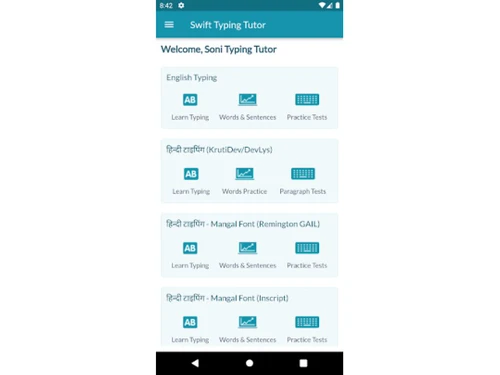
soni typing tutor welcome page
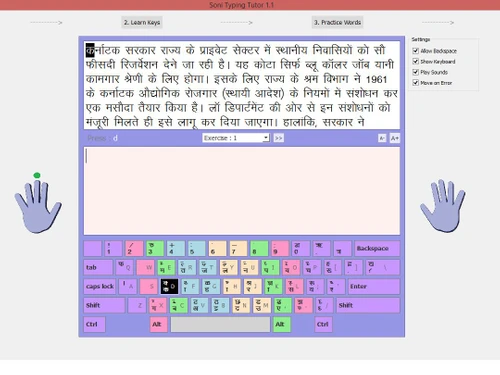
soni typing tutor hindi typing

Soni Typing Tutor

Brand: Soni Typing Tutor

  • 4.7

  • 1 Rating & 1 Review

Soni Typing Tutor is a modern typing software designed to help users master Hindi and English typing efficiently.

See More

Have you used Soni Typing Tutor before?

Share your insights for better experience

Add a Review
Starting Price
₹299 excl.GST
₹ 353 incl. GST

View plans

offer Save upto 18%, Get GST Invoice on your business purchase T&C
offer Buy Now & Pay Later, Check offer on payment page.
Buy Now
100% Genuine
Products
Best Price
Guaranteed
Safe & Secure
Payment
  • Description

  • Pricing

  • Features

  • Specification

  • Review

  • Compare

  • Alternatives

  • FAQ

Starting at ₹299
Buy Now

Soni Typing Tutor Software Overview

What is Soni Typing Tutor?

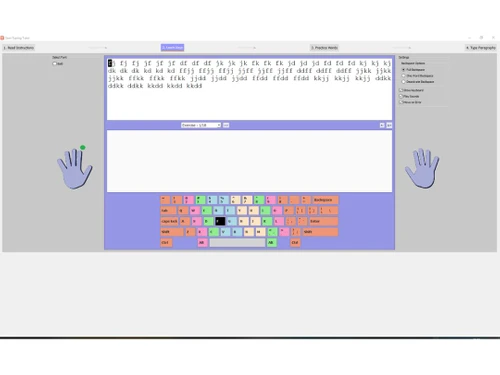
Soni Typing Tutor is a specialised Hindi typing software designed to help users master Hindi typing efficiently, in as little as 10 hours. With its intuitive on-screen virtual keyboard, learners can practice seamlessly while building their skills. The platform also supports English typing, making it a complete solution for bilingual learners.

The software includes all essential Hindi fonts like Krutidev 010, Mangal, and DevLys 010, supporting both Remington Gail and Inscript keyboard layouts. It offers smart tips, shortcuts, and structured exercises to boost typing speed and accuracy. With 600+ Hindi and 300+ English practice exercises, users can track their progress through words, sentences, and full paragraphs.

To simplify learning, the program is divided into four key sections:

  • Read Instructions: Understand typing basics.
  • Learn Keys: Master finger placement.
  • Type Words: Build muscle memory.
  • Practice Paragraphs: Refine speed and accuracy.

This step-by-step approach ensures quick, stress-free learning for beginners and advanced typists alike.

Why People Should Choose Soni Typing Tutor?

  • Government Exam-Centric Design: Soni Typing Tutor is specially designed to enable a candidate to pass most Government jobs examinations in India, such as SSC CHSL, NTCP, BSF, and state-level examinations.
  • 1000+ Structured Typing Exercises: Having more than 1000 exercises that can be used in Hindi and English typing. A learner is provided with a full practice routine with the simplest key drills and the most complicated paragraphs.
  • Step-by-Step Instructions & Pro Tips: Users are advised on the proper finger positions, posture, typing techniques, etc, with clear and viable instructions before any exercise is executed. These are the concepts that are introduced to get into the habit of doing things properly with the least mistakes and the maximum efficiency.
  • Hassle-Free Exam Preparation: Soni Typing Tutor makes clearing typing test rounds a lot easier as it offers mock-like tests and timed practice. The application also recreates the real world of exams, and it helps to deal with pressure and to achieve better results within the limitations of time.
  • Fully Offline Functionality: Among the best aspects of Soni Typing Tutor, one can count the fact that it does not need internet access to apply its Hindi or English typing courses. It has this offline ability which makes it suitable even to the users in unreliable connection regions, where one can practice at any time and anywhere without difficulties.
  • 10 Daily Live Test Simulations: The software provides 10 real-time tests that the user can attempt daily to help strengthen their exam preparation through the replication of the actual government typing tests in terms of format and level of difficulty. These simulations give immediate feedback on the typing speed (WPM), accuracy and error rates that allow learners to monitor their progress and what requires improvement.
  • Free English Typing + Affordable Hindi Module: Although English typing courses come free, with no hidden charges, the Hindi module does not involve too much cost, as a very small one-time fee would be applicable (through the purchase of a license), which makes Soni Typing Tutor a cost-effective option.
  • Detailed Performance Analytics: Users will be given a detailed result of every activity or test, comprising the number of keystrokes per minute, words per minute (WPM), accuracy in percentages column, and error heatmaps.

Soni Typing Tutor Pricing

Soni Typing Tutor price details are available at INR 299/Month at Techjockey.com.

For Soni Typing Tutor price in India, please request a call back for subscription-related details and to avail of offers on premium packages.

Read more

Soni Typing Tutor Pricing & Plans

soni typing tutor
Key Features
  • Desktop Application
  • 1000+ tests & Paragraph to practice
  • Hindi to English
  • Hindi-English Typing
  • Detailed Result
  • Easy setting to change

Calculated Price

₹ 299 Exclusive of all taxes
  • Options

    • Licenses

      Licenses
      Licenses
    • Monthly

      Monthly
      Monthly

Key Features

  • Desktop Application

  • 1000+ tests & Paragraph to practice

  • Hindi to English

  • Hindi-English Typing

  • Detailed Result

  • Easy setting to change

Soni Typing Tutor Features

  • icon_check Desktop Application
    Offline Windows typing software with easy installation and a user-friendly interface for an uninterrupted learning experience.
  • icon_check 1000+ tests & Paragraph to practice
    Comprehensive collection of 1000+ Hindi/English typing tests and paragraphs covering all difficulty levels for practice.
  • icon_check Hindi - English Typing
    Complete Hindi and English typing solution with Krutidev/Mangal font support for all users.
  • icon_check Detailed Result
    Complete performance tracking with WPM, accuracy percentage, error analysis and progress reports for improvement.
  • icon_check Easy setting to change
    Flexible customisation options for fonts, keyboard layouts and test parameters with simple one-click adjustments.
  • icon_check Legacy Font Support
    Includes full compatibility for legacy Hindi fonts like KrutiDev 010 and DevLys 010, which are commonly used in various offices.
  • icon_check Mangal Font Integration
    Supports the modern Mangal Unicode font, making it the ideal software for candidates preparing for recent government job exams.
  • icon_check Virtual On-Screen Keys
    Displays a dynamic virtual keyboard that highlights the correct key and finger position to build muscle memory without looking.
  • icon_check Live Test Simulations
    Provides daily live typing test series that allow students to compete and compare their national rankings with other aspirants.
  • icon_check Comprehensive Analytics
    Generates detailed result sheets showing net speed, gross speed, accuracy percentage, and backspace counts after every session.
  • icon_check Full-Screen Practice
    Features a distraction-free full-screen mode that mimics the actual interface used by most official government testing bodies.
  • icon_check Offline Desktop Access
    Functions as a standalone Windows application that does not require an active internet connection for daily practice routines.
  • icon_check Regional Language Sets
    Expands its utility beyond Hindi by offering specialized typing modules for regional languages like Marathi and Punjabi (Raavi).
  • icon_check Interactive Sound Cues
    Features an optional sound alert that triggers when a wrong key is pressed to provide immediate feedback for better accuracy.
Soni Typing Tutor Demo Video play icon

Get Soni Typing Tutor Demo

Watch the demo video to explore key features, real workflows, and how the software fits your business needs.

Understand
Key Features
Personal
Demo Insights
Interactive
Demo Support

Soni Typing Tutor Specifications

Supported Platforms
Windows Windows
Devices
Desktop Desktop
Deployment
Perpetual Perpetual
Suitable For
All Industries
Business Specific
All Businesses
Business Size
Individual Small Business Medium Business SMBs SMEs
Customer Support
Phone Email Live Chat Forums
Language
English
Training Resources
Documentation Videos

Soni Typing Tutor Review

4.7

Out of 5

img

Overall Rating

Based on
1 Verified Review

Rating Breakdown

  • Features 5
  • Value for Money 5
  • Ease of Use 5
  • Customer Support 4

100% Recommend this Product

Add Review

abhinav kushwaha

User since: < 6 months

4.7

Reviewed on: May 25, 2021

Techjockey Verified

“Rest is one side ..customer service is also excell”

Pros

Very easy settings pannel. Excellent results analysis and worth buying

Cons

No

Compare Soni Typing Tutor With other Hindi Typing Software

Products
Ratings
Pricing
Device Supported
Deployment
Supported Platforms
  • img

    Soni Typing Tutor

  • 4.7

  • ₹ 299.00 excl. GST

  • Desktop

    Mobile

  • Web based

    On Premises

  • Windows

    Mac OS

  • img

    JR Typing Tutor

  • 4

  • ₹ 423

  • Desktop

    Mobile

  • Web based

    On Premises

  • Windows

    Mac OS

(0) Product(s) selected

Soni Typing Tutor Alternatives

See All Soni Typing Tutor Alternatives

Which operating system does Soni Typing Tutor support?

Soni Typing Tutor typing software is compatible with Mac, Windows XP/7/8/8.1, and even Windows 10.

Is there any Soni Typing Tutor app?

Soni Typing Tutor app is not available.

What is the deployment type of Soni Typing Tutor?

Soni Typing Tutor is system based.

Who are the potential users of Soni Typing Tutor?

Anyone preparing for Government typing examinations or individuals looking to fasten their typing speed are potential users of Soni Typing Tutor.

Is there any free trial or demo for Soni Typing Tutor?

Yes, you can get a free demo for Soni Typing Tutor at techjockey.com.

Is Soni Typing Tutor free?

Yes, the free edition of Soni Typing Tutor is available.

How can you download Soni Typing Tutor?

You can download Soni Typing Tutor software for free and install it on your device by visiting the official website.

How does Soni Typing Tutor work?

Soni Typing Tutor is designed to help you master typing with a series of structured lessons. It starts off with the basics, gradually moving on to full paragraphs, all while keeping track of your speed and accuracy.

How much does Soni Typing Tutor cost?

Soni Typing Tutor pricing starts from INR 299/month at Techjockey.com

Who uses Soni Typing Tutor?

The major users of Soni Typing Tutor are Government Job Aspirants, Students, Professionals, Court Staff, Data Entry Operators, and more.

Is there any mobile app for Soni Typing Tutor?

No, Soni Typing Tutor has a dedicated mobile app.

Is Soni typing free or paid?

Soni Typing Tutor offers both free and paid features.

20,000+ Software Listed

Best Price Guranteed

Free Expert Consultation

2M+ Happy Customers

Terms and Condtions

close

Users with registered businesses can purchase goods from merchants on the platform to satisfy their business needs. Users are not permitted to utilize any products acquired through the platform for resale, advertising, business, or further distribution.

For each purchase made, users will receive a Tax Invoice (or 'GST invoice') that includes specific details such as:

  • the GSTIN of the user associated with their registered business, and

  • the specified Entity Name for their business.

It should be noted that not all products are eligible for GST Invoice. Only the products displayed by participating sellers with the 'GST-based Invoice Available' callout on the product description page would qualify.

Certain goods and services are not eligible to get a GST Invoice, including items with VAS, i.e., Value Added Services (e.g., Total Mobile Protection/Assured Buyback) and those involving an exchange offer at the time of purchase.

Users must ensure the accuracy of the GSTIN, and business entity name provided for the GST Invoice. Requests for corrections into GST Invoice would not be accommodated by Techjockey.com or any Seller, and any issues arising from user-provided information are the sole responsibility of users.

Techjockey.com is not liable for the GST Invoice or any associated input tax credit. To efficiently claim an input tax credit, users should select the registered place of business address as per the GST authority's data and follow the provisions of the GST Act and rules.

To claim an input tax credit, the delivery and billing addresses must match. Furthermore, input tax credits will not be granted if the delivery address and GSTIN on the invoice are from different states. In case of incorrect GST details provided during the order placement, the order will be canceled automatically.