 USA
USA UAE
UAESmall Business
Designed for startups and growing businesses


See More





Brand: Jungleworks
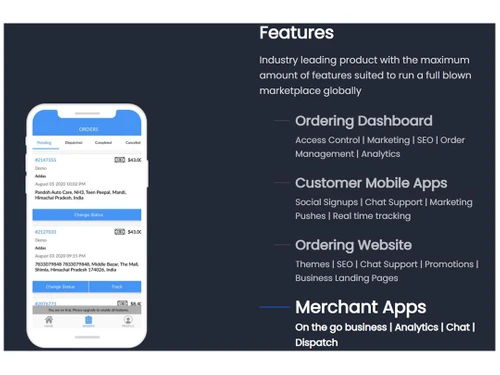
Yelo by Jungleworks is a top food delivery software solution that offers a full suite of tools for managing and scaling food delivery businesses. Whether you run a single restaurant or a network of restaurants, Yelo helps you streamline operations, optimize deliveries, and improve customer experienc...
See MoreHave you used Yelo before?
Share your insights for better experience
 Marketplace Apps Browsing & Listings Ordering Features Store Management Fulfilment & Delivery Shipping & Payment Checkout Chat & Notification Analytics SEO Hosting Service & Support

Watch the demo video to explore key features, real workflows, and how the software fits your business needs.
 Windows
  Desktop
  Cloud-Based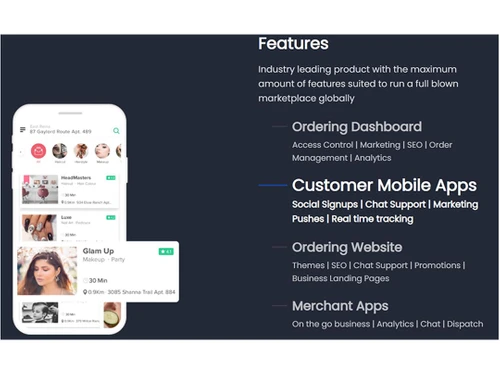


Small Business
Designed for startups and growing businesses
Medium Business
Built for business growth and flexibility
Enterprises
Designed for complex and large-scale business needs
4.5
Out of 5

Overall Rating
Based on
11 Verified Reviews
Rating Breakdown
89% Recommend this Product
Add ReviewUsers generally appreciate Yelo for its user-friendly interface, affordability, and quick deployment capabilities, making it suitable for small businesses and startups. The platform effectively supports multivendor setups and integrates well with delivery management tools. However, many customers express a need for more advanced features, better analytics, and improved customer support. Some also mention technical issues and a confusing layout that can hinder the overall experience.
Pros
"Yelo is cost-effective and offers a range of features suitable for small businesses."
"Integrates well with delivery management tools like Tookan, simplifying operations."
"Yelo allowed us to be operational quickly without much trouble."
Cons
"Customer service is unresponsive, making it difficult to resolve issues."
"Limited options for advanced customizations compared to other platforms."
"Encountered bugs and glitches that affect the user experience."


Apr 15, 2025
Techjockey Verified
“Simple Interface but Lacks Advanced Features”
Yelo's simplicity makes it accessible, but as our business expands, we find the need for more advanced functionalities that Yelo doesn't offer.
Pros
The interface is straightforward and easy to navigate.
Cons
Missing advanced features that growing businesses require.
Reason to switch
Looking for a platform that scales better with advanced features.
Apr 1, 2025
Techjockey Verified
“Great for Multivendor Setup but Needs Better Analytics”
Yelo helps manage multiple vendors efficiently, but the analytics tools don't provide the depth we need to make informed decisions.
Pros
Supports multivendor marketplaces effectively.
Cons
Analytics features are limited and not very insightful.
Reason to switch
Seeking a platform with more comprehensive analytics capabilities.
Mar 15, 2025
Techjockey Verified
“Quick Deployment but Buggy”
Yelo enabled us to launch our marketplace swiftly, but technical issues have been a recurring problem.
Pros
Allows for rapid deployment of online marketplaces.
Cons
Encountered bugs and glitches that affect the user experience.
Reason to switch
Looking for a more stable platform with fewer technical issues.

Yelo
Price On Request
Desktop
Mobile
Web based
On Premises
Windows
Mac OS

RND Food Daily
Price On Request
Desktop
Mobile
Web based
On Premises
Windows
Mac OS

Rute Food Delivery App
₹ 175000
Desktop
Mobile
Web based
On Premises
Windows
Mac OS

G9 Smart Menu
₹ 4000
Desktop
Mobile
Web based
On Premises
Windows
Mac OS
Redbox
Price On Request
Desktop
Mobile
Web based
On Premises
Windows
Mac OS
Deliverect
Price On Request
Desktop
Mobile
Web based
On Premises
Windows
Mac OS

Foodiv
Price On Request
Desktop
Mobile
Web based
On Premises
Windows
Mac OS

Eatance
Price On Request
Desktop
Mobile
Web based
On Premises
Windows
Mac OS

YelowXpress
Price On Request
Desktop
Mobile
Web based
On Premises
Windows
Mac OS

Unimak Food Delivery
Price On Request
Desktop
Mobile
Web based
On Premises
Windows
Mac OS

MealPe
Price On Request
Desktop
Mobile
Web based
On Premises
Windows
Mac OS
(0) Product(s) selected
Available
Price on Request
Available
Price on Request
Available
Price on Request
Available
Price on Request
Available
Price on Request

Available
Price on Request

Available
Price on Request
Yelo provides a full suite of tools to manage and optimize your food delivery business. From order management to delivery tracking, the platform ensures that your operations are efficient and customer-friendly, helping your business grow by increasing customer satisfaction and operational efficiency.
Yes, Yelo allows businesses to create their own branded marketplace apps for food delivery.
Yelo is flexible and scalable, making it suitable for businesses of all sizes. Whether you run a small restaurant or a large food delivery operation, Yelo can be customized to meet your specific needs.
Yelo helps manage the entire delivery process, from receiving orders to tracking deliveries. The platform integrates with various delivery services and provides real-time updates, improving delivery accuracy and speed.
Yelo supports a wide range of payment methods, including credit/debit cards, digital wallets, and other popular payment gateways, making it easy for customers to complete transactions securely.
Yes, Yelo provides a robust store management feature that allows you to easily manage your restaurant’s menu, pricing, and product availability in real-time.
Yes, Yelo includes SEO tools and analytics that help boost your restaurant’s online presence. This makes it easier for potential customers to find your business and make orders.
Yelo provides secure payment processing and stores customer data safely. The platform adheres to industry standards for security, ensuring that sensitive information is protected.
Yes, Yelo offers order tracking tools that allow both customers and businesses to monitor the status of orders in real-time, ensuring timely delivery.
Yes, Yelo has a user-friendly interface that is easy to navigate. Whether you are managing orders, deliveries, or customer communications, the platform is designed for simplicity and ease of use.
20,000+ Software Listed
Best Price Guranteed
Free Expert Consultation
2M+ Happy Customers
Terms and Condtions

Users with registered businesses can purchase goods from merchants on the platform to satisfy their business needs. Users are not permitted to utilize any products acquired through the platform for resale, advertising, business, or further distribution.
For each purchase made, users will receive a Tax Invoice (or 'GST invoice') that includes specific details such as:
the GSTIN of the user associated with their registered business, and
the specified Entity Name for their business.
It should be noted that not all products are eligible for GST Invoice. Only the products displayed by participating sellers with the 'GST-based Invoice Available' callout on the product description page would qualify.
Certain goods and services are not eligible to get a GST Invoice, including items with VAS, i.e., Value Added Services (e.g., Total Mobile Protection/Assured Buyback) and those involving an exchange offer at the time of purchase.
Users must ensure the accuracy of the GSTIN, and business entity name provided for the GST Invoice. Requests for corrections into GST Invoice would not be accommodated by Techjockey.com or any Seller, and any issues arising from user-provided information are the sole responsibility of users.
Techjockey.com is not liable for the GST Invoice or any associated input tax credit. To efficiently claim an input tax credit, users should select the registered place of business address as per the GST authority's data and follow the provisions of the GST Act and rules.
To claim an input tax credit, the delivery and billing addresses must match. Furthermore, input tax credits will not be granted if the delivery address and GSTIN on the invoice are from different states. In case of incorrect GST details provided during the order placement, the order will be canceled automatically.



