linkedin
Kodika logo
play Create your First Screen | Kodika iOS App Builder
kodika Dashboard
kodika Templates

Kodika

Brand: Kodika

  • 4.3

  • 3 Ratings

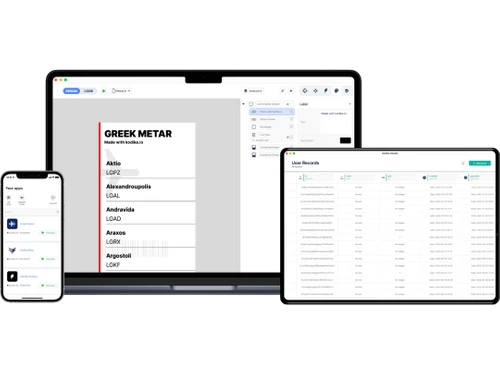
Kodika is a no-code app builder that allows users to create native iOS and Android applications, design custom screens, add features, and build fully functional mobile apps without any coding skills.

See More

Have you used Kodika before?

Share your insights for better experience

Add a Review
Starting Price
€15

View plans

100% Genuine
Products
Best Price
Guaranteed
Safe & Secure
Payment
  • Description

  • Pricing

  • Features

  • Specification

  • Review

  • Compare

  • Alternatives

  • FAQ

Starting at €15

Kodika Software Overview

What is Kodika Software?

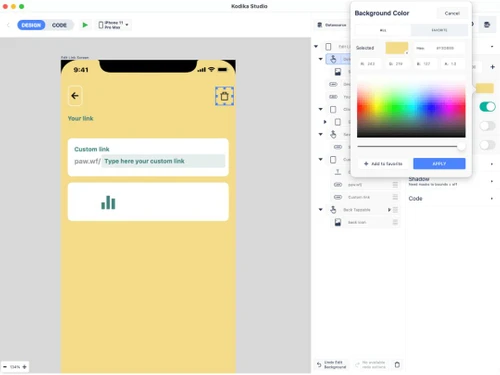
Kodika is a drag-and-drop app builder software that eliminates the need for coding expertise. The platform simplifies the often-complex process of mobile app creation, making it accessible to a wide range of users. The platform provides an automated release system, which generates essential certificates, provisioning profiles, and app uploads to the App Store, relieving users of these technical hassles. Users can effortlessly design their app's interface with responsive elements, including drag-and-drop images, lists, buttons, and more.

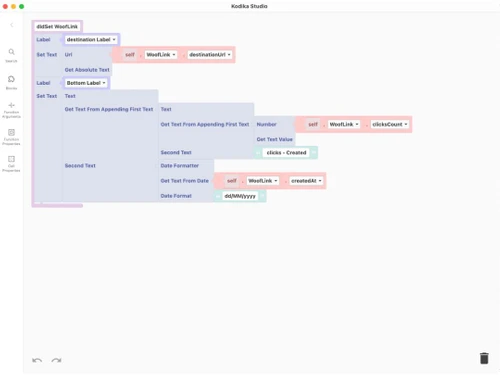
It offers the ability to reuse components to construct grids and lists to enhance app development efficiency. The software provides tools for organizing your project's font and color style guides. You can transform elements into functional and interactive components to ensure a rich user experience. It streamlines the integration of REST API requests to ensure that your app can interact seamlessly with external data sources.

Why Choose Kodika System?

  • The drag-and-drop app builder software allows users to seamlessly connect to external APIs to access a wide range of services and data sources.
  • It allows you to explore options for monetizing your app, such as in-app purchases, subscriptions, or advertising.
  • The platform allows you to efficiently organize, store, and manage data within your app to ensure data integrity and security.
  • It allows you to implement testing features to ensure your app functions correctly and identify and address bugs or errors.
  • The software allows you to create and integrate custom plugins tailored to your app's unique requirements.

Benefits of Kodika Drag and Drop App Builder Solution

  • The drag-and-drop app builder software allows you to craft visually appealing and user-friendly interfaces with the flexibility to adapt to various screen sizes and orientations.
  • It enables you to keep your app content fresh by enabling real-time updates and data synchronization.
  • The platform allows you to fine-tune the appearance and behavior of UI components to align with your app's unique design.
  • It allows you to maintain a clear history of changes to your app for easy tracking and reverting to previous versions if necessary.
  • The software lets you engage and inform your app's users with timely push notifications to enhance user retention and engagement.

Pricing of Kodika Drag and Drop App Builder Software

Kodika pricing in India starts at €15 on techjockey.com. It comes with multiple pricing plans and caters to the diverse customer base.

For subscription-related details and offers on premium packages, please request a call back from our product experts.

Read more

Kodika Company Details

Founded Year:  2017

Build iOS applications with Drag & Drop

Director/Founders Kostas Antonopoulos
Company Size 1-100 Employees

Kodika Pricing & Plans

Pro
Key Features
  • Logic: Unlimited actions
  • Screens: Unlimited
  • Import screens from Sketch/Figma: Unlimited
  • Splash Screen: Custom
  • Zapier Integrations: Unlimited
Starting at €15
    • Quantity

      Quantity
      Quantity
    • Monthly

      Monthly
      Monthly

Key Features

  • Logic: Unlimited actions

  • Screens: Unlimited

  • Import screens from Sketch/Figma: Unlimited

  • Splash Screen: Custom

  • Zapier Integrations: Unlimited

Kodika Features

  • icon_check APP Builder
    Provides a user-friendly app-building tool to create iOS apps without the need for coding skills.
  • icon_check Templates
    Offers various pre-designed templates to start your app development process.
  • icon_check Drag & Drop
    Provides an intuitive drag-and-drop interface to design your app's layout and functionality.
  • icon_check Integrations
    Supports integration with external services and data sources to enhance the app's functionality.
  • icon_check Analytics
    Offers valuable insights into your app's performance and user engagement for data-driven decision-making.
  • icon_check Plugins & Integrations
    This enables you to extend your app's capabilities by incorporating various plugins and integrations.
  • icon_check No Code Platform
    Removes the requirement for coding skills and ensures accessibility to all users.
  • icon_check Dashboard
    Offers a centralized dashboard for monitoring and managing your app.
  • icon_check Easy to Use
    Prioritizes a user-friendly interface for users of all technical expertise to create and manage iOS apps.
Kodika Demo Video play icon

Get Kodika Demo

Watch the demo video to explore key features, real workflows, and how the software fits your business needs.

Understand
Key Features
Personal
Demo Insights
Interactive
Demo Support

Kodika Specifications

Supported Platforms
Windows Windows iOS iOS Android Android MacOS MacOS
Devices
Desktop Desktop Mobile Mobile Tablet Tablet iPad iPad
Deployment
Cloud-Based Cloud-Based
Suitable For
All Industries
Business Specific
All Businesses
Business Size
Small Business Medium Business SMBs SMEs
Customer Support
Phone Email Live Chat Communities Forums
Language
English
Integration
API Integration
Training Resources
Documentation Videos

Explore the Best Alternative Solutions Similar to Your Business Size and Needs

Kodika Review

4.3

Out of 5

img

Overall Rating

Based on
3 Verified Ratings

Rating Breakdown

  • Features 4
  • Value for Money 4.6
  • Ease of Use 4.3
  • Customer Support 4.3

86% Recommend this Product

Add Review

Techjockey Trusted Reviews from Verified Users

No reviews are currently available for Kodika. Discover similar Drag and Drop App Builder Software reviews

  • Builder ai

    4.4

    Whats great - Budgeting and invoice management made easy, great user experience.? read more

  • Appy Pie App Maker

    4.5

    Whats great - Appy Pie allows me to build mobile apps without coding using drag-and-drop tools, templates, and live previews. read more

  • Softr

    4.3

    Whats great - Softr allowed me to create a Progressive Web App (PWA) that functioned adequately on mobile browsers. read more

Compare Kodika With other Drag and Drop App Builder Software

Products
Ratings
Pricing
Device Supported
Deployment
Supported Platforms
  • img

    Kodika

  • 4.3

  • Price On Request

  • Desktop

    Mobile

  • Web based

    On Premises

  • Windows

    Mac OS

  • img

    Appy Pie App Maker

  • 4.3

  • Price On Request

  • Desktop

    Mobile

  • Web based

    On Premises

  • Windows

    Mac OS

  • img

    Base44

  • 4.3

  • Price On Request

  • Desktop

    Mobile

  • Web based

    On Premises

  • Windows

    Mac OS

  • img

    Munshify Forms

  • 4.1

  • Price On Request

  • Desktop

    Mobile

  • Web based

    On Premises

  • Windows

    Mac OS

  • img

    Fuzen

  • 3.9

  • Price On Request

  • Desktop

    Mobile

  • Web based

    On Premises

  • Windows

    Mac OS

  • img

    AppSheet

  • 4.5

  • Price On Request

  • Desktop

    Mobile

  • Web based

    On Premises

  • Windows

    Mac OS

  • img

    AppUp

  • 4.4

  • Price On Request

  • Desktop

    Mobile

  • Web based

    On Premises

  • Windows

    Mac OS

  • img

    App Builder

  • 4.5

  • Price On Request

  • Desktop

    Mobile

  • Web based

    On Premises

  • Windows

    Mac OS

  • img

    Glide

  • 4.2

  • Price On Request

  • Desktop

    Mobile

  • Web based

    On Premises

  • Windows

    Mac OS

  • img

    Jotform Apps

  • 4.5

  • Price On Request

  • Desktop

    Mobile

  • Web based

    On Premises

  • Windows

    Mac OS

  • img

    GoodBarber

  • 4.6

  • Price On Request

  • Desktop

    Mobile

  • Web based

    On Premises

  • Windows

    Mac OS

(0) Product(s) selected

Kodika Alternatives

See All Kodika Alternatives

Starting Price:

$20 /Month

SAVE UPTO 55%

Starting Price:

$49 /Month

Starting Price:

$25

Starting Price:

$14

ZORP

4.5

Starting Price:

$10

Starting Price:

$50

Starting Price:

$59

Starting Price:

$15 /Month

Which operating system does Kodika Software Support?

Kodika software is compatible with the macOS and iOS operating systems.

Is there any Kodika app?

Kodika is available for iOS app users.

What is the deployment type of the Kodika System?

Kodika system supports web-based deployment.

How much does Kodika Drag and Drop App Builder Cost?

Kodika drag and drop app builder price starts at €15 on techjockey.com.

Who are the potential users of the Kodika Drag and Drop App Builder Solution?

Kodika is a user-friendly platform for designers, developers, and non-coders to create mobile apps without coding.

Is there any free trial or demo for Kodika?

Kodika's free trial is available at techjockey.com.

Is Kodika free?

The Kodika platform is not free. Price starts at €15 at techjockey.com.

How can you download Kodika?

Kodika software is a web-based platform. So, installation is not required. Just open the Setup Wizard to get started.

How does Kodika Work?

Kodika is a no-code platform that allows users to develop mobile applications effortlessly, without coding, using a simple drag-and-drop interface.

20,000+ Software Listed

Best Price Guranteed

Free Expert Consultation

2M+ Happy Customers

Terms and Condtions

close

Users with registered businesses can purchase goods from merchants on the platform to satisfy their business needs. Users are not permitted to utilize any products acquired through the platform for resale, advertising, business, or further distribution.

For each purchase made, users will receive a Tax Invoice (or 'GST invoice') that includes specific details such as:

  • the GSTIN of the user associated with their registered business, and

  • the specified Entity Name for their business.

It should be noted that not all products are eligible for GST Invoice. Only the products displayed by participating sellers with the 'GST-based Invoice Available' callout on the product description page would qualify.

Certain goods and services are not eligible to get a GST Invoice, including items with VAS, i.e., Value Added Services (e.g., Total Mobile Protection/Assured Buyback) and those involving an exchange offer at the time of purchase.

Users must ensure the accuracy of the GSTIN, and business entity name provided for the GST Invoice. Requests for corrections into GST Invoice would not be accommodated by Techjockey.com or any Seller, and any issues arising from user-provided information are the sole responsibility of users.

Techjockey.com is not liable for the GST Invoice or any associated input tax credit. To efficiently claim an input tax credit, users should select the registered place of business address as per the GST authority's data and follow the provisions of the GST Act and rules.

To claim an input tax credit, the delivery and billing addresses must match. Furthermore, input tax credits will not be granted if the delivery address and GSTIN on the invoice are from different states. In case of incorrect GST details provided during the order placement, the order will be canceled automatically.