linkedin
AppSheet logo
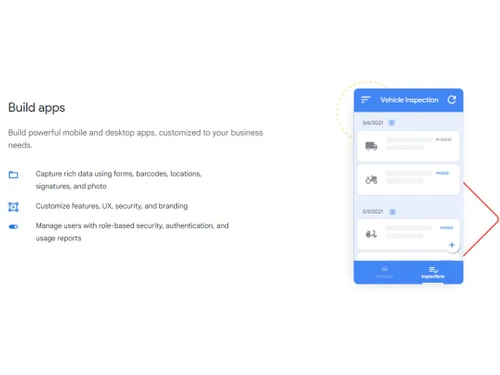
AppSheet Build Apps
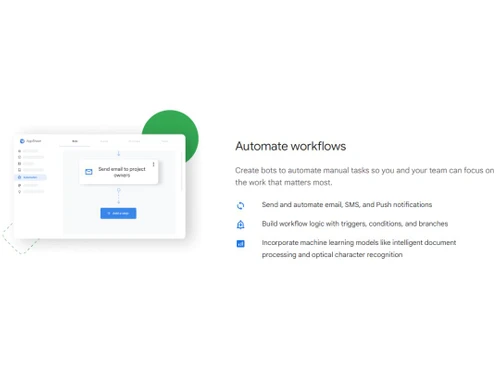
AppSheet Automate
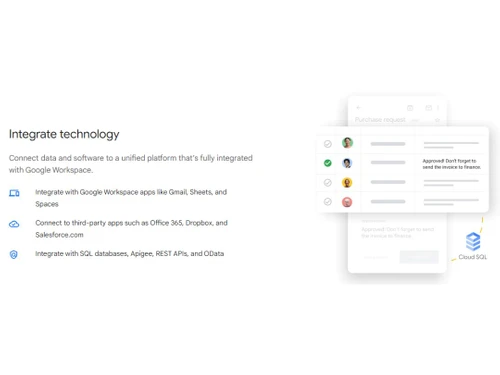
AppSheet Integrate

AppSheet

Brand: AppSheet Software

  • 4.5

  • 3 Ratings

The tool helps to develop applications without any code.

See More

Have you used AppSheet before?

Share your insights for better experience

Add a Review
Starting Price
$5

View plans

100% Genuine
Products
Best Price
Guaranteed
Safe & Secure
Payment
  • Description

  • Pricing

  • Features

  • Specification

  • Review

  • Compare

  • Alternatives

  • FAQ

Starting at $5

AppSheet Software Overview

What is AppSheet?

AppSheet is a no-code platform that helps users create powerful applications and automate their workflows. It is a cloud-based system that enables users to rapidly design, develop, and deploy applications without writing code.

In addition to this, the no-code software can automate processes like sending SMS, push notifications, and emails. Also, users can incorporate machine learning technology for optical character recognition, intelligent document processing, and more. Moreover, Google AppSheet offers a wide range of features, including data synchronization, workflow automation, and more.

Key Functionalities of AppSheet:

  • Automated Application Creation: The website development tool allows users to create applications without coding. It automatically creates forms, workflows, reports, and dashboards with just a few clicks using app templates.
  • Data Management: The no-code solution allows users to store and manage data from multiple sources, such as spreadsheets, databases, and cloud storage. It also provides an intuitive interface to view and edit data, as well as perform advanced analytics.
  • Integrations: This platform offers powerful integrations with popular cloud services such as Google Drive, Dropbox, and Microsoft Office.
  • User Interface: The website development tool provides a user-friendly interface that makes it easy for anyone to create and manage their applications. It also supports drag-and-drop functionality, allowing users to quickly and easily build their applications.

Benefits of AppSheet

  • No Coding Required: The no-code platform is easy to use, even for users with no coding experience. This makes it easy for users to create business-critical applications quickly and efficiently.
  • Cost-Effective: The website development tool is available at an affordable cost and is cheaper than hiring a software developer to create an app.
  • Flexibility: The website development software allows users to customize their applications in terms of branding, features, UX, etc., to fit their specific needs.
  • Scalability: The website development tool is highly scalable and can be used for applications of any size.

AppSheet Pricing

AppSheet pricing starts from $5 at techjockey.com. It comes with multiple pricing plans and caters to a diverse customer base. For subscription-related details and offers on premium packages, please request a call back from our product experts.

Read more

AppSheet Pricing & Plans

Starter
Key Features
  • Duet AI for app creation
  • Basic application and automation features
  • Connect to spreadsheets and cloud file storage pro
  • AppSheet database
Starting at $5
    • Users

      Users
      Users
    • Monthly

      Monthly
      Monthly

Key Features

  • Duet AI for app creation

  • Basic application and automation features

  • Connect to spreadsheets and cloud file storage pro

  • AppSheet database

AppSheet Features

  • icon_check App Templates
    Provides a range of pre-built apps templates that can be customized to fit various use cases.
  • icon_check Build apps
    Enables users to build apps from scratch using a drag-and-drop interface.
  • icon_check Automate workflows
    Allows users to create automated workflows so that apps can respond to user actions and data changes in real-time.
  • icon_check Integrate
    Provides APIs and SDKs for integration with other services and applications.
  • icon_check Data Synchronization
    Offers a powerful data synchronization engine, which ensures that all the data in your app is always up to date.
  • icon_check Application Deployment
    Enables users to easily deploy their apps to the web, mobile devices, or through custom integrations.
  • icon_check Lifecycle Management
    Helps users to manage the lifecycle of their apps, including version control, user access control, and analytics.
  • icon_check Data Security
    Provides encryption, authentication, and access control options to protect your app and its data.
  • icon_check Real Time Updates
    Provides real-time updates so that your app is always up to date with the latest data.

AppSheet Specification

Supported Platforms
Windows Windows MacOS MacOS
Devices
Desktop Desktop
Deployment
Web-Based Web-Based
Suitable For
All Industries
Business Specific
All Businesses
Business Size
SMBs SMEs MSMBs
Language
English

Explore the Best Alternative Solutions Similar to Your Business Size and Needs

AppSheet Review

4.5

Out of 5

img

Overall Rating

Based on
3 Verified Ratings

Rating Breakdown

  • Features 4.3
  • Value for Money 4.6
  • Ease of Use 4.3
  • Customer Support 4.6

86% Recommend this Product

Add Review

Techjockey Trusted Reviews from Verified Users

No reviews are currently available for AppSheet. Discover similar Drag and Drop App Builder Software reviews

  • Builder ai

    4.4

    Whats great - Budgeting and invoice management made easy, great user experience.? read more

  • Appy Pie App Maker

    4.5

    Whats great - Appy Pie allows me to build mobile apps without coding using drag-and-drop tools, templates, and live previews. read more

  • Softr

    4.3

    Whats great - Softr allowed me to create a Progressive Web App (PWA) that functioned adequately on mobile browsers. read more

Compare AppSheet With other Drag and Drop App Builder Software

Products
Ratings
Pricing
Device Supported
Deployment
Supported Platforms
  • img

    AppSheet

  • 4.5

  • Price On Request

  • Desktop

    Mobile

  • Web based

    On Premises

  • Windows

    Mac OS

  • img

    Appy Pie App Maker

  • 4.3

  • Price On Request

  • Desktop

    Mobile

  • Web based

    On Premises

  • Windows

    Mac OS

  • img

    Base44

  • 4.3

  • Price On Request

  • Desktop

    Mobile

  • Web based

    On Premises

  • Windows

    Mac OS

  • img

    Munshify Forms

  • 4.1

  • Price On Request

  • Desktop

    Mobile

  • Web based

    On Premises

  • Windows

    Mac OS

  • img

    Fuzen

  • 3.9

  • Price On Request

  • Desktop

    Mobile

  • Web based

    On Premises

  • Windows

    Mac OS

  • img

    AppUp

  • 4.4

  • Price On Request

  • Desktop

    Mobile

  • Web based

    On Premises

  • Windows

    Mac OS

  • img

    App Builder

  • 4.5

  • Price On Request

  • Desktop

    Mobile

  • Web based

    On Premises

  • Windows

    Mac OS

  • img

    Glide

  • 4.2

  • Price On Request

  • Desktop

    Mobile

  • Web based

    On Premises

  • Windows

    Mac OS

  • img

    Jotform Apps

  • 4.5

  • Price On Request

  • Desktop

    Mobile

  • Web based

    On Premises

  • Windows

    Mac OS

  • img

    GoodBarber

  • 4.6

  • Price On Request

  • Desktop

    Mobile

  • Web based

    On Premises

  • Windows

    Mac OS

  • img

    Appery

  • 4.7

  • Price On Request

  • Desktop

    Mobile

  • Web based

    On Premises

  • Windows

    Mac OS

(0) Product(s) selected

AppSheet Alternatives

See All AppSheet Alternatives

Starting Price:

$20 /Month

SAVE UPTO 55%

Starting Price:

$49 /Month

Starting Price:

$25

Starting Price:

$14

ZORP

4.5

Starting Price:

$10

Starting Price:

$50

Starting Price:

$59

Starting Price:

$15 /Month

Which operating system does AppSheet support?

AppSheet is web-based and is compatible with all operating systems.

Is there any AppSheet app?

AppSheet solution’s app is available for android and iOS mobile devices.

What is the deployment type of AppSheet?

AppSheet tool supports web-based deployment type.

How much does AppSheet cost?

AppSheet price details are available on request at techjockey.com.

Who are the potential users of AppSheet?

AppSheet is typically used by apps and software developers.

Is there any free trial or demo for AppSheet?

AppSheet tool demo is available for free with techjockey.com.

Is AppSheet free?

AppSheet offers a free trial. However, the premium plan with advanced features is available at techjockey.com.

How can you download AppSheet?

For AppSheet, installation is not required because it is web-based.

How does AppSheet work?

AppSheet app development, workflow automation, data security, etc. It's a complete solution for managing apps lifecycle, integrating APIs, and also for managing data.

20,000+ Software Listed

Best Price Guranteed

Free Expert Consultation

2M+ Happy Customers

Terms and Condtions

close

Users with registered businesses can purchase goods from merchants on the platform to satisfy their business needs. Users are not permitted to utilize any products acquired through the platform for resale, advertising, business, or further distribution.

For each purchase made, users will receive a Tax Invoice (or 'GST invoice') that includes specific details such as:

  • the GSTIN of the user associated with their registered business, and

  • the specified Entity Name for their business.

It should be noted that not all products are eligible for GST Invoice. Only the products displayed by participating sellers with the 'GST-based Invoice Available' callout on the product description page would qualify.

Certain goods and services are not eligible to get a GST Invoice, including items with VAS, i.e., Value Added Services (e.g., Total Mobile Protection/Assured Buyback) and those involving an exchange offer at the time of purchase.

Users must ensure the accuracy of the GSTIN, and business entity name provided for the GST Invoice. Requests for corrections into GST Invoice would not be accommodated by Techjockey.com or any Seller, and any issues arising from user-provided information are the sole responsibility of users.

Techjockey.com is not liable for the GST Invoice or any associated input tax credit. To efficiently claim an input tax credit, users should select the registered place of business address as per the GST authority's data and follow the provisions of the GST Act and rules.

To claim an input tax credit, the delivery and billing addresses must match. Furthermore, input tax credits will not be granted if the delivery address and GSTIN on the invoice are from different states. In case of incorrect GST details provided during the order placement, the order will be canceled automatically.