USA
USA UAE
UAESmall Business
Designed for startups and growing businesses
See More





Brand: Dropbox
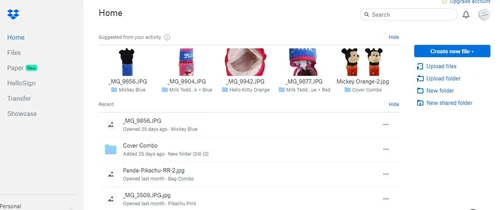
Dropbox is a cloud-based file storage software that helps the user to save their documents in a private cloud and enable them to access the files at any time and any place. The changes made by the user will automatically sync across all the devices hence making it easier to access the latest versions and pick up the work from exactly where it was left off. The software allows users to control and...
See MoreHave you used Dropbox Business before?
Share your insights for better experience
Brand: Dropbox
Founded Year: 2007
Dropbox is the one place to keep life organized and keep work moving. With more than 700 million registered users across 180 countries, we're on a mission to design a more enlightened way of working.
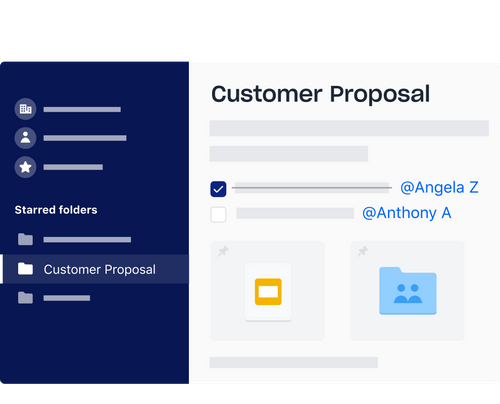
 Flexible storage plans File and version recovery Live Chat Account Management Synchronisation Remote Access Groups Integration Support Optimized Admin Console Audit Logs Enterprise Mobility Management Multi-Factor Authentication (MFA)

Watch the demo video to explore key features, real workflows, and how the software fits your business needs.
 Windows
  iOS
iOS  Android MacOS
  Linux
Linux  Desktop
  Mobile
  iPad
iPad  Cloud-Based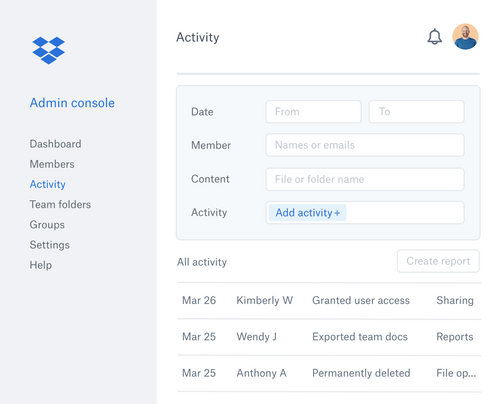

Small Business
Designed for startups and growing businesses
Medium Business
Built for business growth and flexibility
Enterprises
Designed for complex and large-scale business needs
4.4
Out of 5

Overall Rating
Based on
14 Verified Reviews
Rating Breakdown
85% Recommend this Product
Add ReviewCustomers generally appreciate Dropbox Business for its reliability, user-friendly design, and seamless file sharing capabilities, making it a favored choice for both individual users and teams. Many users highlight the convenience of accessing files from any location and the effective collaboration tools. However, some common limitations include frustrations with storage capacity for free accounts, the need for paid subscriptions for extensive features, and a desire for improved security options like encryption. Overall, users find it a valuable tool despite a few minor drawbacks.
Pros
"Seamless and secure file sharing. Offline syncing for devices, reducing data loss concerns. Effective file and folder organization. Convenient accessibility from any device."
"The user-friendly design, intuitive interface, and valuable features make Dropbox a go-to solution for my team and me."
"What I appreciate most about Dropbox is its reliability in storing and organizing documents. The accompanying app makes it incredibly convenient to access any document on the go."
Cons
"The mobile user interface of Dropbox is the only drawback. The automatic photo upload option on mobile lacks some verification or detailed information about the uploaded content"
"There are hardly any disadvantages to note. Dropbox proves to be a platform with 100% advantages, presenting no issues in my usage."
"The 'stop sharing' feature fails to remove the relevant icon, a minor bug that doesn't significantly impact functionality."


Mar 11, 2024
Techjockey Verified
“A Reliable and Affordable Collaboration Solution”
Dropbox facilitates seamless file sharing and team collaboration. Uniform folder and file views enable easy tracking of team activities. The 'Send a copy' feature simplifies sharing with external partners, eliminating the need for additional uploads. Invaluable features like file versioning, an easy admin panel, and the 'online-only' option optimize storage and enhance overall collaboration. In essence, Dropbox stands out as a comprehensive and efficient cloud content collaboration solution.
Pros
The user-friendly design, intuitive interface, and valuable features make Dropbox a go-to solution for my team and me.
Cons
The 'stop sharing' feature fails to remove the relevant icon, a minor bug that doesn't significantly impact functionality.
Mar 4, 2024
Techjockey Verified
“Easy, convenient and bursting with new features”
Dropbox simplifies document storage and collaboration. I love that my files are on my computer without taking up space, and the flexibility of viewing them offline adds to its appeal. It's a versatile solution for storing archives and collaborating on documents in one user-friendly platform.
Pros
What I appreciate most about Dropbox is its reliability in storing and organizing documents. The accompanying app makes it incredibly convenient to access any document on the go.
Cons
While Dropbox is great, the only downside for me is the need to maintain a Google Drive account separately. This is because I use G Suite for my daily business operations, and storing Google documents in Dropbox isn't seamless.
Mar 13, 2024
Techjockey Verified
“Hassle free File Management with Dropbox”
Dropbox simplifies file backup with automatic processes. While free storage is limited, subscribing provides up to 2TB, accommodating multiple backups. File encryption ensures robust protection for sensitive data. It offers easy and smooth file-sharing capabilities.
Pros
Seamless and secure file sharing. Offline syncing for devices, reducing data loss concerns. Effective file and folder organization. Convenient accessibility from any device.
Cons
Expensive subscriptions, bad affordability for some users. Limited features for free users. Inability to edit files online, making it challenging to manage changes. Insufficient storage for free users; subscription needed for maximum benefits

Dropbox Business
Price On Request
Desktop
Mobile
Web based
On Premises
Windows
Mac OS

TeraBox
Price On Request
Desktop
Mobile
Web based
On Premises
Windows
Mac OS

PikPak
Price On Request
Desktop
Mobile
Web based
On Premises
Windows
Mac OS

Zoho WorkDrive
₹ 170
Desktop
Mobile
Web based
On Premises
Windows
Mac OS

Hostzop
₹ 950
Desktop
Mobile
Web based
On Premises
Windows
Mac OS

Mesh Drive
Price On Request
Desktop
Mobile
Web based
On Premises
Windows
Mac OS

Zata.AI
₹ 599
Desktop
Mobile
Web based
On Premises
Windows
Mac OS

Mega
₹ 537
Desktop
Mobile
Web based
On Premises
Windows
Mac OS

Microsoft OneDrive
₹ 415
Desktop
Mobile
Web based
On Premises
Windows
Mac OS

iCloud
Price On Request
Desktop
Mobile
Web based
On Premises
Windows
Mac OS

JioCloud
Price On Request
Desktop
Mobile
Web based
On Premises
Windows
Mac OS
(2) Product(s) selected
Available
Price on Request
Starting Price:
$5 /Month
Starting Price:
$1 /Month

Starting Price:
$7 /Monthly

Available
Price on Request
Available
Price on Request

Starting Price:
€2 /Monthly

Starting Price:
$1 /Monthly

Starting Price:
€5 /Monthly
Starting Price:
$10 /Month

![11 Best Photo Storage Apps in 2026 [Paid & Free]](https://cdn.techjockey.com/blog/wp-content/uploads/2022/11/01165527/11-Best-Photo-Storage-Apps-in-2023-Paid-Free-_feature.jpg?d=265x163 "Blog - 11 Best Photo Storage Apps in 2026 [Paid & Free]")


The typical end-users of Dropbox include startups, enterprises, SMEs and freelancers.
Dropbox enables the user to access all the files saved in Dropbox cloud from any browser or any device having an internet connection.
Dropbox has features that enable the user to integrate with Office online without installing it, thus allowing them to access and edit MS Office files.
The Carousel feature of Dropbox enables the user to see all the photos uploaded, which are organised into albums.
The FileRequests feature of the Dropbox enables the user to send requests for specific files from others.
To troubleshoot sync errors in Dropbox, follow these steps:
0 0
If Dropbox isn't syncing properly, here are some troubleshooting steps to resolve the issue:
0 0
To cancel upload to Dropbox, go with either of these ways:
0 0
To print from Dropbox, follow the steps given below:
0 0
To rename a folder in Dropbox, follow the steps given below:
0 0
20,000+ Software Listed
Best Price Guranteed
Free Expert Consultation
2M+ Happy Customers
Terms and Condtions

Users with registered businesses can purchase goods from merchants on the platform to satisfy their business needs. Users are not permitted to utilize any products acquired through the platform for resale, advertising, business, or further distribution.
For each purchase made, users will receive a Tax Invoice (or 'GST invoice') that includes specific details such as:
the GSTIN of the user associated with their registered business, and
the specified Entity Name for their business.
It should be noted that not all products are eligible for GST Invoice. Only the products displayed by participating sellers with the 'GST-based Invoice Available' callout on the product description page would qualify.
Certain goods and services are not eligible to get a GST Invoice, including items with VAS, i.e., Value Added Services (e.g., Total Mobile Protection/Assured Buyback) and those involving an exchange offer at the time of purchase.
Users must ensure the accuracy of the GSTIN, and business entity name provided for the GST Invoice. Requests for corrections into GST Invoice would not be accommodated by Techjockey.com or any Seller, and any issues arising from user-provided information are the sole responsibility of users.
Techjockey.com is not liable for the GST Invoice or any associated input tax credit. To efficiently claim an input tax credit, users should select the registered place of business address as per the GST authority's data and follow the provisions of the GST Act and rules.
To claim an input tax credit, the delivery and billing addresses must match. Furthermore, input tax credits will not be granted if the delivery address and GSTIN on the invoice are from different states. In case of incorrect GST details provided during the order placement, the order will be canceled automatically.