linkedin
DocSend logo
play What is DocSend? (with cc) | Secure document sharing, document analytics, and document control
DocSend-advanced data rooms
DocSend-secure sharing

DocSend

Brand: Dropbox

  • 4.0

  • 3 Ratings

DocSend helps businesses share, track, and manage files with detailed analytics and access control features.

See More

Have you used DocSend before?

Share your insights for better experience

Add a Review
Starting Price
$15

View plans

100% Genuine
Products
Best Price
Guaranteed
Safe & Secure
Payment
  • Description

  • Pricing

  • Features

  • Specification

  • Review

  • Compare

  • Alternatives

  • FAQ

Starting at $15

DocSend Software Overview

What is DocSend?

DocSend is a secure document management software that helps businesses share files professionally online. It allows users to send documents, presentations, proposals, and reports through secure links instead of email attachments.

Users can control who views their files and can update documents without changing the shared link. DocSend provides detailed analytics that show who opened a document, how long they viewed it, and which pages received the most attention. This helps sales teams, startups, and businesses understand audience engagement. The platform also offers password protection, access controls, and document expiration features for better security.

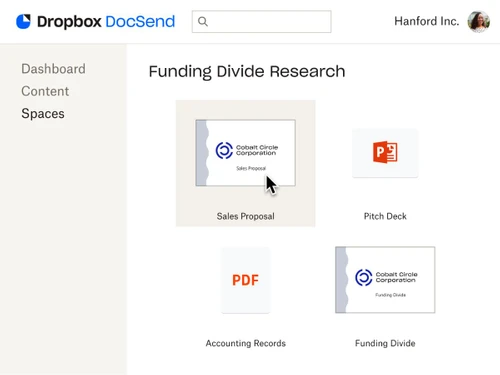
Users can create data rooms to organize and share multiple files with investors, clients, or partners. DocSend integrates with popular business tools to improve workflow efficiency. It is widely used for sales, fundraising, customer communication, and business collaboration. The platform helps teams share important documents securely while gaining valuable insights into viewer activity.

Why Choose DocSend Software?

  • Secure Document Sharing: Share confidential files with advanced security controls and encryption.
  • Real-Time Analytics: Track who viewed your documents, how long they viewed them, and which pages attracted the most attention.
  • Easy File Management: Organize and manage all business documents from a centralized platform.
  • Password Protection: Protect sensitive documents with customizable passwords.
  • Access Control: Control who can view, download, or edit your files.
  • Professional Sharing Links: Create branded and professional document links for clients and investors.
  • Startup Fundraising Support: Ideal for sharing pitch decks and investor presentations securely.
  • E-Signature Integration: Collect electronic signatures directly through shared documents.
  • Version Control: Update documents without changing the original shared link.
  • Detailed Engagement Insights: Understand customer or investor interest through document engagement data.

Benefits of DocSend Software

  • User-Friendly Interface: Simple and intuitive dashboard for easy navigation.
  • Cloud-Based Platform: Access documents anytime and from any device.
  • Collaboration Features: Improve teamwork by sharing files and updates efficiently.
  • Custom Branding Options: Personalize document-sharing pages with company branding.
  • Data Security Compliance: Maintains high standards of data privacy and security.
  • Sales Enablement Tools: Helps sales teams monitor prospect engagement and improve follow-ups.
  • Fast Document Delivery: Share large files quickly without email attachment limitations.
  • Integration with Business Tools: Works with popular CRM and productivity applications.
  • Audit Trails: Keep records of document activity for transparency and tracking.
  • Scalable for Businesses: Suitable for startups, small businesses, and large enterprises alike.

DocSend Pricing

DocSend price starts at USD 15 at techjockey.com.

The pricing model is based on different parameters, including extra features, deployment type, and the total number of users. For further queries related to the product, you can contact our product team and learn more about the pricing and offers.

Read more

Dropbox Company Details

Founded Year:  2007

Dropbox is the one place to keep life organized and keep work moving. With more than 700 million registered users across 180 countries, we're on a mission to design a more enlightened way of working.

Director/Founders Arash Ferdowsi, Drew Houston
Company Size 1000+ Employees

DocSend Pricing & Plans

Personal
Starting at $15
    • Users

      Users
      Users
    • Monthly

      Monthly
      Monthly

Key Features

  • 1 user included

  • Basic sharing controls

  • Document level analytics

  • 4 eSignatures per month

  • Unlimited visitors

Standard
Starting at $65
    • Users

      Users
      Users
    • Monthly

      Monthly
      Monthly

Key Features

  • 1 user included

  • Multi-file sharing

  • Video and rich media analytics

  • File requests

  • Customizable branding

Advanced
Starting at $250
    • Users

      Users
      Users
    • Monthly

      Monthly
      Monthly

Key Features

  • 3 user included

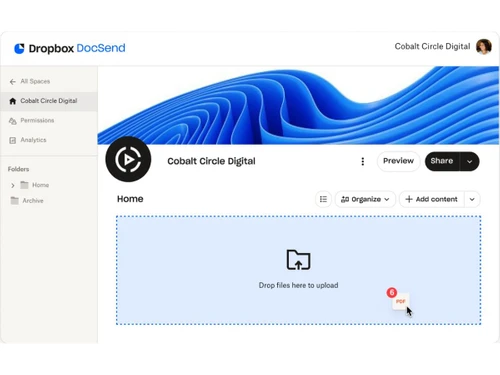
  • Lightweight data rooms (Spaces)

  • Email authentication for visitors

  • Allow/block visitors lists

  • Folder and file level security

Advanced Data Rooms
Starting at $300
    • Users

      Users
      Users
    • Monthly

      Monthly
      Monthly

Key Features

  • 3 user included

  • Enhanced data rooms (Spaces)

  • Group visitor permissions

  • Data room audit log

  • Automatic file indexing

DocSend Features

  • icon_check Document Sharing
    Share documents via secure links instead of attachments, ensuring controlled access and reduced data leakage.
  • icon_check Real-Time Analytics
    Track who views your document, when they open it, and how much time they spend on each page.
  • icon_check Page-Level Engagement Tracking
    Understand reader interest by analyzing time spent on individual pages within shared documents.
  • icon_check Access Control
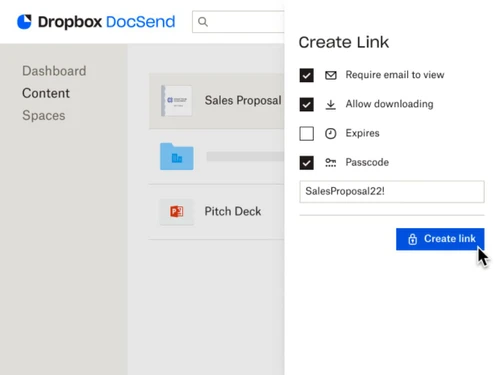
    Restrict access using email verification, passwords, expiration dates, or IP-based permissions.
  • icon_check Version Control
    Update documents after sharing while keeping the same link, ensuring viewers always see the latest version.
  • icon_check Dynamic Watermarking
    Automatically apply viewer-specific watermarks to documents to discourage unauthorized sharing.
  • icon_check One-Click NDA Enforcement
    Require recipients to sign a non-disclosure agreement before viewing sensitive documents.
  • icon_check Virtual Data Rooms
    Organize multiple documents into secure data rooms for fundraising, due diligence, or M&A workflows.
  • icon_check Identity Verification
    Ensure only intended recipients access files through email authentication and identity confirmation.
  • icon_check Print Restrictions
    Disable downloads and printing to maintain full control over confidential document distribution.
  • icon_check Link Revocation
    Instantly disable shared links to prevent further access when documents are no longer needed.
  • icon_check Integrations
    Integrates with Gmail, Outlook, and CRMs to streamline document sharing within existing workflows.
  • icon_check Custom Branding
    Add logos, brand colors, and custom domains to document links for a consistent professional appearance.
  • icon_check Audit Logs and Activity History
    Maintain a detailed audit trail of document access, views, and actions for compliance and transparency.
  • icon_check Team Collaboration
    Manage shared folders, user roles, and permissions to enable secure collaboration across teams.
DocSend Demo Video play icon

Get DocSend Demo

Watch the demo video to explore key features, real workflows, and how the software fits your business needs.

Understand
Key Features
Personal
Demo Insights
Interactive
Demo Support

DocSend Specifications

Supported Platforms
Ubuntu Ubuntu Windows Windows MacOS MacOS Linux Linux
Devices
Desktop Desktop
Deployment
Cloud-Based Cloud-Based
Suitable For
All Industries
Business Specific
All Businesses
Business Size
Small Business Startups Medium Business Enterprises
Customer Support
Email Communities
Language
English
Training Resources
Videos
Compliance Regulation
CCPA

Explore the Best Alternative Solutions Similar to Your Business Size and Needs

DocSend Review

4.0

Out of 5

img

Overall Rating

Based on
3 Verified Ratings

Rating Breakdown

  • Features 4.3
  • Value for Money 4.1
  • Ease of Use 4.1
  • Customer Support 3.8

80% Recommend this Product

Add Review

Techjockey Trusted Reviews from Verified Users

No reviews are currently available for DocSend. Discover similar Document Management Software reviews

  • Greenbox

    4.8

    Whats great - It is so good for reviewing, approving, assigning, tracking, approving controlled documents. read more

  • i-doc

    4.5

    Whats great - Store a lot of substance crosswise over different document types Force request on information dependent on hierarchical m... read more

  • MSB Docs

    4.5

    Whats great - Three of the five recommended vendors were viable read more
Compare DocSend With other Document Management Software

Products
Ratings
Pricing
Device Supported
Deployment
Supported Platforms
  • img

    DocSend

  • 4.0

  • Price On Request

  • Desktop

    Mobile

  • Web based

    On Premises

  • Windows

    Mac OS

  • img

    docEdge DMS

  • 4.5

  • ₹ 750000

  • Desktop

    Mobile

  • Web based

    On Premises

  • Windows

    Mac OS

  • img

    Greenbox

  • 4.8

  • Price On Request

  • Desktop

    Mobile

  • Web based

    On Premises

  • Windows

    Mac OS

  • img

    Docuventa

  • 4.6

  • Price On Request

  • Desktop

    Mobile

  • Web based

    On Premises

  • Windows

    Mac OS

  • img

    FileGenix

  • 5

  • Price On Request

  • Desktop

    Mobile

  • Web based

    On Premises

  • Windows

    Mac OS

  • img

    FileHold

  • 4.3

  • Price On Request

  • Desktop

    Mobile

  • Web based

    On Premises

  • Windows

    Mac OS

  • img

    Krystal DMS

  • 5

  • ₹ 32400

  • Desktop

    Mobile

  • Web based

    On Premises

  • Windows

    Mac OS

  • img

    NetDocuments

  • 4.4

  • Price On Request

  • Desktop

    Mobile

  • Web based

    On Premises

  • Windows

    Mac OS

  • img

    iManage

  • 4.2

  • Price On Request

  • Desktop

    Mobile

  • Web based

    On Premises

  • Windows

    Mac OS

  • img

    Worldox

  • 4.2

  • Price On Request

  • Desktop

    Mobile

  • Web based

    On Premises

  • Windows

    Mac OS

(0) Product(s) selected

DocSend Alternatives

See All DocSend Alternatives

Available

Price on Request

Available

Price on Request
Available

Price on Request

Available

Price on Request
Available

Price on Request

Starting Price:

₹4,000 /Month
Articles for DocSend

See All Related Articles

How much does DocSend Software cost?

DocSend pricing starts at USD 15 on techjockey.com.

Is there a mobile app available for DocSend Software?

No, DocSend does not offer mobile apps for both Android and iOS devices.

Which operating systems are compatible with DocSend Software?

DocSend is compatible with Windows, macOS, Ubuntu, and Linux platforms.

Does DocSend Software offer a free trial?

Yes, DocSend provides a free trial for new users.

How does DocSend Software function?

DocSend allows users to securely share documents, track engagement, and manage file access online.

Who uses DocSend Software?

Startups, sales teams, marketers, investors, and businesses commonly use DocSend.

Is a free demo available for DocSend Software?

Yes, users can request a free demo or explore the platform through its trial version.

Is DocSend Software available for free?

DocSend offers limited free features, but advanced tools require a paid subscription.

20,000+ Software Listed

Best Price Guranteed

Free Expert Consultation

2M+ Happy Customers

Terms and Condtions

close

Users with registered businesses can purchase goods from merchants on the platform to satisfy their business needs. Users are not permitted to utilize any products acquired through the platform for resale, advertising, business, or further distribution.

For each purchase made, users will receive a Tax Invoice (or 'GST invoice') that includes specific details such as:

  • the GSTIN of the user associated with their registered business, and

  • the specified Entity Name for their business.

It should be noted that not all products are eligible for GST Invoice. Only the products displayed by participating sellers with the 'GST-based Invoice Available' callout on the product description page would qualify.

Certain goods and services are not eligible to get a GST Invoice, including items with VAS, i.e., Value Added Services (e.g., Total Mobile Protection/Assured Buyback) and those involving an exchange offer at the time of purchase.

Users must ensure the accuracy of the GSTIN, and business entity name provided for the GST Invoice. Requests for corrections into GST Invoice would not be accommodated by Techjockey.com or any Seller, and any issues arising from user-provided information are the sole responsibility of users.

Techjockey.com is not liable for the GST Invoice or any associated input tax credit. To efficiently claim an input tax credit, users should select the registered place of business address as per the GST authority's data and follow the provisions of the GST Act and rules.

To claim an input tax credit, the delivery and billing addresses must match. Furthermore, input tax credits will not be granted if the delivery address and GSTIN on the invoice are from different states. In case of incorrect GST details provided during the order placement, the order will be canceled automatically.